The best graphics card dock for most people is a Thunderbolt enclosure with a built-in power supply, such as the Razer Core X or Sonnet Breakaway Box 750ex, because it works with almost any Thunderbolt laptop and charges it over the same cable. If your laptop has an OCuLink port, an open-frame dock like the Minisforum DEG1 or ADT-Link R43SG delivers noticeably more of the GPU’s performance for less money. The port on your laptop decides the right dock before the card does.
A graphics card dock (also called an eGPU dock or enclosure) is a box or board that holds a desktop GPU, powers it, and connects it to a laptop or mini PC over a cable. Below are the picks, the bandwidth and power math, and a matrix that maps your setup to a choice.
As an Amazon Associate we earn from qualifying purchases at no extra cost to you.


Our Top Picks
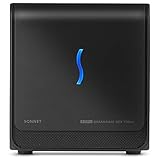
 Sonnet Breakaway Box 750ex Thunderbolt 3 eGPU Enclosure13.38 x 7.25 x 8 inches2 KilogramsCheck on Amazon
Top 3 picks at a glance
Quick comparison of the best graphics card docks
| Pick | Best for | Key specs (per manufacturer) | Price range |
|---|---|---|---|
| Razer Core X | Best overall for Thunderbolt laptops | Thunderbolt 3 (works on TB4 ports), 650 W internal PSU, up to 3-slot cards, USB-C laptop charging up to 100 W | Mid-range |
| Sonnet Breakaway Box 750ex | Best for Macs and quiet, polished use | Thunderbolt, 750 W internal PSU, laptop charging, compact aluminum case | Mid-range to premium |
| Minisforum DEG1 | Best OCuLink value | Open-frame dock, OCuLink (PCIe 4.0 x4), needs your own ATX PSU | Budget |
| AOOSTAR AG02 | Best compact all-in-one OCuLink/USB4 dock | Enclosed, built-in PSU (about 400 W class), OCuLink plus USB4 connection options | Mid-range |
| ADT-Link R43SG | Best bare-bones DIY option | PCIe x16 slot on a board, OCuLink or M.2 variants, external PSU required | Budget |
| ASUS ROG XG Mobile | Best for ROG Flow laptops and tablets only | Proprietary connector, GPU plus ports in a portable shell, works only with supported ROG devices | Premium |
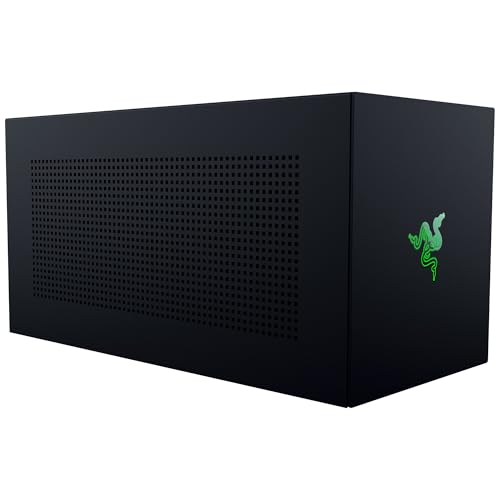
Best overall: Razer Core X
The Razer Core X is the safe default. It is a tool-free enclosure with a 650 W power supply, room for triple-slot cards, and up to 100 W of laptop charging per Razer’s spec sheet. That means one Thunderbolt cable gives you video output, peripherals via the GPU’s ports, and power.
Who it suits: Thunderbolt 3, 4 or 5 laptops (Thunderbolt 5 ports are backward compatible, but the dock still runs at Thunderbolt 3 speed) that you want to dock at a desk and pack up occasionally.
Trade-off: It is large for what it does, and you are limited by the Thunderbolt link (see the bandwidth section). Very large flagship cards can run into length, thickness or connector limits.
Best for Macs and quiet desks: Sonnet Breakaway Box 750ex
Sonnet’s Breakaway Box line is a long-running, well-documented eGPU enclosure family. The 750 W class supply covers most high-end cards while still feeding laptop charging. It suits people who care about fit, noise and compatibility notes more than about getting the lowest price.
Trade-off: It costs more than the Core X for similar real-world gaming performance, and Apple Silicon Macs do not support eGPUs at all. Mac use is limited to older Intel Macs, so check your model first.
Best OCuLink value: Minisforum DEG1
The DEG1 is essentially a PCIe slot on a board with an OCuLink port and a power connector for the card. You supply an ATX or SFX power supply, which keeps the cost low and lets you choose a quiet PSU. Because OCuLink carries PCIe directly instead of wrapping it in Thunderbolt, it offers far more bandwidth.
Trade-off: It is open-frame, so there is no protective shell and it is not very portable. OCuLink also does not carry power or hot-plug reliably, so you shut down, connect, then boot. Your laptop needs its own charger.
Best compact OCuLink/USB4 dock: AOOSTAR AG02
The AG02 packs the GPU slot, a modest built-in power supply and multiple connection options into one enclosure. It is aimed at mini PCs and handhelds that have OCuLink or USB4. It fits mid-power cards well.
Trade-off: A PSU in the 400 W class limits you to cards around 250 W or less in practice, and card thickness is restricted by the shell. Check card dimensions against the manufacturer’s listed clearance.
Best DIY and cheapest: ADT-Link R43SG
The R43SG is a compact adapter board that gives a GPU a full-length slot and a link to your laptop’s M.2 or OCuLink port. It is the cheapest way into high-bandwidth eGPU, and popular in DIY handheld and mini-PC builds.
Trade-off: You handle everything: the PSU, the card support, the cabling and the PSU switching jumper. An internal M.2 conversion also means opening your laptop. It is not recommended if you have never worked inside a PC.
Best for ROG Flow users: ASUS ROG XG Mobile
This is a proprietary dock that combines a mobile or desktop-class GPU, a power supply and ports in one portable unit. It makes sense only if you own a compatible ROG Flow device, since it will not connect to other laptops. Models and GPU options differ by generation, so match the dock to your exact laptop.
Bandwidth: why the connection matters more than the box
The GPU talks to your system over PCIe lanes. Here is the arithmetic for a x4 link:
- PCIe 3.0 x4: 4 lanes × 8 GT/s × (128/130) ≈ 31.5 Gbps ≈ 3.9 GB/s.
- PCIe 4.0 x4 (OCuLink): 4 × 16 GT/s × (128/130) ≈ 63 Gbps ≈ 7.9 GB/s.
- Thunderbolt 3/4 (40 Gbps total): the PCIe tunnel is commonly capped around 22 Gbps ≈ 2.75 GB/s, per Intel’s published Thunderbolt architecture, because the rest of the link is reserved for display and other traffic.
So an OCuLink PCIe 4.0 x4 link has roughly 2.9 times the usable GPU bandwidth of Thunderbolt 3/4 (7.9 ÷ 2.75). Thunderbolt 5 raises total link speed to 80 Gbps, but how much PCIe bandwidth a given enclosure exposes depends on the host controller and dock, so check the spec sheet rather than assuming the full number.
| Connection | Approx. usable GPU bandwidth | Hot-plug | Charges laptop | Typical performance vs. same GPU in a desktop* |
|---|---|---|---|---|
| Thunderbolt 3/4 | about 2.75 GB/s | Yes | Yes (dock-dependent) | Roughly 70–90% |
| USB4 (40 Gbps) | similar to Thunderbolt, host-dependent | Usually | Dock-dependent | Roughly 70–90% |
| OCuLink PCIe 4.0 x4 | about 7.9 GB/s | No (power off to connect) | No | Roughly 85–95% |
*Approximate ranges typical of published eGPU reviews. Real results vary with resolution, game, CPU, patch and whether you output to an external monitor. Using the laptop’s internal screen usually costs extra performance, because frames must travel back over the link.
Power budget: a worked example
Suppose you want to pair an RTX 5070 Ti (300 W total graphics power per NVIDIA’s spec) with a laptop that charges at 100 W.
- GPU: 300 W
- Dock fans, controller and USB ports: about 30–50 W
- Laptop charging through the dock: up to 100 W
- Total worst case: about 450 W
A 650 W dock like the Core X has about 200 W of headroom, which is comfortable, and PSUs run quietest at roughly 50–70% load. For open-frame OCuLink docks, which do not charge the laptop, use this rule: GPU power + 150 W, rounded up to the next common PSU size. For the same card, that is 450 W, so a good 550 W unit is enough.
Connectors matter as much as wattage. Cards like the RTX 5080 (360 W) and RTX 5090 (575 W) use the 12V-2×6 connector. Confirm the dock or PSU has the right cable, because adapters from 8-pin cables are limited by the dock’s 8-pin count. An enclosed 650 W dock with three 8-pin leads suits cards up to the RTX 5070 Ti or Radeon RX 9070 XT class (about 304 W).
How to choose: a decision matrix
| Your situation | Choose | Reason |
|---|---|---|
| Thin laptop with only Thunderbolt 3/4/5, want one cable to the desk | Razer Core X or Sonnet Breakaway Box 750ex | Hot-plug plus laptop charging, widest compatibility |
| Laptop or mini PC with an OCuLink port, tight budget | Minisforum DEG1 + your own PSU | Highest bandwidth for the money |
| Mini PC or handheld, want a tidy enclosure | AOOSTAR AG02 | Built-in PSU, but limited to mid-power cards |
| Comfortable with DIY, laptop has a spare M.2 slot | ADT-Link R43SG | Cheapest path, needs modding |
| ROG Flow laptop | ASUS ROG XG Mobile | Proprietary link designed for it |
| Apple Silicon Mac | None | eGPUs are not supported |
| Intel Mac running macOS | Sonnet-class Thunderbolt enclosure with an AMD card | Limited to supported AMD GPUs and older macOS versions |
Match the card to the link
- Avoid 8 GB cards on Thunderbolt if you can. When a game runs out of VRAM, data spills into system memory over the link, and Thunderbolt’s roughly 2.75 GB/s turns that into stutter. A 12 GB or 16 GB card handles 1440p textures with far less spilling.
- Do not overbuy. A flagship card on Thunderbolt wastes much of its potential. A mid-high card (RTX 5070 class or RX 9070 class) is the usual sweet spot.
- Use an external monitor plugged into the GPU to avoid the return-trip penalty.
- Check your CPU. A low-power laptop CPU often limits high-refresh gaming before the eGPU does.
Checklist before you buy
- Confirm the laptop’s port: Thunderbolt logo (lightning bolt), OCuLink, or generic USB4. Some USB4 ports do not support eGPU use, so check the manufacturer’s page.
- Measure the card length, thickness and height against the dock’s stated limits.
- Add up the power budget as shown above.
- Check whether the cable is the one supplied. Long or uncertified Thunderbolt cables can drop to lower speeds.
- Consider a mini-PC or small desktop instead if you never move the system. A small form factor build is often cheaper and faster than a laptop plus dock.
Frequently Asked Questions
Is an eGPU dock worth it in 2026?
It is worth it if you already own a laptop you like and want better graphics at a desk. If you are buying everything new, a compact desktop or a gaming laptop with a strong built-in GPU usually offers more performance for the money than a laptop plus dock plus card.
Does Thunderbolt 5 make a big difference for eGPUs?
It can, but only when both the laptop and the dock support the higher PCIe bandwidth. Thunderbolt 5 raises total link speed to 80 Gbps, yet many enclosures are still built around Thunderbolt 3/4 speeds. Read the dock’s spec sheet for its actual PCIe data rate before paying extra.
Is OCuLink better than Thunderbolt for gaming?
For raw performance, yes. OCuLink exposes a PCIe 4.0 x4 link with roughly three times the usable bandwidth of the Thunderbolt PCIe tunnel. The costs are no hot-plugging, no power delivery to the laptop, and the need for a port that most laptops lack.
What power supply do I need for an open-frame eGPU dock?
Take the card’s rated total graphics power, add about 150 W for the dock and headroom, and round up. A 300 W card therefore calls for around a 450–550 W unit. Make sure the PSU has the correct PCIe power cables for your card, and use the dock’s PSU-start method as instructed by the manufacturer.
Will any graphics card work in any dock?
No. The dock must physically fit the card, supply enough wattage and the right connectors, and the host system needs drivers and firmware that support eGPU use. Recent NVIDIA and AMD cards work on Windows in most Thunderbolt and OCuLink docks, but always check the manufacturer’s compatibility list.
Can I use an eGPU with a gaming handheld?
Yes, if the handheld has OCuLink or a USB4/Thunderbolt-capable port. Compact docks like the AOOSTAR AG02 or a DIY OCuLink board are the typical choices. Expect a large jump in graphics performance, but remember that the handheld’s CPU may become the limit in some games.
Related guides
More from Amazon
Programs that pair well with the guide above. Offers and eligibility are set by Amazon and may change.
A free business account with business pricing and bulk-buying tools for work, shop or home office.
Create a business accountFree shipping on eligible items, Prime Video and more. Eligible new members can start with a free trial.
Start a Prime free trialAudiobooks and podcasts to listen to on the go. Eligible new members can start with a free trial.
Try Audible freeAd-free music streaming. Eligible new subscribers can start with a free trial.
Try Music Unlimited freeAs an Amazon Associate we earn from qualifying purchases.