The best compact CPU cooler for most small builds is a 67–70 mm low-profile cooler with a 120 mm fan, such as the Thermalright AXP120-X67 for value or the Noctua NH-L12S for quiet operation. If your case is under about 60 mm of CPU clearance, step down to a 37 mm cooler such as the Noctua NH-L9i-17xx (Intel) or NH-L9a-AM5 (AMD) and pair it with a 65 W-class processor. Cooler height and the wattage your CPU actually pulls decide this choice, not brand.
As an Amazon Associate we earn from qualifying purchases at no extra cost to you.


Our Top Picks
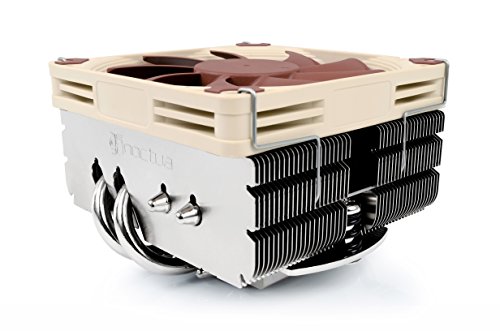

Top 3 picks at a glance
Quick comparison of the best compact CPU coolers
| Pick | Best for | Key specs (per manufacturer) | Price tier |
|---|---|---|---|
| Thermalright AXP120-X67 | Best overall low-profile value | About 67 mm tall, 120 mm slim fan, AM4/AM5 and LGA1700 mounts | Budget |
| Noctua NH-L12S | Quiet, premium low-profile | About 70 mm tall, 120 mm slim PWM fan, broad AMD/Intel mounting | Premium |
| Noctua NH-L9i-17xx / NH-L9a-AM5 | Ultra-slim HTPC and mini-ITX | About 37 mm tall, 92 mm fan, platform-specific versions | Mid-range to premium |
| Thermalright AXP90-X53 | Budget small case under about 60 mm | About 53 mm tall, 90 mm class fan | Budget |
| Noctua NH-L9x65 | Middle ground: 65 mm tall, 92 mm fan | About 65 mm tall, 92 mm fan, AMD and Intel mounting | Premium |
| Thermalright Assassin X 120 Refined SE | Compact tower for 100–150 W CPUs | About 155 mm tall, 120 mm fan, dual-fin stack | Budget |
Heights are rounded from manufacturer spec sheets. Always check the current spec page for your socket revision before buying.
Step one: match the cooler to your CPU’s real power draw
A cooler’s job is to keep the chip under its throttle point at the power it actually draws, not the TDP on the box. Here is a rough worked budget. Assume a 30 °C case-air temperature and a target of 85 °C on the CPU sensor. That gives you a 55 °C temperature rise to spend.
Divide 55 °C by the sustained watts to get the maximum thermal resistance (°C per watt) your cooler can have, including the CPU’s own heat-spreader resistance:
| Sustained CPU power | Example class | Max total resistance | Cooler class that fits |
|---|---|---|---|
| 35 W | Low-power “GE” or “T” chips | 1.57 °C/W | 37 mm cooler, even near-passive |
| 65 W | Ryzen 5 7600 class at eco settings | 0.85 °C/W | 37–53 mm low-profile |
| 88 W | Ryzen 7 9700X, Ryzen 5 7600 at stock PPT | 0.63 °C/W | 65–70 mm with 120 mm fan |
| 125 W | Core i5 at base power, sustained | 0.44 °C/W | 70 mm cooler at higher fan speeds, or a compact tower |
| 200 W | Unlocked Core i7/Ultra 7 or Ryzen 9 under all-core load | 0.28 °C/W | Tower or 240 mm AIO; low-profile will throttle |
This is an illustrative estimate, not a measured result. Real numbers shift with case airflow, fan curve, paste, and how the chip’s power limit is set. The pattern is dependable, though: a low-profile cooler is comfortable up to roughly 90 W sustained, borderline around 125 W, and the wrong tool past that.
Gaming loads are often lighter than all-core stress tests. Many gaming CPUs sit well below their maximum boost power in games, which is why a 65–90 W part can work in a slim case even when rendering would push it harder. Efficient X3D-class Ryzen chips are the easiest to cool in small builds.
Step two: measure clearance, not just cooler height
Listed case clearance (often “CPU cooler max height”) is the hard limit. Leave 2–3 mm spare so side panels and fan cables do not bind. Then check three more things:
- RAM height: Low-profile coolers with a 120 mm fan often overhang the first DIMM slot. Tall heat-spreader RAM may collide, so look for modules around 35 mm tall or less.
- Top-down airflow: Slim coolers push air down onto the VRM and M.2 area. That helps the board, but in a case with no front intake they recirculate hot air.
- Socket and backplate: AM5 uses AM4-style hole spacing with a stock backplate, so older AM4 brackets often carry over. Most LGA1700 coolers fit LGA1851 because the hole spacing is the same. Confirm this with the maker, because some bundled brackets differ.
Best overall: Thermalright AXP120-X67
The AXP120-X67 is the default recommendation when your case allows around 70 mm of height. Per Thermalright’s specification, it pairs a 120 mm slim fan with a dense fin stack and supports current AMD and Intel sockets. It suits 65–125 W CPUs in an SFF case, a slim tower, or a living-room PC.
Trade-off: the fan can get audible at full speed, and the 120 mm footprint can crowd RAM and the top PCIe slot on some mini-ITX boards. Set a custom fan curve rather than running it flat out.
Best premium and quiet: Noctua NH-L12S
The NH-L12S is built for builders who value noise as much as temperature. It is about 70 mm tall with a slim 120 mm PWM fan, and Noctua includes mounting hardware, paste and a low-noise adapter. It suits 65–95 W CPUs in a quiet desktop or media-center build.
Trade-off: it costs noticeably more than the budget pick for similar thermals. You pay for refinement, mounting quality and fan acoustics, not raw cooling headroom.
Best ultra-slim: Noctua NH-L9i-17xx or NH-L9a-AM5
When the case limits you to roughly 40 mm of cooler height (many HTPC, slim ITX and desk-mini cases), these 37 mm coolers are the standard answer. Pick the version for your socket: the “i” model for Intel LGA1700 and the “a” model for AMD AM5. Noctua rates them for lower-wattage CPUs, so treat them as 35–65 W solutions with a small boost margin.
Trade-off: a hot-boosting 100 W+ chip will throttle. Cap its power limit in the BIOS if you pair it with a non-“F-series” gaming CPU.
Best budget small-case option: Thermalright AXP90-X53
At about 53 mm tall with a 90 mm class fan, the AXP90-X53 fits cases that cannot take a 65–70 mm cooler but have more than 37 mm of room. It suits 65 W chips and light gaming builds.
Trade-off: the smaller fan must spin faster than a 120 mm fan for the same airflow, so noise rises sooner under load.
Best mid-height compromise: Noctua NH-L9x65
The NH-L9x65 is a 65 mm cooler that adds a taller fin stack to the 92 mm L9 design. It fits cases limited to around 70 mm and suits builders who want strong acoustics with moderate power. It is an upgrade over the 37 mm L9 models.
Trade-off: it costs more than similarly tall budget coolers, and cooling is not far ahead of the AXP120-X67.
Best compact tower: Thermalright Assassin X 120 Refined SE
If your case allows about 155–160 mm of height, a small single-tower cooler gives much lower thermal resistance than any low-profile unit. The Assassin X 120 Refined SE fits mid-wattage CPUs in compact ATX or micro-ATX cases. It is the practical pick for 125 W sustained loads where low-profile coolers run into the ceiling.
Trade-off: it is not a “slim” cooler. It can collide with tall RAM and shrinks the gap to the side panel, so verify case clearance first.
How to choose: decision matrix
| Your situation | Choose |
|---|---|
| Case allows under 40 mm, CPU 65 W or less | Noctua NH-L9i-17xx or NH-L9a-AM5 |
| Case allows 45–60 mm, 65 W CPU | Thermalright AXP90-X53 |
| Case allows 65–70 mm, up to ~90 W, noise matters | Noctua NH-L12S or NH-L9x65 |
| Case allows 65–70 mm, up to ~125 W, value matters | Thermalright AXP120-X67 |
| Case allows 150 mm or more, 125 W or more | Compact tower such as Assassin X 120 Refined SE, or a 240 mm AIO if the case supports it |
| 200 W-class CPU in a small case | Pick a lower-power CPU, or use a 240 mm AIO; low-profile air will not hold boost clocks |
Tips that matter in small cases
- Set a power limit in the BIOS (for example 88 W on an AM5 chip) before replacing a cooler. It often drops temperatures sharply for a small performance loss in games.
- Run the fan on a curve that stays under about 1,200 rpm at idle and ramps only above 70 °C, so brief boosts do not spike noise.
- Make sure the case has some intake path. A low-profile cooler works poorly in a sealed box.
Frequently Asked Questions
What is a compact CPU cooler?
It is a low-profile or short-tower cooler designed for small cases. Low-profile coolers usually stand 37–70 mm tall, while compact towers stand about 150–160 mm. The right class depends on your case’s listed CPU cooler clearance.
Can a low-profile cooler handle a gaming CPU?
Yes, for efficient chips drawing roughly 65–90 W in games. Many Ryzen and non-K Intel parts fit this range. High-power unlocked CPUs that pull 150 W or more will throttle on a 37–70 mm cooler.
Are low-profile coolers louder than tower coolers?
Usually, at the same temperature. Smaller fin areas and smaller fans need higher rpm to move the same heat. A 120 mm slim fan on a 67–70 mm cooler is a good compromise between size and noise.
Is a compact AIO better than a low-profile air cooler?
It can be for 150 W+ CPUs, because a 240 mm radiator gives far more cooling area. In small cases, though, an AIO needs radiator mounting space, and air coolers are simpler and have no pump to fail. For CPUs below about 100 W, a good low-profile cooler is the more practical choice.
Will my compact cooler fit LGA1851 or AM5?
Often, but not always. AM5 coolers can reuse AM4-style mounting in many cases, and LGA1700 hole spacing is shared by LGA1851. Check the manufacturer’s compatibility list for your exact cooler revision, since some older packs lack the right bracket.
Do I need to replace the stock cooler?
Not always. Stock coolers on 65 W CPUs are adequate but can be loud under load. A compact aftermarket cooler is worth it for lower noise, extra headroom, or a CPU shipped without a cooler.
Related guides
More from Amazon
Programs that pair well with the guide above. Offers and eligibility are set by Amazon and may change.
A free business account with business pricing and bulk-buying tools for work, shop or home office.
Create a business accountFree shipping on eligible items, Prime Video and more. Eligible new members can start with a free trial.
Start a Prime free trialAudiobooks and podcasts to listen to on the go. Eligible new members can start with a free trial.
Try Audible freeAd-free music streaming. Eligible new subscribers can start with a free trial.
Try Music Unlimited freeAs an Amazon Associate we earn from qualifying purchases.


