The best large CPU cooler for most builders in 2026 is the Noctua NH-D15 G2, a dual-tower air cooler with strong sustained cooling and low noise. The best value is the Thermalright Peerless Assassin 120 SE, which gets close to flagship air-cooling results at a budget price. Before you buy either, check your case’s cooler-height limit and your RAM clearance, because with big coolers fit causes more problems than performance.
As an Amazon Associate we earn from qualifying purchases at no extra cost to you.

Our Top Picks

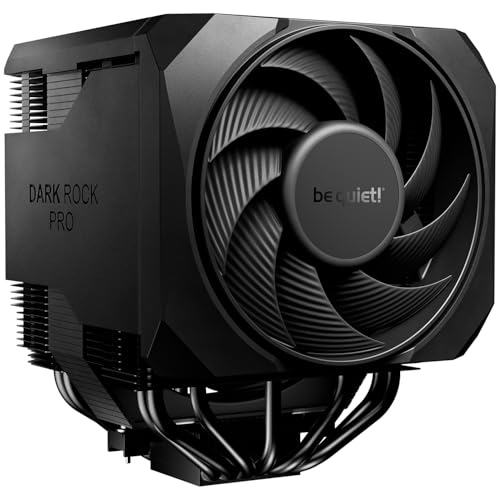
Top 3 picks at a glance
Quick comparison of the best large CPU coolers
Dimensions and ratings below come from manufacturer spec sheets and are approximate. Always confirm the exact figure for your socket and case before ordering.
| Pick | Best for | Key specs | Price tier |
|---|---|---|---|
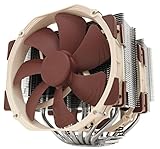
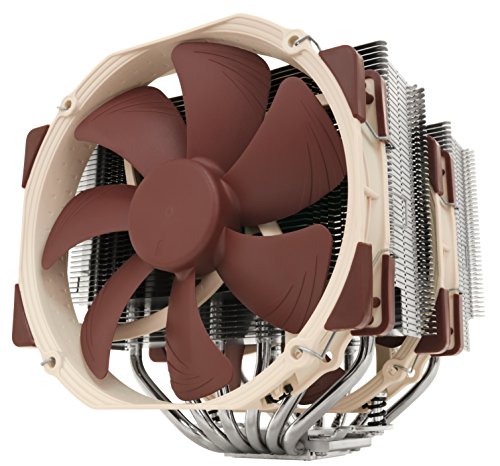
| Noctua NH-D15 G2 | Best overall, quiet high-end air | Dual tower, about 168 mm tall, 2 fans, about 1.5 kg | Premium |
| Thermalright Peerless Assassin 120 SE | Best value | Dual tower, about 155 mm tall, 2x 120 mm fans | Budget |
| Thermalright Phantom Spirit 120 SE | Best performance per cost | Dual tower, about 157 mm tall, 2x 120 mm fans | Budget to mid-range |
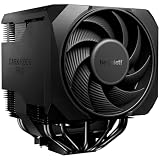
| be quiet! Dark Rock Pro 5 | Quietest under heavy load | Dual tower, about 168 mm tall, rated by the maker for roughly 270 W | Premium |
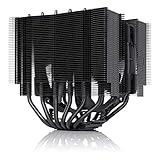
| DeepCool Assassin IV | High-wattage chips, compact-ish footprint | Dual tower, about 164 mm tall, rated by the maker for roughly 280 W | Mid-range |
| Arctic Liquid Freezer III Pro 360 | Best large alternative to air (AIO) | 360 mm radiator, 3 fans, no tower to clear RAM | Mid-range |
Best overall: Noctua NH-D15 G2
The NH-D15 G2 is the update to the long-running NH-D15 and remains the reference dual-tower for people who want maximum air cooling without a pump. It suits anyone with a high-core-count Ryzen or Core Ultra chip who wants low noise at steady load, such as long gaming sessions or rendering.
Trade-off: it is large, heavy and premium-priced, and its mounting hardware is more involved than a budget cooler’s. It also needs a roomy case and may interfere with tall RAM or the top PCIe slot on some boards, so check the maker’s compatibility list.
Best value: Thermalright Peerless Assassin 120 SE
This is the cooler to buy if you want a big dual tower without a big bill. Published reviews regularly place it within a few degrees of far more expensive coolers on chips up to roughly 200 W.
Trade-off: the fans are good rather than exceptional. Under a sustained 250 W load it gets louder than the Noctua or be quiet! options. Mounting is straightforward but less polished.
Best performance per cost: Thermalright Phantom Spirit 120 SE
The Phantom Spirit 120 SE adds a denser fin stack and a more aggressive tower design. It is aimed at buyers with a hot, power-hungry CPU who still want a budget-leaning price.
Trade-off: the extra mass makes front-fan and RAM clearance tighter than on the Peerless Assassin. It also sits slightly taller, so measure your case before choosing it.
Best for quiet operation: be quiet! Dark Rock Pro 5
The Dark Rock Pro 5 focuses on low noise. Its fans and fin layout are tuned so the cooler stays calm while the CPU boosts, which suits a quiet gaming room or a desk with the case nearby.
Trade-off: it is premium-priced, tall and heavy, and the black finish and sizeable tower can block memory slots on some compact boards.
Best for high-wattage CPUs: DeepCool Assassin IV
The Assassin IV is a dual-tower rated by DeepCool for roughly 280 W, which makes it a sensible match for chips that spike to 250 W. It sits in the middle of the price range and is slightly shorter than the 168 mm flagships.
Trade-off: the manufacturer’s wattage figure is a rating, not a guarantee, and fan noise at full load is more noticeable than on the quietest picks.
Best large alternative: a 360 mm AIO such as Arctic Liquid Freezer III Pro 360
If your case has a top or front 360 mm mount, a large AIO avoids the tower-versus-RAM problem completely and moves heat away from the motherboard area. The Arctic Liquid Freezer III family is a common recommendation because of its cooling performance and strong value among 360 mm models.
Trade-off: you add a pump, which can fail or whine, and you need a case that supports the radiator thickness plus fans. Radiator and fan stack can collide with RAM or the motherboard heatsinks if mounted on top.
How to choose: a clearance and decision matrix
Large coolers are rarely limited by cooling ability. They are limited by space. Work through these checks in order:
- Case cooler height limit. Look up the manufacturer’s maximum CPU cooler height. Subtract the cooler height and leave at least 3 to 5 mm of margin. A case rated for 170 mm and a 168 mm cooler leaves only 2 mm, which is too tight if the side panel bulges or the paste layer is thick.
- RAM clearance. Dual-tower coolers often overhang the first DIMM slot with a front fan. If your memory is taller than about 40 mm, check the cooler’s listed memory clearance or raise the front fan.
- Top PCIe slot and VRM heatsinks. A wide tower can touch the top graphics card slot or tall VRM fins. Confirm the cooler’s spec for your motherboard.
- Weight and transport. A cooler of around 1.5 kg puts leverage on the socket if you move the PC upright. Remove it or secure it when shipping.
- Socket and mounting. Confirm AM5 and LGA 1851 or LGA 1700 support. Most current coolers include both mounts, but older boxed kits may not.
Decision matrix
| Your situation | Best choice | Why |
|---|---|---|
| Mid-tower case, 165 mm or more clearance, want quiet | Noctua NH-D15 G2 or be quiet! Dark Rock Pro 5 | Premium air with low noise at high load |
| Case limit 155 to 160 mm | Peerless Assassin 120 SE or Phantom Spirit 120 SE | Shorter tower leaves safe margin |
| Case limit 160 to 165 mm, CPU peaks near 250 W | DeepCool Assassin IV | High wattage rating, moderate height |
| Tall RAM (above 40 mm) and a crowded board | 360 mm AIO | No tower over the memory slots |
| Compact case, 140 mm or less | Single-tower or low-profile cooler, not a dual tower | Large dual towers will not fit |
| Budget build, gaming-focused X3D chip | Peerless Assassin 120 SE | Chip power is moderate, so extra cost buys little |
Worked example: matching cooler to CPU power
Take a CPU with a 250 W peak power limit (typical of top-end Intel desktop chips) and a 230 W socket power limit (typical of 170 W TDP Ryzen chips). Most gaming loads sit far lower, around 80 to 140 W, while all-core rendering sits near the limit.
- Gaming at about 120 W: even a budget dual tower holds the chip in a comfortable range with low fan speed.
- Rendering at about 230 W: heat output is nearly double. Cooler efficiency and fan speed matter, so a flagship dual tower or 360 mm AIO keeps noise lower than a budget model running near its limit.
- Rule of thumb: choose a cooler whose manufacturer rating is at least 20 to 30 percent above your chip’s sustained power. A 230 W load suits a cooler rated around 280 W, which gives headroom so fans do not have to run at full speed.
Also consider that you can often lower the power limit in the BIOS. Cutting a 250 W limit to about 200 W typically costs a small amount of all-core performance in published reviews and reduces heat considerably, which can let a cheaper cooler handle the chip.
Large air cooler or large AIO?
- Air: no pump to fail, simple, long lifespan, and usually quieter at idle. The downside is size and weight.
- 360 mm AIO: better at moving heat to the case edge and frees up the space around the socket. The downside is pump noise, a limited lifespan, and the need for case support.
For most gamers on a 100 to 150 W chip, air is the simpler and more reliable choice. For 250 W chips in cases with good radiator support, a 360 mm AIO is a reasonable step up.
Installation tips that affect results
- Apply a pea-sized amount of paste, or follow the cooler maker’s pattern. Too much paste does not improve cooling.
- Tighten the mounting screws evenly in a cross pattern, stopping at the stop or the stated torque.
- Point airflow front to back, with the exhaust fan or top fan pulling the heat out.
- Set a fan curve in the BIOS so the fans ramp gradually. A flat, aggressive curve loses the quietness you paid for.
Frequently Asked Questions
Is a large CPU cooler worth it for gaming?
Often it is, if you have a high-power chip or want quiet operation. A big dual tower can hold a CPU at lower temperatures while spinning its fans slowly. On efficient gaming chips drawing around 100 W, a mid-sized cooler can be enough.
Will a big air cooler block my RAM?
It can. Dual-tower coolers with a front fan may overhang the first memory slot, and tall modules can collide with the fan. Check the cooler’s memory clearance in its specification, or raise the fan on its clips if the design allows it.
How tall a cooler can my case take?
Check the case maker’s maximum CPU cooler height, usually listed in the specifications. Many mid-towers allow about 160 to 185 mm, while compact cases may allow 140 mm or less. Leave a few millimeters of margin.
Is a dual-tower air cooler better than a 360 mm AIO?
Not always. Top dual towers can match a 240 mm AIO and come close to some 360 mm models, with fewer failure points. A 360 mm AIO usually has the edge at sustained high power and frees up the area around the socket.
Are heavy coolers safe for the motherboard?
For a stationary desktop, yes, since modern backplates and mounting systems are designed for the weight. If you move or ship the PC, remove the cooler or support it, since shock puts stress on the socket area.
Do I need a big cooler for a Ryzen X3D chip?
Usually not. Many X3D processors run at moderate power in games, so a mid-range dual tower such as the Peerless Assassin 120 SE is typically enough. Larger coolers help mainly with all-core workloads or if you want very low fan noise.
Related guides
More from Amazon
Programs that pair well with the guide above. Offers and eligibility are set by Amazon and may change.
A free business account with business pricing and bulk-buying tools for work, shop or home office.
Create a business accountFree shipping on eligible items, Prime Video and more. Eligible new members can start with a free trial.
Start a Prime free trialAudiobooks and podcasts to listen to on the go. Eligible new members can start with a free trial.
Try Audible freeAd-free music streaming. Eligible new subscribers can start with a free trial.
Try Music Unlimited freeAs an Amazon Associate we earn from qualifying purchases.


