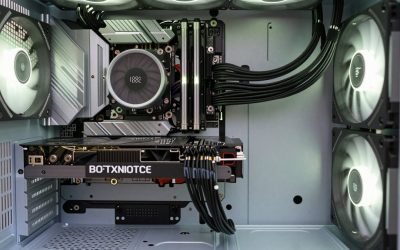
The strongest gaming computer in this group is the KOTIN desktop, which lists a Ryzen 7 9700X, a Radeon RX 9070 XT with 16GB, 32GB of DDR5 and a 1TB SSD. If you would rather spend less and still get a current-generation graphics card, the LXZ build with an RTX 5060 is the sensible middle path. Everything below those two is a 1080p-class tower built around older graphics cards, priced to match. Our editorial team has not handled these PCs, so every spec here comes from the seller’s listing title, and the word “market” in the keyword means we compared what is actually listed rather than every PC ever made.
Our Top Picks
Top 3 picks at a glance
Quick picks
As an Amazon Associate we earn from qualifying purchases at no extra cost to you.


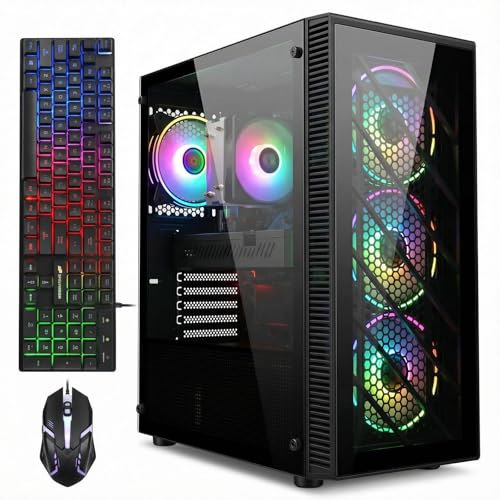



- KOTIN Ryzen 7 9700X / RX 9070 XT – best for 1440p play and room to grow
- LXZ Ryzen 7 8700F / RTX 5060 – best current-generation value
- STGAubron Ryzen 5 5500 / RTX 3060 12G – best mid-range tower for 1080p, with some 1440p headroom
- STGAubron Core i7 / RX 590, 32GB – best for multitasking on a budget
- Volt X3 V1.2 Ryzen 5 2600 / GTX 1070 – best for buyers who want Windows 11 Pro stated as activated
- STGAubron Core i7 / GTX 1070 and RX 580 builds – entry-level 1080p
- STGAubron Core i5 / RX 550 4G – lightest use only
All eight side by side
| Model | Type | Key specs as stated in title | Best for |
|---|---|---|---|
| KOTIN Gaming PC | Prebuilt tower | Ryzen 7 9700X, RX 9070 XT 16GB, 32GB DDR5, 1TB SSD, 360mm liquid cooler, 850W Gold PSU, WiFi 7 | High-refresh 1440p |
| LXZ Prebuilt Gaming PC | Prebuilt tower | Ryzen 7 8700F, RTX 5060, 16GB DDR5, 1TB SSD, 650W PSU | Current-gen value |
| STGAubron R5 5500 / RTX 3060 | Prebuilt tower | R5 5500, RTX 3060 12G, 16G DDR4, 1T SSD, WiFi 6 | Mid-range 1080p |
| STGAubron Core i7 / RX 590 | Prebuilt tower | Core i7, RX 590 8G, 32G RAM, 1TB SSD | Budget multitasking |
| Volt X3 V1.2 | Prebuilt tower | Ryzen 5 2600, GTX 1070 8GB, 16GB DDR4, 512GB NVMe, Windows 11 Pro | Entry-level 1080p |
| STGAubron Core i7 / GTX 1070 | Prebuilt tower | Core i7, GTX 1070 8G, 16G RAM, 512G SSD | Entry-level 1080p |
| STGAubron Core i7 / RX 580 | Prebuilt tower | Core i7, RX 580 8G, 16G RAM, 1T SSD | Entry-level 1080p |
| STGAubron Core i5 / RX 550 | Prebuilt tower | Core i5, RX 550 4G, 16G RAM, 512G SSD | Light games only |
The eight desktops, one by one
KOTIN Gaming PC (Ryzen 7 9700X, RX 9070 XT 16GB)
This is the only listing that pairs a recent Ryzen 7 with a 16GB Radeon RX 9070 XT, plus 32GB of DDR5 and a 1TB SSD. The title also names a 360mm liquid cooler, an 850W Gold-rated power supply, WiFi 7 and Windows 11. An 11.3-inch smart display is listed too, but the title does not say what it shows, so check the listing before treating it as a feature. The “1440p 4K” tag at the end is a seller claim; cards in this class are generally positioned for 1440p, and 4K results depend on the game and settings you choose. The title does not name the motherboard, the SSD model or the case.
Pros
- Current-generation CPU and GPU named outright
- 32GB of DDR5 leaves headroom for streaming and background apps
- 850W Gold PSU suggests spare capacity for later upgrades
Cons
- Highest price tier of the eight
- Motherboard model and SSD speed are not named
Who it’s for: buyers who want one PC to carry a 1440p monitor for several years. Who should skip it: anyone happy at 1080p, or anyone who wants a widely known brand with a long service record.
LXZ Prebuilt Gaming PC (Ryzen 7 8700F, RTX 5060)
LXZ pairs a Ryzen 7 8700F with an RTX 5060, 16GB of DDR5 and a 1TB SSD. That is a modern platform without the cost of the top tier, and the title adds six RGB fans. The 650W power supply is plausible for this class of card, though the title gives no maker or efficiency rating. The 8700F has no built-in graphics as far as we know, so the discrete card is the only video output. The RTX 5060 is generally specified with 8GB of VRAM, which the title does not mention, so confirm it on the listing before you commit to high texture settings.
Pros
- New-generation GPU on a DDR5 platform
- 1TB SSD is a sensible starting size
- Six fans are listed for airflow
Cons
- 16GB is fine today but is the first thing you might upgrade
- PSU maker is not named
- Seven USB 2.0 against three USB 3.0 ports is an odd split worth checking
Who it’s for: 1080p and 1440p players wanting current features at a moderate price tier. Who should skip it: buyers who need plenty of fast USB ports for capture cards or external drives.
STGAubron Gaming PC (Ryzen 5 5500, RTX 3060 12G)
The STGAubron R5 5500 build with the RTX 3060 12G is the best-balanced older-generation option here: a six-core Ryzen, 12GB of graphics memory, 16GB of DDR4 and a 1TB SSD. The 12GB of VRAM is the useful part, since several other builds on this list have 8GB or less. The platform is DDR4, so future upgrades mean staying with that memory type. The title also lists WiFi 6, Bluetooth 5.2, DisplayPort and HDMI outputs, and Windows 11 Home. As with the other STGAubron listings, it does not name the power supply or the case, so ask before you plan a graphics card upgrade. Because the Ryzen 5 5500 is a six-core part, it should keep a 12GB card reasonably fed at 1080p, though a chip at this tier can become the limit in CPU-heavy games.
Pros
- 12GB of graphics memory suits higher texture settings
- 1TB of storage on a mid-range tower
Cons
- Card is a generation or two back and lacks the newest upscaling features
- Power supply and case are not named in the title
Who it’s for: 1080p players who also want some 1440p headroom without paying for the newest card. Who should skip it: anyone who wants the latest GPU features or a DDR5 upgrade path.
STGAubron Gaming PC (Core i7, RX 590 8G, 32GB RAM)
This variant stands out for 32GB of RAM and a 1TB SSD alongside an RX 590 8G. The title says “Core I7 up to 3.9GHz” without naming the generation, and that clock speed suggests an older chip, so ask the seller for the exact model before purchase. The graphics card is a legacy design, which means the large RAM figure helps video editing and multitasking more than it helps frame rates. Treat the “4K DP, HDMI” wording as a list of output connectors rather than a promise of 4K gaming. WiFi 6, Bluetooth 5.0 and Windows 11 Home are listed. If you are comparing it with the 16GB siblings, remember that extra memory is cheap to add later while a better graphics card is not, so weigh the premium accordingly.
Pros
- 32GB of RAM and a 1TB SSD at a low price tier
- 8GB of graphics memory
Cons
- CPU generation is not stated
- Old graphics architecture limits what new releases will do
Who it’s for: students or home users who game casually and multitask heavily. Who should skip it: anyone chasing high frame rates in recent games.
Volt X3 V1.2 Gaming PC (Ryzen 5 2600, GTX 1070 8GB)
The Volt X3 combines a Ryzen 5 2600 at 3.9GHz with a GTX 1070 8GB, 16GB of DDR4 and a 512GB NVMe SSD. The title mentions four ARGB fans, WiFi plus Bluetooth, and an activated Windows 11 Pro 64-bit in white. A garbled character appears in the title, which suggests careless copy handling, so the listing detail page is the authority. The CPU and GPU are both several years old, so treat this as an entry-level 1080p machine. Only 512GB of storage means roughly a few large installs before you are deleting games. It is the only listing here that says Windows is activated, which can save a purchase of a licence, though you should confirm what that means with the seller.
Pros
- Windows 11 Pro stated as activated
- NVMe storage named rather than a generic SSD
Cons
- Oldest CPU of the group
- 512GB fills quickly with modern game installs
Who it’s for: buyers who want a simple white-case 1080p starter with a Pro licence. Who should skip it: anyone planning to play new releases at high settings.
STGAubron Gaming PC (Core i7, GTX 1070 8G, 512G SSD)
This is a close cousin of the Volt build: a GTX 1070 8G, 16G RAM and a 512G SSD, but with an unnamed Core i7 rated “up to 3.9GHz”. It follows the same STGAubron title template as the other towers, listing WiFi 6, Bluetooth 5.0 and Windows 11 Home. Among the entry-level group it is a reasonable choice if the seller will confirm the processor model, since the 1070 is a capable 1080p card for older and esports titles. The 512G drive is the main limit: a handful of large games will fill it, and the title does not say whether a second drive slot is free.
Pros
- Capable older card for 1080p
- WiFi 6 and Bluetooth listed
Cons
- 512G is tight for a game library
- CPU model unspecified
Who it’s for: a cheap 1080p tower for older titles. Who should skip it: buyers who want modern graphics features or a big library on one drive. It also suits someone who plans to add a second drive on day one.
STGAubron Gaming PC (Core i7, RX 580 8G, 1T SSD)
Same chassis idea with an RX 580 8G, 16G RAM and a 1T SSD. Compared with the 512G GTX 1070 version, this one gives double the storage alongside a similarly dated graphics card, so the choice between the two comes down to what the seller will confirm about the CPU and power supply. The title again says “Core I7 up to 3.9GHz” with no model, and it lists WiFi 6, Bluetooth 5.0 and Windows 11 Home. The 8GB card can run older and esports titles at 1080p, but it will need reduced settings on recent releases. Ask the seller for the CPU model and PSU details, because those two answers decide whether this tower is a bargain or a dead end.
Pros
- 1T SSD at an entry price tier
- 8GB of graphics memory
Cons
- Dated graphics architecture
- CPU generation not named
Who it’s for: budget buyers who need space for a game library. Who should skip it: anyone planning a graphics card swap soon, since the power supply is not described.
STGAubron Gaming PC (Core i5, RX 550 4G, 512G SSD)
The lowest rung: a Core i5 “up to 3.6G”, an RX 550 4G, 16G RAM and a 512G SSD. The RX 550 is an entry-level card, so this is closer to a general home or school PC with light gaming than a true gaming rig. The title mentions streaming and video editing, but a 4GB entry card will struggle with both, so treat those as marketing words rather than capability. WiFi 6, Bluetooth 5.0 and Windows 11 Home are listed. If gaming is the goal, spending a little more on the RX 580 or GTX 1070 versions buys a much bigger jump in graphics ability than any other upgrade here.
Pros
- Lowest price tier on the list
- 16G RAM is workable for everyday use
Cons
- Weak graphics card for modern games
- The “gaming” label is generous
Who it’s for: casual players of older or esports titles on a tight budget. Who should skip it: anyone who wants a gaming PC to play recent releases.
How we picked these
We started from eight desktop listings gathered for this keyword and sorted them by the graphics card named in the title, then by CPU, RAM and storage. Our basis is published specifications, manufacturer documentation and buyer reviews. Nobody on the team used or measured these units, so we do not give frame-rate numbers for any build. We flagged listings with unnamed processors, mixed specs and missing power supply details, and we kept the older-card towers only as clearly labelled entry-level options. Where a title seemed ambiguous, we said so rather than guess.
What to look for before you pay
Start with the graphics card
In a gaming PC the graphics card sets frame rates more than any other part. A card from the RX 9070 XT class sits at the high end of this list, an RTX 5060 and RTX 3060 12G sit in the middle, and the GTX 1070, RX 580, RX 590 and RX 550 are older. Check graphics memory too: 8GB is the minimum we would want on a new purchase, and 12GB or 16GB gives you room as texture sizes grow. A card’s name alone does not tell you the exact variant, so look for a model number or manufacturer in the listing images. A card sold under the same name can differ in clock speed and cooler quality between makers.
Resolution matters as much as the card. At 1080p, even older cards cope with many titles when settings come down. At 1440p you want at least a mid-range card, and 4K is a stretch for anything below the top of this list. Pick the monitor you own or plan to buy first, then work backwards. A 144Hz monitor asks more of the card than a 60Hz one at the same resolution, because the target frame rate is higher.
CPU, platform and upgrade path
The Ryzen 7 9700X and 8700F in this list sit on AMD’s newer socket, which uses DDR5. The older Ryzen parts and the unnamed Core chips are on DDR4 platforms. A newer platform is easier to keep for years, and our guide to building an AMD AM5 gaming PC explains how chipsets and memory profiles interact. If a listing says only “Core i7 up to 3.9GHz” and gives no model, ask. Without a model number you cannot judge the generation, the core count or whether the CPU supports Windows 11 officially. Windows 11 requires a compatible 64-bit processor, TPM 2.0 and Secure Boot capability, which most recent builds meet but very old CPUs may not.
RAM and storage
16GB is the working minimum and 32GB is more comfortable; for how that plays out in games see how much RAM you need for gaming. For storage, 1TB is the sensible start because modern game installs run large. NVMe drives are faster than SATA, but for gaming the difference is small, so do not pay a large premium for a faster drive; our piece on whether a PCIe 5.0 SSD is worth it goes through the trade-offs. Ask whether there is a free M.2 slot or a spare drive bay for a second drive.
Power supply and cooling
Look for a named power supply maker and an efficiency rating such as Gold. The KOTIN listing gives an 850W Gold unit; LXZ gives 650W with no rating. Cooling matters as much: a 360mm liquid cooler and several fans only help if the case lets air in and out. If you plan to add parts later, read our comparison of airflow-focused PC cases before deciding whether to move a prebuilt into a new shell. Ask the seller what the warranty covers if a liquid cooler fails, and whether radiator and pump are covered separately from the rest of the PC.
Read the title like a spec sheet
Prebuilt titles are crowded. Use this checklist before you click Buy:
| Check | What a good listing shows | Warning sign |
|---|---|---|
| CPU | Exact model, e.g. Ryzen 5 5500 | “Core i7 up to 3.9GHz” only |
| GPU | Model and memory size | Name only |
| Power supply | Wattage, brand, rating | Wattage only |
| Storage | Type and size | “SSD” with no size |
| Windows | Edition stated | “Compatible” only |
| Warranty | Period and who services it | Not mentioned |
Mistakes buyers make
The first mistake is buying on the RAM figure alone: 32GB of memory next to an RX 590 does not make a fast gaming machine. The second is trusting resolution tags such as “1440p 4K” in a title; those are marketing claims and the graphics card decides what is realistic. A third is ignoring the power supply. A no-name unit can limit upgrades, and some prebuilts use proprietary connectors. A fourth is assuming Windows is activated; read the edition and activation wording. A fifth is chasing RGB fan counts over airflow design: four or six lit fans do not guarantee a case with a clear intake and exhaust path, and noise can climb with every extra fan. A sixth is forgetting peripherals, since a monitor, keyboard and mouse may not be included. Finally, buyers skip the warranty terms, and with small brands the length and process of support matter more than a slightly lower price.
Verdict
Short answer first. If you want the best gaming computer on the market from this set, the KOTIN RX 9070 XT desktop has the strongest listed parts, and the LXZ RTX 5060 build is the better value. The STGAubron RTX 3060 12G tower is a solid mid-range pick. The older RX 580, RX 590, GTX 1070 and RX 550 builds are entry-level options and should be priced accordingly. Confirm the CPU model, power supply and warranty in each listing before you buy, and set your budget by monitor resolution rather than by fan count.
Frequently asked questions
What is the best gaming computer on the market right now?
Among the eight listings here, the KOTIN build has the strongest parts on paper: a Ryzen 7 9700X, a 16GB RX 9070 XT, 32GB of DDR5 and a 1TB SSD. The LXZ RTX 5060 desktop is the better value pick if you want a current-generation graphics card at a lower price tier. Neither claim comes from our own measurements, so check each listing before buying.
Is an RX 580 or GTX 1070 gaming PC still worth buying?
Only for lighter jobs. Those graphics cards launched years ago and lack features found on newer cards, such as modern upscaling and ray-tracing hardware. They can run older and esports titles at 1080p with reduced settings, but they are a poor long-term purchase for new releases. If your budget stretches to an RTX 3060 12GB or newer, that is usually the safer choice.
How much RAM does a gaming computer need?
16GB is the practical floor for current games, and 32GB gives comfortable headroom if you stream, run a browser with many tabs, or keep background apps open. DDR5 systems also tend to be easier to extend later because the platform is newer. Check that the listing names the memory type and that the motherboard has a free slot, since sellers rarely say.
Does a bigger power supply make a gaming PC faster?
No. Wattage only sets how much load the PC can draw safely. What matters is that the power supply comfortably covers the graphics card and CPU, comes from an identifiable maker, and has the right connectors. A listing that states only a wattage and nothing about brand or efficiency rating leaves a question mark you should ask the seller to resolve.
Are prebuilt gaming PCs from small brands safe to buy?
They can be, provided you do your homework. Look for a clear warranty period, a named return policy, a seller who answers questions, and a listing that names each major part. Treat vague titles, mixed specs and missing component brands as warning signs. Keep the invoice and take photos of the packaging in case you need to claim.