The RX 9060 XT 16GB is roughly 30% to 35% faster than the RX 7600 XT in games, much stronger in ray tracing, and the only one of the two with official FSR 4 machine-learning upscaling, so it is the clear pick for anyone buying new; for current RX 7600 XT owners, the upgrade is worth it mainly if the old card can be sold to cover a good part of the cost, because the VRAM stays at 16 GB and the jump is one performance tier, not two. Gamers at 1440p and anyone who leans on upscaling get the most out of the move.
As an Amazon Associate we earn from qualifying purchases at no extra cost to you.

Our Top Picks
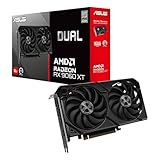
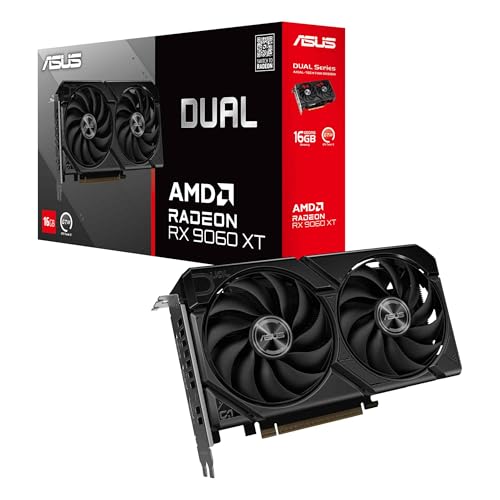 ASUS Dual Radeon RX 9060 XT 16GB GDDR6RX9060XT|16GB|Black8 x 4.7 x 1.9 inches1.3 poundsCheck on Amazon

The Same Size Chip, a Newer Architecture
These two cards look nearly identical on a spec sheet: 2048 stream processors, a 128-bit bus and 16 GB of GDDR6. The difference lies in RDNA 4, a smaller 4 nm process and higher clocks. TechSpot’s RX 9060 XT review noted that the core configuration is unchanged from the 7600 XT, with the new card running higher clocks and faster 20 Gbps memory.
| Specification | RX 7600 XT | RX 9060 XT 16GB |
|---|---|---|
| Architecture | RDNA 3.0 | RDNA 4.0 |
| Release date | 8 January 2024 | 4 June 2025 |
| Launch MSRP | $329 | $349 |
| Stream processors | 2048 | 2048 |
| Boost clock | 2755 MHz | 3130 MHz |
| Process | 6 nm | 4 nm |
| Memory | 16 GB GDDR6 | 16 GB GDDR6 |
| Memory bus | 128-bit | 128-bit |
| Bandwidth | 288.0 GB/s | 322.3 GB/s |
| L2 / L3 cache | 2 MB / 32 MB | 4 MB / 32 MB |
| Board power (TDP) | 190 W | 160 W |
| Interface | PCIe 4.0 x8 | PCIe 5.0 x16 |
| Power connectors | 1x 8-pin | 1x 8-pin |
| Length / width | 204 mm / 2-slot | 267 mm / 2-slot |
| Display outputs | 1x HDMI 2.1a, 3x DisplayPort 2.1 | 1x HDMI 2.1b, 2x DisplayPort 2.1a |
Measured Gains in Games
TechSpot described the RX 9060 XT as the most substantial generational leap in AMD’s mainstream class in years. Pre-launch benchmark leaks and early review coverage pointed to roughly a 35% lead over the RX 7600 XT at 1080p, and aggregate review data generally places the gap in the 30% to 35% range at 1080p and 1440p. Tom’s Hardware also reported about a 31% gain in compute benchmarks, consistent with the gaming results.
As a rough illustration, a game averaging about 60 fps at 1080p high on the RX 7600 XT would typically land somewhere around 78 to 82 fps on the RX 9060 XT 16GB. The exact gain varies with game, settings, CPU and patch, and some titles show smaller or larger differences.
Ray tracing: the bigger story
RDNA 4 substantially reworked AMD’s ray tracing hardware. In ray-traced games, the RX 9060 XT’s lead over the RX 7600 XT is generally larger than its raster lead, which moves 1080p ray tracing from barely usable to genuinely playable in many titles when paired with upscaling. The RX 7600 XT remains a raster-first card.
1440p
Both cards share a 128-bit bus, so neither is a dedicated 1440p high-refresh card. The RX 9060 XT’s extra speed and FSR 4 make 1440p at high settings with upscaling far more comfortable, while the RX 7600 XT typically needs medium settings or aggressive upscaling in demanding games at that resolution.
FSR 4 Changes the Upscaling Equation
The feature difference may matter more than the raw fps gain. FSR 4 is AMD’s machine-learning upscaler and is officially supported on RDNA 4 cards. It produces noticeably cleaner image quality than FSR 3.1, particularly in Performance and Balanced modes, which means upscaling on the RX 9060 XT can be pushed harder with less visual cost. AMD’s newer ML-driven features are also aimed at RDNA 4.
The RX 7600 XT stays on FSR 3.1 upscaling and frame generation, plus AMD Fluid Motion Frames at the driver level. Those still work well for raising frame rates, but the image quality gap between FSR 3.1 and FSR 4 is visible, especially at 1080p where upscaling has fewer pixels to work with.
Power, Platform and Fit
On paper the RX 9060 XT has a lower 160 W rating compared to 190 W for the RX 7600 XT. However, TechSpot measured the RX 9060 XT drawing slightly more power than the 7600 XT in one demanding game, because partner cards often ship with higher power limits. In practice, treat both as roughly 160 to 200 W cards.
PSU sizing with the common rule of GPU power plus CPU power plus about 150 W headroom, using 190 W as a conservative figure for either card and a 125 W CPU: 190 + 125 + 150 = 465 W, so a quality 550 W unit is ample for both. Both use a single 8-pin connector, so no cabling change is needed when upgrading.
Two platform details favor the newer card:
- PCIe link: the RX 9060 XT uses a full x16 link (PCIe 5.0) while the RX 7600 XT uses x8. On older PCIe 3.0 motherboards, the 7600 XT is limited to PCIe 3.0 x8, while the 9060 XT gets PCIe 3.0 x16, double the bus bandwidth. The 16 GB buffer limits the impact for both, but the 9060 XT is less sensitive to older boards.
- Length: the reference listing for the RX 9060 XT is 267 mm against 204 mm for the RX 7600 XT. Partner models vary considerably, including compact designs, but small form factor builders should measure clearance before buying.
Output count drops from four to three on the reference spec (one HDMI plus two DisplayPort), which matters only for multi-monitor setups using four displays.
Is the Upgrade Worth the Money?
Start with launch value. Setting the RX 7600 XT at 100 performance points and the RX 9060 XT 16GB at about 132:
- RX 7600 XT: $329 / 100 = $3.29 per point
- RX 9060 XT 16GB: $349 / 132 = about $2.64 per point
For a new buyer the RX 9060 XT 16GB is clearly better value at launch prices, around 20% cheaper per frame, with better features.
For an existing owner, the calculation is about net cost. A used RX 7600 XT usually sells somewhere around $200 to $250 depending on condition and region. If the RX 9060 XT 16GB is bought near its launch price, the net outlay is roughly $100 to $150 for about a third more performance, FSR 4 and better ray tracing. That is reasonable, though not urgent: the RX 7600 XT still plays everything at 1080p and has the same 16 GB, so it is not running into the memory problems that push 8 GB card owners to upgrade.
Owners who want a larger leap could consider stepping up to an RX 9070 or RX 9070 GRE instead, which offers far more than a single-tier improvement over the RX 7600 XT.
Decision Guide
| Situation | Recommendation |
|---|---|
| Buying new for 1080p or 1440p | RX 9060 XT 16GB |
| Own an RX 7600 XT, happy at 1080p | Keep it for now |
| Own an RX 7600 XT, moving to 1440p | Upgrade, or go further to an RX 9070-class card |
| Want playable ray tracing | RX 9060 XT 16GB |
| Rely heavily on upscaling | RX 9060 XT 16GB for FSR 4 |
| Older PCIe 3.0 motherboard | RX 9060 XT 16GB benefits from its x16 link |
| Very compact case | Check model length; the RX 7600 XT reference card is shorter |
Frequently Asked Questions
How much faster is the RX 9060 XT 16GB than the RX 7600 XT?
Review data and early benchmarks place it roughly 30% to 35% faster in rasterized games at 1080p and 1440p. The gap is larger in ray-traced games thanks to RDNA 4’s improved RT hardware. Individual games can show smaller or larger differences.
Can the RX 7600 XT use FSR 4?
FSR 4 is officially supported on RDNA 4 cards such as the RX 9060 XT and RX 9070 series. The RX 7600 XT uses FSR 3.1 upscaling and frame generation plus driver-level AFMF. That gives it working frame generation but lower upscaling image quality than FSR 4.
Do I need a new power supply to upgrade?
No. Both cards use a single 8-pin connector and draw a broadly similar amount of power in games. A quality 550 W PSU handles either card with a mainstream CPU.
Is the RX 9060 XT 8GB a better deal than the 16GB version?
The 8 GB version is cheaper, but coming from a 16 GB RX 7600 XT it would be a step down in memory. Many recent games use more than 8 GB at high texture settings. For anyone upgrading from an RX 7600 XT, the 16 GB model is the sensible choice.
Does PCIe 5.0 on the RX 9060 XT matter?
On a PCIe 5.0 or 4.0 board, the link speed rarely affects frame rates at this performance level. The more important point is the full x16 lane count, which helps on older PCIe 3.0 boards where the RX 7600 XT’s x8 link is more restrictive.
Related guides
More from Amazon
Programs that pair well with the guide above. Offers and eligibility are set by Amazon and may change.
A free business account with business pricing and bulk-buying tools for work, shop or home office.
Create a business accountFree shipping on eligible items, Prime Video and more. Eligible new members can start with a free trial.
Start a Prime free trialAudiobooks and podcasts to listen to on the go. Eligible new members can start with a free trial.
Try Audible freeAd-free music streaming. Eligible new subscribers can start with a free trial.
Try Music Unlimited freeAs an Amazon Associate we earn from qualifying purchases.