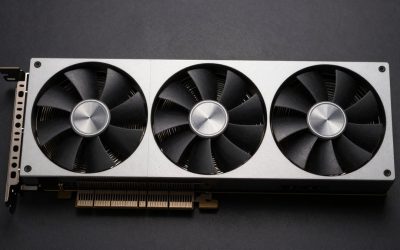
Yes, upgrading from an RX 6700 XT to an RX 9070 GRE is worth it for 1440p gamers. Review data places the GRE in a much higher performance class, roughly 50-70% faster in rasterized games and further ahead with ray tracing on, and it adds FSR 4. The catch is that VRAM stays at 12 GB, so the upgrade gives you speed and features but no more memory headroom.
The RX 6700 XT launched in March 2021 at $479 as AMD’s RDNA 2 1440p card. The RX 9070 GRE followed in May 2025 at $549 and is built on RDNA 4. For about $70 more at MSRP, four years later, you get a card that review data places in the same tier as the RX 7900 GRE.
As an Amazon Associate we earn from qualifying purchases at no extra cost to you.


Our Top Picks
 ASUS ATS Radeon RX 9070 GRE 12GB GDDR6RX9070GRE|OC|12GB12 x 4.95 x 0.1 inches2.2 poundsCheck on Amazon
 ASUS Prime Radeon™ RX 9070 GRE EVO OCRX9070GRE|OC|12GB|EVO12 x 5 x 0.1 inches2.4 poundsCheck on Amazon

Top 3 picks at a glance
Specifications: Old vs New
| Specification | RX 6700 XT | RX 9070 GRE |
|---|---|---|
| Architecture | RDNA 2.0 | RDNA 4.0 |
| Release date | 3 March 2021 | 8 May 2025 |
| Launch price (MSRP) | $479 | $549 |
| Stream processors | 2560 | 3072 |
| Boost clock | 2581 MHz | 2790 MHz |
| Process | 7 nm | 4 nm |
| TDP | 230 W | 220 W |
| Memory | 12 GB GDDR6 | 12 GB GDDR6 |
| Memory bus | 192-bit | 192-bit |
| Bandwidth | 384.0 GB/s | 432.0 GB/s |
| L2 / L3 cache | 3 MB / 96 MB | 8 MB / 48 MB |
| Interface | PCIe 4.0 x16 | PCIe 5.0 x16 |
| Power connectors | 1x 6-pin + 1x 8-pin | 2x 8-pin |
| Width | 2-slot (267 mm reference) | 2-slot |
| Outputs | 1x HDMI, 3x DisplayPort | 1x HDMI 2.1b, 3x DisplayPort 2.1a |
The spec sheet understates the jump. The GRE has only 20% more stream processors and a modest clock increase, but each RDNA 4 compute unit does considerably more work than an RDNA 2 unit, especially in ray tracing and AI-assisted workloads. Memory size and bus width stay the same, and bandwidth goes up a little.
Performance Class: What You Gain
TechPowerUp’s RX 9070 GRE review shows it performing on par with the RX 7900 GRE in raster and about 6% ahead in ray tracing. In those same review charts, the 7900 GRE class sits well above the RX 6700 XT. Synthetic results such as 3DMark Fire Strike show about a 45% gap. Comprehensive game suites at 1440p generally show the GRE about 50-70% faster than the 6700 XT, with some simpler aggregator sites reporting smaller numbers. Treat 50-70% as the realistic 1440p range.
What that means in practice at 1440p high settings in demanding modern games:
- Titles where the 6700 XT manages 45-60 FPS often move into the 70-100 FPS range on the GRE.
- Games that needed FSR Performance mode on the 6700 XT can run at native resolution or FSR 4 Quality.
- High-refresh 1440p monitors (144-165 Hz) become practical targets in many more games.
All figures are approximate and vary with settings, CPU, game patches and driver releases.
Ray Tracing: The Biggest Jump
The RX 6700 XT has first-generation AMD ray tracing hardware, and turning on RT usually halves its frame rate or worse. RDNA 4 reworked the ray tracing units considerably, so the GRE’s lead over the 6700 XT grows with RT enabled. Titles with moderate RT effects become playable at 1440p with FSR 4. Path-traced modes remain a struggle on both cards.
FSR 4: A Feature the 6700 XT Cannot Use
FSR 4 is AMD’s machine-learning upscaler, and it is officially limited to RDNA 4 GPUs. It noticeably improves image stability, fine detail and motion clarity compared with FSR 2 and FSR 3.1, which are what the 6700 XT relies on. FSR 3.1 frame generation works on both cards, but with FSR 4 upscaling the GRE starts from a cleaner, higher base frame rate, which makes generated frames look better and feel more responsive.
For many 6700 XT owners, this feature matters as much as the raw speed gain: upscaled 1440p looks substantially better on the GRE.
The VRAM Question: Same 12 GB
This upgrade brings no extra memory. 12 GB remains adequate for 1440p in current games, and most titles use 8-11 GB at high settings. With a faster GPU, though, you are more likely to raise settings, enable RT and use higher-resolution textures, all of which push memory use up. If you plan to move to 4K or want the most headroom for future games, the RX 9070 (16 GB) is the safer step, at a higher cost.
Power, PSU and Connector Changes
Power draw barely changes: 230 W for the 6700 XT against 220 W for the GRE. Any PSU that ran the old card comfortably has enough wattage. Using GPU TDP + CPU + about 150 W of headroom with a 105 W CPU: 220 + 105 + 150 = 475 W, so a good 550-650 W unit works well.
The connector requirement changes, though. The 6700 XT reference design uses one 6-pin and one 8-pin, and the GRE needs two 8-pin connectors. Check that your PSU has two separate 6+2-pin PCIe leads. Avoid daisy-chaining both connectors from one cable if your PSU allows separate runs. Both cards are 2-slot designs, but GRE partner card lengths vary, so measure your case clearance before buying.
Upgrade Cost Worked Out
Net cost matters more than sticker price. RX 6700 XT cards usually sell for $180-$240 used depending on model and condition. If a GRE costs around its $549 MSRP:
- Net upgrade cost: $549 – ~$210 = about $340.
- Performance gain: about 60% (middle of the 50-70% range).
- Cost per 1% gained: $340 / 60 = about $5.70.
For comparison, a full new-card cost per performance point at launch prices, setting the 6700 XT at 100 and the GRE at 160: RX 6700 XT $479 / 100 = $4.79, RX 9070 GRE $549 / 160 = $3.43. The GRE gives about 28% more performance per launch dollar, before even counting FSR 4 and better ray tracing.
When the Upgrade Pays Off
| Situation | Recommendation |
|---|---|
| 1440p, high-refresh monitor | Strong upgrade: the GRE takes many games past 100 FPS |
| Want ray tracing at 1440p | Strong upgrade: RT becomes usable with FSR 4 |
| 1080p at 60-75 Hz | Weak upgrade: the 6700 XT already handles this |
| Planning 4K | Consider the RX 9070 instead for 16 GB |
| Older CPU (e.g. 6-core from 2018-2019) | Check the CPU first, since it may limit the gain at 1080p |
| PSU without two 8-pin leads | Budget for a PSU upgrade as well |
CPU Pairing Note
A GPU that is 50-70% faster needs a CPU that can keep up. At 1440p most modern 6-core and 8-core processors are fine. Owners of older quad-core or early Ryzen chips may see smaller gains, especially in CPU-heavy games and at 1080p. The GRE’s PCIe 5.0 x16 interface works in PCIe 4.0 and 3.0 slots with negligible loss, since the card has a full sixteen lanes.
Verdict
The RX 9070 GRE is a real generational upgrade over the RX 6700 XT. At 1440p it is roughly 50-70% faster in raster, with a bigger lead in ray tracing, and it gives access to FSR 4’s much cleaner upscaling, all at about the same power draw. The unchanged 12 GB of VRAM is the one compromise. For 1440p players it is a very good upgrade, while players aiming at 4K should look at the 16 GB RX 9070.
Frequently Asked Questions
How much faster is the RX 9070 GRE than the RX 6700 XT?
Review data generally places the RX 9070 GRE around 50-70% faster at 1440p in rasterized games, depending on the title. The lead is larger with ray tracing on, because RDNA 4’s RT hardware is much stronger than RDNA 2’s. Some aggregate sites report smaller gaps, so expect the exact result to vary by game.
Do I need a new power supply to upgrade?
Wattage is rarely a problem, since the GRE’s 220 W TDP is slightly lower than the 6700 XT’s 230 W. The issue is connectors: the GRE needs two 8-pin PCIe connectors, while many 6700 XT models use a 6-pin plus an 8-pin. If your PSU has two 6+2-pin leads, you can keep it.
Can the RX 6700 XT use FSR 4?
FSR 4 is officially supported only on RDNA 4 graphics cards, the RX 9000 series. The RX 6700 XT supports FSR 3.1 and earlier versions, including frame generation. That gap in upscaling quality is one of the main reasons to upgrade.
Is 12 GB on the RX 9070 GRE enough for 1440p?
Yes, 12 GB handles current games at 1440p high settings in nearly all cases. With heavy ray tracing and maximum textures, a few titles can get close to the limit. For 4K, or for the longest lifespan, the 16 GB RX 9070 is the safer choice.
Is it better to upgrade to the RX 9070 instead of the GRE?
The RX 9070 has more compute units and 16 GB of VRAM. Reviews show it roughly 18-23% faster than the GRE at 1440p. It costs more at launch, but if you want 4K or extra memory headroom, the step up is worth considering.
Related guides
More from Amazon
Programs that pair well with the guide above. Offers and eligibility are set by Amazon and may change.
A free business account with business pricing and bulk-buying tools for work, shop or home office.
Create a business accountFree shipping on eligible items, Prime Video and more. Eligible new members can start with a free trial.
Start a Prime free trialAudiobooks and podcasts to listen to on the go. Eligible new members can start with a free trial.
Try Audible freeAd-free music streaming. Eligible new subscribers can start with a free trial.
Try Music Unlimited freeAs an Amazon Associate we earn from qualifying purchases.