Our Short List of 3
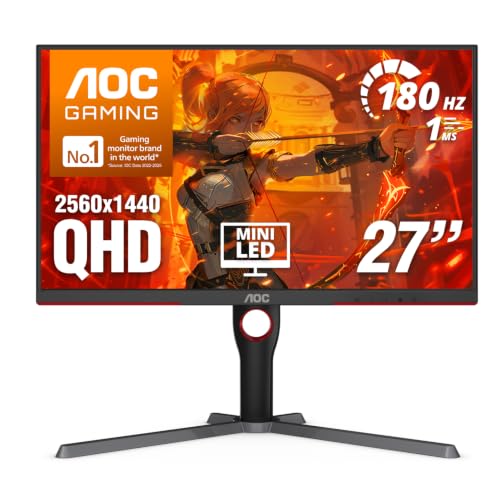
- Best for: HDR gaming and dark, atmospheric titles
- 27-inch QHD (2560 x 1440) Mini LED panel
- 180Hz refresh rate, 1ms GtG response time
- VESA DisplayHDR 1000 certified
- Color gamut listed at 137.5 percent sRGB

- Best for: Competitive shooters and fast-paced esports titles
- 27-inch QHD (2560 x 1440) Fast IPS panel
- 180Hz refresh rate, 1ms response time
- Extreme Low Motion Blur Sync
- Color gamut listed at 130 percent sRGB

- Best for: Everyday 1440p gaming mixed with desk work
- 27-inch QHD (2560 x 1440) display
- Refresh rate up to 180Hz
- Response time listed at 2ms
- Color coverage listed at 99 percent sRGB
All 4 Picks at a Glance
| Product | Specs | Action |
|---|---|---|
| AOC Q27G3XMN 27-Inch QHD Mini LED Gaming Monitor |
| Check price on Amazon |
| ASUS TUF Gaming VG27AQ3A 27-Inch 1440P Monitor |
| Check price on Amazon |
| Dell G2725D 27-Inch QHD Gaming Monitor |
| Check price on Amazon |
 Acer Nitro XV272U W2bmiiprx 27-Inch WQHD Gaming Monitor |
| Check price on Amazon |
Shopping in this budget tier is really a decision about priorities. The money buys a sharp 1440p panel almost everywhere, so the real choice is what gets the emphasis: a Mini LED backlight with serious HDR, the highest refresh rate for competitive play, a deep curve for immersion, or a plain all-rounder that simply does everything competently. Picking the wrong emphasis is how buyers end up with a fast monitor whose HDR disappoints, or a pretty panel that feels slow in shooters.
This guide is for PC gamers upgrading from an older 1080p display and for console players who want a single screen that handles both. The five picks below cover the main directions: the AOC Q27G3XMN for HDR, the ASUS TUF Gaming VG27AQ3A for motion clarity, the curved Samsung Odyssey G55C, the Dell G2725D as the value all-rounder, and the Acer Nitro XV272U W2bmiiprx for high-refresh play.
Our Top Picks
- AOC 27 Inch Gaming Monitor QHD 180Hz Mini-LED27" 180Hz Mini-LED10.19 x 23.82 x 20.94 inches15.6 PoundsCheck on Amazon
- ASUS TUF Gaming VG27AQ3A 27 Inch 1440p 180Hz14.4" x 24.2" x 2.1"24.2 x 8.4 x 17.9 inches10.1 poundsCheck on Amazon
Top 3 picks at a glance
Quick Picks
As an Amazon Associate we earn from qualifying purchases
| Product | Best for | Key spec from title |
|---|---|---|
| AOC Q27G3XMN 27-Inch QHD Mini LED Gaming Monitor | HDR gaming | Mini LED backlight with DisplayHDR 1000 |
| ASUS TUF Gaming VG27AQ3A 27-Inch 1440P Monitor | Competitive shooters | 180Hz Fast IPS panel with ELMB Sync |
| Samsung Odyssey G55C 27-Inch QHD Curved Gaming Monitor | Immersive single-player games | 1000R curved panel at 165Hz |
| Dell G2725D 27-Inch QHD Gaming Monitor | Everyday 1440p value | 180Hz refresh with 99 percent sRGB coverage |
| Acer Nitro XV272U W2bmiiprx 27-Inch WQHD Gaming Monitor | High-refresh esports play | 240Hz WQHD IPS panel |
How to Choose
Resolution and screen size come first
At this budget, 27 inches at 2560 x 1440 is the sweet spot, and every pick in this guide sits there. That pairing gives a sharp image without demanding a flagship graphics card, and it leaves enough desktop space for work between sessions. Smaller 24-inch panels in this tier are usually 1080p esports models, which trade sharpness for speed. Bigger 32-inch screens stretch the same pixel count thinner, so text and fine detail look softer. Decide whether sharpness or raw size matters more before comparing anything else.
Refresh rate and response time
Refresh rate sets the ceiling on how smooth motion can look, provided the graphics card can feed it. A 165Hz or 180Hz panel is a large step up from 60Hz for fast games, and 240Hz helps competitive players who run lighter titles at very high frame rates. Response time figures are measured differently by each brand, so treat them as a rough guide rather than a ranking. Adaptive sync support matters more in practice, because it keeps motion smooth when the frame rate dips below the panel maximum.
Panel type and HDR expectations
IPS panels give the widest viewing angles and the most consistent color, which suits mixed gaming and desk work. VA panels deliver deeper contrast and are the usual choice for curved screens, at the cost of some dark-scene smearing. HDR labels need care: a DisplayHDR 400 badge means basic tone mapping, while a Mini LED backlight with DisplayHDR 1000, like the AOC below, can produce genuinely bright highlights and dark shadows in the same scene. If HDR gaming is the priority, the backlight matters more than the badge.
Ports, stands and everyday ergonomics
Check the port list against the machines you actually own. A PC and a console together need at least two usable inputs, and DisplayPort is the connection that unlocks the full refresh rate on most of these monitors, while HDMI is often capped lower. Stand adjustment varies widely in this tier: some picks offer height adjustment, others tilt only, which pushes the cost of a monitor arm onto the buyer. Built-in speakers are a convenience for casual video, not a replacement for a headset.
The 5 Best Options
AOC Q27G3XMN 27-Inch QHD Mini LED Gaming Monitor
- Best for: HDR gaming and dark, atmospheric titles
- 27-inch QHD (2560 x 1440) Mini LED panel
- 180Hz refresh rate, 1ms GtG response time
- VESA DisplayHDR 1000 certified
- Color gamut listed at 137.5 percent sRGB
HDR gaming and dark, atmospheric titles
Only one HDMI port, so a PC plus two consoles means swapping cables or adding a switch.
The Q27G3XMN is the pick for players who care about HDR and contrast above everything else in this tier. Its Mini LED backlight carries a VESA DisplayHDR 1000 rating, which puts its highlight brightness and shadow depth in a different class from the edge-lit panels around it, while the 180Hz refresh rate and Adaptive Sync keep fast games smooth. It suits story-driven and atmospheric titles where lighting sells the scene, and the height-adjustable stand and three-year zero-bright-dot coverage round out a package that asks few compromises.
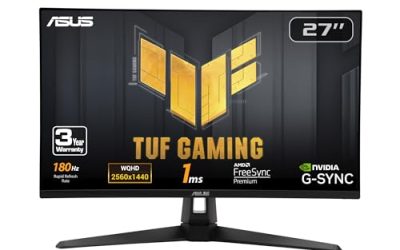
ASUS TUF Gaming VG27AQ3A 27-Inch 1440P Monitor
- Best for: Competitive shooters and fast-paced esports titles
- 27-inch QHD (2560 x 1440) Fast IPS panel
- 180Hz refresh rate, 1ms response time
- Extreme Low Motion Blur Sync
- Color gamut listed at 130 percent sRGB
Competitive shooters and fast-paced esports titles
HDR support is basic compared with the Mini LED pick above, so do not buy it for HDR first.
The VG27AQ3A is built around motion clarity. Its Fast IPS panel runs at 180Hz with a 1ms response time, and ASUS Extreme Low Motion Blur Sync can strobe the backlight while variable refresh stays active, a combination aimed squarely at competitive shooters where target tracking matters more than cinematic contrast. FreeSync Premium and G-SYNC compatibility cover both graphics card brands, the color gamut is wide for a speed-focused panel, and built-in speakers handle call audio and casual video without extra desk gear.
Samsung Odyssey G55C 27-Inch QHD Curved Gaming Monitor
The Odyssey G55C is the immersion pick. Its 1000R curve is the tightest in this guide, wrapping the 27-inch QHD panel around the player’s field of view in a way flat screens do not, and the VA panel behind it delivers the deep contrast that dark game scenes benefit from. The 165Hz refresh rate and FreeSync support keep motion respectable, and Samsung lists Eye Saver features for longer sessions. It fits single-player and sim players who sit centered on one screen and want the world to feel bigger.
Specs
- 27-inch QHD (2560 x 1440) curved panel, 1000R curvature
- 165Hz refresh rate, 1ms (MPRT) response time
- HDR10 support
- AMD Radeon FreeSync
- Eye Care features listed
- Model number LS27CG552ENXZA
Best for: Immersive single-player games and racing or flight sims
Watch out for: A steep curve is a personal taste, and VA panels can smear in fast dark scenes compared with IPS.
ASIN: B0CQRYS74G
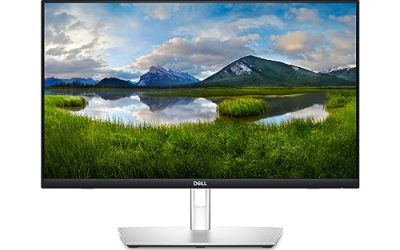
Dell G2725D 27-Inch QHD Gaming Monitor
- Best for: Everyday 1440p gaming mixed with desk work
- 27-inch QHD (2560 x 1440) display
- Refresh rate up to 180Hz
- Response time listed at 2ms
- Color coverage listed at 99 percent sRGB
Everyday 1440p gaming mixed with desk work
The tilt-only stand is the main compromise; there is no height adjustment without a separate arm.
The G2725D is the straightforward all-rounder of the group. Dell’s listing pairs the 1440p panel with a refresh rate of up to 180Hz, near-full sRGB coverage for respectable color, and ComfortView Plus eye comfort features, which makes it an easy recommendation for a desk that splits time between games and ordinary work. FreeSync support keeps frame rates smooth, and the port selection covers a PC plus a console. The stand is tilt-only, so buyers who need height adjustment should budget for an arm or pick a rival here.
Acer Nitro XV272U W2bmiiprx 27-Inch WQHD Gaming Monitor
- Best for: High-refresh esports play on PC and console
- 27-inch WQHD (2560 x 1440) IPS panel
- Up to 240Hz refresh rate
- Response time up to 0.5ms
- AMD FreeSync Premium
High-refresh esports play on PC and console
Reaching 240Hz needs a graphics card that can drive 1440p at very high frame rates; weaker PCs will not use the headroom.
The XV272U W2bmiiprx is the refresh-rate specialist, pushing a 240Hz ceiling that none of the other picks here match. That headroom is aimed at competitive players running shooters and lighter esports titles at very high frame rates, and the IPS panel keeps viewing angles and color consistent while doing it. FreeSync Premium and DisplayHDR 400 support are both listed, the ErgoStand gives proper height adjustment, and the port mix includes two HDMI 2.1 inputs alongside DisplayPort, which suits a PC and current consoles sharing one screen.
Which One Fits Your Situation
You play story-driven games and love HDR scenes
Choose the AOC Q27G3XMN. It is the only pick here with a Mini LED backlight and a DisplayHDR 1000 rating, so night scenes, neon cities and dark dungeons hold their depth instead of washing out. The 180Hz refresh rate still covers faster games comfortably, making it the most complete single-screen option in this tier.
You play competitive shooters most nights
Choose between the ASUS TUF Gaming VG27AQ3A and the Acer Nitro XV272U W2bmiiprx. The ASUS counters motion blur with ELMB Sync at 180Hz, while the Acer offers the higher 240Hz ceiling. If your PC already pushes very high frame rates in your main titles, take the Acer; if it sits lower, the ASUS blur reduction is the more useful tool.
Your desk is shared between a PC and a console
Choose the Acer Nitro XV272U W2bmiiprx or the Dell G2725D. The Acer’s two HDMI 2.1 ports plus DisplayPort cover a PC and two consoles without cable swapping, and its stand adjusts for different chairs and players. The Dell is the calmer choice when the same desk also handles work hours, thanks to its eye comfort features and accurate color coverage.
You want one immersive screen for sims and single-player
Choose the Samsung Odyssey G55C. The 1000R curve fills peripheral vision in cockpits and open worlds, and the VA panel’s contrast suits the dark scenes those games love. Sit centered and reasonably close for the full effect, since the curve is designed around a single viewer in the middle rather than a couch shared by several people.
Common Mistakes
- Assuming every port runs the full refresh rate, when HDMI is often capped below what DisplayPort delivers on the same monitor.
- Buying a 240Hz panel for a PC that cannot push frame rates anywhere near that ceiling at 1440p.
- Treating every HDR badge as equal, when a basic DisplayHDR 400 label and a Mini LED DisplayHDR 1000 backlight are very different things.
- Ignoring stand adjustment and discovering too late that a tilt-only base needs a separate arm for a comfortable setup.
- Picking a steep curved panel for shared viewing or color-critical work, where flat IPS screens behave better.
Frequently Asked Questions
Is 1440p worth it over 1080p in this budget tier?
For most players, yes. At 27 inches, 1440p looks visibly sharper than 1080p in games and leaves far more room on the desktop for work. The cost is performance: the graphics card renders more pixels, so very demanding titles may need lower settings. Players focused purely on competitive speed sometimes still prefer smaller 1080p panels instead.
How much refresh rate do I actually need?
A jump from 60Hz to 165Hz or 180Hz is the improvement most players notice immediately, and it is where this tier is strongest. Moving to 240Hz helps mainly in competitive titles where the PC can already produce very high frame rates. If your games usually run well below that, a 180Hz pick spends the budget more sensibly.
Can these monitors handle a console as well as a PC?
Yes, with one check: confirm the HDMI refresh limits in the listing before buying, because consoles connect over HDMI and some models cap that input below the DisplayPort rate. All five picks list FreeSync support and at least one HDMI input, and the Acer adds a second HDMI 2.1 port for multi-console desks.
Does HDR on a budget monitor make a real difference?
It depends entirely on the backlight. A Mini LED panel with local dimming, like the AOC in this guide, produces HDR highlights and shadows that are clearly visible. A basic DisplayHDR 400 edge-lit panel mostly accepts the signal without transforming the image. Buyers who rank HDR highly should start with the backlight specification, not the badge.
Related guides
More from Amazon
Programs that pair well with the guide above. Offers and eligibility are set by Amazon and may change.
A free business account with business pricing and bulk-buying tools for work, shop or home office.
Create a business accountFree shipping on eligible items, Prime Video and more. Eligible new members can start with a free trial.
Start a Prime free trialAudiobooks and podcasts to listen to on the go. Eligible new members can start with a free trial.
Try Audible freeAd-free music streaming. Eligible new subscribers can start with a free trial.
Try Music Unlimited freeAs an Amazon Associate we earn from qualifying purchases.