Our Short List of 3

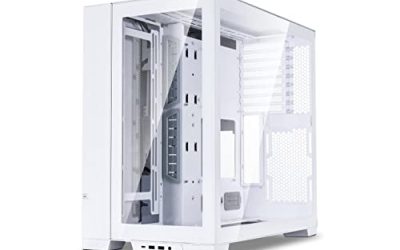
- Best for: First-time builders who want a windowed case with a tidy interior and a clear cooling upgrade path.
- Micro-ATX form factor, SPCC steel chassis
- Tempered glass side panel, 4mm thick
- Mesh front panel with built-in blue LED strip
- Full-length power supply cover
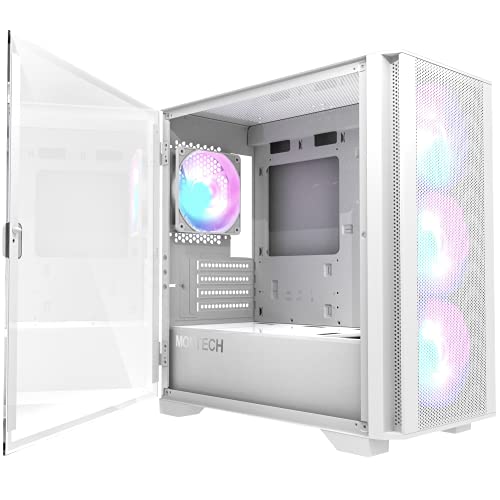
- Best for: Builders who want strong airflow and lighting with no extra fans to buy.
- Micro-ATX form factor with fine mesh front panel
- Four 120mm ARGB fans pre-installed
- Tempered glass side panel with swivel opening
- Graphics card clearance up to 330mm

- Best for: Compact builds in awkward spots, where the movable I/O panel and small footprint earn their keep.
- Micro-ATX and Mini-ITX motherboard support
- Mini-tower form factor, bottom-mount power supply
- Magnetic dust filters on the perforated panels
- Transparent acrylic side panel, edge to edge
All 3 Picks at a Glance
| Product | Specs | Action |
|---|---|---|
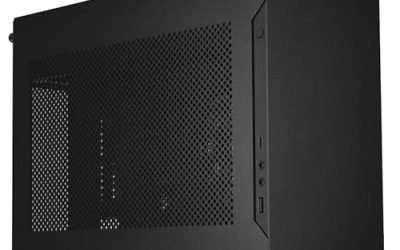
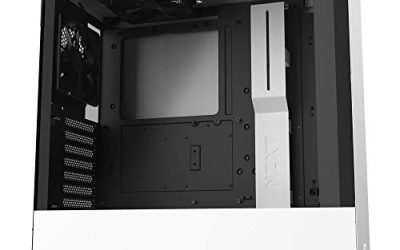
| Thermaltake Versa H18 Tempered Glass |
| Check price on Amazon |
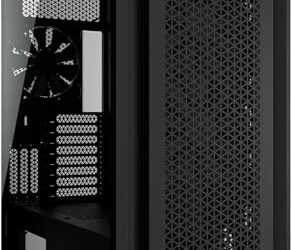
| Montech AIR 100 ARGB White |
| Check price on Amazon |
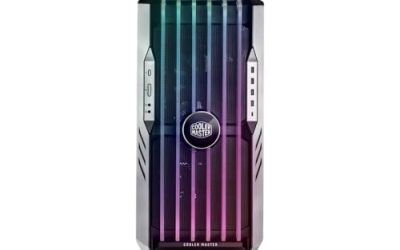
| Cooler Master MasterBox Q300L |
| Check price on Amazon |
A PC case at this tier does more than hold parts together. It sets the airflow your graphics card breathes, the length of card and cooler you can install, and how pleasant the build feels. Cases in this bracket vary widely in steel thickness, fan count and front panel design, so two similar-looking boxes can behave very differently under a gaming load. Choosing well leaves more of the build fund for the parts that set frame rates, while keeping the system cool and quiet.
This guide is for first-time builders, compact Micro-ATX builds and anyone turning an office machine into a gaming rig. The three picks below come from Amazon listings and their published specifications: the Thermaltake Versa H18 Tempered Glass for a first windowed build, the Montech AIR 100 ARGB White for airflow out of the box, and the Cooler Master MasterBox Q300L for a compact, flexible layout. Each fits a standard ATX power supply and a full-length graphics card, with cable routing simple enough for a first build.
Our Top Picks
Top 3 picks at a glance
Quick Picks
As an Amazon Associate we earn from qualifying purchases.
| Product | Best for | Key spec from title |
|---|---|---|
| Thermaltake Versa H18 Tempered Glass | A first build with a window | Micro-ATX gaming case with tempered glass side panel |
| Montech AIR 100 ARGB White | Airflow straight out of the box | Micro-ATX case with four pre-installed ARGB fans |
| Cooler Master MasterBox Q300L | A compact case with a flexible layout | Micro-ATX tower with magnetic dust filters and adjustable I/O |
How to Choose
Airflow Before Looks
A mesh or perforated front panel moves far more air than a solid slab of plastic or glass, and at this tier that difference shows up directly in graphics card temperatures. Count the fans that come in the box before assuming you need to buy more, and check whether the front panel is a fine mesh, a patterned grille or a closed sheet. Dust filters on the intake matter too, since a case that breathes well also pulls in dust, and magnetic filters are far easier to clean than fixed ones. A good-looking case that deprives the graphics card of air is a poor trade.
Measure Your Graphics Card and Cooler
Every case in this guide lists clear limits for graphics card length, CPU cooler height and power supply length, and those numbers decide whether your parts fit at all. Measure the card you own or plan to buy, including any extra length from a thick cooler shroud, and compare it against the case limit with a little room to spare. Tall tower air coolers need the same treatment, since a cooler that presses against the side panel is a cooler that cannot be installed. Check radiator support as well if a liquid cooler is part of the plan, because not every compact case takes a front radiator.
Match the Form Factor to Your Board
Micro-ATX and Mini-ITX boards fit all three cases here, while a full ATX board needs a larger enclosure, so the motherboard you own sets the case size before anything else does. A compact Micro-ATX case suits most first builds, since it holds a standard graphics card, a tower cooler and a couple of drives without wasting desk space. Mini-ITX boards also fit, but they leave expansion slots empty and can make cable routing tighter. Buy the case for the board you have, not the board you might own one day, and confirm the mounting holes line up with your board size.
Build Ease and Cable Space
A first build goes far better in a case with a power supply cover, routing cutouts behind the motherboard tray and a side panel that comes off without a fight. The cover hides the power supply and its spare cables, the cutouts let cables pass behind the tray instead of across the airflow path, and a hinged or thumbscrew panel makes later upgrades painless. Front I/O placement matters as well: ports on the top edge suit a case that sits on the floor, while front-facing ports suit a case on the desk. Small conveniences like these decide whether the build takes an evening or a weekend.
The 3 Best Options
Thermaltake Versa H18 Tempered Glass
- Best for: First-time builders who want a windowed case with a tidy interior and a clear cooling upgrade path.
- Micro-ATX form factor, SPCC steel chassis
- Tempered glass side panel, 4mm thick
- Mesh front panel with built-in blue LED strip
- Full-length power supply cover
First-time builders who want a windowed case with a tidy interior and a clear cooling upgrade path.
Only one fan ships in the box, so plan on adding front intake fans for a gaming load.
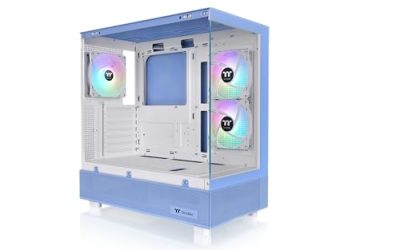
The Versa H18 is the straightforward pick for a first windowed build, pairing a tempered glass side panel with a compact Micro-ATX frame that still swallows a full-size graphics card. Its front carries a mesh panel with a built-in blue LED strip, and the interior keeps a full-length power supply cover that hides cabling and gives the finished build a tidy look. A rear fan comes in the box, and the chassis supports liquid cooling radiators at the front, giving the build a clear upgrade path. The steel body feels solid for the tier, and the window shows off the parts without a larger desk footprint.
Watch out for: Only one fan ships in the box, so plan on adding front intake fans for a gaming load.
Montech AIR 100 ARGB White
- Best for: Builders who want strong airflow and lighting with no extra fans to buy.
- Micro-ATX form factor with fine mesh front panel
- Four 120mm ARGB fans pre-installed
- Tempered glass side panel with swivel opening
- Graphics card clearance up to 330mm
Builders who want strong airflow and lighting with no extra fans to buy.
The white finish shows dust and fingerprints more readily than a black case, so wipe the panels down now and then.
The AIR 100 ARGB White arrives ready to cool, with four pre-installed ARGB fans and a fine mesh front panel that feeds them fresh air from the moment the system powers on. Its swivel tempered glass side panel opens easily for access, and the white interior brightens the build while keeping cable routing visible and simple. Clearance is generous for a compact Micro-ATX case, taking long graphics cards, tall tower coolers and a front radiator, so the case rarely forces a compromise on parts. The front I/O gives two USB 3.0 ports alongside a USB 2.0 port and audio jacks, which covers the peripherals most builders plug in daily.
Watch out for: The white finish shows dust and fingerprints more readily than a black case, so wipe the panels down now and then.
Cooler Master MasterBox Q300L
- Best for: Compact builds in awkward spots, where the movable I/O panel and small footprint earn their keep.
- Micro-ATX and Mini-ITX motherboard support
- Mini-tower form factor, bottom-mount power supply
- Magnetic dust filters on the perforated panels
- Transparent acrylic side panel, edge to edge
Compact builds in awkward spots, where the movable I/O panel and small footprint earn their keep.
The side panel is acrylic rather than tempered glass, so it scratches more easily and needs gentle cleaning.
The Q300L is the most flexible case in this guide, with an I/O panel that moves to six positions and perforated panels on every side that keep air moving. Its magnetic dust filters lift off for cleaning, the acrylic side panel runs edge to edge for a clear view of the parts, and the chassis takes a standard ATX power supply despite its small size. Graphics card clearance reaches 360mm and CPU cooler clearance reaches 159mm, which covers most mainstream gaming parts without fuss. The case suits a build that will sit in an awkward spot, since the adjustable I/O panel adapts to desk, floor or shelf.
Watch out for: The side panel is acrylic rather than tempered glass, so it scratches more easily and needs gentle cleaning.
Which One Fits Your Situation
A First Build With a Window
Pick the Versa H18 when the goal is a clean first build with a view of the parts. The tempered glass panel and power supply cover make the finished system look deliberate, and the single included fan keeps the first step simple while leaving an obvious first upgrade. Add two front intake fans when the graphics card goes in, and the case handles a mainstream gaming load without complaint.
Airflow Straight Out of the Box
Pick the AIR 100 ARGB White when cooling matters from day one and extra fan purchases are not part of the plan. Four pre-installed fans behind a fine mesh front move plenty of air, and the generous clearances mean a long graphics card and a tall tower cooler fit without measuring twice. The white finish and lighting suit a build that will sit on the desk in plain sight.
The Smallest Footprint on the Desk
Pick the Q300L when desk space is tight and the case needs to tuck into a corner or under a shelf. Its compact frame still takes a standard power supply and a long graphics card, and the I/O panel moves to whichever side stays reachable. The perforated panels keep air flowing from every direction, which suits a case that ends up close to a wall.
Reusing Parts From an Older Machine
Pick the Q300L again when the build reuses a Micro-ATX board, a standard power supply and a graphics card from an older system. The flexible I/O placement adapts to the room the old parts leave behind, and the wide graphics card clearance takes cards that larger compact cases sometimes refuse. Magnetic filters make the move-in easy to keep clean afterwards.
Common Mistakes
- Buying a case before measuring the graphics card, then finding the card is longer than the clearance allows.
- Choosing a solid front panel for looks and wondering why the graphics card runs hot under load.
- Forgetting that a full ATX motherboard does not fit a Micro-ATX case, no matter how roomy the listing photos look.
- Skipping the dust filters, then cleaning dust out of heatsink fins every few weeks instead of rinsing a filter.
- Routing all cables across the middle of the case instead of behind the motherboard tray, choking the airflow the fans just created.
Frequently Asked Questions
Can a case in this tier hold a full-size graphics card?
Yes. All three cases here take graphics cards of 330mm or more, which covers most mainstream gaming cards, including dual-fan and many triple-fan models. Measure the exact card before ordering, since a few flagship cards with oversized coolers run longer than these limits, and leave a little room for the power cables at the end of the card.
Do I need to buy extra fans?
It depends on the case. The AIR 100 ARGB White ships with four fans and needs nothing extra for a typical build, while the Versa H18 ships with one rear fan and benefits from two front intakes. The Q300L ships with one fan and has room for up to five, so adding front intake fans is the sensible first step for a gaming load.
Is tempered glass safe in a budget case?
Tempered glass is the same material used in pricier cases, and it is designed to crumble into small blunt pieces rather than sharp shards if it ever breaks. Handle the panel by its edges, set it down on a soft surface during the build, and avoid tightening screws against it. The Q300L uses acrylic instead, which is lighter and will not shatter but scratches more easily.
Micro-ATX or Mini-ITX for a first build?
Micro-ATX is the easier first build, since the board costs less, holds more expansion slots and leaves more room for hands and cables inside the case. Mini-ITX suits a very small desk footprint, but the cramped interior makes cable routing and cooler installation harder. All three cases here take both board sizes, so the choice comes down to how small the build needs to be.
Related guides
More from Amazon
Programs that pair well with the guide above. Offers and eligibility are set by Amazon and may change.
A free business account with business pricing and bulk-buying tools for work, shop or home office.
Create a business accountFree shipping on eligible items, Prime Video and more. Eligible new members can start with a free trial.
Start a Prime free trialAudiobooks and podcasts to listen to on the go. Eligible new members can start with a free trial.
Try Audible freeAd-free music streaming. Eligible new subscribers can start with a free trial.
Try Music Unlimited freeAs an Amazon Associate we earn from qualifying purchases.