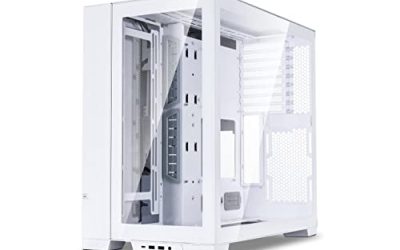
A PC case is the part of a build you live with every day, and it shapes more than looks. It decides how cool the graphics card and processor run, how much room a long graphics card or tall air cooler gets, how easy cables are to route, and how loud the machine sounds under load. A case that is too small forces awkward compromises, while blocked intake panels can leave strong parts running hotter than they should. Choosing well at the start saves rebuilding later.
This guide compares three mid-tower ATX cases taken from their Amazon listings: the CORSAIR 4000D Airflow, the NZXT H5 Flow 2024, and the LIAN LI LANCOOL 216 RGB. Each fits standard ATX boards and full-size graphics cards, and each takes a different approach. The CORSAIR leads on proven, balanced airflow, the NZXT leads on compact size with a graphics-card cooling trick, and the LIAN LI leads on out-of-the-box fan power and lighting.
Quick Picks
As an Amazon Associate we earn from qualifying purchases
| Product | Best for | Key spec from title |
|---|---|---|
| CORSAIR 4000D Airflow Tempered Glass Mid-Tower ATX Case, Black | Balanced first builds | Two 120mm AirGuide fans, 360mm front radiator support |
| NZXT H5 Flow 2024 Compact ATX Mid-Tower PC Gaming Case, Black | Compact ATX builds | Two 120mm fans included, 360mm front and 240mm top radiator support |
| LIAN LI LANCOOL 216 RGB Mid-Tower PC Case, Black | Maximum stock airflow and lighting | Two 160mm ARGB front fans and one 140mm PWM rear fan pre-installed |
How to Choose
Match the case to your motherboard and graphics card
Start with the parts you already own or plan to buy, because a case that cannot fit them is a non-starter no matter how good it looks. Check the motherboard form factor first: all three cases here accept ATX boards, along with smaller Micro-ATX and Mini-ITX boards, and two of them also accept wider E-ATX boards. Then measure the graphics card, since modern cards are long and thick, and confirm the cooler height and radiator size you plan to use. A case with generous clearance gives you room to upgrade later without replacing the chassis, which is the single most practical reason to buy slightly bigger than your current parts demand.
Judge airflow by the front panel and the included fans
Airflow is the most important performance feature of a case, and the front panel tells you most of it before you buy. Perforated steel or fine mesh lets intake fans pull cool air straight onto the graphics card and processor, while a solid glass or plastic front forces air through narrow side gaps and runs warmer. Count the fans in the box as well, because a case with two or three good fans installed is ready to build, while a case with one fan or none needs extra fans before it cools properly. All three cases here use mesh or perforated fronts and arrive with at least two fans fitted.
Think about radiator and cooler support before you buy cooling
If you plan to use a liquid cooler, confirm the radiator sizes the case accepts and where they mount, because not every mid-tower fits a 360mm radiator in both the front and the top. Front mounting usually allows the largest radiator but can shorten the space left for the graphics card, while top mounting depends on clearance above the memory and motherboard heatsinks. Air-cooler builders should check the maximum cooler height instead, along with the depth of the cable channel behind the motherboard tray. Buying the case and the cooler together avoids the common problem of parts that fit on paper and collide in practice.
Weigh size, noise, and the look you want on your desk
A mid-tower is the sensible middle ground for most builders, but cases in this class still vary in depth, width, and weight, so measure your desk or floor space before ordering. Deeper cases fit longer cards and thicker radiators, while narrower cases sit more neatly beside a monitor. Noise follows the airflow design: open mesh panels and large, slow-spinning fans tend to run quieter than small fans working hard behind a restrictive front. Finally, decide how much glass and lighting you want, since a tempered glass side panel shows off the build and RGB fans add colour, while a plain steel panel keeps the focus on the hardware inside.
The 3 Best Options
CORSAIR 4000D Airflow Tempered Glass Mid-Tower ATX Case, Black
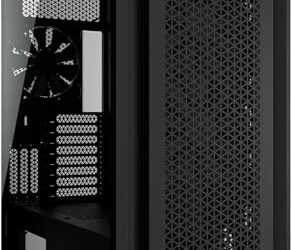
The CORSAIR 4000D Airflow is the safe, well-rounded choice in this group, and it earns that position with a proven layout rather than any single headline feature. Its perforated steel front panel feeds cool air directly to the two included 120mm AirGuide fans, and the interior follows a familiar pattern with a full-length power supply shroud, a tempered glass side panel, and a cable channel with generous depth behind the motherboard tray. It accepts boards up to E-ATX width and radiators up to 360mm in the front, so it covers the vast majority of gaming builds without fuss.
Specs
- Mid-tower ATX case with tempered glass side panel
- Motherboard support: E-ATX, ATX, Micro-ATX, Mini-ITX
- Two 120mm AirGuide fans included
- Radiator support: up to 360mm front, 280mm in the roof
- Fits up to 6x 120mm or 4x 140mm cooling fans
- RapidRoute cable management system with 25mm of routing depth
- Dimensions: 17.83 x 9.06 x 18.35 inches
- Item weight: 17.2 pounds
- Model number: CC-9011200-WW
Best for: First-time builders who want a proven mid-tower with strong airflow and easy cable routing.
Watch out for: The stock fan count is modest for a case of this size, so builders running hot parts may want to add intake fans.
NZXT H5 Flow 2024 Compact ATX Mid-Tower PC Gaming Case, Black

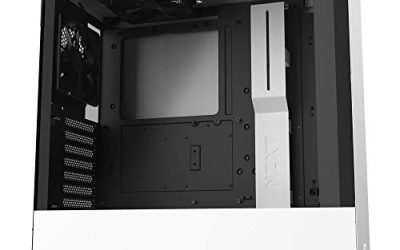
The NZXT H5 Flow 2024 is the compact pick here, built for builders who want a smaller footprint without giving up ATX compatibility. Its perforated front and ultra-fine mesh panels keep intake air moving, while the perforated power supply shroud has angled bottom fan mounts aimed at the graphics card, which feed cool air where it matters most. Two 120mm fans come pre-installed, one front and one rear, and the case supports a 360mm front radiator and a 240mm top radiator. The tempered glass panel and tidy cable system keep the finished build looking clean.
Specs
- Compact ATX mid-tower case with tempered glass side panel
- Motherboard support: ATX, Micro-ATX, Mini-ITX
- Model number: CC-H52FB-01
- Two 120mm fans included
- Radiator support: 360mm front, 240mm top
- Perforated power supply shroud with angled bottom fan mounts
- Ultra-fine mesh panels for dust-filtered ventilation
- Front I/O with USB-C, USB-A, and audio
- Dimensions: 16.9 x 8.86 x 18.3 inches
- Item weight: 17.6 pounds
Best for: Builders who want a compact ATX case that still cools a full-size graphics card well.
Watch out for: The bottom shroud fan slots are empty, so the graphics-card cooling trick needs extra fans to work at full effect.
LIAN LI LANCOOL 216 RGB Mid-Tower PC Case, Black
The LIAN LI LANCOOL 216 RGB is the airflow specialist here, with the strongest stock fan package of the three. Two large 160mm ARGB fans sit at the front and a 140mm PWM fan at the rear, so the case moves serious air with no extra fans. Mesh covers the front, top, and power supply shroud, and a rear bracket can hold a fan behind the expansion slots to feed the graphics card directly. It supports boards up to E-ATX width and offers an alternative motherboard position that trades space between the top radiator and the graphics card area.
Specs
- Mid-tower case with 4.0mm tempered glass side panel
- Motherboard support: E-ATX, ATX, Micro-ATX, Mini-ITX
- Two 160mm ARGB front fans and one 140mm PWM rear fan pre-installed
- Model number: LANCOOL 216R-X
- Mesh panels on the front, top, and power supply shroud
- Rear PCIe fan bracket for direct graphics-card cooling
- Seven expansion slots
- Dimensions: 480.9 x 235 x 491.7 mm
- Item weight: 10.5 kg
Best for: Builders who want maximum cooling and lighting from the stock fan package, with room for large parts.
Watch out for: The open mesh design prioritises airflow over silence, and the lighting needs a compatible ARGB header or controller.
Which One Fits Your Situation
You are building your first gaming PC
Pick the CORSAIR 4000D Airflow. Its layout is familiar, its cable channel is roomy, and its front panel and fan setup work well with no extra purchases, which keeps a first build simple. The wide motherboard support and generous radiator room also mean the case stays useful when you upgrade the graphics card or cooling later, so you are not buying a chassis you will outgrow in a year.
Your desk space is tight and you want a smaller case
Pick the NZXT H5 Flow 2024. It is the most compact of the three while still taking a full ATX board and a long graphics card, and its perforated shroud with angled fan mounts gives the graphics card fresh air in a smaller box. Just remember that the bottom fan mounts arrive empty, so budget for two extra fans if you want the full benefit of that design.
Cooling comes first and you want RGB lighting included
Pick the LIAN LI LANCOOL 216 RGB. Its two 160mm ARGB front fans and 140mm rear fan move more air than the other two cases manage with their stock fans, and the all-around mesh keeps the path open. The E-ATX support and alternative motherboard position add flexibility for large builds, though the open design runs louder than a sealed case at the same fan speeds.
You want the most upgrade room for future parts
Pick the CORSAIR 4000D Airflow or the LIAN LI LANCOOL 216 RGB. Both accept E-ATX boards, long graphics cards, and large radiators, which covers the widest range of future upgrades. The CORSAIR suits builders who value a tidy, proven interior, while the LIAN LI suits builders who want the strongest stock cooling and the most flexible motherboard placement.
Common Mistakes
- Buying a case before checking the graphics card length, cooler height, and radiator size against the case limits.
- Choosing a solid front panel for a hot build, then wondering why temperatures climb under load.
- Forgetting that a case with few included fans needs extra fans bought separately before it cools properly.
- Ignoring the cable channel depth, which makes routing thick power cables much harder in a narrow case.
- Ordering a case without measuring the desk or floor space it will actually sit on.
Frequently Asked Questions
What size case do I need for a standard gaming build?
A mid-tower ATX case suits most standard gaming builds, because it fits full-size ATX boards, long graphics cards, tall air coolers, and large radiators without the bulk of a full tower. All three cases here are mid-towers that accept ATX boards and full-size graphics cards, so any works for a typical single-card build. Choose a full tower only for extra drive bays, dual radiators, or very large boards.
How many fans should a PC case include?
Two fans are the minimum for a gaming build, one intake at the front and one exhaust at the rear, and three or more fans cover hot parts better. The CORSAIR and NZXT cases include two fans each, while the LIAN LI includes three larger fans, so it cools best with no extra purchases. Adding intake fans at the front and bottom usually helps temperatures more than extra exhaust fans.
Does a mesh front panel really improve cooling?
Yes, a mesh or perforated front panel improves cooling because intake fans pull cool air straight into the case instead of forcing it through narrow side gaps. All three cases in this guide use mesh or perforated fronts, which is a major reason they cool well. A solid glass or plastic front looks striking but runs warmer, so it suits low-power builds or builders who add extra fans to compensate.
Is a tempered glass side panel worth having?
A tempered glass side panel is worthwhile if you enjoy seeing the build and keeping cables tidy, since it turns the interior into a display. All three cases here include tempered glass, with the LIAN LI using thicker glass. Glass adds weight and needs care when building, since it can crack if dropped or overtightened, so handle it gently and keep the film on until the build is finished.
Related guides
More from Amazon
Programs that pair well with the guide above. Offers and eligibility are set by Amazon and may change.
A free business account with business pricing and bulk-buying tools for work, shop or home office.
Create a business accountFree shipping on eligible items, Prime Video and more. Eligible new members can start with a free trial.
Start a Prime free trialAudiobooks and podcasts to listen to on the go. Eligible new members can start with a free trial.
Try Audible freeAd-free music streaming. Eligible new subscribers can start with a free trial.
Try Music Unlimited freeAs an Amazon Associate we earn from qualifying purchases.