Our Short List of 3
- Best for: A large photo or video library kept on one desktop drive.
- 12TB capacity desktop external hard drive
- Thunderbolt 3 and USB-C ports
- Silver aluminium enclosure, model 0G05383-1
- Designed for Mac and PC desktop use

- Best for: A single fast desktop drive for editing and backup.
- 8TB capacity desktop external hard drive
- Thunderbolt 3, USB-C and USB 3.0 ports
- 7200 RPM enterprise-class drive inside
- One month of Adobe Creative Cloud included, model STFY8000400

- Best for: Editors who need a large RAID volume and a dock together.
- 28TB capacity external RAID hard drive
- Dual Thunderbolt 3 ports with daisy chaining
- Hardware RAID with mirroring and striping modes
- Data Rescue service included, model STGB28000400
All 4 Picks at a Glance
| Product | Specs | Action |
|---|---|---|
| G-Technology 12TB G-DRIVE with Thunderbolt 3 |
| Check price on Amazon |
| LaCie d2 Thunderbolt 3 8TB |
| Check price on Amazon |
| LaCie 2big Dock Thunderbolt 3 28TB |
| Check price on Amazon |
 LaCie d2 Professional 14TB |
| Check price on Amazon |
A Thunderbolt 3 hard drive is the answer when a USB drive feels too slow for large video files, photo libraries, and full-system backups. The real decision is not the port alone but the balance of capacity, speed, and desk footprint: a single desktop drive suits a growing media library, while a RAID enclosure suits editors who need both space and redundancy. Thunderbolt 3 also chains devices together, so one port can serve a drive, a display, and a dock.
This guide is for video editors, photographers, and anyone whose backups have outgrown a portable drive, and it covers desktop drives with Thunderbolt 3 ports for Mac and PC. Each pick was chosen from the names and specs on its Amazon page, with capacity, interface, and included software checked against the listing. The picks below cover single drives and RAID enclosures, so you can match the drive to your library and your work. A quiet drive that stays connected is the one that gets used.
Our Top Picks
Top 3 picks at a glance
Quick Picks
As an Amazon Associate we earn from qualifying purchases
| Product | Best for | Key spec from title |
|---|---|---|
| G-Technology 12TB G-DRIVE with Thunderbolt 3 | Large media libraries on a desk | 12TB capacity with Thunderbolt 3 |
| LaCie d2 Thunderbolt 3 8TB | A single fast desktop drive | 8TB capacity with Thunderbolt 3 |
| LaCie 2big Dock Thunderbolt 3 28TB | Editors who need RAID and a dock | 28TB RAID with Thunderbolt 3 |
| LaCie d2 Professional 14TB | Big backups with room to grow | 14TB capacity with Thunderbolt 3 |
How to Choose
Thunderbolt 3 speed and daisy chaining
Thunderbolt 3 moves data far faster than a standard USB port, which matters when you copy hundreds of gigabytes of footage or run a photo library directly from the drive. A single spinning drive cannot saturate the link, so the port mainly removes the bottleneck for RAID enclosures and multi-drive setups. Check that your computer has a real Thunderbolt 3 port, since a USB-C port with the same shape may run at USB speeds only. Daisy chaining lets you connect a second drive or a display through the first drive, which keeps a one-port laptop usable.
Capacity and how your library grows
Pick a capacity with headroom, because a media library only grows and a drive that is nearly full slows down and leaves no room for a second copy. A 8TB drive suits a photographer with a few years of raw files, while a 12TB or 14TB drive suits an editor with several projects on the go. RAID enclosures start larger because they hold two or more drives, and the usable space depends on the RAID mode you choose. Plan for the next two years of files rather than the files you already have.
RAID modes and what they protect
A two-bay enclosure can mirror its drives so one failure loses nothing, or stripe them so both drives combine into one faster volume with no safety net. Mirroring suits irreplaceable work, while striping suits scratch disks and caches where speed matters more than survival. A RAID is not a backup by itself, so keep a second copy of anything you cannot recreate, even on a mirrored array. Check whether the enclosure lets you change modes without reformatting, since some models lock you into the mode you pick first.
Noise, cooling and desk placement
Desktop drives spin constantly while they work, and a drive with a small fan can hum loudly enough to notice in a quiet room. Look for a model with a large, slow fan or a passively cooled case if the drive will sit beside you all day. Place the drive where air can move around it, and keep it off the floor where dust and knocks are more likely. A drive that runs cool and quiet is one you will leave connected, which is what makes backups actually happen.
The 4 Best Options
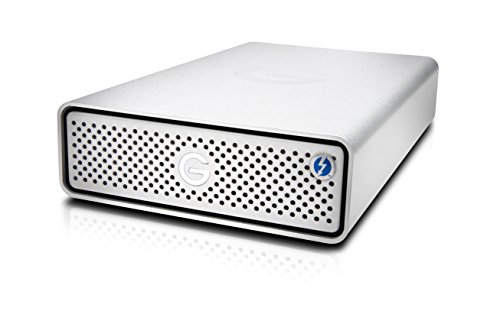
G-Technology 12TB G-DRIVE with Thunderbolt 3
- Best for: A large photo or video library kept on one desktop drive.
- 12TB capacity desktop external hard drive
- Thunderbolt 3 and USB-C ports
- Silver aluminium enclosure, model 0G05383-1
- Designed for Mac and PC desktop use
A large photo or video library kept on one desktop drive.
A single drive has no redundancy, so keep a second copy of anything irreplaceable.
This desktop drive suits editors and photographers who need a large single volume for a media library without managing a RAID. The aluminium case sits upright on a desk, the Thunderbolt 3 port keeps transfers quick for a spinning drive, and the USB-C port gives a fallback connection for machines without Thunderbolt. Twelve terabytes holds years of footage and raw photos, and the drive works as a Time Machine target or a working volume for editing software. The drive is built for a desk that stays put, and its upright case takes little room beside a monitor.
LaCie d2 Thunderbolt 3 8TB
- Best for: A single fast desktop drive for editing and backup.
- 8TB capacity desktop external hard drive
- Thunderbolt 3, USB-C and USB 3.0 ports
- 7200 RPM enterprise-class drive inside
- One month of Adobe Creative Cloud included, model STFY8000400
A single fast desktop drive for editing and backup.
The drive needs mains power, so it is a desk drive rather than a portable one.
This drive suits a desk where one fast, quiet volume is enough and the budget does not stretch to a larger enclosure. The 7200 RPM enterprise-class drive inside keeps sustained transfers steady for video work, and the Thunderbolt 3 port pairs with a USB-C port for machines that lack Thunderbolt. Eight terabytes covers a solid library of raw photos and project files, and the included month of Adobe Creative Cloud is a useful extra for editors starting a subscription. The aluminium case matches a Mac desk well, and the drive runs quietly enough to leave on through a workday.
LaCie 2big Dock Thunderbolt 3 28TB
- Best for: Editors who need a large RAID volume and a dock together.
- 28TB capacity external RAID hard drive
- Dual Thunderbolt 3 ports with daisy chaining
- Hardware RAID with mirroring and striping modes
- Data Rescue service included, model STGB28000400
Editors who need a large RAID volume and a dock together.
The usable capacity depends on the RAID mode, so check the mode before filling it.
This enclosure suits professionals who want a large RAID volume plus a dock in one box on the desk. Two bays hold enterprise-class drives that can mirror each other or stripe for speed, and the front of the dock carries the ports a card-based workflow needs. Twenty-eight terabytes of raw capacity gives room for several projects at once, and the Data Rescue service that comes with the drive adds a safety net for the files inside. The dock sits on the desk as a hub for cards and drives, so a card-based workflow stays in one place.
LaCie d2 Professional 14TB
- Best for: Big backups and archives with room to grow.
- 14TB capacity desktop external hard drive
- Thunderbolt 3, USB-C and USB 3.0 ports
- 7200 RPM enterprise-class drive inside
- One month of Adobe Creative Cloud included, model STHA14000800
Big backups and archives with room to grow.
Like the other desktop drives here, it needs mains power and a fixed desk spot.
This drive suits anyone whose library has outgrown an 8TB volume but who does not need a RAID enclosure yet. The 7200 RPM enterprise-class drive inside is built for long sustained writes, which suits video ingest and large backups, and the Thunderbolt 3 port keeps the connection out of the way of the transfer. Fourteen terabytes gives room for a growing archive plus a working project or two, and the USB-C port keeps the drive usable on machines without Thunderbolt. The drive is a straightforward archive box, and its large capacity means fewer trips to swap drives around.
Which One Fits Your Situation
You edit video and need a fast working drive
Choose the LaCie d2 Thunderbolt 3 8TB, because its 7200 RPM enterprise-class drive keeps sustained transfers steady while you scrub a timeline. The Thunderbolt 3 port removes the interface bottleneck, and the single volume is simple to manage when a project is live. Move finished projects to a larger archive drive once the edit is done, so the working drive stays fast.
You have a large library and one drive must hold it
Choose the G-Technology 12TB G-DRIVE, because twelve terabytes holds years of media in a single volume without RAID management. The desktop case is built to sit on a desk for years, and the USB-C port gives you a fallback if you move to a machine without Thunderbolt. Pair it with a second drive for backup, since a single volume has no safety net.
You want RAID protection and a dock in one box
Choose the LaCie 2big Dock Thunderbolt 3 28TB, because its two bays mirror each other to survive a drive failure, and the dock ports keep your card workflow on the desk. The large raw capacity suits several projects at once, and the Data Rescue service adds cover for the files inside. Set the RAID mode before you start filling it, since changing modes later means starting over.
You need the most room for archives and backups
Choose the LaCie d2 Professional 14TB, because fourteen terabytes gives the most headroom of the single-drive picks for a growing archive. The enterprise-class drive is built for long sustained writes, which suits full-system backups and video ingest. Keep a second copy of anything you cannot recreate, since this is a single drive with no redundancy.
Common Mistakes
- Buying a Thunderbolt 3 drive for a computer whose USB-C port is USB only, then finding the drive runs at USB speeds.
- Filling a single drive to the brim and leaving no room for a second copy of irreplaceable files.
- Choosing a striped RAID for the only copy of a project, then losing everything when one drive in the pair fails.
- Placing a desktop drive on the floor or in a closed cabinet where heat and dust shorten its life.
- Skipping the check that the drive works as a Time Machine or backup target before relying on it for backups.
Frequently Asked Questions
Will a Thunderbolt 3 hard drive work on a USB-C port?
It depends on the port. A Thunderbolt 3 drive needs a real Thunderbolt 3 port, and a plain USB-C port will not carry the Thunderbolt signal. Many drives here also carry a USB-C port, so they still work on a USB-only machine at USB speeds. Check your computer for the Thunderbolt logo beside the port before buying.
Is a Thunderbolt 3 spinning drive faster than a USB drive?
Yes, in sustained transfers, because Thunderbolt 3 removes the interface bottleneck that limits a USB connection. A single spinning drive still tops out near the speed of its own mechanism, so the gain is largest on RAID enclosures. For a single drive, the benefit is a stable, fast connection while you edit or back up large files.
Do I need a RAID enclosure for video editing?
Not always. A single fast drive such as the LaCie d2 handles most editing work, and a RAID mainly adds capacity and redundancy for larger projects. Mirroring protects against a drive failure, while striping adds speed for multi-stream timelines. A RAID is not a backup, so keep a second copy of finished work on another drive.
Can I use these drives with both Mac and PC?
Yes. The drives in this guide are listed for Mac and PC, and they connect over Thunderbolt 3 or USB-C on either platform. You may need to reformat a drive when you move it between systems, since Mac and Windows use different file systems by default. Back up anything on the drive first, because reformatting erases it.
Related guides
More from Amazon
Programs that pair well with the guide above. Offers and eligibility are set by Amazon and may change.
A free business account with business pricing and bulk-buying tools for work, shop or home office.
Create a business accountFree shipping on eligible items, Prime Video and more. Eligible new members can start with a free trial.
Start a Prime free trialAudiobooks and podcasts to listen to on the go. Eligible new members can start with a free trial.
Try Audible freeAd-free music streaming. Eligible new subscribers can start with a free trial.
Try Music Unlimited freeAs an Amazon Associate we earn from qualifying purchases.