Our Short List of 3

- Best for: A first side-by-side dual setup on a standard desk.
- Fits two screens from 13 to 30 inches, up to 22 lbs each
- VESA 75x75mm or 100x100mm mounting patterns
- Steel construction
- Tilt from +90 degrees to -90 degrees, swivel 180 degrees, rotation 360 degrees

- Best for: Heavy gaming panels and large curved screens that need capacity to spare.
- Each arm holds up to 26.4 lbs
- USB ports built into the base
- VESA 75x75mm or 100x100mm mounting patterns
- Clamp or grommet base
- Best for: Anyone who wants the monitors mounted and adjusted quickly, without tools.
- Fits 13 to 32 inch flat or curved monitors, max load 19.8 lbs per arm
- VESA 75x75mm or 100x100mm mounting patterns
- Tool-free VESA mounting
- Height adjustment up to 17.5 inches, extension up to 18.1 inches
All 5 Picks at a Glance
| Product | Specs | Action |
|---|---|---|
| VIVO STAND-V002 |
| Check price on Amazon |
| HUANUO HNDS7 |
| Check price on Amazon |
| ErGear Fast Install Dual Monitor Arm |
| Check price on Amazon |
 VIVO STAND-V002T |
| Check price on Amazon |
 MOUNTUP Dual Monitor Stand |
| Check price on Amazon |
Two monitors change how a desk works, but only when both screens sit at the right height and angle. A pair of factory stands eats desk space, puts the screens at different heights, and leaves cables trailing across the work surface. The real decision is not which stand looks tidiest in a photo, it is which mounting style fits your monitors, your desk, and the way you sit.
This guide is for gamers running a game on one screen and chat or a guide on the other, for home-office workers pairing a laptop dock with a second display, and for creators who want one screen in landscape and one in portrait. Every stand below is picked from its Amazon listing name and specifications, with weight limits, VESA patterns, and mounting options taken from the product page.
Our Top Picks
Top 3 picks at a glance
Quick Picks
As an Amazon Associate we earn from qualifying purchases.
| Product | Best for | Key spec from title |
|---|---|---|
| VIVO STAND-V002 | A sturdy side-by-side pair on a first dual setup | Holds two screens up to 22 lbs each |
| HUANUO HNDS7 | The heaviest pair of monitors in this guide | Each arm holds up to 26.4 lbs |
| ErGear Fast Install Dual Monitor Arm | Quick setup with no tools on the VESA plates | Tool-free VESA mount, 19.8 lbs per arm |
| VIVO STAND-V002T | Stacking two screens on a narrow desk | Vertical stacked mount, 22 lbs per screen |
| MOUNTUP Dual Monitor Stand | Smooth pneumatic movement for shared desks | Pneumatic arms, 4.4 to 17.6 lbs per arm |
How to Choose
Match the weight limit before the screen size
Screen size is the number everyone checks first, and it is the wrong number to start with. A 27-inch gaming panel with a thick back and a built-in power supply can weigh far more than a slim 32-inch office panel, and a stand that sags under a heavy screen will drift downward all day. Weigh each monitor, or look up its weight without the factory stand, then compare that number with the per-arm limit on the listing. Keep a margin of a couple of pounds, because a stand running at its stated maximum has no room left for a slight imbalance or a heavier cable load.
Check the VESA pattern and the back of your monitor
Almost every stand in this guide uses the 75 by 75 millimetre or 100 by 100 millimetre VESA hole patterns, and that only helps if your monitors actually have those holes. Some curved gaming monitors hide the mounting holes under a cover, some ultra-wide models use a larger pattern, and a few budget screens have no VESA mounting at all. Look at the back of each monitor before ordering, measure the hole spacing, and confirm the pattern matches the stand. If one of your two screens lacks VESA holes, you need an adapter or a different stand entirely.
Decide between a clamp, a grommet, and a pole
Most dual stands attach to the desk with a C-clamp that grips the back edge, and that is the simplest option when the desk edge is reachable and thick enough. A grommet mount threads through a cable hole in the desk and holds better on thick tops, but it needs a hole in the right place. Pole stands slide both monitors up and down a single column and suit fixed layouts, while gas-spring and pneumatic arms let you push a screen aside and pull it back in one motion. Measure your desk thickness and check what sits underneath the edge before you choose.
Plan the layout: side by side, stacked, or mixed
Two screens side by side is the familiar layout, and it works best when both monitors are the same size and you sit centred between them. Stacking one screen above the other saves width on a narrow desk and suits a main gaming screen with a chat or monitoring screen above it, but the top screen sits high and the neck tilts up to read it. A mixed layout, one landscape and one portrait, suits code, long documents, and chat windows. Decide the layout first, because a pole stand built for stacking cannot spread two screens wide, and a wide side-by-side arm cannot stack them.
The 5 Best Options
VIVO STAND-V002
- Best for: A first side-by-side dual setup on a standard desk.
- Fits two screens from 13 to 30 inches, up to 22 lbs each
- VESA 75x75mm or 100x100mm mounting patterns
- Steel construction
- Tilt from +90 degrees to -90 degrees, swivel 180 degrees, rotation 360 degrees
A first side-by-side dual setup on a standard desk.
The pole fixes both screens to one column, so the pair cannot spread as wide as two independent arms.
The VIVO STAND-V002 is the straightforward pick for a first dual-monitor setup, because it does the basics well and nothing about it demands a decision you have not made yet. Two arms hang from a single steel pole, each one tilting, swivelling, and rotating on its own, so you can set one screen straight ahead for gaming and angle the second toward you for chat or a browser. Height slides along the pole, which makes it easy to line up two screens of different sizes at the same eye level.
Watch out for: The pole fixes both screens to one column, so the pair cannot spread as wide as two independent arms.
HUANUO HNDS7
- Best for: Heavy gaming panels and large curved screens that need capacity to spare.
- Each arm holds up to 26.4 lbs
- USB ports built into the base
- VESA 75x75mm or 100x100mm mounting patterns
- Clamp or grommet base
Heavy gaming panels and large curved screens that need capacity to spare.
Weigh both monitors without their factory stands first, because the per-arm limit is the number that decides whether this stand works for you.
The HUANUO HNDS7 is the pick when your monitors are heavy, because each arm holds up to 26.4 lbs, the highest capacity in this guide. That headroom matters for thick gaming panels and large curved screens that would push a lighter stand to its limit. USB ports sit in the base, which keeps a keyboard receiver or a charging cable close to hand instead of trailing to the back of the desk. The mount fixes to the desk with either a clamp or a grommet, and the arms adjust in height, tilt, swivel, and rotation.
Watch out for: Weigh both monitors without their factory stands first, because the per-arm limit is the number that decides whether this stand works for you.
ErGear Fast Install Dual Monitor Arm
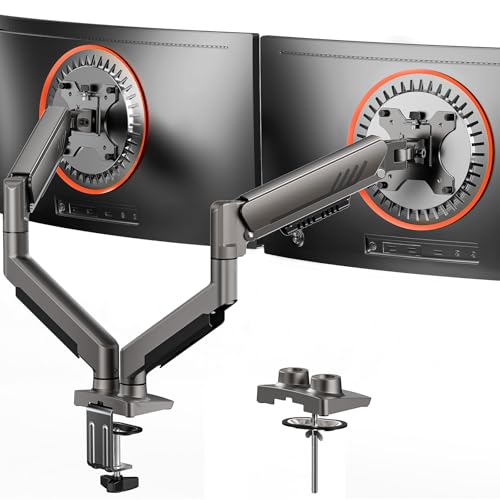
- Best for: Anyone who wants the monitors mounted and adjusted quickly, without tools.
- Fits 13 to 32 inch flat or curved monitors, max load 19.8 lbs per arm
- VESA 75x75mm or 100x100mm mounting patterns
- Tool-free VESA mounting
- Height adjustment up to 17.5 inches, extension up to 18.1 inches
Anyone who wants the monitors mounted and adjusted quickly, without tools.
The clamp and grommet each have a narrow desk-thickness range, so measure your desk before ordering.
The ErGear Fast Install arm is the pick when setup speed matters, because its VESA plates attach without tools, in three steps, instead of the usual fiddly screwdriver work behind a monitor. The arm fits flat or curved screens from 13 to 32 inches at up to 19.8 lbs each, and it reaches 17.5 inches high with an 18.1-inch extension, so a second screen can sit well out to the side or pull in close. Tilt runs from +80 degrees to -50 degrees, swivel runs 90 degrees each way, and rotation runs a full 360 degrees for portrait use.
Watch out for: The clamp and grommet each have a narrow desk-thickness range, so measure your desk before ordering.
VIVO STAND-V002T
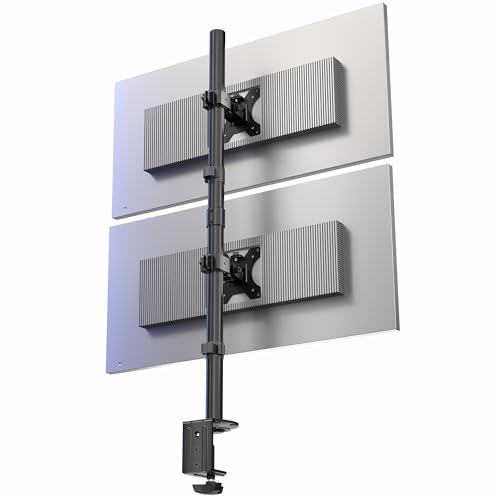
- Best for: Narrow desks where two screens must stack instead of spreading wide.
- Vertical stacked mount for two screens, up to 22 lbs per screen
- VESA 75x75mm or 100x100mm mounting patterns
- Tilt +15 degrees to -15 degrees, swivel 360 degrees, rotation 360 degrees
- Height adjustment along the centre pole
Narrow desks where two screens must stack instead of spreading wide.
The top screen sits high, so this layout suits a secondary screen above a main one rather than two screens you read for hours.
The VIVO STAND-V002T stacks two screens one above the other, which is the answer when the desk is too narrow for a side-by-side pair. A tall centre pole carries both brackets, each holding up to 22 lbs, and the screens tilt 15 degrees up or down, swivel a full 360 degrees, and rotate for portrait or landscape. The stacked layout suits a main screen at eye level with a second screen above it for chat, streams, or system monitoring, and it leaves the full width of the desk free for a keyboard, speakers, and a notebook.
Watch out for: The top screen sits high, so this layout suits a secondary screen above a main one rather than two screens you read for hours.
MOUNTUP Dual Monitor Stand
- Best for: Desks where the screens move often, or where two people share one setup.
- Fits screens 17 to 32 inches, 4.4 to 17.6 lbs per arm
- VESA 75x75mm or 100x100mm mounting patterns
- Pneumatic arms with 19.9 inches of extension and 9.4 inches of height adjustment
- Tilt 90 degrees up and 45 degrees down, swivel 180 degrees, rotation 360 degrees
Desks where the screens move often, or where two people share one setup.
Pneumatic arms need their tension set to match each monitor’s weight, so adjust the tension before you expect the arm to hold a screen still.
The MOUNTUP stand uses pneumatic arms, which is the feature that matters on a desk shared by more than one person or one person who moves screens often. Instead of loosening a joint and re-tightening it, you push a screen to a new position and the arm holds it there, with 19.9 inches of extension and 9.4 inches of height adjustment to play with. The arms fit screens from 17 to 32 inches at 4.4 to 17.6 lbs each, tilt 90 degrees up and 45 degrees down, swivel 180 degrees, and rotate a full 360 degrees. Cables run inside the arms, which keeps the desk tidy.
Watch out for: Pneumatic arms need their tension set to match each monitor’s weight, so adjust the tension before you expect the arm to hold a screen still.
Which One Fits Your Situation
A first dual setup with two matching screens
Pick the VIVO STAND-V002. Two arms on one steel pole keep the pair level and lined up, the 22 lb limit covers most standard gaming and office panels, and the clamp or grommet choice fits almost any desk. It is the simplest route from two factory stands to one clean setup.
Heavy or curved gaming monitors
Pick the HUANUO HNDS7. Its 26.4 lb per-arm capacity is the highest in this guide, which leaves real headroom under a thick gaming panel or a large curved screen that would strain a lighter stand. Weigh each monitor without its stand first, confirm the VESA pattern on the back, and check that the desk edge suits a clamp or a grommet before you order.
A narrow desk or a small room
Pick the VIVO STAND-V002T. Stacking the screens vertically uses the height above the desk instead of the width across it, so a desk that cannot hold two screens side by side can still run a dual setup. Put the screen you watch most at eye level and the secondary screen above it.
Screens that move during the day
Pick the MOUNTUP stand or the ErGear Fast Install arm. The MOUNTUP pneumatic arms glide to a new position and stay there, which suits a desk where screens swing toward a second person or fold away at the end of the day. The ErGear arm trades the pneumatic movement for faster setup, with tool-free VESA plates and a long reach.
Common Mistakes
- Buying by screen size alone and ignoring the weight of each monitor without its factory stand.
- Assuming every monitor has VESA holes, then finding one screen cannot mount at all.
- Ordering a clamp mount for a desk with a thick edge, a lip, or a crossbeam underneath that blocks the clamp.
- Stacking two screens vertically and then reading the top one for hours, which strains the neck.
- Skipping the tension adjustment on a pneumatic or gas-spring arm, so the screen sinks or floats instead of holding its position.
Frequently Asked Questions
Can a dual monitor stand hold two different sized screens?
Yes, provided each screen is inside the stand’s size and weight limits and has a matching VESA pattern. Pole stands make lining up different sizes easy, because each arm slides to its own height. Arms with a shared height setting need the screens closer in size to look level.
Do I need a grommet hole in my desk?
No. Every stand in this guide also mounts with a C-clamp that grips the back edge of the desk, so a grommet hole is optional. A grommet mount is the stronger choice on very thick desks, but only when a hole already exists in a useful position or you are willing to drill one.
Will a monitor stand work on a glass desk?
It depends on the desk. A clamp can crack glass if it is tightened hard, and many glass tops are too thin for a clamp to grip safely. A freestanding base or a grommet mount suits glass better, and the desk maker’s own guidance is the authority. None of the stands in this guide is sold as a glass-desk mount.
How do I stop a monitor arm from sagging?
Set the arm tension to match the monitor’s weight, using the adjustment screw the stand ships with. A screen that sinks is usually an arm set for a lighter monitor, and a screen that floats upward is usually an arm set too tight. Tighten or loosen in small steps, and check the position again after the cables are connected, because cable weight pulls on the arm too.
Related guides
More from Amazon
Programs that pair well with the guide above. Offers and eligibility are set by Amazon and may change.
A free business account with business pricing and bulk-buying tools for work, shop or home office.
Create a business accountFree shipping on eligible items, Prime Video and more. Eligible new members can start with a free trial.
Start a Prime free trialAudiobooks and podcasts to listen to on the go. Eligible new members can start with a free trial.
Try Audible freeAd-free music streaming. Eligible new subscribers can start with a free trial.
Try Music Unlimited freeAs an Amazon Associate we earn from qualifying purchases.