Our Short List of 3
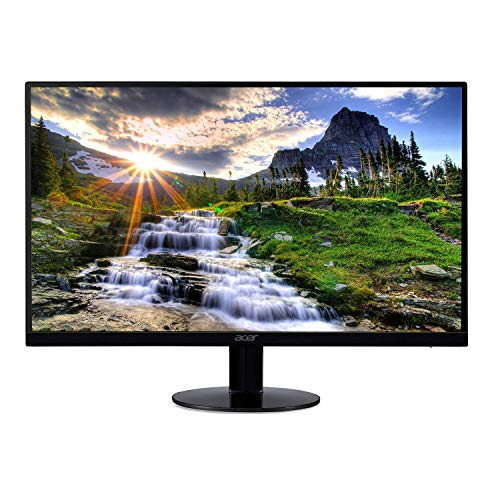
- Best for: Small desks, dorm rooms and second screens where a compact IPS panel matters most.
- 21.5-inch Full HD (1920 x 1080) IPS display
- 75Hz refresh rate with AMD Radeon FreeSync
- 4ms response time
- 250 nits brightness

- Best for: Everyday work and study on a full-size 24-inch screen with speakers built in.
- 24-inch Full HD (1920 x 1080) LED display
- 75Hz refresh rate with Adaptive Sync
- 8ms response time
- 2 HDMI ports and 1 VGA port

- Best for: Casual gaming and films on a curved screen that wraps the picture around one viewer.
- 24-inch curved Full HD (1920 x 1080) gaming monitor
- 75Hz refresh rate
- 2 HDMI ports and 1 VGA port
- Built-in speakers
All 5 Picks at a Glance
| Product | Specs | Action |
|---|---|---|
| Acer SB220Q bi |
| Check price on Amazon |
| Sceptre E248W-19203R |
| Check price on Amazon |
| Sceptre C248W-1920RN |
| Check price on Amazon |
 LG 24MP400-B |
| Check price on Amazon |
 ViewSonic VA2448-MHU |
| Check price on Amazon |
A cheap monitor is easy to buy and easy to regret. The panel looks fine in a product photo, then text looks soft, the stand wobbles every time you type, and the single HDMI port forces you to crawl behind the desk whenever you switch machines. The real decision is not finding the lowest number on a listing. It is figuring out which corners you can live with and which ones will annoy you every day you sit down to work or play.
This guide is for students, home-office workers and casual gamers who need a solid screen without stretching the budget. It also suits anyone adding a second display to a laptop or an older desktop. Every pick below comes from the name and the listed specifications on its Amazon product page, so you can check the same details before you order.
Our Top Picks
Top 3 picks at a glance
Quick Picks
As an Amazon Associate we earn from qualifying purchases.
| Product | Best for | Key spec from title |
|---|---|---|
| Acer SB220Q bi | Small desks and second screens | 21.5-inch Full HD IPS, 75Hz |
| Sceptre E248W-19203R | Everyday work with built-in sound | 24-inch Full HD, 75Hz, 2 HDMI |
| Sceptre C248W-1920RN | Curved casual gaming | 24-inch curved Full HD, R1500 curve |
| LG 24MP400-B | Long workdays at the desk | 24-inch Full HD IPS, 75Hz, borderless |
| ViewSonic VA2448-MHU | Laptop setups and smoother motion | 24-inch Full HD IPS, 120Hz, USB-C |
How to Choose
Panel type and viewing angles
Panel type decides how the screen looks when you are not sitting dead center. An IPS panel keeps colors steady when you lean back or share the screen with someone beside you, which suits shared desks and family computers. A VA panel usually shows deeper blacks and stronger contrast, so films and dark game scenes look richer, but colors can shift sooner when you view from the side. A TN panel reacts fast and costs little, yet its colors wash out quickly off angle. Here, IPS is the safest default for mixed use, VA is the better pick when contrast matters more than color accuracy, and TN only makes sense when you always sit straight in front of the screen.
Resolution, size and refresh rate
Every monitor in this roundup runs at 1920 x 1080, and that is the right call at this end of the market. Full HD keeps text readable and graphics cards unstressed, while higher resolutions on a cheap panel usually mean washed-out colors or a dimmer backlight. Size is the more useful question: 21.5 inches fits a cramped dorm desk, while 24 inches gives documents and browser tabs room to breathe. Refresh rate matters too. A 75Hz panel feels calmer than an old 60Hz screen when you scroll, and a 120Hz panel feels smoother still, so match the refresh rate to how much time you spend scrolling, gaming or editing video.
Ports and the second-screen test
Ports decide whether a monitor fits your machines or fights them. HDMI covers nearly every modern laptop, console and desktop, while VGA only matters if you still run an older machine. Two HDMI ports let you keep a desktop and a laptop plugged in at once, which is the difference between switching inputs with a button and crawling behind the desk with a cable. USB-C is the real prize for laptop owners, since one cable can carry video and keep the setup tidy. Before you order, count the outputs on every device you plan to connect, then check the listing twice, because budget monitors rarely carry the port you forgot.
The stand, the speakers and the small print
Budget monitors save money in places you only notice after unboxing. Some stands tilt and nothing else, so a screen that sits too low will strain your neck unless you add a riser or a stack of books. A VESA mount changes that entirely, letting you bolt the screen to an arm or the wall, but several cheap models skip VESA altogether. Built-in speakers sound convenient, and they are fine for video calls and system alerts, yet they stay thin and quiet next to even modest external speakers. Read the listing for tilt range, mount support and speaker wattage before you buy, because those three lines decide how the monitor lives on your desk.
The 5 Best Options
Acer SB220Q bi
- Best for: Small desks, dorm rooms and second screens where a compact IPS panel matters most.
- 21.5-inch Full HD (1920 x 1080) IPS display
- 75Hz refresh rate with AMD Radeon FreeSync
- 4ms response time
- 250 nits brightness
Small desks, dorm rooms and second screens where a compact IPS panel matters most.
Confirm it is still sold before buying — one recent listing snapshot showed no featured offers, and Acer points buyers toward a newer model. The stand tilts only, and there is no VESA mount, so check your desk setup first.
The SB220Q bi is the smallest screen here, and that is its charm. A 21.5-inch IPS panel keeps text sharp and colors steady across a desk that cannot fit anything larger, while thin ZeroFrame bezels make it look far more expensive than its place here suggests. FreeSync smooths out casual games on AMD graphics, and the 75Hz refresh rate is a welcome step up from the 60Hz panels that still fill offices. HDMI and VGA cover both modern laptops and older desktops, so it works as a first monitor or a second one. Just remember the stand only tilts, with no VESA mount, so plan around it.
Watch out for: Confirm it is still sold before buying — one recent listing snapshot showed no featured offers, and Acer points buyers toward a newer model. The stand tilts only, and there is no VESA mount, so check your desk setup first.
Sceptre E248W-19203R
- Best for: Everyday work and study on a full-size 24-inch screen with speakers built in.
- 24-inch Full HD (1920 x 1080) LED display
- 75Hz refresh rate with Adaptive Sync
- 8ms response time
- 2 HDMI ports and 1 VGA port
Everyday work and study on a full-size 24-inch screen with speakers built in.
Confirm it is still sold before buying — our check rested on tracker listings rather than a live product page. Built-in speakers are handy for calls but thin for films and music.
The E248W-19203R is the plain workhorse of this roundup, and plain is exactly the point. Its 24-inch screen gives spreadsheets, essays and browser tabs the space they need, while two HDMI ports and a VGA port let a desktop and a laptop share the same display without constant cable swaps. Built-in speakers handle video calls and short clips without extra hardware, and the VESA mount points leave the door open to an arm later. Adaptive Sync keeps casual games free of tearing, and the slim frame suits a two-monitor row. Nothing here dazzles, yet nothing gets in the way, which is what a daily driver should do.
Watch out for: Confirm it is still sold before buying — our check rested on tracker listings rather than a live product page. Built-in speakers are handy for calls but thin for films and music.
Sceptre C248W-1920RN
- Best for: Casual gaming and films on a curved screen that wraps the picture around one viewer.
- 24-inch curved Full HD (1920 x 1080) gaming monitor
- 75Hz refresh rate
- 2 HDMI ports and 1 VGA port
- Built-in speakers
Casual gaming and films on a curved screen that wraps the picture around one viewer.
Confirm it is still sold before buying, and confirm the exact model number and curvature on the listing, since Sceptre sells near-identical variants with different refresh rates. The curve suits one person sitting centered, not a shared desk.
The C248W-1920RN is the only curved screen in this roundup, and the curve changes how a desk feels. Wrapping the picture slightly around a single viewer makes films and casual games feel closer, while the 24-inch size keeps the whole panel inside your field of view without turning your head. Two HDMI ports and a VGA port cover a desktop and a console side by side, built-in speakers keep the desk clear of extra boxes, and the VESA mount points allow a wall or arm setup later. It is a simple panel with one clear idea: sit centered, and the curve does the rest.
Watch out for: Confirm it is still sold before buying, and confirm the exact model number and curvature on the listing, since Sceptre sells near-identical variants with different refresh rates. The curve suits one person sitting centered, not a shared desk.
LG 24MP400-B
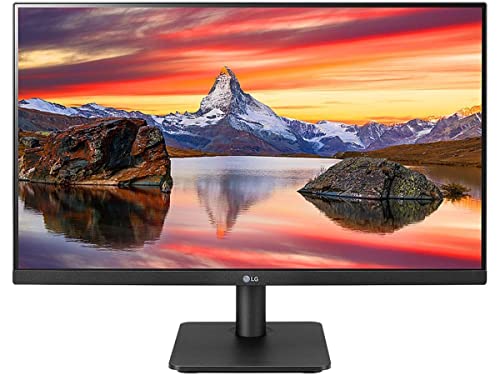
- Best for: All-day office work where an IPS panel, thin bezels and eye-comfort modes earn their keep.
- 24-inch Full HD (1920 x 1080) IPS display
- 75Hz refresh rate with AMD FreeSync
- 5ms response time
- 3-side virtually borderless design
All-day office work where an IPS panel, thin bezels and eye-comfort modes earn their keep.
Confirm it is still sold before buying — our check rested on tracker listings rather than a live product page. It sits at the top of the inexpensive band in this roundup, so weigh the IPS panel and borderless design against the step up from the cheaper picks.
The 24MP400-B is the most polished office screen in this roundup. Its IPS panel holds colors steady across wide viewing angles, the three-side borderless design trims visual clutter, and Reader Mode plus Smart Energy Saving make long reading sessions easier on the eyes. FreeSync keeps casual games smooth, the 5ms response time is quick enough for everyday play, and OnScreen Control lets you adjust settings without fumbling for tiny buttons under the bezel. HDMI and D-Sub inputs cover both current laptops and older office desktops, so it settles into almost any workspace without adapters or fuss.
Watch out for: Confirm it is still sold before buying — our check rested on tracker listings rather than a live product page. It sits at the top of the inexpensive band in this roundup, so weigh the IPS panel and borderless design against the step up from the cheaper picks.
ViewSonic VA2448-MHU
- Best for: Laptop owners who want one cable for video and a smoother 120Hz panel for work and play.
- 24-inch Full HD (1920 x 1080) IPS display
- 120Hz refresh rate with Variable Refresh Rate
- 1ms response time (MPRT)
- HDMI, VGA and USB-C inputs
Laptop owners who want one cable for video and a smoother 120Hz panel for work and play.
Confirm it is still sold before buying — our check rested on tracker listings rather than a live product page. Do not confuse it with the VA2448-MH, which drops the USB-C input.
The VA2448-MHU is the most modern monitor here, and the difference shows the moment you plug in a laptop. A USB-C input joins HDMI and VGA, so newer machines connect with a single cable, while the 120Hz refresh rate and Variable Refresh Rate make scrolling and casual gaming visibly smoother than the 75Hz panels around it. The IPS panel keeps colors consistent for documents and video, dual speakers cover calls without extra hardware, and the frameless design looks tidy in a two-screen row. It costs more than the simplest picks, yet it is the one screen here that still feels current a few years down the road.
Watch out for: Confirm it is still sold before buying — our check rested on tracker listings rather than a live product page. Do not confuse it with the VA2448-MH, which drops the USB-C input.
Which One Fits Your Situation
The smallest desk or the tightest budget
Pick the Acer SB220Q bi. Its 21.5-inch panel fits where a 24-inch screen would crowd the keyboard, and the slim bezels keep a cramped setup looking tidy. FreeSync and the 75Hz refresh rate cover casual games, while HDMI and VGA handle old and new machines alike. Just accept the tilt-only stand and the missing VESA mount before you order.
A home office that runs all day
Pick the LG 24MP400-B. The IPS panel stays consistent through long documents and video calls, Reader Mode eases eye strain during reading, and the borderless design keeps the desk feeling open. FreeSync covers the occasional game after hours, and OnScreen Control beats fumbling with bezel buttons. It is the calmest screen here for eight-hour days.
Casual gaming after work
Pick the ViewSonic VA2448-MHU. Its 120Hz panel and Variable Refresh Rate make motion smoother than every other screen in this roundup, which shows in fast games and in plain scrolling too. If immersion matters more than refresh rate, the curved Sceptre C248W-1920RN is the alternative, wrapping films and games around a single centered viewer.
A family computer or a first monitor for a student
Pick the Sceptre E248W-19203R. The full-size 24-inch screen suits homework, streaming and shared use, built-in speakers mean one less thing to buy, and two HDMI ports let a desktop and a laptop share the display. The VESA mount points also leave room to add an arm later, when the desk setup grows up.
Common Mistakes
- Buying by screen size alone and ignoring the panel type, then wondering why colors shift when anyone views from the side.
- Forgetting to count ports, and discovering too late that the monitor has one HDMI input for two machines.
- Assuming every monitor supports a VESA mount, then finding a tilt-only stand with nowhere to bolt an arm.
- Choosing a curved screen for a shared desk, where only the centered viewer gets the benefit of the curve.
- Ordering without checking that the exact ASIN is still sold, and ending up with a renewed unit or a different variant than the model you meant to buy.
Frequently Asked Questions
Is a 75Hz monitor enough for everyday use?
Yes, for most people it is. A 75Hz panel scrolls more calmly than an old 60Hz screen, and it handles documents, video calls, streaming and casual games without fuss. Competitive players chasing the smoothest motion should look at the 120Hz ViewSonic instead, but office work, study and films feel fine at 75Hz.
Do I need an IPS panel on a tight budget?
You do not need one, but it is the safest choice at this end of the market. IPS keeps colors steady when you lean back or share the screen, which matters on shared desks and family computers. VA panels show deeper blacks for films, so pick VA when contrast matters more to you than viewing angles.
Can an inexpensive monitor work for gaming?
Yes, for casual gaming it can. FreeSync or Adaptive Sync plus a 75Hz refresh rate keeps most games smooth, and the 120Hz ViewSonic goes further for faster titles. What these screens skip is the high refresh rate and low response time of dedicated gaming monitors, so competitive players should budget for a purpose-built panel instead.
What should I check before ordering?
Check the exact model number and ASIN on the listing, confirm the ports match your machines, and confirm the stand and VESA support suit your desk. Listings for budget monitors often mix near-identical variants, so read the title and the specification table carefully rather than trusting the photo alone.
Related guides
More from Amazon
Programs that pair well with the guide above. Offers and eligibility are set by Amazon and may change.
A free business account with business pricing and bulk-buying tools for work, shop or home office.
Create a business accountFree shipping on eligible items, Prime Video and more. Eligible new members can start with a free trial.
Start a Prime free trialAudiobooks and podcasts to listen to on the go. Eligible new members can start with a free trial.
Try Audible freeAd-free music streaming. Eligible new subscribers can start with a free trial.
Try Music Unlimited freeAs an Amazon Associate we earn from qualifying purchases.