If you are choosing memory for a new build or an upgrade, the question of ddr4 vs ddr5 ram speed performance and value sits at the center of the decision. DDR4 has been the standard for years, with mature boards, wide compatibility and a deep catalogue of kits. DDR5 is the newer generation, built around higher data rates, larger capacities per module and on-module power management. The two are not interchangeable, so the choice is tied to your motherboard as much as to your budget and workload.

The quick answer is straightforward. If you already own a DDR4 motherboard and it still meets your needs, a quality DDR4 kit remains a sensible way to add capacity and keep a proven system running. If you are building a new PC on a current platform, DDR5 is the natural choice, because new mainstream boards are designed around it and it gives your build a longer upgrade path. Everyday users, office builds and budget-conscious upgraders on existing DDR4 boards will find DDR4 hard to fault.
This guide compares the two generations head to head on speed, latency, capacity, compatibility and value, then looks at one representative kit from each side so you can see what the numbers mean in practice.
Our Top Picks
- CORSAIR Vengeance LPX DDR4 RAM 32GB2 count (pack of 1)5.32 x 0.28 x 1.32 inches0 poundsCheck on Amazon
Quick Picks
| Kit | Generation | Capacity | Rated Speed | Rated Timings | Voltage | Best For |
|---|---|---|---|---|---|---|
| CORSAIR Vengeance LPX DDR4 32GB | DDR4 | 32GB (2 x 16GB) | 3200MHz | CL16-20-20-38 | 1.35V | Existing DDR4 builds and upgrades |
| CORSAIR Vengeance DDR5 32GB | DDR5 | 32GB (2 x 16GB) | 6400MHz | CL36-48-48-104 | 1.35V | New builds on current platforms |
Both kits below are 32GB dual-module sets, which makes the comparison fair: same total capacity, same dual-channel layout, and the same well-known maker. The difference is the generation, and everything that follows from it.
How to Choose
Speed and Bandwidth
Raw data rate is where DDR5 makes its clearest case. Mainstream DDR4 kits commonly run at 2133MHz to 3600MHz, with 3200MHz serving as the sweet spot for most DDR4 builds. DDR5 starts where DDR4 leaves off, with common kits rated at 4800MHz and above, and enthusiast kits reaching 6000MHz, 6400MHz and beyond. That higher data rate translates into greater memory bandwidth, which is the amount of data the memory can move in a given moment.
Bandwidth matters most when the processor is constantly fed with new data. Games with large open worlds, video editing timelines with high-resolution footage, 3D rendering, and heavy multitasking all push large streams of data through memory. In those workloads, a DDR5 kit can keep the processor supplied more smoothly than a DDR4 kit at the same capacity. For lighter work such as web browsing, document editing and media playback, the bandwidth gap is far less visible, because those tasks rarely saturate even DDR4 bandwidth.
Rated speed is not automatic speed. A kit reaches its rated figure through its stored overclocking profile, known as XMP on Intel platforms and EXPO on AMD platforms. Without that profile enabled in the BIOS, the modules run at a slower default speed, so the installer should enable the profile and confirm the system boots stably at the rated speed.
Latency
Latency is the other half of the speed story, and it is where DDR4 still holds a visible edge on paper. Latency is expressed as CAS latency, or CL, and it measures how many clock cycles pass before data is available after a request. DDR4 kits commonly carry CL14 to CL18 at 3200MHz or 3600MHz. DDR5 kits commonly carry CL30 to CL40 at 6000MHz or 6400MHz. Those larger DDR5 numbers look worse at first glance, but the comparison needs context.
Real latency in nanoseconds depends on both the CL number and the clock speed. Because DDR5 runs at a much higher clock speed, each cycle is shorter, so a CL36 DDR5 kit can deliver first-word latency close to that of a CL16 DDR4 kit. The two generations end up nearer than the headline numbers suggest. In gaming, latency-sensitive tasks such as competitive play at high frame rates can still favor tightly timed DDR4, while bandwidth-heavy tasks favor DDR5. Neither generation wins on latency alone, and the practical difference for most users is smaller than the spec sheet implies.
Look at the full timing string rather than the first number alone. Lower numbers within the same generation generally point to a more responsive kit, but cross-generation comparisons should weigh bandwidth and latency together.
Capacity
Capacity is the factor most likely to change how a PC feels day to day. A system with too little memory pages data to storage, and that slowdown is far more noticeable than the gap between DDR4 and DDR5 at the same capacity. For general use, 16GB remains workable. For gaming alongside background applications, streaming, or content creation, 32GB is the comfortable standard, and it is the capacity used by both kits in this guide. For professional video work, large 3D scenes, virtual machines, or heavy multitasking, 64GB gives extra headroom.
DDR5 has a structural advantage here. DDR5 modules can be built at higher densities, so a single DDR5 stick can hold more memory than a typical DDR4 stick, and future DDR5 kits will reach capacities that DDR4 cannot match on the same number of slots. A builder who wants 64GB or more will find DDR5 the easier path, often with only two modules. DDR4 still covers 16GB and 32GB comfortably, and those capacities suit the large majority of users.
Before choosing a capacity, check how many memory slots the board has and how many are already filled. Mixing kits later can cause stability problems, because a matched kit is validated as a set, so buying the capacity you expect to need in a single matched kit is the safer approach.
Platform Compatibility
Compatibility is the hard limit in this comparison. DDR4 and DDR5 modules are physically different: the notch on the connector sits in a different place, so a DDR4 module cannot be installed in a DDR5 slot, and a DDR5 module cannot be installed in a DDR4 slot. There is no adapter that changes this, and forcing a module into the wrong slot can damage the board and the memory.
Motherboards are built for one generation or the other, and most boards accept only one. That means the memory choice is usually made when the motherboard is chosen, not after. Anyone upgrading an existing PC must match the generation the board already uses. Anyone building new should check the board specification sheet before ordering memory, and confirm the exact kit appears on the board maker’s qualified memory list.
Processor support follows the same split. Older processors pair with DDR4 boards, while current processors pair with DDR5 boards, with some current-generation processors still available on DDR4 boards for budget builds. The memory controller inside the processor also sets a practical ceiling on speed: a kit rated above what the controller can sustain will simply run slower. Checking the processor and board specifications together avoids paying for speed the system cannot use.
Value Positioning
Value is where the decision gets personal, because the two generations sit at different points in their life cycles. DDR4 is a mature product with a vast installed base, wide availability and a long history of stable operation. Its value lies in making an existing system better without replacing the motherboard and processor. For someone whose DDR4 system already handles its workload, adding capacity or replacing a failing kit is a focused, sensible spend.
DDR5 carries the value of a newer platform. A new build on DDR5 pairs current memory with a current board and processor, and that combination is the one that will receive new kit options and larger capacities in the years ahead. The value is not only in the speed of the kit bought today, but in the upgrade path it leaves open: a DDR5 board bought now can accept faster and larger DDR5 kits later, while a DDR4 board has reached the end of its generation.
Value also depends on the cost of the whole system rather than the memory alone. A DDR4 upgrade usually means buying memory only, while a move to DDR5 usually means buying a board, a processor and memory together. The fair comparison is the total cost of each path. For a new build, where the board and processor are being bought anyway, DDR5 is the natural value choice. For an upgrade, DDR4 usually wins on total cost.
Future-Proofing
Future-proofing is often overstated, but it has a real meaning here. DDR5 is the generation that new platforms are built around, so its ecosystem will keep growing: faster kits, denser modules and broader board support. A DDR5 system bought today can be upgraded with memory for years, and its board will support the processors of its generation. A DDR4 system is a finished ecosystem: it works well, but no new DDR4 platforms are coming, and its upgrade ceiling is fixed.
That does not make DDR4 a poor choice. A DDR4 system that meets its owner’s needs for three or four more years has delivered its value. Future-proofing matters most to builders who keep a system for a long time and upgrade it in stages. It matters least to someone who replaces the whole PC at once, or who needs a capable machine now on a tight budget.
The balanced view is this: DDR5 is the forward-looking choice for new builds, and DDR4 is the practical choice for existing systems. Neither is a mistake when matched to the right situation, and the wrong choice is almost always a mismatch between memory generation and motherboard, rather than a flaw in either generation.
The Best Ddr4 Vs Ddr5 Ram Speed Performance and Value Reviewed
CORSAIR Vengeance LPX DDR4 32GB (2x16GB) 3200MHz (B07RW6Z692)
The CORSAIR Vengeance LPX DDR4 32GB kit is the DDR4 representative in this comparison, and it is a strong example of why DDR4 remains relevant. It pairs two 16GB modules for 32GB in dual channel, rated at 3200MHz with CL16-20-20-38 timings at 1.35V, using the model number CMK32GX4M2E3200C16. The 3200MHz rating with CL16 timings is the classic DDR4 sweet spot: fast enough to keep a gaming or multitasking system fed, with timings tight enough to keep response snappy.
Its defining trait is the low-profile heat spreader. The modules stand shorter than many performance kits, which suits compact cases and builds where a large air cooler overhangs the memory slots. The aluminum spreader moves heat away from the memory chips, while the eight-layer circuit board supports stable operation at the rated speed. Intel XMP 2.0 support means the rated speed can be enabled with a single BIOS setting on compatible boards.
This kit suits anyone upgrading or maintaining a DDR4 desktop: a gaming PC on an older platform, a home office machine that needs more multitasking headroom, or a creator workstation that is still fast enough everywhere except memory capacity. It is also a sensible choice for a budget new build on a DDR4 board.
Who should skip it: anyone building on a DDR5 board, since the module will not fit, and anyone whose board cannot enable the XMP profile, since the kit would then run below its rated speed. Builders who want RGB lighting should also look elsewhere, as this kit uses a plain black spreader with no lighting.
CORSAIR Vengeance DDR5 32GB (2x16GB) 6400MHz (B0DJW4PKY3)
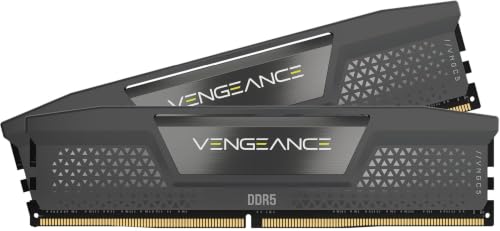
The CORSAIR Vengeance DDR5 32GB kit is the DDR5 representative here, and it shows what the newer generation brings to a current build. It pairs two 16GB modules for 32GB in dual channel, rated at 6400MHz with CL36-48-48-104 timings at 1.35V, using the model number CMK32GX5M2B6400Z36. That is exactly double the rated data rate of the DDR4 kit above, and the bandwidth advantage that follows is the core of the DDR5 case.
Onboard voltage regulation moves power control onto the module itself, which allows finer control over stable operation at high speeds. Support for both AMD EXPO and Intel XMP 3.0 means the rated profile can be enabled on either platform, and CORSAIR iCUE software allows real-time frequency monitoring. The solid aluminum heat spreader keeps the modules cool while staying compact enough for wide compatibility.
This kit suits new builds on current AMD and Intel platforms, gamers chasing high refresh rates, and creators moving large files or running memory-hungry applications. It is also the right pick for a builder who wants room to grow, since the DDR5 board it sits in will accept larger and faster kits later.
Who should skip it: anyone on a DDR4 board, since the module physically will not fit, and anyone whose processor or board cannot sustain 6400MHz, since the kit would run below its rated speed and the advantage over a slower DDR5 kit would narrow. Builders using a small-form-factor case should also check module clearance, even though the spreader is compact.
What to Check Before You Buy
Start with the motherboard manual. Confirm whether the board takes DDR4 or DDR5, how many slots it has, the maximum capacity per slot, and the fastest speed it supports. Then check the board maker’s qualified memory list for the exact kit model number, because a listed kit has been validated with that board.
Next, confirm the processor. The memory controller in the processor sets the practical speed ceiling, and a kit rated far above that ceiling will run slower than its label. Check whether the processor platform uses XMP or EXPO, and whether the kit supports the matching profile.
Capacity planning comes next. Choose the total capacity in a single matched kit rather than planning to mix kits later, and remember that two modules in dual channel outperform a single module of the same total capacity in most workloads. For most gaming and creation builds, 32GB in two modules is the balanced starting point.
Physical fit is easy to overlook. Measure clearance under the CPU cooler and note the module height, especially with large air coolers. Low-profile kits solve many of these problems, but tall spreaders can collide with cooler overhangs.
Finally, plan the BIOS step. After installation, enter the BIOS, enable the XMP or EXPO profile, and confirm the system boots and runs stably at the rated speed. If the system is unstable at the rated speed, dropping to a lower speed in the BIOS is a normal troubleshooting step. Keep the board BIOS updated, because newer BIOS versions often improve memory compatibility, particularly on DDR5 platforms.
FAQ
Can I use DDR5 RAM in a DDR4 motherboard?
No. DDR4 and DDR5 modules have the notch in different positions, so a DDR5 module cannot be installed in a DDR4 slot, and the reverse is also true. The board determines the generation, and the memory must match it.
Is DDR5 faster than DDR4 for gaming?
In most cases, yes, but the size of the gain depends on the game, the resolution and the rest of the system. Bandwidth-heavy games and high-refresh-rate play benefit most, while many games at high resolution are limited by the graphics card rather than memory.
Does DDR5 latency cancel out its speed advantage?
Not in general. DDR5 carries higher CL numbers, but its much higher clock speed means each cycle is shorter, so real latency ends up close to DDR4. DDR5 wins on bandwidth, DDR4 can still hold a small edge in latency-sensitive situations, and the overall difference is modest for most users.
How much RAM do I need, 16GB or 32GB?
For general use and light gaming, 16GB is workable. For gaming with background applications, streaming, photo editing or video work, 32GB is the comfortable choice and the capacity used by both kits in this guide. Heavy professional workloads may justify 64GB.
Should I upgrade to DDR5 or add more DDR4?
If your current DDR4 system still meets your needs, adding DDR4 capacity is the simpler and more focused upgrade. Moving to DDR5 means replacing the motherboard and processor as well, so it makes sense when the whole platform is due for replacement or when building a new PC.
Bottom Line
The ddr4 vs ddr5 ram speed performance and value question has no single winner, because the right answer depends on the system the memory goes into. DDR5 is faster on bandwidth, scales to larger capacities, and is the generation that new platforms are built around, which makes it the clear choice for a new build. DDR4 is mature, proven and tightly timed, and it remains the smart choice for keeping an existing DDR4 system running well.
If you are building new, choose DDR5 and pick a kit your board and processor can sustain, such as the 6400MHz CORSAIR Vengeance DDR5 kit above. If you are upgrading a DDR4 machine, a 32GB DDR4 kit such as the CORSAIR Vengeance LPX 3200MHz set gives that system the capacity it needs without a platform change. Match the generation to the board first, capacity second, and speed third.
Disclosure: As an Amazon Associate, we may earn from qualifying purchases.
Related guides
More from Amazon
Programs that pair well with the guide above. Offers and eligibility are set by Amazon and may change.
A free business account with business pricing and bulk-buying tools for work, shop or home office.
Create a business accountFree shipping on eligible items, Prime Video and more. Eligible new members can start with a free trial.
Start a Prime free trialAudiobooks and podcasts to listen to on the go. Eligible new members can start with a free trial.
Try Audible freeAd-free music streaming. Eligible new subscribers can start with a free trial.
Try Music Unlimited freeAs an Amazon Associate we earn from qualifying purchases.