Our Short List of 3

- Best for: A gaming desk where the monitor is the centrepiece and a metal finish plus a flagship OLED panel are both wanted.
- Design: sleek metal design per title and description
- Stand: height-adjustable screen that swivels and tilts; Easy Setup Stand, no tools or screws per description
- Screen size: 32 inches; resolution: 3840×2160 (4K UHD) per listing
- Panel: QD-OLED per title

- Best for: A light-coloured desk setup that wants a white monitor with a full ergonomic stand and a 4K IPS panel.
- Colour: White per title and spec table
- Design: sleek, ultra-narrow bezel design per description
- Stand: tilt, height, swivel and pivot adjustable per title
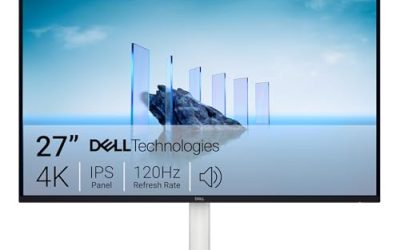
- Screen size: 27 inches; resolution: 3840 x 2160 per listing
- Best for: A multi-monitor desk that wants matched, virtually borderless screens with the smallest stated base footprint here.
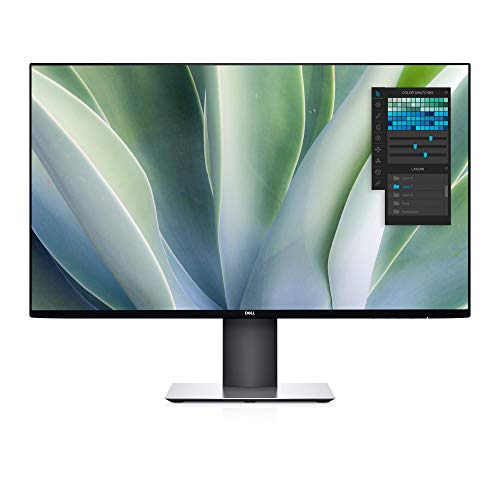
- Design: Infinity Edge bezels per title; virtually borderless design per description
- Panel profile: 6.5mm at its thinnest per description
- Base: approximately 29% smaller than its predecessor per description
- Stand: pivot, tilt, swivel and height adjustment per description
All 5 Picks at a Glance
| Product | Specs | Action |
|---|---|---|
| Samsung Odyssey OLED G8 (G80SD) 32-inch |
| Check price on Amazon |
| LG UltraFine 27US550-W 27-inch |
| Check price on Amazon |
| Dell UltraSharp U2719DX 27-inch |
| Check price on Amazon |
 ASUS ProArt Display PA278QV 27-inch |
| Check price on Amazon |
 Samsung ViewFinity S9 27-inch |
| Check price on Amazon |
Choosing a monitor for its looks is a decision most guides pretend is subjective, but the honest version rests on facts a listing states: whether the bezels are described as frameless or virtually borderless, whether the finish is metal or a named colour, and how the stand moves. Those stated design facts are what this ranking uses, nothing else: no in-person impressions, no photographs judged, no beauty claims a listing does not make about itself.
The five monitors below span a metal-bodied OLED gaming flagship, a white-finished 4K LG, two 27-inch virtually borderless desk monitors and a slim metal 5K Samsung with a built-in camera. Every design claim is attributed to the listing field that states it, and where a claim appears in only one field, this guide says which field carries it.
Our Top Picks
Top 3 picks at a glance
Quick Picks
As an Amazon Associate we earn from qualifying purchases.
| Product | Best for | Key spec from title |
|---|---|---|
| Samsung Odyssey OLED G8 (G80SD) 32-inch | A gaming desk where the monitor is the centrepiece and a metal finish plus a flagship OLED panel are both wanted. | Sleek metal design, QD-OLED 4K, 240Hz |
| LG UltraFine 27US550-W 27-inch | A light-coloured desk setup that wants a white monitor with a full ergonomic stand and a 4K IPS panel. | White finish, ultra-narrow bezel design, 4K IPS |
| Dell UltraSharp U2719DX 27-inch | A multi-monitor desk that wants matched, virtually borderless screens with the smallest stated base footprint here. | InfinityEdge bezels, 6.5mm thin panel profile |
| ASUS ProArt Display PA278QV 27-inch | A creator desk that wants a frameless-stated design plus verified colour accuracy for photo and design work. | Frameless design, WQHD IPS, Calman Verified |
| Samsung ViewFinity S9 27-inch | A Mac-centred desk that wants a metal 5K screen with the camera built in, keeping the desktop free of a separate webcam. | Slim metal design, 5K, 4K Slimfit camera |
How to Choose
Bezel wording is a spectrum, so read it literally
The listings here use different design words, and the differences are the information. One bullet says frameless outright. One title says Infinity Edge bezels while its description says virtually borderless. One description says ultra-narrow bezel, a narrower claim than frameless, and this guide does not upgrade it. When you compare listings yourself, rank the exact wording: a stated frameless design, a virtually borderless claim and an ultra-narrow bezel are three different promises, and only the first two support a near-seamless multi-monitor picture.
Finish and colour are variant facts, not vibes
A metal design is claimed by two listings here in their titles and descriptions, which makes it a stated construction fact you can compare. A white finish is a variant value: it lives in the title and spec table of one pick, and ordering the wrong variant of the same model is the easiest way to receive a black monitor for a white desk. Check the colour field on the live listing at checkout, and treat any finish a listing does not name (wood tones, RGB trim, textured backs) as absent, because it is.
Stand design decides how the desk actually looks
A monitor’s beauty in a room is mostly its posture. The stands here range from tilt-only arrangements to full tilt, swivel, pivot and height sets, one tool-free setup stand, and one compact base stated as 29% smaller than its predecessor. A small base frees desk surface; a pivot suits document work; a VESA mount removes the stand from the picture entirely. Decide whether the finished look is a floating screen on an arm or a composed stand on the desk, then read the stand fields against that picture.
A built-in camera changes the silhouette
Only one pick here states a built-in camera, and it changes the top edge of the desk: no clipped webcam, no cable over the bezel. The trade is that the camera’s position is fixed to the monitor’s, and its stated specification (a 4K Slimfit camera in that listing) is what you get. If your desk look depends on a clean top edge and you take video calls daily, that single stated feature can outweigh a gamut figure. If you never call on camera, it is weight in the wrong place.
The 5 Best Options
Samsung Odyssey OLED G8 (G80SD) 32-inch
- Best for: A gaming desk where the monitor is the centrepiece and a metal finish plus a flagship OLED panel are both wanted.
- Design: sleek metal design per title and description
- Stand: height-adjustable screen that swivels and tilts; Easy Setup Stand, no tools or screws per description
- Screen size: 32 inches; resolution: 3840×2160 (4K UHD) per listing
- Panel: QD-OLED per title
A gaming desk where the monitor is the centrepiece and a metal finish plus a flagship OLED panel are both wanted.
The metal-design claim is the listing’s own wording in two fields; finishes can photograph differently from how they read, so treat the claim as a stated fact, not a finish sample.
The G80SD leads this ranking on a design claim two of its listing fields agree on: the title and the description both call it a sleek metal design. The description adds a height-adjustable screen that swivels and tilts, and an Easy Setup Stand that installs with no tools or screws, which is a desk-appearance fact as much as a convenience one. Behind the finish sits a 32-inch QD-OLED panel at 3840×2160 with a 240Hz refresh rate and 0.03ms response, a matte glare-free surface, G-Sync compatibility, built-in speakers and DisplayPort and HDMI inputs.
Watch out for: The metal-design claim is the listing’s own wording in two fields; finishes can photograph differently from how they read, so treat the claim as a stated fact, not a finish sample.
LG UltraFine 27US550-W 27-inch
- Best for: A light-coloured desk setup that wants a white monitor with a full ergonomic stand and a 4K IPS panel.
- Colour: White per title and spec table
- Design: sleek, ultra-narrow bezel design per description
- Stand: tilt, height, swivel and pivot adjustable per title
- Screen size: 27 inches; resolution: 3840 x 2160 per listing
A light-coloured desk setup that wants a white monitor with a full ergonomic stand and a 4K IPS panel.
Confirm the live listing’s selected variant is the White finish before ordering, since the colour is a variant value carried by the title.
The 27US550-W is this pool’s white-finish pick, with the colour stated in both its title and its spec table. Its description calls the design sleek with an ultra-narrow bezel, and calls the monitor streamlined; that bezel wording is the claim this guide uses, and it is deliberately not upgraded to frameless, a word this listing does not use. The stand adjusts for tilt, height, swivel and pivot. The panel is a 27-inch 4K UHD 3840×2160 IPS screen at 60Hz with HDR10, up to 90% DCI-P3 colour per the description, and HDMI and DisplayPort inputs.
Watch out for: Confirm the live listing’s selected variant is the White finish before ordering, since the colour is a variant value carried by the title.
Dell UltraSharp U2719DX 27-inch
- Best for: A multi-monitor desk that wants matched, virtually borderless screens with the smallest stated base footprint here.
- Design: Infinity Edge bezels per title; virtually borderless design per description
- Panel profile: 6.5mm at its thinnest per description
- Base: approximately 29% smaller than its predecessor per description
- Stand: pivot, tilt, swivel and height adjustment per description
A multi-monitor desk that wants matched, virtually borderless screens with the smallest stated base footprint here.
This is the oldest model line in the pool and its live availability is the least certain: confirm a live new offer exists on this ASIN, not only used or renewed offers, before relying on it.
The U2719DX makes its design case in numbers its description states: a virtually borderless InfinityEdge design for nearly seamless multi-monitor views, a panel profile only 6.5mm at its thinnest, and a base approximately 29% smaller than its predecessor’s. Title and description agree on the InfinityEdge framing. The stand pivots, tilts, swivels and adjusts for height on a hinge riser the description says makes adjustments easier. The panel is a 27-inch WQHD 2560×1440 IPS screen in black. It is the oldest model line in this pool, which its Watch out line handles plainly.
Watch out for: This is the oldest model line in the pool and its live availability is the least certain: confirm a live new offer exists on this ASIN, not only used or renewed offers, before relying on it.
ASUS ProArt Display PA278QV 27-inch
- Best for: A creator desk that wants a frameless-stated design plus verified colour accuracy for photo and design work.
- Design: frameless design per listing bullet
- Stand: ergonomic stand with tilt, swivel, pivot and height adjustments; VESA wall-mountable per bullet
- Screen size: 27 inches; resolution: 2560 x 1440 per listing
- Panel: IPS; response time: 5.0 ms per bullet
A creator desk that wants a frameless-stated design plus verified colour accuracy for photo and design work.
The design bullets for this pick were captured through pages quoting the listing rather than a direct page read, so re-confirm the frameless wording on the live listing before relying on it.
The PA278QV’s design claim is a single listing bullet that calls it a 27-inch WQHD IPS monitor with a frameless design, and this guide attributes the claim to that bullet rather than spreading it across fields. The same bullets state an ergonomic stand with tilt, swivel, pivot and height adjustments plus VESA wall mounting, in a black finish. The panel is a 2560×1440 IPS screen with 100% sRGB and Rec. 709 coverage, a Delta E under 2 figure, Calman verification and a 5ms response time, connecting over DisplayPort, HDMI, DVI-D and Mini DisplayPort.
Watch out for: The design bullets for this pick were captured through pages quoting the listing rather than a direct page read, so re-confirm the frameless wording on the live listing before relying on it.
Samsung ViewFinity S9 27-inch
- Best for: A Mac-centred desk that wants a metal 5K screen with the camera built in, keeping the desktop free of a separate webcam.
- Design: slim metal design per title and description
- Stand: height-adjustable screen that tilts; pivot 90 degrees; VESA compatible per description
- Screen size: 27 inches; class: 5K per title
- Finish: matte display per title
A Mac-centred desk that wants a metal 5K screen with the camera built in, keeping the desktop free of a separate webcam.
Two settlements are mandatory before relying on this pick: secondary sources question its current availability, and the listing’s item-details model field conflicts with the title’s model name, which governs. Confirm the live offer and the title model on the page first.
The ViewFinity S9 pairs a slim metal design, stated in its title and again in its description, with the most distinctive silhouette in this pool: a 27-inch 5K matte screen with a built-in 4K Slimfit camera, so the webcam is part of the monitor rather than a lump clipped on top. The description adds a height-adjustable screen that tilts, a 90-degree pivot for long documents and VESA-compatible mounting to keep the desk clear. Connectivity is Thunderbolt 4 and DisplayPort, with AirPlay, smart TV apps and a gaming hub in the title. Two live checks are mandatory for this pick, below.
Watch out for: Two settlements are mandatory before relying on this pick: secondary sources question its current availability, and the listing’s item-details model field conflicts with the title’s model name, which governs. Confirm the live offer and the title model on the page first.
Which One Fits Your Situation
A gaming room built around one statement screen
Take the Samsung Odyssey OLED G8: a sleek metal design stated in two fields, a tool-free setup stand, and a 32-inch QD-OLED panel behind the finish. Its height-adjustable screen that swivels and tilts keeps that posture composed from every seat in the room, and the glare-free matte finish keeps reflections from spoiling the effect.
A white or light-wood desk setup
Take the LG 27US550-W, the pool’s white-finish pick, with an ultra-narrow bezel description and a fully adjustable stand for a composed posture. Confirm the white variant at checkout, because the colour is a variant value on the listing and the same model family sells in darker finishes elsewhere.
A dual-monitor productivity wall
Take the Dell U2719DX for its virtually borderless InfinityEdge framing and thin 6.5mm profile, the pairing its description explicitly aims at multi-monitor views. Matched units matter more than any single specification here: two of the same model keep bezels, heights and colour aligned across the wall of screens the description aims at.
A video-call-heavy Mac desk
Take the Samsung ViewFinity S9 for the slim metal design plus the built-in 4K Slimfit camera, after settling its availability and model checks on the live listing. Settle the availability question and the model-name conflict on its live listing first, since both checks are flagged in its section and neither should be discovered after the desk is planned.
Common Mistakes
- Upgrading a listing’s bezel wording in your head, reading ultra-narrow as frameless when the manufacturer chose the narrower word on purpose.
- Ordering the right model in the wrong finish because the colour is a variant value, then rebuilding the desk’s colour scheme around a black monitor.
- Judging looks from the panel alone and ignoring the stand, when base size and adjustment range decide the posture the room actually sees.
- Assuming a design claim repeated in a roundup came from the listing, when for one pick here it rests on a single bullet that should be re-read live.
- Skipping the availability check on a design-led pick whose current supply secondary sources question, and designing a desk around a screen that cannot be ordered.
Frequently Asked Questions
How is looking judged without seeing the monitors?
From listing-stated design facts only: bezel wording, finish and colour fields, stand design and adjustments, and stated dimensions such as panel thickness and base size. Each claim in this guide is attributed to the field that states it, and nothing rests on photographs or in-person impressions. Where a claim appears in only one field, the guide names that field.
Which monitor is actually frameless?
The ASUS ProArt PA278QV’s listing bullet states a frameless design. The Dell states virtually borderless InfinityEdge bezels, and the LG states an ultra-narrow bezel; those wordings are reported as written, not upgraded. The Dell’s wording comes from its title and description together, while the LG’s narrower phrase comes from its description alone, which is why the two are never described with the same word.
Which picks claim a metal design?
Two: the Samsung Odyssey OLED G8 states a sleek metal design in its title and description, and the Samsung ViewFinity S9 states a slim metal design in its title and description. The two Samsungs make the claim in metal, while the other three argue through bezel wording, profile thickness and base size instead of materials.
Why does the ViewFinity S9 carry extra checks?
Because its listing’s item-details model field conflicts with the model named in its title, which governs, and because secondary sources question whether it can currently be bought new. Both points settle on the live listing before purchase. The title governs the variant identity, so the guide prints the title’s model name and flags the conflict rather than silently choosing the catalogue-style code from the details field.
Related guides
More from Amazon
Programs that pair well with the guide above. Offers and eligibility are set by Amazon and may change.
A free business account with business pricing and bulk-buying tools for work, shop or home office.
Create a business accountFree shipping on eligible items, Prime Video and more. Eligible new members can start with a free trial.
Start a Prime free trialAudiobooks and podcasts to listen to on the go. Eligible new members can start with a free trial.
Try Audible freeAd-free music streaming. Eligible new subscribers can start with a free trial.
Try Music Unlimited freeAs an Amazon Associate we earn from qualifying purchases.