Our Short List of 3

- Best for: Roblox players who want the simple route — no PC, no cables, no base stations.

- Best for: Roblox players who want the sharpest standalone picture and room for a bigger library.
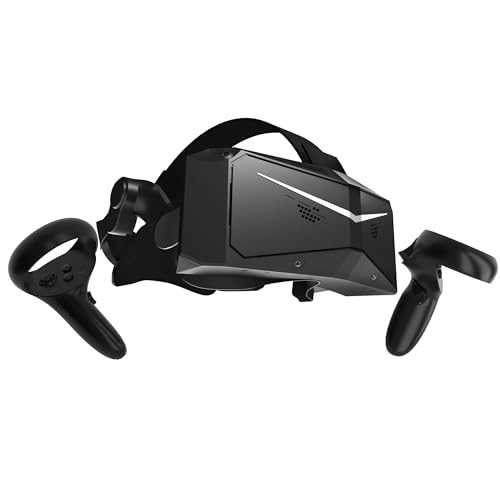
- Best for: PC players who want the clearest Roblox picture and already own a strong gaming PC.
All 3 Picks at a Glance
| Product | Specs | Action |
|---|---|---|
| Meta Quest 3S 128GB |
| Check price on Amazon |
| Meta Quest 3 512GB |
| Check price on Amazon |
| Pimax Crystal Light with Controllers |
| Check price on Amazon |
Roblox in virtual reality changes how the game feels. Instead of watching a flat screen, you walk through the worlds, reach for objects with your hands, and look around by turning your head. The catch is that not every VR headset runs Roblox. Some headsets run it on their own, with no computer in the room. Others need a gaming PC and SteamVR. This guide covers both routes, with four headsets that can run Roblox right now, compared on the specs their listings publish.
The short version: a standalone Quest headset is the simple route for most Roblox players. It runs Roblox from its own store, with no PC and no cables. A PCVR headset is the route for players who already own a strong gaming PC and want sharper panels and wider views. Both routes play the same Roblox worlds, and the same Roblox account works on either one.
The two standalone picks here are the Meta Quest 3S and the Meta Quest 3. The two PCVR picks are the Pimax Crystal Light and the HTC Vive Pro 2. Every headset in this guide ships with controllers in the box, and every one of them runs Roblox through a route its maker supports: the Quest headsets run it natively, and the PCVR headsets run it through SteamVR on a Windows PC.
One headset is absent on purpose. The Quest 2 is the older standalone headset that many Roblox players already own, but Meta ended production of it, and its software support winds down. A new buyer is better served by the Quest 3S, which replaces it at the entry end of the line.
Our Top Picks
Top 3 picks at a glance
What to look for
Route first. This is the decision that shapes everything else. A standalone headset has its own chip, battery, and store, so it runs Roblox with no PC at all. A PCVR headset has no chip of its own for games: it draws everything from a Windows gaming PC through a cable, and Roblox on PC runs through SteamVR. If there is no gaming PC in the house, the choice is already made — pick a standalone Quest.
Resolution and lenses. Roblox worlds are bright, blocky, and full of text on signs, menus, and name tags, so per-eye resolution matters more here than in a dark horror game. The Quest 3S gives 1832 by 1920 pixels per eye through Fresnel lenses. The Quest 3 gives 2064 by 2208 pixels per eye through pancake lenses, which also widen the clear sweet spot — the area where the image stays sharp without moving the headset. The Pimax Crystal Light gives 2880 by 2880 pixels per eye through glass aspheric lenses, and the Vive Pro 2 gives 2448 by 2448 pixels per eye.
Refresh. The Quest headsets run at 90Hz and can switch to 120Hz. The Pimax lets you choose 72Hz, 90Hz, or 120Hz to match what your graphics card can drive. The Vive Pro 2 runs at 120Hz. Higher refresh means smoother motion, and smoother motion means less discomfort when a Roblox world spins the camera quickly.
Tracking. The Quest headsets and the Pimax track themselves with cameras built into the headset, so there is nothing to mount on the wall. The Vive Pro 2 is different: it uses two SteamVR base stations, which are included in the kit, and they need a place to sit or mount with a clear view of the play area.
Controllers. All four headsets in this guide ship with controllers. The Quest headsets ship with Touch Plus controllers, which have no tracking rings and carry haptics in the grips. The Pimax ships with two of its own controllers in the listing used here — other listings sell the headset alone, so confirm the exact listing includes controllers before you buy. The Vive Pro 2 ships with wireless controllers that pair with its base stations.
Comfort and weight. A Roblox session can run long, so weight and balance matter as much as resolution. The Quest 3S weighs 514 grams and the Quest 3 weighs 515 grams, both with a soft fabric strap in the box. The Pimax Crystal Light headset weighs 815 grams, and its weight sits further forward because of the large lenses, so the fit matters more on long sessions. The Vive Pro 2 is the bulkiest pick here: a larger headset, a tether, and two base stations to place.
Storage. Roblox itself is a small install, so storage is not the deciding factor it is on a console. The Quest 3S holds 128GB and the Quest 3 holds 512GB. The difference is how many other games fit alongside Roblox before you have to delete something. The PCVR headsets have no storage of their own — games live on the PC, so the PC hard drive is the limit.
IPD and glasses. IPD is the distance between your pupils, and a headset that cannot match it will look blurry at the edges. The Quest 3 has a wheel that adjusts IPD across a wide range. The Quest 3S has three fixed IPD steps. The Pimax adjusts manually from 58 to 72 mm. The Vive Pro 2 has an IPD dial on the headset.
Battery and sessions. The standalone headsets run on a battery: the Quest 3S runs up to 2.5 hours on a charge and the Quest 3 up to 2.2 hours, per their listings. The PCVR headsets draw power through their tether, so a session is never cut short by a battery — but the cable is always there, and cable management becomes part of the play area.
Age and accounts. Roblox on Quest needs a Meta account, and Meta accounts need the user to be 13 or older. Roblox on PC needs a Roblox account and SteamVR. Either way, an adult should set up the account and the guardian boundary, and the headset should be fitted to the wearer before the first session.
Meta Quest 3S 128GB
- Best for: Roblox players who want the simple route — no PC, no cables, no base stations.
Roblox players who want the simple route — no PC, no cables, no base stations.
The Quest 3S is the entry standalone headset in the current Meta line, and it is the most direct way into Roblox VR. It runs Roblox natively from the Quest Store: install it, sign in with a Roblox account, and play over Wi-Fi. No PC, no cable, no base stations, and no extra hardware to buy. That simplicity is the whole point of this pick.
The specs are honest mid-range. A Snapdragon XR2 Gen 2 chip drives the headset, with 8GB of memory alongside it. Each eye gets 1832 by 1920 pixels through Fresnel lenses, and the display runs at 90Hz with a 120Hz mode for smoother motion. The 128GB of storage holds Roblox and a modest library of other games. Touch Plus controllers come in the box — ringless, with haptics and thumbsticks — and hand tracking is built in for menus and supported apps. Full-color passthrough lets you see the room without lifting the headset, and the guardian boundary lets you draw a play area around a chair or a rug. The headset weighs 514 grams, the battery runs up to 2.5 hours per the listing, and a 3-month trial of Meta Horizon+ is included.
The trade-offs are clear and worth knowing before you buy. Fresnel lenses have a narrower clear sweet spot than the pancake lenses on the Quest 3, so the image softens sooner toward the edges and the headset needs a careful fit. There is no wired headphone jack, so audio goes through the built-in speakers or a Bluetooth headset. And 128GB fills up faster than you expect once larger games join Roblox in the library — but Roblox itself is small, and deleting a game to make room is quick. Stock evidence is the freshest in this guide, with multiple trackers showing it in stock on Amazon as of late November 2026.
Meta Quest 3 512GB
- Best for: Roblox players who want the sharpest standalone picture and room for a bigger library.
Roblox players who want the sharpest standalone picture and room for a bigger library.
The Quest 3 is the stronger standalone headset in the current Meta line, and the jump over the Quest 3S is visible the moment you put it on. The same Snapdragon XR2 Gen 2 chip and 8GB of memory drive it, but the display is a step up: 2064 by 2208 pixels per eye through pancake lenses, with a 110-degree field of view and a wider clear sweet spot. The display runs at 90Hz with a 120Hz mode, and the headset weighs 515 grams with a soft strap in the box.
Storage is the other big difference: 512GB instead of 128GB, so the library can grow without deleting games to make room. The controllers are the same Touch Plus pair as the Quest 3S, with haptics and thumbsticks, and hand tracking is built in. The battery runs up to 2.2 hours per the listing, a little shorter than the Quest 3S, and a 3-month trial of Meta Horizon+ is included. The Quest 3 also links to a PC over Air Link or a USB-C cable, so it covers PCVR later with no new headset needed.
Two things to confirm before buying. First, the 128GB Quest 3 is gone from the current line, so 512GB is the model Meta sells now — confirm the listing is the 512GB model and not an older 128GB listing. Second, the most recent direct crawl of this listing is months old, and the freshest evidence is mirror pages showing it in stock in the last few days, so confirm the listing shows a new-unit buying option before you buy. The headset itself is the strongest standalone pick in this guide, and it is the right one if Roblox is the main game but not the only game.
Pimax Crystal Light with Controllers
- Best for: PC players who want the clearest Roblox picture and already own a strong gaming PC.
PC players who want the clearest Roblox picture and already own a strong gaming PC.
The Pimax Crystal Light is the sharpest headset in this guide, and it is not close. Each eye gets 2880 by 2880 pixels through glass aspheric lenses, on a QLED panel with Mini-LED local dimming for deeper contrast. The listing gives 35 pixels per degree, which is the number that explains why small text stays readable at a distance. The display runs at 72Hz, 90Hz, or 120Hz, so you can match the refresh to what your graphics card can drive, and the headset tracks itself with onboard cameras — no base stations, no wall mounts, nothing to install in the room.
This is a tethered PCVR headset, and that shapes everything about it. It connects to a Windows gaming PC through a DisplayPort cable, draws power through the tether, and runs Roblox through SteamVR. Independent guides say it needs a strong graphics card to drive its panels properly, and that is the key judgment call: Roblox alone is a light game, but the headset’s panels ask for far more graphics power than the game needs, so a modest PC will not show you what this headset can do. If the PC is not strong enough, the Quest 3 will look better in practice, because it renders its own picture at a resolution its own chip can handle.
The listing used here includes two controllers, a DisplayPort cable, and a power adapter. Other listings sell the headset alone, so confirm the exact listing includes controllers before you buy — a headset without controllers cannot play Roblox properly. The headset weighs 815 grams, which is the heaviest figure here, and the weight sits forward because of the large lenses, so the fit and the strap matter on long sessions. Stock evidence rests on mirror pages showing it in stock in the last few days and a tracker page listing it on Amazon, so confirm the listing before you buy.
HTC Vive Pro 2 Full Kit
Best for: PC players who want base-station tracking and the widest view, and already have a PCVR room set up.
The Vive Pro 2 is the veteran PCVR headset in this guide, and its spec sheet still holds up. The combined resolution is 4896 by 2448 pixels — 2448 by 2448 per eye — on LCD panels running at 120Hz, with a 120-degree field of view that is the widest in this guide. The kit includes the headset, two SteamVR base stations, and wireless controllers, plus built-in headphones with Hi-Res audio and 3D spatial sound. It connects to a Windows PC through DisplayPort and USB, and Roblox runs through SteamVR.
The trade-offs are the setup and the age of the evidence. Two base stations need a place to sit or mount with a clear view of the play area, and the tether needs cable management, so this is the most involved setup here and it asks for the most room. The most recent direct crawl of this listing is 232 days old and shows no stock flag in the crawl itself, so this is the weakest stock evidence in the guide: HTC promoted it on Amazon in the autumn of 2025 and a roundup from two weeks ago still links it on Amazon, but confirm a new-unit buying option live before you buy. If the listing shows no buying option, the guide stands on three headsets, and the Pimax covers the same PCVR ground with fresher evidence.
| Headset | Route | Per-eye resolution | Refresh | Tracking | Weight |
|---|---|---|---|---|---|
| Meta Quest 3S 128GB | Standalone | 1832×1920 | 90 / 120Hz | Inside-out | 514 g |
| Meta Quest 3 512GB | Standalone | 2064×2208 | 90 / 120Hz | Inside-out | 515 g |
| Pimax Crystal Light | PCVR via SteamVR | 2880×2880 | 72 / 90 / 120Hz | Inside-out | 815 g |
| HTC Vive Pro 2 | PCVR via SteamVR | 2448×2448 | 120Hz | Base stations | Not listed |
Frequently asked questions
Can I play Roblox on a Quest headset without a gaming PC?
Yes. Roblox runs natively on the Quest 3 and Quest 3S: install it from the Quest Store, sign in with a Roblox account, and play over Wi-Fi. No PC, no cable, and no extra hardware is needed. A Meta account is required, and Meta accounts need the user to be 13 or older, so an adult should set up the account.
Do the PCVR headsets in this guide need anything else?
Yes. The Pimax Crystal Light and the HTC Vive Pro 2 are PC-only headsets: they need a Windows gaming PC with a DisplayPort output and SteamVR installed, and Roblox on PC runs through SteamVR. The Pimax tracks itself with onboard cameras, so it needs no base stations — just the PC, the cable, and a clear area. The Vive Pro 2 needs its two base stations mounted or placed with a clear view of the play area, which is the most setup in this guide.
Which headset fits a small room?
The Quest 3S fits a small room best. It needs no PC, no base stations, and no cables, and the guardian boundary lets you draw a play area around a chair or a rug. The Pimax also works in a small room — inside-out tracking means no base stations — but it needs a gaming PC nearby and a cable running to it, so the desk has to sit inside the play area or close to it. The Vive Pro 2 asks for the most room: two base stations, a tether, and space to move without tripping over the cable.
How to choose
Pick the Quest 3S if you want the simple route: no PC, no cables, no base stations, and Roblox running natively from the Quest Store. It is the entry pick, the lightest headset here, and it has the freshest stock evidence in this guide.
Pick the Quest 3 if you want the sharpest standalone picture and room for a bigger library, and if you like the option of linking to a PC later. The pancake lenses, the wider field of view, and the 512GB of storage are the reasons to step up, and the mixed reality passthrough is sharper too.
Pick the Pimax Crystal Light if you already own a strong gaming PC and want the clearest Roblox image in this guide. Confirm the listing includes controllers, confirm the PC can drive the panels, and know that the headset is tethered and PC-only.
Pick the Vive Pro 2 if you want base-station tracking and the widest field of view, and you already have a PCVR room with space for two base stations. Confirm a new-unit buying option live first — its stock evidence is the oldest in this guide.
Whichever route you choose, confirm three things on the listing before you buy: the exact model and storage size, that controllers are included in the box, and that the listing shows a new-unit buying option. Roblox itself is the same game on every headset here — the choice is about how you want to reach it.
Disclosure: As an Amazon Associate, we may earn a commission from qualifying purchases made through links in this article, at no additional cost to you.
Related guides
More from Amazon
Programs that pair well with the guide above. Offers and eligibility are set by Amazon and may change.
A free business account with business pricing and bulk-buying tools for work, shop or home office.
Create a business accountFree shipping on eligible items, Prime Video and more. Eligible new members can start with a free trial.
Start a Prime free trialAudiobooks and podcasts to listen to on the go. Eligible new members can start with a free trial.
Try Audible freeAd-free music streaming. Eligible new subscribers can start with a free trial.
Try Music Unlimited freeAs an Amazon Associate we earn from qualifying purchases.