Our Short List of 3

- Best for: Mac households and solo desk users who value screen sharpness and a minimal setup.
- Display: 24-inch Retina display
- Processor: Apple M4 chip with 8-core CPU and 8-core GPU
- Memory: 16GB unified memory
- Storage: 256GB SSD storage

- Best for: home office workers and students on Windows who multitask heavily and want generous memory and storage from day one.
- Display: 27-inch FHD display, 1920 x 1080 resolution
- Processor: AMD Ryzen 7 7730U, 8 cores, up to 4.5 GHz
- Memory: 32GB DDR4 RAM at 3200 MHz
- Storage: 1TB SSD
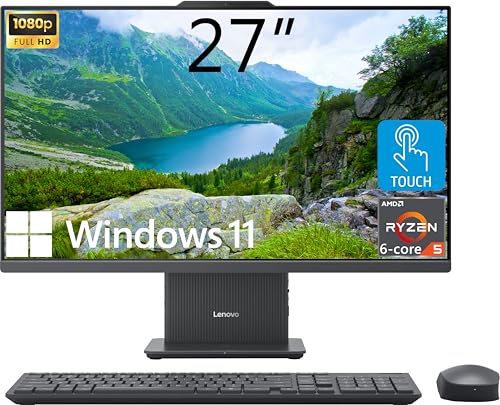
- Best for: families and shared desks that want touch input, a charging pad in the stand and a screen that can double for another device.
- Display: 27-inch FHD (1920 x 1080) IPS touchscreen, 300 nits, 99% sRGB, anti-glare
- Processor: AMD Ryzen 5 8645HS, 6 cores and 12 threads, up to 5.0 GHz
- Memory: 32GB DDR5 RAM
- Storage: 1TB PCIe M.2 SSD
All 3 Picks at a Glance
| Product | Specs | Action |
|---|---|---|
| Apple iMac 24-inch with M4 chip |
| Check price on Amazon |
| HP 27 inch All-in-One Desktop PC (27-cr0012) |
| Check price on Amazon |
| Lenovo IdeaCentre All-in-One 27 |
| Check price on Amazon |
Buying an all-in-one is really two decisions locked into one purchase: the screen you will look at every day, and the processor, memory and storage you will be stuck with for years. Unlike a tower, there is no swapping the monitor later or dropping in more memory when the machine starts to feel slow, so the configuration on the listing page matters far more than the brand badge on the chin.
This guide is for home office workers, students and families who want one clean machine on the desk instead of a tower, a separate monitor and a knot of cables. The three picks below were chosen from the product names and specifications published on their Amazon listing pages, covering one macOS option and two quite different Windows approaches.
Our Top Picks
Top 3 picks at a glance
Quick Picks
As an Amazon Associate we earn from qualifying purchases
| Product | Best for | Key spec from title |
|---|---|---|
| Apple iMac 24-inch with M4 chip | Mac users who want the sharpest screen | M4 chip with 8-core CPU and 8-core GPU |
| HP 27 inch All-in-One Desktop PC (27-cr0012) | Windows multitaskers who want memory headroom | AMD Ryzen 7 7730U with 32GB RAM and 1TB SSD |
| Lenovo IdeaCentre All-in-One 27 | Touch users and shared family desks | Ryzen 5 8645HS with 27-inch FHD touchscreen |
How to Choose
Screen Size and Resolution Decide the Desk First
The display is the part of an all-in-one you can never change, so start there. A 24-inch panel suits a small desk and keeps text large at its native resolution, while a 27-inch panel gives spreadsheets and side-by-side windows more room but spreads the same Full HD pixel count thinner, which can make text look softer up close. The listing for the iMac describes a 24-inch Retina display, which packs far more pixels into a smaller area. Measure your desk depth before ordering: bigger screens need more viewing distance, and the stand footprint listed in the product dimensions decides whether the machine physically fits beside printers, lamps and paperwork.
Processor Class Sets the Working Speed
All-in-ones use laptop-class processors because everything sits behind a thin screen, so compare the chip name carefully rather than assuming desktop performance. An eight-core chip such as the Ryzen 7 7730U in the HP listing handles heavy browser use, office suites and light photo work comfortably, while a six-core part like the Ryzen 5 8645HS in the Lenovo listing trades a little multitasking headroom for efficiency. Apple’s M4 follows its own scale, pairing the CPU and GPU in one chip with unified memory. Match the processor to the heaviest job you actually run weekly, not the heaviest job you can imagine, because you cannot upgrade it later.
Memory and Storage Are Hard to Change Later
On most all-in-ones the memory is soldered or awkward to reach, and the storage bay may not be accessible at all, so the configuration you order is effectively the configuration you retire. The listings here show the spread clearly: the iMac configuration carries 16GB of unified memory and a 256GB SSD, while both Windows picks carry 32GB of RAM and a 1TB SSD. If you keep large photo libraries, virtual machines or years of documents on the machine itself, the bigger SSD matters more than a slightly faster chip. Buyers who live in cloud storage can accept the smaller drive, but nobody should plan on upgrading either part after purchase.
Ports, Camera and Bundled Extras
Because the computer lives inside the screen, its port selection decides how tidy the desk stays. Count the USB ports on the listing and check for HDMI: an HDMI output lets you add a second monitor later, and the Lenovo listing also includes an HDMI input, which lets the screen double as a display for a laptop or console. Video calls are the other daily use, so look at the camera arrangement; the HP listing specifies a tiltable pop-up privacy camera that hides when not in use. Finally, confirm the box contents. All three listings here include a keyboard and mouse, but the style and connection type differ between wired and wireless sets.
The 3 Best Options
Apple iMac 24-inch with M4 chip
- Best for: Mac households and solo desk users who value screen sharpness and a minimal setup.
- Display: 24-inch Retina display
- Processor: Apple M4 chip with 8-core CPU and 8-core GPU
- Memory: 16GB unified memory
- Storage: 256GB SSD storage
Mac households and solo desk users who value screen sharpness and a minimal setup.
the 256GB SSD fills quickly with local photo and video libraries, and the memory in this configuration is fixed at purchase.
The iMac is the pick for buyers already settled on macOS who want the cleanest possible desk setup. The listing describes the M4 chip with an 8-core CPU and 8-core GPU, built for Apple Intelligence, behind a 24-inch Retina display, and the whole machine weighs under ten pounds according to the product details, so it suits smaller desks and rooms where the computer is also part of the furniture. The 16GB of unified memory in this configuration is comfortable for everyday work, document editing, browsing and photo management, and the silver finish keeps the look neutral in a living space.
HP 27 inch All-in-One Desktop PC (27-cr0012)
- Best for: home office workers and students on Windows who multitask heavily and want generous memory and storage from day one.
- Display: 27-inch FHD display, 1920 x 1080 resolution
- Processor: AMD Ryzen 7 7730U, 8 cores, up to 4.5 GHz
- Memory: 32GB DDR4 RAM at 3200 MHz
- Storage: 1TB SSD
home office workers and students on Windows who multitask heavily and want generous memory and storage from day one.
the display is non-touch and Full HD spread across 27 inches looks less crisp than a higher-resolution panel, and the memory is DDR4 rather than the newer DDR5.
The HP is the Windows workhorse of this group, and its listing leads with memory and storage rather than screen tricks. The spec sheet shows an AMD Ryzen 7 7730U processor with eight cores, 32GB of DDR4 RAM and a 1TB SSD, a combination aimed at people who keep many applications and browser tabs open at once. The 27-inch Full HD display is not a touchscreen, which keeps the panel simple, and the listing highlights a tiltable pop-up privacy camera for calls. Built-in stereo speakers, five USB ports and an included keyboard and mouse round out a package designed to be unboxed and used the same day.
Lenovo IdeaCentre All-in-One 27
- Best for: families and shared desks that want touch input, a charging pad in the stand and a screen that can double for another device.
- Display: 27-inch FHD (1920 x 1080) IPS touchscreen, 300 nits, 99% sRGB, anti-glare
- Processor: AMD Ryzen 5 8645HS, 6 cores and 12 threads, up to 5.0 GHz
- Memory: 32GB DDR5 RAM
- Storage: 1TB PCIe M.2 SSD
families and shared desks that want touch input, a charging pad in the stand and a screen that can double for another device.
the six-core processor has less multitasking headroom than the eight-core HP, and touch input is wasted if your work never leaves the keyboard.
The Lenovo is the most interactive machine here. Its listing describes a 27-inch Full HD IPS touchscreen with 300 nits of brightness and 99 percent sRGB coverage, driven by an AMD Ryzen 5 8645HS processor with six cores and twelve threads, 32GB of DDR5 memory and a 1TB PCIe M.2 SSD. The stand base doubles as a wireless charging pad according to the listing, a small touch that suits a shared desk where phones come and go. The port list is the strongest of the three, with both HDMI input and output, so the screen can serve a second device when the PC itself is idle.
Which One Fits Your Situation
A Small Desk in a Bedroom or Dorm Room
Space decides this one. The iMac takes the least room of the three, with the smallest footprint and a weight under ten pounds on its listing, and its 24-inch screen stays sharp at close viewing distances. A single power cable and the bundled wireless peripherals keep a cramped desk workable, and the built-in speakers remove the need for separate desktop speakers in a small room.
A Busy Home Office With Many Apps Open
If your day is a spreadsheet, a video call, a dozen browser tabs and a chat app all at once, memory is the spec that matters, and both Windows picks carry 32GB. The HP gets the nod for its eight-core Ryzen 7 processor and its pop-up privacy camera for calls, while the Lenovo answers with faster DDR5 memory and a touchscreen. Either way, the 1TB SSD on both listings leaves room for local files without constant cleanup.
A Shared Family Computer in the Kitchen or Living Room
A shared machine needs to be approachable for everyone, and the Lenovo fits that role best. The touchscreen lets younger users tap through homework apps, the wireless charging base in the stand gives phones a home, and the HDMI input means the screen can show a game console or a laptop when nobody is using the PC. The 32GB of memory also keeps the machine responsive when several user accounts stay signed in.
A Mac Household Replacing an Older Intel iMac
For a household already using iPhones and iCloud, the iMac is the natural replacement, and the M4 configuration in this guide is the current design with the slimmer body and Retina display. Check your storage use on the old machine before ordering, because this configuration lists a 256GB SSD; heavy local libraries argue for managing files in iCloud or on an external drive from the start.
Common Mistakes
- Buying on screen size alone and ignoring resolution, so a large Full HD panel ends up looking soft at normal desk distances.
- Ordering the smallest storage configuration to save money, then filling the SSD within a year with photos, videos and game installs.
- Assuming memory can be upgraded later, when most all-in-one designs make RAM difficult or impossible to change after purchase.
- Forgetting to count ports, then covering the clean new desk with hubs and adapters for printers, drives and a second monitor.
- Overlooking the camera and microphone setup on the listing, even though the machine will be the household’s main video call device.
Frequently Asked Questions
Can an all-in-one computer drive a second monitor?
Usually yes, as long as the listing shows a video output. The HP listing includes an HDMI port and the Lenovo listing specifies both HDMI-in and HDMI-out, so either can feed an external display for a dual-screen desk. Check the exact port list on the product page before ordering, because some compact models rely on USB-C video instead of a full-size HDMI socket.
Is 16GB of memory enough for an all-in-one?
For browsing, documents, email, streaming and light photo work, 16GB is a workable amount, and it is the configuration listed for the iMac in this guide. Buyers who routinely run many heavy applications together, edit large files or keep dozens of tabs open should lean toward the 32GB configurations, since memory is rarely upgradeable in this category.
Can you upgrade an all-in-one computer later?
Plan on no. The processors in these listings are integrated parts, memory is often soldered or buried behind the display assembly, and storage access varies by model. Treat the configuration on the listing as final, and spend your decision time on the processor, memory and SSD size rather than on a future upgrade path that may never open up.
Do all-in-one computers include a keyboard and mouse?
The three listings in this guide do. The HP product details list a keyboard and mouse in the box, the Lenovo listing specifies a wireless keyboard and mouse set, and the iMac ships as a complete desktop package. Confirm the box contents on the listing anyway, because some business-focused configurations are sold as the computer alone for buyers reusing existing peripherals.
Related guides
More from Amazon
Programs that pair well with the guide above. Offers and eligibility are set by Amazon and may change.
A free business account with business pricing and bulk-buying tools for work, shop or home office.
Create a business accountFree shipping on eligible items, Prime Video and more. Eligible new members can start with a free trial.
Start a Prime free trialAudiobooks and podcasts to listen to on the go. Eligible new members can start with a free trial.
Try Audible freeAd-free music streaming. Eligible new subscribers can start with a free trial.
Try Music Unlimited freeAs an Amazon Associate we earn from qualifying purchases.