Our Short List of 3
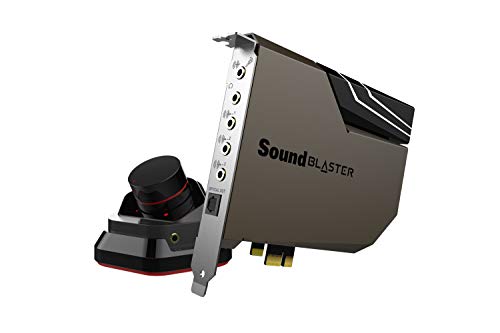
- Interface: Internal PCIe
- DAC: ESS SABRE-class 9018
- Dynamic range: 127 dB
- Playback: Up to 32-bit/384 kHz PCM, DSD64
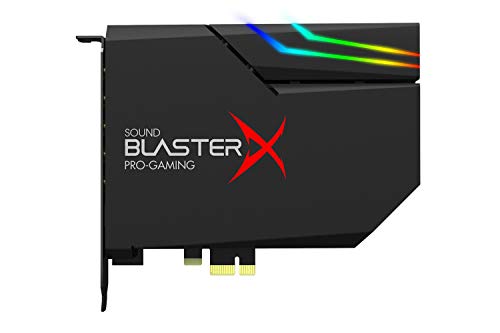
- Interface: Internal PCIe
- DAC: SABRE32-class
- Signal-to-noise ratio: Up to 122 dB
- Playback: Up to 32-bit/384 kHz
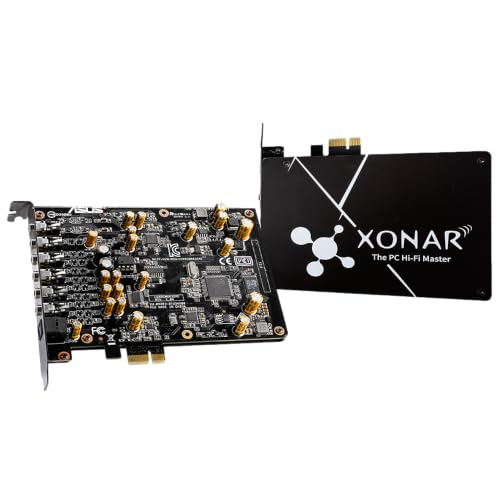
- Interface: Internal PCIe
- Channels: 7.1
- Playback: Up to 192 kHz/24-bit
- Signal-to-noise ratio: 110 dB front output, 108 dB headphone output as listed by ASUS
All 4 Picks at a Glance
| Product | Specs | Action |
|---|---|---|
| 1. Creative Sound Blaster AE-7 |
| Check price on Amazon |
| 2. Creative Sound BlasterX AE-5 Plus |
| Check price on Amazon |
| 3. ASUS Xonar AE |
| Check price on Amazon |
 4. Creative Sound Blaster Audigy Fx V2 |
| Check price on Amazon |
As an Amazon Associate we earn from qualifying purchases.
Most gaming motherboards ship with onboard audio that is good enough for basic playback, but onboard sound shares space with power delivery, graphics card noise, and other components that can add hiss, crackle, or a flat, compressed character to games and music. A dedicated internal PCIe sound card moves conversion and amplification onto its own board, with its own DAC, shielding, and headphone amplifier. For a desktop gaming PC with a free PCIe slot, that is still the cleanest way to upgrade audio without adding another box to the desk.
This guide covers internal PCIe sound cards only, so every pick installs the same way and serves the same job. That consistency matters: you compare DAC quality, dynamic range, surround support, headphone drive, and software directly. The four cards below span a practical range, from an entry-level upgrade over onboard audio to a premium card with a discrete headphone bi-amplifier and a desktop control module.
A note on the keyword behind this guide: the search phrase includes a publication name. This is an ordinary sound card buying guide written for this site, and it does not claim that any publication has selected, endorsed, or featured any product listed here. Judge each card on its published specifications and on whether its outputs match your speakers and headphones.
Disclosure: This article contains affiliate links. If you buy through a link on this page, this site may earn a commission at no additional cost to you.
Our Top Picks
Top 3 picks at a glance
Quick Picks
- Best overall internal card: Creative Sound Blaster AE-7 — 127 dB dynamic range, ESS SABRE-class 9018 DAC, discrete Xamp headphone bi-amplifier, and an Audio Control Module for desk-side volume and connections.
- Best for gaming features and lighting: Creative Sound BlasterX AE-5 Plus — SABRE32-class conversion at 32-bit/384 kHz, up to 122 dB SNR, Dolby Digital Live and DTS encoding, and an RGB lighting system.
- Best value 7.1 card: ASUS Xonar AE — 7.1-channel output, 192 kHz/24-bit playback, 110 dB SNR, a 150 ohm headphone amplifier, and an EMI back plate for shielding.
- Best entry-level upgrade: Creative Sound Blaster Audigy Fx V2 — compact PCIe card with 120 dB DAC, 24-bit/192 kHz playback, discrete and virtual 5.1 surround, Scout Mode, and support for headphones up to 600 ohms.
If you only listen through a basic headset and your onboard audio is already quiet, you may not need any of these. If you hear background noise when the graphics card is under load, if your headphones sound quiet or thin, or if you run a 5.1 speaker set and want proper discrete outputs, a card from this list addresses a specific weakness rather than adding a cosmetic extra.
1. Creative Sound Blaster AE-7
- Interface: Internal PCIe
- DAC: ESS SABRE-class 9018
- Dynamic range: 127 dB
- Playback: Up to 32-bit/384 kHz PCM, DSD64
The Sound Blaster AE-7 is the strongest all-round internal card in this group. It is built around an ESS SABRE-class 9018 DAC with a 127 dB dynamic range and playback up to 32-bit/384 kHz, plus DSD64 playback support. A wide dynamic range does not guarantee good sound on its own, but it gives quiet passages and loud effects more separation before noise becomes audible, which is exactly where onboard audio tends to struggle during busy game scenes.
The headphone stage is a discrete Xamp bi-amplifier, meaning each earcup channel is amplified separately rather than through a single shared stage. Creative rates the card for demanding headphones, and the low output approach is intended to keep control over bass and detail. For speaker users, the AE-7 supports discrete 5.1 surround and virtual 7.1 for speakers and headphones, with Dolby Digital Live and DTS Connect encoding for sending multichannel audio to an external receiver or decoder.
The included Audio Control Module is the practical difference over cheaper cards. It puts volume control and headphone and microphone connections within reach on the desk, so you are not reaching behind the tower to swap between speakers and a headset. The trade-off is more cabling and a larger installation than a bare card, and the AE-7 only makes sense in a desktop with a free PCIe slot and room for the module connection.
Key specifications
Pros
Cons
Check the Creative Sound Blaster AE-7 on Amazon
2. Creative Sound BlasterX AE-5 Plus
- Interface: Internal PCIe
- DAC: SABRE32-class
- Signal-to-noise ratio: Up to 122 dB
- Playback: Up to 32-bit/384 kHz
The Sound BlasterX AE-5 Plus sits one step below the AE-7 and is aimed squarely at gamers who want strong headphone drive, surround encoding, and lighting in a single card. It uses a SABRE32-class DAC with hi-res playback up to 32-bit/384 kHz and a signal-to-noise ratio of up to 122 dB. That places it clearly above typical onboard solutions on paper, while keeping the same Sound Core3D processing family as the higher card.
Like the AE-7, the AE-5 Plus uses a Xamp discrete headphone bi-amplifier with 1 ohm output impedance, rated by Creative to drive studio-grade headphones up to 600 ohms, including planar-magnetic models. It supports discrete 5.1 and virtual 7.1 surround, Sound Blaster surround virtualization, and, in the Plus version, Dolby Digital Live and DTS encoding. Those encoding options matter if you connect to a home theater receiver or a speaker system that expects a Dolby or DTS stream over an optical connection.
The RGB lighting system is the visible difference. Through a case window, the card and its lighting can match the rest of a build, and Creative supplies LED strip support in this product family. Lighting does not change audio quality, so treat it as a build preference rather than a performance reason. If you do not care about lighting and do not need a control module, the AE-5 Plus is the balanced point in this list: strong DAC figures, full surround encoding, and a powerful headphone stage without the AE-7 module hardware.
Key specifications
Pros
Cons
Check the Creative Sound BlasterX AE-5 Plus on Amazon
3. ASUS Xonar AE
- Interface: Internal PCIe
- Channels: 7.1
- Playback: Up to 192 kHz/24-bit
- Signal-to-noise ratio: 110 dB front output, 108 dB headphone output as listed by ASUS
The ASUS Xonar AE is a 7.1-channel PCIe gaming sound card built for buyers who want true multichannel speaker outputs and a cleaner headphone output without moving to a premium Creative card. It delivers 192 kHz/24-bit hi-res audio with a 110 dB signal-to-noise ratio on the front output, using an ESS DAC and a C-Media 6632AE audio processor, according to ASUS specifications.
The built-in headphone amplifier is rated for 150 ohm headphones, which covers most gaming headsets and many mainstream studio headphones, though it is a more modest stage than the 600 ohm designs above. If your headphones are easy to drive, that limit is unlikely to matter in practice. If you own high-impedance or planar-magnetic headphones, one of the Creative cards is the safer match on specifications alone.
ASUS includes an exclusive EMI back plate that shields the card from electromagnetic interference inside the case. That is a relevant design point for gaming PCs, where a graphics card sits close to the sound card slot and can introduce noise. Sonic Studio software provides audio control through a single interface, and Perfect Voice technology is intended to reduce background noise for clearer in-game communication. The Xonar AE needs one PCIe slot and Windows support as listed by ASUS, so confirm driver availability for your exact Windows version on the product page before buying.
Key specifications
Pros
Cons
Check the ASUS Xonar AE on Amazon
4. Creative Sound Blaster Audigy Fx V2
- Interface: Internal PCIe, compact design with interchangeable brackets
- DAC: 120 dB DAC
- Playback: Up to 24-bit/192 kHz
- Surround: Discrete 5.1 and virtual 5.1
The Sound Blaster Audigy Fx V2 is the entry point in this guide and the card to consider when onboard audio is noisy or too quiet but a premium card is hard to justify. It is a compact, upgradable hi-res PCIe sound card with a 120 dB DAC and playback up to 24-bit/192 kHz. On specifications, its DAC figure is surprisingly strong for its tier, sitting between the Xonar AE and the AE-5 Plus.
For surround, the Audigy Fx V2 offers discrete 5.1 and virtual 5.1, along with Scout Mode, which is designed to emphasize in-game cues such as footsteps, and the Sound Blaster Acoustic Engine for adjusting surround, dialogue, and bass processing. The headphone output supports headphones up to 600 ohms on the listing, which gives it more headphone headroom than its entry positioning suggests. SmartComms Kit features, including VoiceDetect and NoiseClean, are aimed at calls and voice chat by handling automatic unmuting and noise reduction on both ends of a conversation.
The card uses interchangeable brackets and a compact design intended to fit a wide range of cases, including smaller builds where a full-size card is awkward. An optional DBPro expansion card is sold separately for buyers who later want additional outputs, so do not assume optical output or the expansion features are in the base package. Check the exact contents on the product page, and treat the base card as a 5.1 analog card unless the listing for your chosen package says otherwise.
Key specifications
Pros
Cons
Check the Creative Sound Blaster Audigy Fx V2 on Amazon
How to Choose an Internal Sound Card
Start with the slot and the case. Every card in this guide is an internal PCIe card for a desktop PC. A laptop, a mini PC with no expansion slot, or a motherboard whose only free slot is blocked by a thick graphics card cannot use any of them. Check the slot position, the card length and height, bracket options, and any extra power or front-panel connections before you compare audio specifications.
Next, match the outputs to what you actually own. A 5.1 analog speaker set needs discrete outputs for front, rear, and center or subwoofer channels, which all four cards handle in some form. A 7.1 speaker system points you toward the Xonar AE in this list. A receiver-based setup benefits from Dolby Digital Live or DTS encoding, offered by the AE-7 and AE-5 Plus. Headphone-only buyers can ignore most speaker outputs and focus on the amplifier specification instead.
Headphone drive is the third filter. Easy-to-drive gaming headsets work with any card here. Headphones rated around 150 ohms suit the Xonar AE on paper, while high-impedance and planar-magnetic headphones are better matched to the Creative cards rated up to 600 ohms. Impedance is not the whole story, since sensitivity also affects loudness, but the amplifier specification is the clearest specification a listing gives you.
Then look at conversion quality in context. Dynamic range and signal-to-noise ratio describe how much clean signal sits above the noise floor. The AE-7 leads this guide at 127 dB dynamic range, followed by the AE-5 Plus at up to 122 dB SNR, the Audigy Fx V2 with a 120 dB DAC, and the Xonar AE at 110 dB SNR. Higher figures are preferable, but a quiet installation matters too: shielding, slot placement away from the graphics card, and clean cabling can decide whether you hear the benefit.
Finally, check software and drivers for your operating system before buying. Sound cards depend on their control software for surround virtualization, microphone processing, and output switching. Confirm Windows version support, download the current driver from the manufacturer rather than relying on a disc in the box, and verify the return terms on the product page in case your motherboard and the card do not cooperate.
FAQs
Do gaming PCs still need a sound card?
Many do not, because modern onboard audio is adequate for a basic headset. A dedicated card becomes worthwhile when onboard output is noisy under graphics load, too quiet for your headphones, or missing the discrete surround outputs or encoding your speaker system needs. The need is specific, not automatic.
Is an internal PCIe sound card better than a USB sound card?
Neither type is better for everyone. This guide covers internal PCIe cards because they install permanently, draw power from the slot, and avoid desk clutter. USB devices are easier to move between computers and can suit laptops. Since all picks here are internal, compare them on DAC, amplifier, and outputs rather than on portability.
What does dynamic range or SNR mean for games?
These figures describe the gap between the audio signal and background noise. A larger gap can keep quiet details, such as distant movement or soft dialogue, clearer under loud effects. In practice, interference inside the case and the quality of your headphones or speakers also shape what you hear.
Can these cards drive high-impedance headphones?
The AE-7, AE-5 Plus, and Audigy Fx V2 list support for headphones up to 600 ohms, while the Xonar AE amplifier is rated for 150 ohm headphones. Check both impedance and sensitivity for your exact headphones, and confirm the specification on the product page for the card you choose.
Do I need 5.1 or 7.1 support?
Only if your speakers or your listening habits use it. A stereo headset with virtual surround does not need 7.1 analog outputs. A 5.1 speaker set needs discrete 5.1 support, and a 7.1 speaker system needs a card with 7.1 output, such as the Xonar AE in this guide.
Will a sound card reduce voice chat noise?
Some cards include microphone processing. The Audigy Fx V2 lists SmartComms Kit noise reduction features, and the Xonar AE lists Perfect Voice technology. These tools can help with steady background noise, but microphone placement and room noise still have the largest effect on how clear you sound.
Conclusion
For most desktop gaming PCs, the Creative Sound Blaster AE-5 Plus is the balanced choice in this guide, pairing a strong SABRE32-class DAC, Dolby and DTS encoding, and a powerful discrete headphone amplifier in one internal card. Step up to the Sound Blaster AE-7 if the desktop control module and the highest dynamic range figure here matter to you. Choose the ASUS Xonar AE for 7.1 speaker output with shielding at a value tier, and choose the Audigy Fx V2 for a compact, entry-level upgrade that still brings a capable DAC, 5.1 surround, and useful voice features. Whichever card you pick, confirm the free PCIe slot, your headphone impedance, and current driver support on the product page before ordering.
Related guides
More from Amazon
Programs that pair well with the guide above. Offers and eligibility are set by Amazon and may change.
A free business account with business pricing and bulk-buying tools for work, shop or home office.
Create a business accountFree shipping on eligible items, Prime Video and more. Eligible new members can start with a free trial.
Start a Prime free trialAudiobooks and podcasts to listen to on the go. Eligible new members can start with a free trial.
Try Audible freeAd-free music streaming. Eligible new subscribers can start with a free trial.
Try Music Unlimited freeAs an Amazon Associate we earn from qualifying purchases.