Our Short List of 3

- Best for: A singer-songwriter recording vocals and guitar in a first home studio.
- 2 mic/line/instrument combo inputs for simultaneous two-channel recording
- 24-bit/192 kHz AD-DA converters
- Third-generation Scarlett mic preamps with switchable Air mode
- Gain halos for visual level feedback
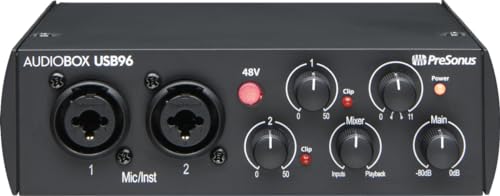
- Best for: A home-studio owner who records vocals and guitar and needs MIDI for a keyboard.
- 2 combo mic/instrument inputs with Class A mic preamps
- 24-bit resolution with 44.1, 48, 88.2 and 96 kHz sample rates
- MIDI in/out for keyboards and controllers
- 48V phantom power for condenser microphones

- Best for: Streamers and podcasters who want visible meters and loopback routing in one compact unit.
- 2-in/2-out USB-C audio interface
- ESS Sabre32 Ultra DAC with 24-bit/192 kHz resolution
- Full-color LCD for input and output level metering
- 2 combo XLR/TRS inputs with 48V phantom power
All 4 Picks at a Glance
| Product | Specs | Action |
|---|---|---|
| Focusrite Scarlett 2i2 3rd Gen |
| Check price on Amazon |
| PreSonus AudioBox USB 96 25th Anniversary |
| Check price on Amazon |
| MOTU M2 |
| Check price on Amazon |
 Behringer U-Phoria UMC202HD |
| Check price on Amazon |
A studio sound card decides what your recordings actually sound like before any plugin touches them. The choice is not about picking the most expensive box on the shelf; it is about matching the number of microphones and instruments you record at once, the kind of headphones you monitor with, and the computer the interface has to work with every day.
This guide is written for home-studio owners recording vocals and guitar, podcasters moving from a USB microphone to an XLR setup, and streamers who want cleaner voice audio without a rack of gear. Each interface below was chosen from the name and specifications shown on its Amazon product page, so the preamp count, resolution and connections listed here are the ones the listing itself states.
Top 3 picks at a glance
Quick Picks
As an Amazon Associate we earn from qualifying purchases.
| Product | Best for | Key spec from title |
|---|---|---|
| Focusrite Scarlett 2i2 3rd Gen | A first home-studio setup recording vocals and guitar | 2-in/2-out USB interface, 24-bit/192 kHz |
| PreSonus AudioBox USB 96 25th Anniversary | Recording a singer and a guitarist while a keyboard stays connected | 2×2 USB 2.0 interface, 24-bit/96 kHz, MIDI I/O |
| MOTU M2 | Streaming and podcasting with visible level meters | 2×2 USB-C interface, ESS Sabre32 DAC, 24-bit/192 kHz |
| Behringer U-Phoria UMC202HD | A first interface for vocals and guitar in a small setup | 2×2 USB interface, 24-bit/192 kHz, Midas preamps |
How to Choose
Inputs and preamps
Count the sources you record at the same time before looking at anything else. A singer recording a vocal over a guitar needs two inputs, while a podcast with two hosts needs two microphone preamps, and a keyboard player adds MIDI to the list. Combo jacks accept both XLR microphones and quarter-inch instrument cables, which keeps a small setup flexible when a session changes shape. Phantom power matters the moment a condenser microphone enters the picture, since those microphones stay silent without it. A preamp with enough clean gain also matters for quieter dynamic microphones, which can sound thin when the gain knob is pushed to its limit.
Sample rate and bit depth
Sample rate and bit depth describe how finely the interface measures the incoming sound. A 24-bit depth is the standard to look for, because it leaves far more room between the quietest and loudest sounds than 16-bit recording, which makes clipping less likely when a vocalist suddenly sings louder. Sample rates of 96 kHz and 192 kHz both exceed what most home projects need, and the difference between them is rarely audible in a finished mix. Higher rates also create larger files and heavier sessions, so choosing the highest number on the box is not always the smarter move.
Latency and drivers
Latency is the delay between playing a note and hearing it back through the computer, and it decides whether recording feels natural or like talking through a long tunnel. Direct monitoring solves most of the problem by sending the input signal straight to the headphones before the computer processes it, so the performer hears themselves instantly. Driver quality decides how low the remaining delay can go and how stable the interface stays during long sessions. Before buying, check that the manufacturer still publishes drivers for your operating system, since an interface with abandoned drivers can stop working after a system update.
Outputs, monitoring and MIDI
Outputs decide what the interface can feed once the recording is done. Balanced outputs connect to powered studio monitors without picking up hum, a separate headphone output with its own volume knob lets a performer monitor independently, and a monitor mix control blends the live input with playback. MIDI in and out ports connect keyboards, drum machines and hardware synthesizers that still use the five-pin connection, which a USB-only interface cannot do. If a setup includes any of that hardware, MIDI support should be treated as a requirement rather than a bonus feature.
The 4 Best Options
Focusrite Scarlett 2i2 3rd Gen
- Best for: A singer-songwriter recording vocals and guitar in a first home studio.
- 2 mic/line/instrument combo inputs for simultaneous two-channel recording
- 24-bit/192 kHz AD-DA converters
- Third-generation Scarlett mic preamps with switchable Air mode
- Gain halos for visual level feedback
A singer-songwriter recording vocals and guitar in a first home studio.
The interface has two inputs, so recording a full drum kit or a whole band at once is not possible; check that two channels cover your sessions.
The Scarlett 2i2 has become the default first interface for home studios because it does the basics with very little fuss. Two combo inputs take an XLR microphone or a guitar cable, and the Air switch adds brightness to vocals and acoustic instruments when a take sounds flat. Gain halos around the knobs turn green, amber or red as the signal rises, which makes setting a level far easier than watching a meter inside a DAW. It draws power from the USB cable, so there is no separate adapter to lose, and the separate headphone and speaker volume controls keep monitoring simple during overdubs.
Watch out for: The interface has two inputs, so recording a full drum kit or a whole band at once is not possible; check that two channels cover your sessions.
PreSonus AudioBox USB 96 25th Anniversary
- Best for: A home-studio owner who records vocals and guitar and needs MIDI for a keyboard.
- 2 combo mic/instrument inputs with Class A mic preamps
- 24-bit resolution with 44.1, 48, 88.2 and 96 kHz sample rates
- MIDI in/out for keyboards and controllers
- 48V phantom power for condenser microphones
A home-studio owner who records vocals and guitar and needs MIDI for a keyboard.
The maximum sample rate is 96 kHz, so confirm your projects do not require 192 kHz sessions before buying.
The AudioBox USB 96 is the interface to pick when a keyboard or a drum machine sits next to the microphone. Its MIDI in and out ports connect older keyboards and controllers that USB-only interfaces leave stranded, and the two Class A preamps handle a condenser microphone and a guitar in the same session. A mixer knob blends the live input with playback from the computer, so a vocalist hears themselves without the delay that makes overdubbing feel strange. The steel case survives being carried between rooms, and Studio One Artist is included for anyone who has not settled on recording software yet.
Watch out for: The maximum sample rate is 96 kHz, so confirm your projects do not require 192 kHz sessions before buying.
MOTU M2
- Best for: Streamers and podcasters who want visible meters and loopback routing in one compact unit.
- 2-in/2-out USB-C audio interface
- ESS Sabre32 Ultra DAC with 24-bit/192 kHz resolution
- Full-color LCD for input and output level metering
- 2 combo XLR/TRS inputs with 48V phantom power
Streamers and podcasters who want visible meters and loopback routing in one compact unit.
The M2 uses a USB-C connection, so check that your computer has a USB-C port or that you have a suitable adapter cable.
The MOTU M2 stands out the moment it is switched on, because its full-color LCD shows input and output levels without opening any software. That screen earns its keep during streaming and podcasting, where a glance confirms the microphone is live and the level is safe. Under the panel, ESS Sabre32 converters handle the digital side, and the two combo inputs accept microphones, guitars and line-level sources. Loopback routing sends computer audio into a stream or a call alongside the microphone, which removes the need for extra mixing software. MIDI ports and both TRS and RCA monitor outputs round out a box that covers more setups than its size suggests.
Watch out for: The M2 uses a USB-C connection, so check that your computer has a USB-C port or that you have a suitable adapter cable.
Behringer U-Phoria UMC202HD
- Best for: A beginner recording vocals and guitar who wants a straightforward first interface.
- 2×2 USB 2.0 audio interface for microphones and instruments
- Audiophile 24-bit/192 kHz resolution
- 2 Midas-designed mic preamps with 48V phantom power
- 2 combo XLR/TRS inputs
A beginner recording vocals and guitar who wants a straightforward first interface.
There is no MIDI input or output, so a keyboard or controller must connect to the computer another way.
The UMC202HD covers the essentials of a home studio with the smallest learning curve of this group. Two Midas-designed preamps take a microphone and an instrument at the same time, and the direct-monitor switch lets a performer hear the input with no delay while recording. The 24-bit/192 kHz converters match the resolution of interfaces that sit further up the range, and the metal case holds up to being moved between a desk and a rehearsal room. It works with the major recording programs on Windows and macOS, so the software a beginner already owns is usually enough to start.
Watch out for: There is no MIDI input or output, so a keyboard or controller must connect to the computer another way.
Which One Fits Your Situation
Recording vocals and acoustic guitar at the same time
Pick the Focusrite Scarlett 2i2 3rd Gen. Its two combo inputs take a condenser microphone and a guitar cable together, the Air mode brightens acoustic takes, and the gain halos make level-setting quick between songs. The separate headphone and monitor controls also make overdubbing a second part straightforward. It also runs on USB power alone, so the setup stays simple on a crowded desk.
Starting a two-person podcast
Pick the PreSonus AudioBox USB 96 25th Anniversary. Two Class A preamps give each host a proper microphone input, the mixer knob keeps monitoring delay-free, and the MIDI ports stay useful if a keyboard joins the show later. Studio One Artist is included, so the recording software question is settled on day one.
Streaming with live monitoring
Pick the MOTU M2. The full-color LCD shows levels at a glance while a stream is live, and loopback routing mixes computer audio with the microphone without extra software. The ESS converters keep the stream clean, and the USB-C connection keeps the desk tidy. MIDI ports and two kinds of monitor outputs also leave room to add a keyboard or powered speakers later.
Building a first studio on a small desk
Pick the Behringer U-Phoria UMC202HD. It covers the two inputs a beginner needs, the direct-monitor switch removes delay while recording, and the compact metal case fits a crowded desk. The 24-bit/192 kHz converters leave room to grow without replacing the interface. Two Midas-designed preamps handle a microphone and an instrument at the same time, so a first session needs nothing else.
Common Mistakes
- Buying an interface with one microphone input and discovering a two-person recording needs a second preamp.
- Choosing a condenser microphone without checking that the interface supplies 48V phantom power.
- Recording at the highest sample rate available and ending up with oversized sessions that strain an older laptop.
- Plugging studio monitors into unbalanced outputs and blaming the interface for the hum that follows.
- Forgetting to install the manufacturer’s drivers and assuming the interface is faulty when latency stays high.
Frequently Asked Questions
Do I need a studio sound card if my motherboard already has audio?
Motherboard audio is built for playback, not recording. It has no XLR microphone preamp, no phantom power for condenser microphones and no instrument input, so a vocal or guitar cannot be plugged in directly. A studio interface adds those inputs, cleaner conversion and direct monitoring, which are the parts that change how a recording sounds.
Is 192 kHz better than 96 kHz for home recording?
Not in any way most listeners will notice. Both rates capture far more detail than a finished song needs, and the difference between them is smaller than the difference a microphone or a room makes. Higher rates also double the file size and the load on the computer, so 96 kHz is enough for most home studios.
Can I use a studio sound card with a laptop?
Yes, every interface in this guide is bus-powered over USB and works with a laptop. The main checks are a free USB port of the right type and drivers for the laptop’s operating system. A USB-C interface on a laptop with only USB-A ports needs an adapter cable, so confirm the port type before ordering.
What cables do I need besides the interface?
Plan for an XLR cable for each microphone, an instrument cable for a guitar or bass, and a pair of balanced cables for powered studio monitors. The interface ships with its USB cable, but microphone and monitor cables are usually sold separately. A microphone stand and a pop filter are worth adding for vocal sessions.
Start with the number of inputs the next year of sessions will need, then match the interface to that list rather than to a specification sheet. Any of the four interfaces here will record a clean vocal and guitar track; the right one is the one whose inputs, outputs and monitoring fit the way the studio actually works.
Related guides
More from Amazon
Programs that pair well with the guide above. Offers and eligibility are set by Amazon and may change.
A free business account with business pricing and bulk-buying tools for work, shop or home office.
Create a business accountFree shipping on eligible items, Prime Video and more. Eligible new members can start with a free trial.
Start a Prime free trialAudiobooks and podcasts to listen to on the go. Eligible new members can start with a free trial.
Try Audible freeAd-free music streaming. Eligible new subscribers can start with a free trial.
Try Music Unlimited freeAs an Amazon Associate we earn from qualifying purchases.