Our Short List of 3

- Best for: Players who want the most immersive curve for fast-paced games.
- 34-inch VA panel with 3440 by 1440 WQHD resolution
- 1000R curved screen
- 165Hz refresh rate and 1ms response time
- AMD FreeSync Premium support
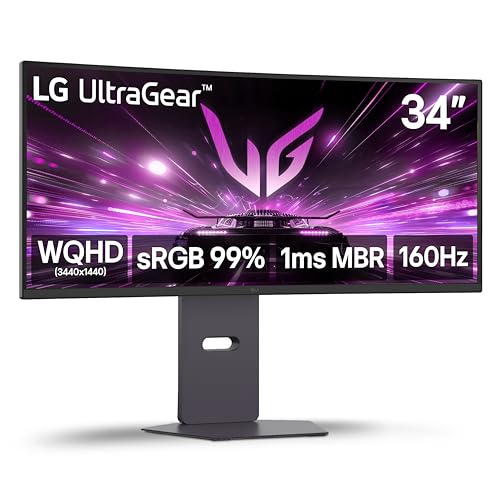
- Best for: Gamers who want built-in speakers and a high refresh rate in one screen.
- 34-inch VA panel with 3440 by 1440 QHD resolution
- 160Hz refresh rate with 1ms Motion Blur Reduction
- HDR10 support and 99 percent sRGB coverage
- AMD FreeSync Premium support

- Best for: Players who want rich colour and HDR highlights at 144Hz.
- 34-inch VA panel with 3440 by 1440 resolution
- 144Hz refresh rate and 1ms MPRT response time
- 1500R curved screen
- 90 percent DCI-P3 colour coverage
All 4 Picks at a Glance
| Product | Specs | Action |
|---|---|---|
| Samsung Odyssey G5 34-Inch |
| Check price on Amazon |
| LG UltraGear 34GP63A-B |
| Check price on Amazon |
| GIGABYTE G34WQC A |
| Check price on Amazon |
 Dell S3422DWG |
| Check price on Amazon |
A wide monitor changes how a gaming PC feels to use, because the extra horizontal space replaces a second screen and stretches the game world across your whole field of view. The real decision is not simply how large the panel is, but which combination of resolution, refresh rate, curve, and panel type matches the games you play and the graphics card already sitting in your case.
This guide is for PC gamers moving from a standard 16:9 screen to a 21:9 ultrawide, for players who want one screen for gaming and work, and for buyers checking whether their graphics card can drive 3440 by 1440 pixels smoothly. Every monitor below was chosen from the name and specifications shown on its Amazon product page.
Our Top Picks
Top 3 picks at a glance
Quick Picks
As an Amazon Associate we earn from qualifying purchases
| Product | Best for | Key spec from title |
|---|---|---|
| Samsung Odyssey G5 34-Inch | Fast-paced games on a deep curve | 34-inch 1000R curved WQHD screen |
| LG UltraGear 34GP63A-B | Smooth play with built-in speakers | 34-inch curved QHD screen at 160Hz |
| GIGABYTE G34WQC A | Colour-rich play at a high refresh rate | 34-inch 144Hz ultra-wide curved screen |
| Dell S3422DWG | Immersive play with a gentle curve | 34-inch 1800R curved WQHD screen |
How to Choose
Resolution and aspect ratio
Most wide monitors worth buying use a 21:9 aspect ratio with a 3440 by 1440 resolution, which gives roughly a third more horizontal pixels than a standard 1440p screen. That extra width shows more of the map in strategy games, more of the track in racing games, and more timeline in video editing, all without a second monitor. A 2560 by 1080 panel costs less but looks soft on a 34-inch screen, while a 5120 by 1440 super-ultrawide demands a much stronger graphics card. Check that your favourite games support 21:9 properly, because a few older titles stretch the image or show black bars at the sides.
Refresh rate and response time
Refresh rate decides how smooth motion looks, and response time decides how clean fast movement stays. A 144Hz panel is the sensible starting point for a gaming ultrawide, with 160Hz and 165Hz models adding a small extra margin for competitive play. Look for a quoted response time of 1 millisecond, and remember that manufacturers measure it differently, so treat the number as a rough guide rather than a promise. Adaptive sync matters just as much: FreeSync Premium support keeps the frame rate and the panel in step, which removes tearing without the input lag that older sync methods introduced.
Panel type and colour
Ultrawide gaming monitors mostly use VA panels, which deliver deep blacks and strong contrast, often rated around 3000 to 1, and that contrast makes dark scenes in horror and space games look genuinely dark. The trade-off is narrower viewing angles and occasional smearing in very fast dark-to-light transitions. IPS ultrawides keep colours accurate from wider angles and suit colour work, but they cost more and their blacks look grey in a dark room. Check the colour coverage figure on the listing: 90 percent DCI-P3 or 99 percent sRGB both signal a panel that will make games look rich rather than washed out.
Curve, stand, and connections
The curve rating tells you how tightly the screen wraps around you, with 1000R the most aggressive and 1800R the gentlest, and a tighter curve suits a single screen placed close to your face while a gentler curve feels calmer for mixed gaming and office work. The stand deserves the same attention as the panel: height adjustment lets you set the screen at eye level, while a tilt-only stand may force you to stack books underneath. Count the ports before you buy, since two HDMI ports and one DisplayPort cover a PC and a console, and a built-in USB hub saves you reaching behind the desk for spare ports.
The 4 Best Options
Samsung Odyssey G5 34-Inch
- Best for: Players who want the most immersive curve for fast-paced games.
- 34-inch VA panel with 3440 by 1440 WQHD resolution
- 1000R curved screen
- 165Hz refresh rate and 1ms response time
- AMD FreeSync Premium support
Players who want the most immersive curve for fast-paced games.
The tight 1000R curve feels intense up close, so measure your desk depth before ordering.
The Samsung Odyssey G5 wraps a 34-inch WQHD screen around the viewer with a tight 1000R curve, which makes it the most immersive pick in this guide for players who sit close to their monitor. Its 165Hz refresh rate and 1ms response time keep fast shooters and racing games smooth, while FreeSync Premium keeps frames and panel in step. The VA panel delivers the deep blacks that suit dark, atmospheric games, and the wide screen also works well as a single-screen replacement for a dual-monitor work setup.
Watch out for: The tight 1000R curve feels intense up close, so measure your desk depth before ordering.
LG UltraGear 34GP63A-B
- Best for: Gamers who want built-in speakers and a high refresh rate in one screen.
- 34-inch VA panel with 3440 by 1440 QHD resolution
- 160Hz refresh rate with 1ms Motion Blur Reduction
- HDR10 support and 99 percent sRGB coverage
- AMD FreeSync Premium support
Gamers who want built-in speakers and a high refresh rate in one screen.
The HDMI ports cap the full resolution at 85Hz, so use DisplayPort for the full 160Hz.
The LG UltraGear 34GP63A-B pairs a 34-inch curved QHD screen with a 160Hz refresh rate, making it a strong all-rounder for gaming and everyday use. Its VA panel covers 99 percent of the sRGB spectrum and supports HDR10, so colours look vivid in both games and films. Two built-in 7W speakers tuned with MaxxAudio mean you can play without headphones, which is rare at this size, and the height-adjustable stand makes it easy to set the screen at eye level for long sessions.
Watch out for: The HDMI ports cap the full resolution at 85Hz, so use DisplayPort for the full 160Hz.
GIGABYTE G34WQC A
- Best for: Players who want rich colour and HDR highlights at 144Hz.
- 34-inch VA panel with 3440 by 1440 resolution
- 144Hz refresh rate and 1ms MPRT response time
- 1500R curved screen
- 90 percent DCI-P3 colour coverage
Players who want rich colour and HDR highlights at 144Hz.
The stand takes up a fair amount of desk depth, so check your available space first.
The GIGABYTE G34WQC A is a 34-inch ultrawide with a 144Hz refresh rate and a 1500R curve that sits between the aggressive Samsung and the gentle Dell, giving a balanced wrap without overwhelming a smaller desk. Its VA panel covers 90 percent of the DCI-P3 colour space and carries VESA DisplayHDR 400 certification, so bright highlights in games stand out against dark scenes. Built-in speakers, a height-adjustable stand, and FreeSync Premium support round out a monitor that handles competitive play and single-player adventures with equal ease.
Watch out for: The stand takes up a fair amount of desk depth, so check your available space first.
Dell S3422DWG
- Best for: A shared gaming and work desk where the screen must suit both jobs.
- 34-inch VA panel with 3440 by 1440 WQHD resolution
- 144Hz refresh rate and 1ms MPRT response time
- 1800R curved screen with 21:9 aspect ratio
- AMD FreeSync Premium Pro support
A shared gaming and work desk where the screen must suit both jobs.
The gentle curve is less dramatic than tighter rivals, so it suits calm viewing more than maximum immersion.
The Dell S3422DWG takes a calmer approach to the ultrawide format, with a gentle 1800R curve that feels natural for both gaming and office work on the same screen. Its 34-inch WQHD panel runs at 144Hz with a 1ms MPRT response time, and FreeSync Premium Pro support keeps fast motion free of tearing. The panel covers 90 percent of the DCI-P3 colour space and carries DisplayHDR 400 certification, while the stand adjusts for height, tilt, swivel, and slant, which makes it the most flexible screen here for a shared desk.
Watch out for: The gentle curve is less dramatic than tighter rivals, so it suits calm viewing more than maximum immersion.
Which One Fits Your Situation
You play fast shooters and sit close
Pick the Samsung Odyssey G5. The 1000R curve fills your peripheral vision, the 165Hz refresh rate keeps motion smooth, and the 1ms response time keeps fast turns clean. Sit about an arm’s length away and the curve does the work of pulling the edges of the screen toward you.
You want one screen for games and films
Pick the LG UltraGear 34GP63A-B. The 160Hz panel handles games, the HDR10 support and 99 percent sRGB coverage make films look vivid, and the built-in speakers mean you can watch without headphones. Use DisplayPort to unlock the full refresh rate. The height-adjustable stand also lets you set the screen at eye level for long film sessions.
You want rich colour on a mid-size desk
Pick the GIGABYTE G34WQC A. The 90 percent DCI-P3 coverage and DisplayHDR 400 certification make colours pop, the 1500R curve is a comfortable middle ground, and the 144Hz refresh rate is fast enough for most competitive games. The 1500R curve keeps the edges close without overwhelming a smaller desk, and the built-in speakers save space that separate speakers would take.
You share the desk with work
Pick the Dell S3422DWG. The gentle 1800R curve feels calm during long work sessions, the stand adjusts in every direction, and the USB hub keeps peripherals within reach. It is the easiest screen here to live with all day. The five USB ports keep a keyboard, mouse, and headset connected, and the swivel adjustment lets you turn the screen toward a colleague.
Common Mistakes
- Buying a 34-inch ultrawide before checking whether your graphics card can drive 3440 by 1440 pixels at high settings.
- Choosing a panel by refresh rate alone and ignoring whether the HDMI ports can carry that rate at full resolution.
- Placing a tightly curved monitor too far away, which wastes the curve and makes the edges feel distant.
- Assuming every game supports 21:9, then finding black bars or a stretched image in an older favourite.
- Forgetting to measure desk depth, so a large stand leaves no room for a keyboard and mouse.
Frequently Asked Questions
Is a 34-inch ultrawide better than two monitors?
For most gamers it is, because a single ultrawide removes the bezel gap in the middle of your view and keeps the game window centred. Two monitors still win when you need a separate screen for chat or streaming tools, since a second display can stay on while the game runs full screen.
Do I need a powerful graphics card for 3440 by 1440?
You need a mid-range card or better for high settings at this resolution, because it carries about a third more pixels than standard 1440p. A card that handles 1440p comfortably will usually manage an ultrawide with a few settings lowered, while older cards may need medium settings.
Does the curve rating matter for gaming?
Yes, because the curve decides how much of the screen sits at the same distance from your eyes. A 1000R curve wraps tightly and suits close seating, while an 1800R curve is gentler and suits a screen shared with office work. Neither is better in absolute terms.
Is 144Hz enough for an ultrawide gaming monitor?
Yes for most players, since 144Hz already looks far smoother than a standard 60Hz screen. The 160Hz and 165Hz models in this guide add a small margin for competitive play, but the difference is subtle compared with the jump from 60Hz to 144Hz.
Related guides
More from Amazon
Programs that pair well with the guide above. Offers and eligibility are set by Amazon and may change.
A free business account with business pricing and bulk-buying tools for work, shop or home office.
Create a business accountFree shipping on eligible items, Prime Video and more. Eligible new members can start with a free trial.
Start a Prime free trialAudiobooks and podcasts to listen to on the go. Eligible new members can start with a free trial.
Try Audible freeAd-free music streaming. Eligible new subscribers can start with a free trial.
Try Music Unlimited freeAs an Amazon Associate we earn from qualifying purchases.