Our Short List of 3

- Bar length: 15.7 in
- Color temperature: 3000K to 6500K
- Color rendering: Ra98
- Controls: Touch, with auto-dimming ambient sensor

- Light sources: Front task light plus rear backlight
- Backlight presets: Work, Immersive and Design
- Controls: Wireless remote with backlit buttons
- Optics: Asymmetric front beam, screen-glare free

- Output: 250 lumens
- Color temperature: 2700K to 6500K, stepless
- Color rendering: Ra95
- Blue light rating: RG0
All 4 Picks at a Glance
| Product | Specs | Action |
|---|---|---|
| 1. Quntis ScreenLinear Basic Monitor Light Bar |
| Check price on Amazon |
| 3. Quntis Monitor Light Bar with Backlight |
| Check price on Amazon |
| 4. Yeelight Monitor Light Bar |
| Check price on Amazon |
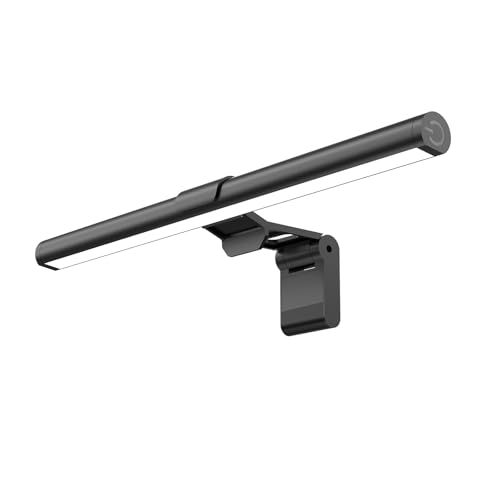 5. SAMPHON Monitor Light Bar |
| Check price on Amazon |
The best monitor light bar arrangement for a dual monitor gaming setup is one bar per screen, matched as a pair. A single bar centered over the join between two monitors lights the seam and the desk below it, while the outer halves of both screens stay comparatively dim and the beam angle changes across the pair. Two identical bars keep brightness and color temperature even from one display to the next, which matters when a game world, a stream dashboard and a chat window all sit side by side in a dark room.
The five picks below were chosen with that paired layout in mind: consistent color output, controls that stay manageable when there are two of everything, and mounts that sit happily on two separate panels. They span budget and premium tiers, an auto-dimming pair, and a backlight model.
As an Amazon Associate, we earn from qualifying purchases.
Top 3 picks at a glance
Quick Answer
For most dual monitor gaming setups, fit one Quntis ScreenLinear Basic per screen: its auto-dimming sensor keeps both bars at the same brightness without any fiddling. The Xiaomi Mi bar is the premium alternative with a wireless remote, while the Quntis backlight model adds bias lighting behind both displays for dark-room play.
Table of Contents
- Quick Answer
-
- Quntis ScreenLinear Basic Monitor Light Bar
-
- Xiaomi Mi Computer Monitor Light Bar
-
- Quntis Monitor Light Bar with Backlight
-
- Yeelight Monitor Light Bar
-
- SAMPHON Monitor Light Bar
- How to Choose
- Who Should Skip
- FAQ
- Final Verdict
- Product and ASIN Reference
1. Quntis ScreenLinear Basic Monitor Light Bar
- Bar length: 15.7 in
- Color temperature: 3000K to 6500K
- Color rendering: Ra98
- Controls: Touch, with auto-dimming ambient sensor
The ScreenLinear Basic is the easiest bar to run as a matched pair, because its headline feature does the syncing for you. A built-in ambient sensor auto-dims each bar to hold a steady work-surface brightness as room light changes, so the left and right screens stay at the same level through an evening session without either bar being touched. Set both to the same color temperature once and the pair behaves like one lighting system spread across two monitors.
The asymmetric optics throw the light down onto the desk and keep it off the glass, and the published color rendering figure of Ra98 is the highest in this roundup, which helps when the second screen carries color-sensitive work such as a stream overlay or photo reference. Controls are touch-only on the bar itself, so adjustments mean reaching up, but with the sensor handling brightness that reach is rare. The 15.7-inch body suits 24- and 27-inch monitors well; on wider panels it lights the central desk area rather than the full span.
2. Xiaomi Mi Computer Monitor Light Bar
The Xiaomi Mi bar is the premium pick for a dual setup where the two screens do different jobs. Its magnetic mount rotates to fine-tune the beam angle, which is useful when one monitor sits slightly higher or angled inward, and the included 2.4 GHz wireless remote puck adjusts brightness and color temperature from the desk instead of at the screen. Bought as a pair, each bar keeps its own remote, so the gaming screen and the side screen can run different warmth settings for play versus reading.
The metal body gives it a more finished look than plastic rivals, and the published Ra95 color rendering with a wide 2700K to 6500K range covers warm evening light through to cool daylight tones. At 17.7 inches it is one of the longer bars here, spreading light further across a wide desk. The clamp-free magnetic design does assume a reasonably flat top edge, so heavily sculpted gaming monitor backs deserve a fit check before ordering two.
Specs
- Bar length: 17.7 in
- Color temperature: 2700K to 6500K
- Color rendering: Ra95
- Controls: 2.4 GHz wireless remote
- Mount: Magnetic, angle adjustable
- Power: USB-C
- Body: Metal
- Tier: Premium
3. Quntis Monitor Light Bar with Backlight
- Light sources: Front task light plus rear backlight
- Backlight presets: Work, Immersive and Design
- Controls: Wireless remote with backlit buttons
- Optics: Asymmetric front beam, screen-glare free
This Quntis model answers the other half of the dual monitor problem: the wall behind the screens. Alongside its front task light it carries a rear backlight that washes the wall with ambient light, softening the contrast between two bright panels and a dark room. Run a pair of them and the glow spans the full width of the setup, which is the bias-lighting effect that makes long night sessions easier to sit through.
The backlight offers Work, Immersive and Design presets, so the rear glow can stay neutral for desk work or shift for media and play, while the front beam keeps its glare-free task role. A backlit wireless remote handles both light sources, and its illuminated buttons are easy to find mid-session. Because the front and rear lights are independent, one bar can light the desk while its backlight stays off, which helps when only one side of the setup is in use. It is the natural upgrade path if a plain pair of task bars leaves the room feeling stark.
4. Yeelight Monitor Light Bar
- Output: 250 lumens
- Color temperature: 2700K to 6500K, stepless
- Color rendering: Ra95
- Blue light rating: RG0
The Yeelight bar brings a full aluminum body and a lighting-brand spec sheet to the budget end of a dual setup. It holds an RG0 blue-light safety rating, the safest photobiological classification, alongside Ra95 color rendering and a stepless 2700K to 6500K range that budget bars usually restrict to a few fixed steps. That range matters in a pair: both bars can be dialed to exactly the same warmth.
Output is a modest 250 lumens, which is enough for the desk zone under each screen but will not flood a deep desk, so this pair suits compact battlestations rather than wide executive desks. Controls are touch-based with no remote, keeping the second screen’s lighting simple and cable-light. The low-profile body clears a top-mounted webcam and the mount works on flat and curved panels, which makes it a tidy match for a main curved gaming monitor paired with a flat secondary display.
5. SAMPHON Monitor Light Bar
- Bar length: 11.8 in
- Color temperatures: 3000K, 4000K and 6500K steps
- Controls: Mechanical switch with memory function
- Mount: Counterweight clip, tool-free
The SAMPHON is the low-cost way to light the second monitor when the main screen already has a bar, or to test the paired layout before committing to two premium units. Its 11.8-inch body is short, which limits it to smaller panels, but on a 22- or 24-inch side monitor in portrait or landscape it covers the keyboard zone in front of that screen well enough for chat, guides and voice apps.
A mechanical switch cycles three fixed color temperatures, 3000K, 4000K and 6500K, and a memory function recalls the last setting at power-up, so the bar returns to the same look every session without adjustment. The counterweight clip installs without tools and grips thin or thick top bezels. The body is plastic and there is no auto-dimming or remote, which is the honest trade at this tier. As a matched pair for a compact dual setup it works; as the only light over a wide desk it will feel undersized.
How to Choose
Start with the pair principle: two identical bars, one per monitor, beat one long or premium bar straddling the join, because each screen gets its own correctly angled beam and matched color. If the budget only stretches to one bar today, buy the model you can duplicate later, and put it on the main gaming screen first.
Next, match the control style to how the two screens are used. Auto-dimming, as on the Quntis Basic, keeps a pair synchronized with no effort and suits setups where both monitors are used together. Separate remotes, as with the Xiaomi Mi, suit a main screen plus a utility screen that run at different brightness. Touch-only bars are fine when settings rarely change.
Then check the physical fit on both panels: top-bezel thickness, any curve, and whether a webcam already lives at the center of either screen. Finally, plan power. Two bars need two USB ports and tidy cable runs down two separate monitor arms or stands, so count spare ports on the PC or a powered hub before the pair arrives. A rear backlight is worth adding when the setup faces a wall and evening contrast fatigue is the main complaint.
Who Should Skip
Skip the pair approach if the two monitors are different sizes with very different bezels and you care about a perfectly symmetrical look; matched bars still sit at different heights. Owners of a single ultrawide should look at curved-rated bars instead, since two short bars leave a dark seam at the center of one continuous panel. If the desk already has a good lamp and the second screen is only on occasionally, one bar on the main monitor plus the SAMPHON later is a better spend than two premium bars today. And if the monitors are wall-mounted flush with no clearance behind them, rear-backlight models lose their main advantage.
FAQ
Do I need two light bars for a dual monitor setup?
One bar can light the desk in front of a single screen, but the second monitor is left with a bright panel in a dark zone, which recreates the contrast problem a light bar is meant to solve. A matched pair, one centered on each monitor, keeps brightness and color temperature even across the whole setup.
Can one long light bar cover two monitors?
A single bar centered over the join puts its brightest zone over the seam between the screens rather than over either keyboard area, and its fixed beam angle cannot suit two separately angled panels. Very long bars exist for ultrawides, but for two distinct monitors, two standard bars give more even coverage.
How do I keep two light bars at the same settings?
The simplest route is an auto-dimming model, where each bar reads the same room light and settles at the same brightness on its own. With manual bars, set both to the same color temperature step and brightness level when they are installed, and choose models with a memory function so they return to those settings at power-up.
Where do two light bars plug in?
Most monitor light bars run from USB, so a pair needs two ports. A port on each monitor’s built-in hub is the tidiest option where available; otherwise use rear PC ports or a powered hub, and route each cable down its own monitor’s stand or arm so the two runs stay separate and slack-free.
Final Verdict
For most dual monitor gaming setups, a pair of Quntis ScreenLinear Basic bars is the default recommendation: the auto-dimming sensors keep both sides matched, and the Ra98 output is the cleanest here. Step up to the Xiaomi Mi pair for metal build quality and per-screen wireless remotes, or choose the Quntis backlight model when wall glow behind both screens is the goal. The Yeelight pair is the budget route with real color range, and the SAMPHON covers a small second screen for the least outlay.
Product and ASIN Reference
| Product | ASIN |
|---|---|
| Quntis ScreenLinear Basic Monitor Light Bar | B08DKQ3JG1 |
| Xiaomi Mi Computer Monitor Light Bar | B08W2C5W59 |
| Quntis Monitor Light Bar with Backlight | B0CKRJZBTX |
| Yeelight Monitor Light Bar | B0DRG3WXB3 |
| SAMPHON Monitor Light Bar | B0FW43JPNG |
Related guides
More from Amazon
Programs that pair well with the guide above. Offers and eligibility are set by Amazon and may change.
A free business account with business pricing and bulk-buying tools for work, shop or home office.
Create a business accountFree shipping on eligible items, Prime Video and more. Eligible new members can start with a free trial.
Start a Prime free trialAudiobooks and podcasts to listen to on the go. Eligible new members can start with a free trial.
Try Audible freeAd-free music streaming. Eligible new subscribers can start with a free trial.
Try Music Unlimited freeAs an Amazon Associate we earn from qualifying purchases.