The best silent CPU cooler for most builders in 2026 is a large dual-tower air cooler such as the Noctua NH-D15 G2, because its big fins let the fans spin slowly at gaming loads. For a similar result at a much lower price, the Thermalright Peerless Assassin 120 SE is the usual quiet budget choice. What makes a cooler quiet is headroom: the cooler’s capacity should be well above what your CPU actually draws, so the fans never need to speed up.
As an Amazon Associate we earn from qualifying purchases at no extra cost to you.


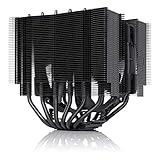

Our Top Picks


Top 3 picks at a glance
Quick comparison of the quiet picks
| Pick | Best for | Key specs | Price range |
|---|---|---|---|
| Noctua NH-D15 G2 | Best overall, high-end CPUs | Dual tower, three-heatpipe-class build with two 140 mm PWM fans, about 168 mm tall | Premium |
| Thermalright Peerless Assassin 120 SE | Best budget quiet air cooler | Dual tower, two 120 mm PWM fans, about 155 mm tall | Budget |
| Noctua NH-U12A | Best for tighter cases | Single tower, two 120 mm fans, about 158 mm tall | Premium |
| be quiet! Dark Rock Pro 5 | Best for quiet fans and a dark look | Dual tower, Silent Wings fans, about 168 mm tall, rated around 270 W by the manufacturer | Upper mid-range to premium |
| Noctua NH-L9x65 | Best low-profile for small builds | 65 mm tall, 92 mm fan, suited to modest CPUs | Mid-range |
| Arctic Liquid Freezer III 360 | Best quiet AIO for hot CPUs | 360 mm radiator, three 120 mm fans, pump plus VRM fan | Mid-range to upper mid-range |
Dimensions and ratings come from each manufacturer’s spec sheet. Check them against your own case before ordering.
Best overall: Noctua NH-D15 G2
This is the one to buy if you want the lowest fan speeds at a given temperature on a high-end CPU. The two towers and large 140 mm fans move a lot of air at low rpm, and Noctua’s fan curves and mounting hardware cover AM4, AM5, LGA1700 and LGA1851. The trade-offs are size and price. At about 168 mm tall it needs a wide case, and the cooler overhangs the first RAM slot on some boards, so check memory height before you buy.
Best budget: Thermalright Peerless Assassin 120 SE
This dual-tower cooler costs far less than the premium brands. Its two 120 mm fans are slightly louder at full speed, but the cooler is large enough that a mid-range CPU rarely pushes them there. Trade-offs: fan bearings and the included paste are plainer than Noctua’s, and the fan noise character (a faint hum rather than a pure whoosh) varies from unit to unit. Capping the fan curve fixes most of that, as covered below.
Best for tighter cases: Noctua NH-U12A
The NH-U12A uses a single tower with two high-pressure 120 mm fans, so it keeps noise low while staying under 160 mm. It suits mid-tower cases where a dual tower would collide with the side panel or the RAM. It runs a little warmer than the NH-D15 G2 on 200 W-class chips, but it is excellent with 65 W to 150 W processors.
Best for quiet fans and a dark look: be quiet! Dark Rock Pro 5
be quiet! tunes its Silent Wings fans for low acoustic noise, and the all-black finish is easier to match to a build than Noctua’s brown and beige. The manufacturer rates it around 270 W, which is plenty for any mainstream gaming CPU. The trade-off is a high price for how large the cooler is, and the same 168 mm height as the NH-D15 G2.
Best low-profile: Noctua NH-L9x65
For small-form-factor cases with a strict 65 mm or lower clearance, this is the quiet option. The 92 mm fan is easy on the ears at 6-core to 8-core gaming loads, but it is not meant for sustained all-core loads on a 200 W chip. Pair it with a CPU you run at a reduced power limit, which is common in small builds.
Best quiet AIO: Arctic Liquid Freezer III 360
If your CPU runs hot, a 360 mm radiator gives you the surface area to keep fans slow. The 360 mm size matters more than the brand: three fans spread the load, so each can turn slowly. The trade-offs are pump noise (a faint hum or gurgle that some people hear in silent rooms), the need for a case that fits a 360 mm radiator, and a shorter expected life than a plain air cooler.
Worked example: how much cooler headroom do you need?
Noise grows quickly with fan speed. A common acoustic rule of thumb is that sound pressure changes by roughly 50 × log10 of the speed ratio, so it is approximate and varies by fan design. Dropping a fan from 1,500 rpm to 1,000 rpm gives 50 × log10(0.667), a change of about 9 dB. That is a very noticeable reduction, and it explains why bigger coolers sound quieter.
Now put numbers to a cooler choice. Suppose your CPU draws about 90 W while gaming and about 180 W in a long all-core render. A cooler rated for 250 W will carry the gaming load at roughly 36 percent of its rated capacity (90 ÷ 250) and the render at 72 percent (180 ÷ 250). A cooler rated for 150 W would be at 60 percent for gaming and over its limit for rendering. The first stays slow and quiet in both cases, and the second ramps up in both. As a working rule, aim for a rated capacity at least 1.5 times your sustained power draw, and 2 times if you want it truly inaudible.
Ratings from different brands are not measured the same way, so use them to compare cooler classes rather than to predict exact temperatures.
Decision matrix: match your situation to a cooler
| Your situation | Sustained CPU power | Case clearance | Choose |
|---|---|---|---|
| High-end gaming CPU, quiet priority | 90–150 W | 170 mm or more | Noctua NH-D15 G2 or be quiet! Dark Rock Pro 5 |
| Mid-range CPU, tight budget | 65–120 W | 160 mm or more | Thermalright Peerless Assassin 120 SE |
| Mid-tower with limited width | 65–150 W | 160 mm | Noctua NH-U12A |
| Small-form-factor case | 35–95 W | Around 65 mm | Noctua NH-L9x65 |
| Hot CPU, heavy rendering | 180–250 W | 360 mm radiator mount | Arctic Liquid Freezer III 360 |
How to choose: the criteria that decide noise
1. Cooler size and fin area
A larger heatsink lets fans run slower for the same temperature. This is the single biggest factor, which is why tower coolers beat small ones at the same price.
2. Fan size and bearing quality
Fans of 120 mm to 140 mm move more air per revolution than smaller ones. Look for PWM control down to a low minimum rpm, ideally 300 to 500 rpm. A fan that cannot slow down will whir at idle no matter how big the cooler is.
3. Clearance and fit
Measure the space between the CPU socket and the side panel, and check the manufacturer’s RAM height limits. Also confirm your socket: AM4, AM5, LGA1700 and LGA1851 are each covered by the major brands, but check the spec sheet.
4. Your case and the rest of the fans
A silent cooler in a loud case is wasted. Case fans and a graphics card that spins up under load often dominate the noise, so match their curves to the cooler’s.
Fan curve settings that keep it quiet
- Idle to 50 °C: hold the fan at its minimum, around 30 to 40 percent PWM. The reason is that below this temperature extra airflow only adds noise.
- 50 °C to 75 °C: ramp slowly from 40 to about 60 percent. A gentle slope avoids the audible rev-up and rev-down during brief boosts.
- Above 75 °C: climb to 80 or 100 percent only here, so the fan is loud only when it is actually needed.
- Add 2 to 5 seconds of response delay in your BIOS or fan software. Short CPU spikes then do not trigger fan changes.
- Consider a lower CPU power limit. Cutting a chip from 200 W to 140 W often costs only a few percent in games while lowering temperature noticeably.
Frequently Asked Questions
Is an air cooler or an AIO quieter?
A large dual-tower air cooler is usually as quiet as an AIO at gaming loads and has no pump noise. An AIO with a 360 mm radiator can be quieter under heavy sustained loads on hot CPUs, because it spreads heat across more fan area.
Can a cooler be silent if my case is loud?
Not in practice. Case fans, the GPU and even coil whine can mask or exceed the cooler’s noise. Tune all fan curves together, and use a case with good airflow so fans can run slowly.
Does thermal paste affect noise?
Indirectly. Good paste and even mounting lower temperatures a few degrees, which can keep the fan curve lower. It will not change noise at a fixed fan speed, so focus on cooler size first.
Is fanless cooling an option?
Fanless towers exist for low-power CPUs of roughly 65 W or less, and they depend on case airflow. They are not a good fit for modern high-end gaming CPUs.
How loud is too loud?
In a quiet room, most people stop noticing a PC below roughly 25 to 30 dBA measured at close range. Manufacturers’ noise figures are measured in different ways, so treat them as guidance and rely on cooler size and fan curves to get there.
Do I need to replace the stock cooler?
If your CPU ships with a basic cooler, upgrading usually brings the largest drop in noise. Some high-end chips ship without a cooler at all, so budget for one.
Related guides
More from Amazon
Programs that pair well with the guide above. Offers and eligibility are set by Amazon and may change.
A free business account with business pricing and bulk-buying tools for work, shop or home office.
Create a business accountFree shipping on eligible items, Prime Video and more. Eligible new members can start with a free trial.
Start a Prime free trialAudiobooks and podcasts to listen to on the go. Eligible new members can start with a free trial.
Try Audible freeAd-free music streaming. Eligible new subscribers can start with a free trial.
Try Music Unlimited freeAs an Amazon Associate we earn from qualifying purchases.


