The best gaming “hard drive” in 2026 is a PCIe 4.0 NVMe SSD such as the WD_BLACK SN850X or Samsung 990 Pro for the games you play now. A large 3.5-inch hard disk such as the Seagate BarraCuda or Toshiba X300 is worth buying only as cheap bulk storage for games you rarely launch. Most gamers are best served by a 2 TB NVMe SSD as the main drive, plus a hard disk or portable SSD only if the library outgrows it.
The search term says “hard drives”, but what people usually want is storage that makes games load quickly and holds a big library. This guide treats the phrase that way and covers both drive types, including consoles and external options.
As an Amazon Associate we earn from qualifying purchases at no extra cost to you.

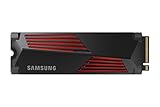


Our Top Picks

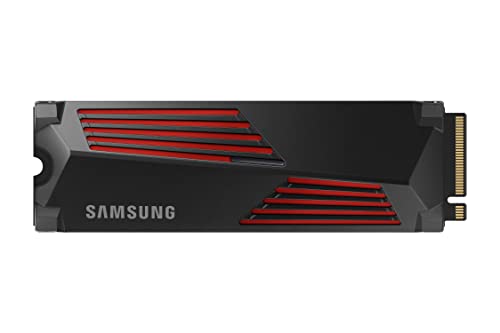


Top 3 picks at a glance
Quick comparison of the best picks
| Pick | Best for | Key specs (per manufacturer spec sheets) | Price range |
|---|---|---|---|
| WD_BLACK SN850X | Best overall for PC (and PS5 with heatsink version) | M.2 NVMe, PCIe 4.0 x4, up to about 7,300 MB/s read (1-2 TB models) | Mid-range to premium |
| Samsung 990 Pro | Premium PC and PS5 build | M.2 NVMe, PCIe 4.0 x4, up to about 7,450 MB/s read | Premium |
| Crucial P310 | Best budget NVMe | M.2 NVMe, PCIe 4.0 x4, up to about 7,100 MB/s read (2 TB) | Budget to mid-range |
| Seagate BarraCuda 3.5-inch | Cheapest bulk capacity | SATA 6 Gb/s, 5,400 or 7,200 rpm depending on capacity, roughly 150-250 MB/s sequential | Budget |
| Toshiba X300 | Higher-performance hard disk | SATA 6 Gb/s, 7,200 rpm, large cache | Budget to mid-range |
| Samsung T7 Shield | Best portable SSD for consoles and laptops | USB 3.2 Gen 2, up to about 1,050 MB/s, rugged casing | Mid-range |
| WD_BLACK P10 Game Drive | Portable hard disk for old games and backups | USB 3.2 Gen 1, 2.5-inch HDD, roughly 100-130 MB/s real-world | Budget |
Best overall: WD_BLACK SN850X
The SN850X suits anyone with a free M.2 slot who wants one drive that handles the OS, current games and big patches. It sits near the top of the PCIe 4.0 class. Published reviews generally find it among the fastest in sustained and mixed workloads, and its heatsink version fits the PS5 expansion bay. The main trade-off is price per terabyte. It costs several times what a hard disk does, so a 4 TB version is a real expense.
Best premium: Samsung 990 Pro
The 990 Pro is a good choice if you want strong sustained performance, efficient power draw and a mature software suite. In everyday gaming it is hard to tell apart from the SN850X, because game loading is limited by CPU decompression and asset streaming, not raw drive speed. The trade-off is paying a premium for gains you will mostly see in file copies and benchmarks.
Best budget: Crucial P310
The P310 is the pick if you want NVMe loading speed without the flagship price. It uses PCIe 4.0 and has a spec-sheet speed in the same range as the premium drives. The trade-off is that entry-level drives tend to slow down more under long sustained writes, such as moving a 300 GB library, and many budget models skip a heatsink and DRAM cache. For a gaming-only drive that mostly reads, this rarely matters.
Best bulk storage: Seagate BarraCuda or Toshiba X300
A 3.5-inch hard disk is the only way to keep several terabytes of games installed on a tight budget. Use it as a secondary “archive” drive for older titles, strategy games, indie games and anything that is not open-world. The trade-off is that mechanical seeks hurt large open-world games and modern titles built around fast SSD streaming. Some newer games list an SSD as a requirement for this reason. The 7,200 rpm X300 is a little quicker; the BarraCuda is usually cheaper.
Best portable: Samsung T7 Shield (SSD) or WD_BLACK P10 (HDD)
An external USB SSD suits a handheld PC, a laptop with no free M.2 slot, or a PS5 or Xbox where you want to store and shuffle games. The T7 Shield is rugged and fast enough that games launch from it almost as fast as from a SATA SSD. The P10 is a hard disk, so it is slow but cheap per terabyte. The key trade-off with consoles is compatibility. A PS5 can play PS4 games from a USB drive but cannot run PS5 games from it, and Xbox Series X|S games need the proprietary expansion card or internal storage.
How to choose: a worked capacity calculation
Game installs are large, and many modern titles take well over 100 GB once optional packs are added. Plan from your actual library instead of guessing.
- Count the games you play in a typical month. Say 12 games.
- Multiply by an average install size. At 70 GB each, that is 840 GB.
- Add 20% free space so the SSD keeps its speed and patches have room: 840 × 1.2 ≈ 1,010 GB.
- Add the operating system, apps and a shader cache, roughly 150-250 GB.
- Total ≈ 1.2 TB, so a 2 TB drive. A 1 TB drive would have been full in practice.
A usable 1 TB NVMe drive shows about 930 GiB in Windows, so the 1 TB class is tight for this player. Anyone who plays three or four big shooters at once should start at 2 TB.
What speed actually saves: copy and restore times
Copying a 1 TB (1,000,000 MB) library shows the real-world gap. These are estimates based on typical sequential speeds, and real-world rates vary.
| Drive type | Assumed real speed | Time to move 1 TB |
|---|---|---|
| Portable HDD (USB 3.2 Gen 1) | about 120 MB/s | about 2.3 hours |
| 3.5-inch 7,200 rpm HDD | about 180 MB/s | about 1.5 hours |
| SATA SSD | about 500 MB/s | about 33 minutes |
| USB 3.2 Gen 2 SSD | about 900 MB/s | about 18 minutes |
| PCIe 4.0 NVMe (sustained) | about 3,000 MB/s | about 6 minutes |
Your internet connection is often the bottleneck for downloads. A 500 Mbps line delivers roughly 60 MB/s, which is slower than any drive in the table. Faster storage pays off in load times, shader compilation and moving games between drives, not in downloading.
Decision matrix: match your situation to a drive
| Your situation | Buy this |
|---|---|
| Desktop with free M.2 slot, plays new AAA games | 2 TB PCIe 4.0 NVMe (SN850X, 990 Pro or P310) |
| Desktop, library over 3 TB, tight budget | 1-2 TB NVMe for current games plus a 4 TB or larger 3.5-inch HDD for the rest |
| Older PC with SATA ports only | 2.5-inch SATA SSD for the main games; HDD only for archives |
| PS5 | PCIe 4.0 M.2 NVMe with a heatsink, sized to Sony’s requirements; external drive for PS4 titles only |
| Xbox Series X|S | Official expansion card for native games; external USB drive for backups and older titles |
| Laptop or handheld PC | Portable USB SSD, or a size-compatible internal M.2 drive if there is a slot |
| Mostly older or indie games | A 7,200 rpm HDD is acceptable |
Specs worth checking before you buy
- Interface and slot. Confirm your motherboard has an M.2 slot with PCIe 4.0 x4. A PCIe 4.0 drive in a PCIe 3.0 slot works but tops out near 3,500 MB/s, which is still fine for games.
- Heat. Fast NVMe drives throttle without airflow. Use the motherboard heatsink, and for a PS5 make sure the heatsink fits the bay.
- Endurance and warranty. Gaming is read-heavy, so even modest endurance ratings are adequate. A five-year warranty is typical for the drives above.
- Cache and NAND type. Cheap drives without DRAM rely on host memory and slow down when nearly full, so keep at least 15-20% free.
- Hard disk recording type. Avoid shingled (SMR) hard disks for game drives if you can, because they slow down badly under heavy writes. Check the manufacturer’s spec sheet or datasheet.
Frequently Asked Questions
Is an HDD still good enough for gaming in 2026?
It works for older, smaller and less demanding games, but it is a poor main drive. Modern titles stream assets constantly and some list an SSD as a minimum requirement. Use a hard disk only as extra storage for games you play occasionally.
How much storage do I need for a gaming PC?
For most players, 2 TB is the practical starting point, because big games commonly take 70-150 GB each and you need free space for patches. If you only keep a handful of games installed, 1 TB can work. Heavy players should consider 4 TB or an NVMe plus a hard disk.
Will a faster NVMe drive give higher FPS?
Not in most games. Frame rates depend mainly on the GPU and CPU, and drive speed mostly changes load times, texture pop-in in a few streaming-heavy titles, and shader loading. Differences between PCIe 4.0 and PCIe 5.0 drives in games are typically small in published reviews.
Can I play PS5 games from an external hard drive?
No. According to Sony, PS5 games must run from the internal SSD or a compatible M.2 SSD in the expansion bay. External USB drives can store PS5 games but cannot run them, though they can run PS4 titles.
Should I get a SATA SSD or an NVMe SSD?
If you have an M.2 slot, buy NVMe, because prices are often close to SATA and speeds are much higher. Choose SATA only when your system has no free M.2 slot. In real gaming, a SATA SSD is still far better than a hard disk.
Does filling an SSD slow it down?
Yes, especially on budget drives with a small or absent DRAM cache. Aim to keep 15-20% of the capacity free, and size the drive using the worked calculation above so you are not near the limit on day one.
Related guides
More from Amazon
Programs that pair well with the guide above. Offers and eligibility are set by Amazon and may change.
A free business account with business pricing and bulk-buying tools for work, shop or home office.
Create a business accountFree shipping on eligible items, Prime Video and more. Eligible new members can start with a free trial.
Start a Prime free trialAudiobooks and podcasts to listen to on the go. Eligible new members can start with a free trial.
Try Audible freeAd-free music streaming. Eligible new subscribers can start with a free trial.
Try Music Unlimited freeAs an Amazon Associate we earn from qualifying purchases.


