The best high-performance CPU cooler for most enthusiasts is a dual-tower air cooler such as the Noctua NH-D15 G2, or a 360mm liquid AIO such as the Arctic Liquid Freezer III 360 if your case has top or front radiator space. Both can sustain 200W+ CPU loads quietly. Value-focused towers like the Thermalright Phantom Spirit 120 SE get close for far less money, and a simpler 120mm tower is enough for most gaming-only CPUs.
Cooler choice depends on how many watts your CPU actually sustains, how much space your case gives you, and how much noise you will accept. The sections below turn those into numbers you can check before buying.
As an Amazon Associate we earn from qualifying purchases at no extra cost to you.


Our Top Picks
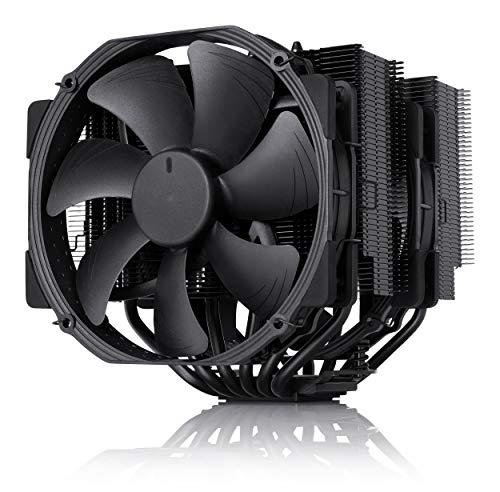


Top 3 picks at a glance
Quick comparison of the top performance coolers
| Pick | Best for | Key specs (per manufacturer) | Price range |
|---|---|---|---|
| Noctua NH-D15 G2 | Best overall air cooler | Dual tower, three-fan-capable design, about 168mm tall, 140mm-class fans | Premium |
| Arctic Liquid Freezer III 360 | Best overall AIO | 360mm radiator, about 38mm thick, three 120mm fans, VRM fan on the pump block | Mid-range to upper mid-range |
| Thermalright Phantom Spirit 120 SE | Best value high-end air | Dual tower, two 120mm fans, about 157mm tall | Budget to mid-range |
| Thermalright Peerless Assassin 120 SE | Best budget performance | Dual tower, two 120mm fans, about 155mm tall | Budget |
| be quiet! Dark Rock Pro 5 | Best for quiet operation | Dual tower, about 168mm tall, silent-focused fans | Upper mid-range to premium |
| Lian Li Galahad II Trinity 360 | Best AIO for looks and easy fitting | 360mm radiator, three 120mm fans, daisy-chained cabling | Mid-range |
| Noctua NH-U12A | Best single tower for tight cases | Single tower, two 120mm fans, about 158mm tall | Upper mid-range |
Heights are approximate and come from manufacturer spec sheets. Always check the current spec page for your socket and case, because revisions and mounting kits change.
Step one: work out how much heat you need to move
A cooler is only “high-performance” relative to your CPU’s sustained power. Per the manufacturers’ specifications, a Ryzen 7 9800X3D has a 120W TDP and about 162W package power limit. A Ryzen 9 9950X has a 170W TDP and about 230W package power limit. Intel’s Core Ultra 9 285K lists 250W maximum turbo power. Those limits matter more than the TDP label.
Worked example: the thermal budget
This is an illustrative approximation, not a measured result. The idea is to convert your target temperature into the thermal resistance (°C per watt) your cooler must deliver.
- Target: 85°C package temperature under all-core load.
- Air inside the case: a 28°C room plus roughly 7°C case rise gives about 35°C.
- Allowed rise: 85 − 35 = 50°C for the whole chain from die to case air.
- CPU at 230W: 50 ÷ 230 ≈ 0.22°C/W total. If the chip’s internal resistance and thermal paste take roughly 0.10°C/W (an assumed figure that varies by chip), the cooler needs about 0.12°C/W or better.
- CPU at 162W: 50 ÷ 162 ≈ 0.31°C/W total. That leaves about 0.21°C/W for the cooler, which a decent 120mm tower can meet.
The takeaway is that the same 85°C target is nearly twice as hard on a 230W chip as on a 162W one. That is why a gaming-only X3D build can use a modest cooler, while a 16-core or flagship Intel chip running rendering loads benefits from a dual tower or 360mm AIO.
Decision matrix: match your situation to a cooler class
| Your situation | Sustained CPU power | Recommended class |
|---|---|---|
| Gaming only, X3D or mid-range CPU | Up to about 120–160W | Quality 120mm single tower or budget dual tower |
| Gaming plus streaming or editing | About 160–200W | Dual tower (Peerless Assassin 120 SE, Phantom Spirit 120 SE) or 240mm AIO |
| Flagship 16-core or Core Ultra 9 / Core i9, heavy all-core work | About 200–250W+ | Noctua NH-D15 G2, or 360mm AIO |
| Small case, under about 160mm cooler clearance | Any, with lower power limits | Compact tower (NH-U12A) or 240mm AIO if the case supports it |
| Noise matters most | Any | Oversized dual tower or 360mm AIO at low fan speeds |
| Shipping the PC often or moving it to LANs | Any | Air cooler, with the tower secured and the PC transported carefully |
Best overall air cooler: Noctua NH-D15 G2
The NH-D15 G2 is the reference choice if you want AIO-class cooling without a pump, tubing or coolant. It is a dual-tower design with a three-heatpipe-group layout and large, quiet fans, and it comes with Noctua’s mounting kits for current AMD and Intel sockets. It suits flagship CPUs in roomy cases and anyone who wants low noise and a long service life.
Trade-off: it is large and expensive for air cooling. It is about 168mm tall, so confirm side-panel clearance. Check memory clearance too, since tall heatsinks can crowd the first RAM slot, and the cooler may block some top-mounted radiators.
Best overall AIO: Arctic Liquid Freezer III 360
The Liquid Freezer III 360 is a thick 360mm radiator with three 120mm fans and a small fan on the pump block to cool the motherboard VRMs. It stays popular because it keeps CPU temperatures low under sustained loads at reasonable noise levels, and it costs less than many branded rivals. It suits high-power CPUs where the case has a 360mm mount in the front or top.
Trade-off: the radiator is about 38mm thick, so fans and radiator together need roughly 55–60mm of space. In some cases this collides with motherboard heatsinks or RAM when top-mounted. Check your case’s radiator support.
Best value: Thermalright Phantom Spirit 120 SE and Peerless Assassin 120 SE
These dual-tower coolers deliver a large share of a flagship air cooler’s performance at a fraction of the cost. The Phantom Spirit 120 SE adds a denser fin stack and more refined fans. The Peerless Assassin 120 SE is the budget-friendly choice. Either suits builders who want to put money into the GPU instead of the cooler.
Trade-off: fan acoustics and mounting hardware are less polished than Noctua’s. Under sustained 200W+ loads, the fans spin faster and sound more obvious.
Best for quiet builds: be quiet! Dark Rock Pro 5
The Dark Rock Pro 5 is built around low noise. It has a large dual-tower body and quiet fans, and it suits workstation-style builds that run long renders. Trade-off: it is tall, wide and usually priced above the value towers, with similar performance to them in many reviews.
Best AIO for easy builds: Lian Li Galahad II Trinity 360
This 360mm AIO has a clean, daisy-chained cable layout, which makes it easier to tidy than many rivals. It suits showcase builds where cable clutter and looks matter as much as temperatures. Trade-off: you pay partly for aesthetics, and plain performance-per-price can favor the Arctic.
Best compact option: Noctua NH-U12A
If your case limits you to around 158–160mm of cooler height, the NH-U12A is one of the strongest single towers available. It can handle most gaming CPUs and mid-range multicore chips well. Trade-off: flagship CPUs at full all-core power will run hotter than they do with a dual tower or 360mm AIO.
How to choose: the five checks before you buy
- Socket support. AM5 and LGA1700/LGA1851 mount differently. Confirm that the kit includes your bracket. AM5 coolers generally reuse the AM4 mounting hardware on the stock backplate.
- Height or radiator fit. Add a margin of at least 5mm to the cooler height against your case’s listed limit. For AIOs, check radiator size, thickness and fan clearance, plus whether tubes can reach the pump block.
- RAM clearance. Tall RAM heatsinks can conflict with dual-tower fans. Fan placement can usually be adjusted, but you may need to raise the fan.
- Sustained power. Use the thermal-budget method above. Cooling above about 200W is where dual towers and 360mm AIOs begin to pull ahead of single towers.
- Noise target. A larger cooler running at lower RPM is quieter than a small one pushed hard. Use PWM fans and a gentle fan curve (see the FAQ).
Air vs liquid: the practical trade-offs
| Factor | Large air cooler | 360mm AIO |
|---|---|---|
| Peak cooling on 200W+ CPUs | Very strong with top models | Strong, often slightly better |
| Noise profile | Fan noise only | Fan noise plus pump hum |
| Failure points | Fans only | Pump, fans, tubing |
| Typical lifespan | Many years, fans replaceable | Commonly around five to seven years, per typical manufacturer warranty periods |
| Case fit | Needs height and RAM clearance | Needs radiator mount and thickness |
| Motherboard VRM airflow | Fan airflow passes over the VRM area | Often needs extra airflow, unless the pump has a VRM fan |
Frequently Asked Questions
Is a 360mm AIO always better than the best air cooler?
No. Top dual-tower air coolers, such as the NH-D15 G2, perform in the same range as many 360mm AIOs in published reviews, and they have fewer points of failure. A 360mm AIO often has an edge under very heavy, sustained loads and can run quieter at the same temperature. Your case layout and noise preferences matter more than the category.
Do I need a high-end cooler for a gaming CPU like the Ryzen 7 9800X3D?
Usually not. With a package power limit around 162W according to AMD’s specifications, a quality dual tower or 240mm AIO is plenty, and many good 120mm towers cope well. Spend the extra money on the GPU unless you want a quieter system.
What fan settings give the best balance of noise and cooling?
Set the CPU fan to a gentle curve in BIOS or fan-control software. For example, hold around 30–40% speed below 60°C, ramp up to about 60–70% at 80°C, and use a few seconds of response delay (hysteresis) so the fans do not surge during short boosts. Gaming loads rarely need maximum RPM, and surges are the main source of annoying noise.
Will a bigger cooler lower temperatures if the CPU hits its thermal limit anyway?
Modern CPUs boost until they hit a power or temperature limit, so better cooling often gives you more sustained clock speed rather than just lower numbers. Some chips, like Ryzen processors, are designed to run close to 90°C or higher under heavy load, so a high reading is not automatically a problem. If clocks drop or the CPU throttles, upgrade the cooler or lower power limits.
How often should I replace thermal paste?
Most pre-applied or quality pastes last several years in a desktop PC. Replace it when you remove the cooler or when temperatures rise noticeably over time with the same fan speeds. Apply a pea-sized amount or a thin line, depending on the CPU’s shape, and follow the cooler manufacturer’s guidance.
Should I worry about AIO pump noise?
Some pump hum is normal, but a rattle or gurgle is not. Mount the radiator so the pump is not the highest point in the loop, to avoid trapped air. Run the pump at a fixed, moderate speed in BIOS if your model supports it, and contact the manufacturer if grinding persists.
Related guides
More from Amazon
Programs that pair well with the guide above. Offers and eligibility are set by Amazon and may change.
A free business account with business pricing and bulk-buying tools for work, shop or home office.
Create a business accountFree shipping on eligible items, Prime Video and more. Eligible new members can start with a free trial.
Start a Prime free trialAudiobooks and podcasts to listen to on the go. Eligible new members can start with a free trial.
Try Audible freeAd-free music streaming. Eligible new subscribers can start with a free trial.
Try Music Unlimited freeAs an Amazon Associate we earn from qualifying purchases.


