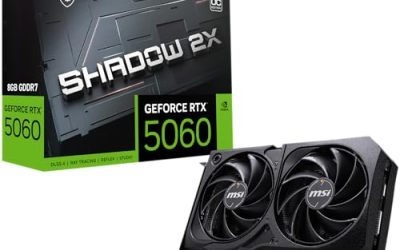
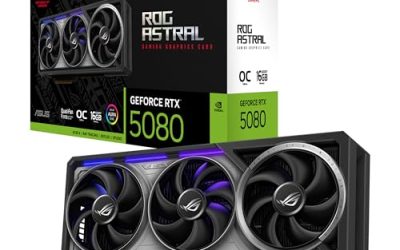
The best graphics card for most gamers in 2026 is the GeForce RTX 5070 Ti or the Radeon RX 9070 XT, because both are 16GB cards that handle 1440p at high refresh rates and many games at 4K with upscaling. Go up to the RTX 5080 or RTX 5090 only if you play 4K at high settings, and drop to the RTX 5060 Ti 16GB, RX 9060 XT 16GB or Arc B580 if you play at 1080p or budget-limited 1440p. Benchmarks should settle the choice only after you match them to your resolution, monitor and power supply.
As an Amazon Associate we earn from qualifying purchases at no extra cost to you.


Top 3 picks at a glance
Quick comparison of the best graphics cards
Memory bandwidth below is calculated as bus width divided by 8, multiplied by the memory data rate. Board power and memory figures come from the manufacturers’ spec sheets. Partner cards may differ slightly.
| Pick | Best for | VRAM / bus | Board power | Bandwidth | Price range |
|---|---|---|---|---|---|
| GeForce RTX 5090 | No-compromise 4K, creators | 32GB GDDR7 / 512-bit | 575W | about 1,790 GB/s | Ultra-premium |
| GeForce RTX 5080 | High-refresh 4K | 16GB GDDR7 / 256-bit | 360W | about 960 GB/s | Premium |
| GeForce RTX 5070 Ti | Best overall, 1440p to 4K | 16GB GDDR7 / 256-bit | 300W | about 900 GB/s | Upper mid-range |
| Radeon RX 9070 XT | Best raster value at 1440p | 16GB GDDR6 / 256-bit | 304W | about 640 GB/s | Upper mid-range |
| Radeon RX 9070 | Efficient 1440p | 16GB GDDR6 / 256-bit | 220W | about 640 GB/s | Mid-range |
| GeForce RTX 5070 | 1440p with DLSS, small PSUs | 12GB GDDR7 / 192-bit | 250W | about 670 GB/s | Mid-range |
| GeForce RTX 5060 Ti 16GB | Best budget-to-mid 1440p | 16GB GDDR7 / 128-bit | 180W | about 450 GB/s | Budget to mid-range |
| Radeon RX 9060 XT 16GB | Budget 1440p, AMD route | 16GB GDDR6 / 128-bit | about 160W | about 320 GB/s | Budget to mid-range |
| Intel Arc B580 | Cheapest sensible 1080p/1440p | 12GB GDDR6 / 192-bit | 190W | about 456 GB/s | Budget |
How to read graphics card benchmarks without being misled
A benchmark chart is only useful if its test conditions match yours. Check these four things before trusting any bar graph:
- Resolution: a card that leads at 1080p may lead by a wider margin at 4K, or a narrower one. Narrow-bus cards such as the 128-bit RTX 5060 Ti fall behind faster as resolution rises.
- Test CPU: reviewers use fast CPUs to avoid bottlenecks. A six-year-old mid-range CPU can cap a fast GPU at 1080p and flatten the differences.
- Upscaling and frame generation: DLSS 4 multi-frame generation and FSR 4 can multiply the displayed frame rate. Those numbers measure smoothness, not rendering speed, so compare native or same-upscaler results.
- 1% lows: average FPS hides stutter. Prefer reviews that show 1% low figures, especially for 8GB and 12GB cards.
Worked example: turning percentages into value
Suppose card A averages 90 FPS and card B averages 108 FPS in the same test. B is 108 / 90 = 1.20, so 20% faster. If B costs 30% more than A, A is the better value per frame. If B costs only 10% more, B is. Use this check with current street prices, because pricing moves faster than performance does.
Approximate performance by tier
These ranges are approximate and typical of what published reviews show for recent demanding games at high settings without ray tracing. They vary with the game, patch, CPU and settings, so treat them as orientation, not guarantees.
| Card class | 1080p high | 1440p high | 4K high (native) |
|---|---|---|---|
| RTX 5090 | Often CPU-limited | 150-220 FPS | 90-140 FPS |
| RTX 5080 | Often CPU-limited | 120-180 FPS | 65-100 FPS |
| RTX 5070 Ti / RX 9070 XT | 130-200 FPS | 95-150 FPS | 50-80 FPS |
| RX 9070 / RTX 5070 | 115-180 FPS | 80-125 FPS | 40-65 FPS |
| RTX 5060 Ti / RX 9060 XT (16GB) | 95-150 FPS | 60-100 FPS | 30-50 FPS (upscaling advised) |
| Arc B580 | 80-125 FPS | 50-80 FPS | Not recommended |
Best overall: GeForce RTX 5070 Ti
The RTX 5070 Ti has 16GB of GDDR7 on a 256-bit bus, about 900 GB/s of bandwidth, and a 300W board power. That is enough for 1440p at high refresh and for 4K with DLSS Quality in most games. It suits players who want ray tracing and Nvidia features such as DLSS 4 and good encoder support for streaming. The trade-off is price: it sits well above the 5060 Ti, and the gap to the RTX 5080 is smaller than the gap to the 5070.
Best raster value: Radeon RX 9070 XT
The RX 9070 XT also has 16GB on a 256-bit bus and typically lands near the RTX 5070 Ti in rasterized games according to published reviews. It is the pick if you want maximum frames per unit of spend and are comfortable with FSR 4. The trade-offs are weaker ray-tracing and path-tracing results in many titles and a slightly higher 304W board power.
Best for 4K: RTX 5080 and RTX 5090
The RTX 5080 is the sensible 4K card for a 120Hz or 144Hz display with upscaling, but its 16GB can be tight in the heaviest path-traced games at 4K. The RTX 5090 has 32GB and roughly double the 5080’s bus width, so it suits 4K at 144Hz or higher, 4K ultrawide, AI workloads and 3D rendering. It needs a strong PSU and a case with real airflow. Its 575W board power makes it a poor fit for small builds.
Best mid-range for efficiency: Radeon RX 9070 and RTX 5070
The RX 9070 gives you 16GB at 220W, which makes it easy to power and cool. The RTX 5070 draws 250W and has 12GB, which is fine at 1440p today but gives less headroom for texture-heavy games over the next few years. Choose the 9070 if VRAM longevity matters. Choose the 5070 if you rely on Nvidia-specific features.
Best budget picks: RTX 5060 Ti 16GB, RX 9060 XT 16GB, Arc B580
The 16GB versions of the RTX 5060 Ti and RX 9060 XT are the budget cards to buy for 1440p, because the 8GB variants of both can run out of memory at high texture settings. The Intel Arc B580 gives 12GB on a 192-bit bus for the lowest outlay here, with strong 1080p results. Its drawbacks are higher CPU overhead and occasional game-compatibility quirks, so it works best with a reasonably modern CPU. If you are choosing between a 16GB and an 8GB version of the same GPU, buy the 16GB unless the price gap is very small.
Decision matrix: match your setup to a card
| Your situation | Choose | Why |
|---|---|---|
| 1080p, 144Hz, esports | Arc B580 or RTX 5060 Ti | Frame rates are usually CPU-bound; extra GPU power is wasted |
| 1440p, 144-165Hz, AAA games | RX 9070 XT or RTX 5070 Ti | Both hold high settings with headroom |
| 1440p on a tight budget | RTX 5060 Ti 16GB or RX 9060 XT 16GB | 16GB avoids texture stutter; use upscaling in the heaviest games |
| 4K, 60-120Hz | RTX 5080 (or RTX 5070 Ti with upscaling) | Bandwidth and shader count scale well at 4K |
| 4K at 144Hz+ or creative and AI work | RTX 5090 | 32GB VRAM and the widest bus |
| Small case, 550-650W PSU | RX 9070 or RTX 5070 | Board power of 250W or less |
Power budget: will your PSU cope?
Add the GPU’s board power, the CPU’s peak draw and about 75-100W for the motherboard, RAM, drives and fans. Then multiply by about 1.3 for headroom, because GPUs can spike above their rated power for milliseconds.
Example: an RTX 5070 Ti (300W) with a CPU that peaks at 125W and 100W for the rest comes to 525W. Multiplied by 1.3, that is about 680W, so a quality 750W unit is the sensible choice. For an RTX 5090 (575W) with the same CPU and other parts, the total is 800W. Multiplied by 1.3, it is about 1,040W, so you want a 1000-1200W ATX 3.x power supply with a native 12V-2×6 cable. Check each card’s own spec sheet, because partner models with factory overclocks often draw more.
VRAM and resolution: how much is enough
- 1080p: 8GB works for many games but is no longer comfortable at high textures. 12GB is safer.
- 1440p: 12GB is the practical minimum, and 16GB gives room for ray tracing and texture packs.
- 4K: 16GB is the floor for high settings. Path tracing or mods can exceed it, which is where 24GB and 32GB cards help.
Frequently Asked Questions
Which graphics card has the best price-to-performance in benchmarks?
In rasterized games, the Radeon RX 9070 XT and the 16GB RTX 5060 Ti or RX 9060 XT are usually the strongest value picks in published reviews. Value changes with street prices, so divide current price by average FPS at your resolution to compare cards fairly.
Is 8GB of VRAM still enough in 2026?
It is enough for 1080p at medium to high settings in many games, but newer titles can exceed it at high textures, which causes stutter and texture pop-in. If you plan to keep the card for several years or play at 1440p, buy a 12GB or 16GB model.
Are synthetic benchmarks like 3DMark useful for choosing a GPU?
They are useful for checking that your card performs in line with others of its model, and for verifying overclocks or stability. They are less reliable for predicting game performance, because drivers and engines respond differently from one title to the next. Use game benchmarks at your resolution for buying decisions.
Should I trust benchmarks that use frame generation?
Treat them as a separate category. Frame generation raises displayed FPS but does not reduce input latency the way a faster GPU does, and it works best when the base frame rate is already above roughly 60 FPS. Compare native or same-upscaler results first, then decide whether frame generation matters for you.
Will a faster GPU help if my CPU is old?
Only partly. If your CPU already limits you at 1080p, a faster GPU yields little gain unless you raise the resolution or settings. Check whether GPU usage sits near 95-100% in your games; if it is well below that, upgrade the CPU or raise the resolution before buying a more expensive card.
Do I need a PCIe 5.0 motherboard for these cards?
No. Current cards work in PCIe 4.0 and 3.0 slots, and the performance loss is usually small, though 8GB cards on x8 interfaces such as the RTX 5060 Ti can lose more on older PCIe 3.0 boards. If your board is PCIe 3.0, a 16GB card avoids the worst of that penalty.
Related guides
More from Amazon
Programs that pair well with the guide above. Offers and eligibility are set by Amazon and may change.
A free business account with business pricing and bulk-buying tools for work, shop or home office.
Create a business accountFree shipping on eligible items, Prime Video and more. Eligible new members can start with a free trial.
Start a Prime free trialAudiobooks and podcasts to listen to on the go. Eligible new members can start with a free trial.
Try Audible freeAd-free music streaming. Eligible new subscribers can start with a free trial.
Try Music Unlimited freeAs an Amazon Associate we earn from qualifying purchases.