The best quality CPU coolers in 2026 are dual-tower air coolers such as the Noctua NH-D15 G2 and Thermalright Peerless Assassin 120 SE, plus 360 mm liquid coolers such as the Arctic Liquid Freezer III 360 for hot, high-wattage chips. Most gaming CPUs do not need a flagship cooler. A good single- or dual-tower air cooler handles a Ryzen X3D chip or a Core Ultra 5/7 quietly, and a 280-360 mm AIO only pays off above roughly 200 W of sustained load.
As an Amazon Associate we earn from qualifying purchases at no extra cost to you.



Our Top Picks


Top 3 picks at a glance
Quick comparison of the picks
| Pick | Best for | Key specs | Price range |
|---|---|---|---|
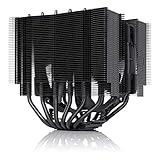
| Noctua NH-D15 G2 | Best overall air cooler | Dual tower, 3 heatpipe-heavy design, about 168 mm tall, 140 mm fans | Premium |
| Thermalright Peerless Assassin 120 SE | Best value dual tower | Dual tower, two 120 mm fans, about 155 mm tall | Budget |
| Arctic Liquid Freezer III 360 | Best AIO for heavy loads | 360 mm radiator, about 38 mm thick, VRM fan included | Mid-range |
| Noctua NH-U12A | Best 120 mm-class quiet tower | Single tower, two 120 mm fans, about 158 mm tall | Mid-range to premium |
| DeepCool AK400 | Best budget for X3D and midrange Intel | Single tower, 120 mm fan, about 155 mm tall | Budget |
| Noctua NH-L9i-17xx / NH-L12S | Best low-profile for small cases | About 37 mm and 70 mm tall respectively | Mid-range |
Heights and radiator sizes come from the manufacturers’ spec sheets. Exact fan packs and bundled parts can change between revisions, so check the current listing before you buy.
Best overall: Noctua NH-D15 G2
The NH-D15 G2 is the default answer when you want the lowest noise at a given temperature and do not want a pump or leak risk. It suits Ryzen 9 and Core Ultra 9 builds, long gaming sessions and anyone who wants a cooler that outlasts the next two CPU generations. The trade-off is size and cost. At about 168 mm tall it needs a wide, tall case, and you must check RAM clearance and the first PCIe slot. Its price is also in the premium tier, which is hard to justify for a 65-120 W chip.
Best value: Thermalright Peerless Assassin 120 SE
This dual-tower cooler gets close to flagship-air performance for a budget price. It fits most mid-sized cases and is a sensible match for a Ryzen 7 9800X3D, Ryzen 7 7700 or a Core Ultra 7. The trade-offs are a basic fan and mounting kit, and fan noise at full load that is more noticeable than on a Noctua. Swapping to a better fan later is easy if you want it quieter.
Best liquid cooler: Arctic Liquid Freezer III 360
A 360 mm AIO suits chips that spike past 200 W, such as a Core i9 or Core Ultra 9, or a Ryzen 9 9950X with an all-core workload. It also moves heat out of the CPU area, which helps in compact builds. The Liquid Freezer III line is popular because it pairs a thick radiator with a low price relative to RGB-heavy rivals, and it adds a small fan over the VRM area. The trade-offs are pump noise at idle if you run it fast, tube routing in smaller cases, and a typical AIO lifespan of five to seven years. Check that your case supports a 360 mm radiator in the top or front mount. Other solid AIOs include the Corsair iCUE Link Titan 360 RX, NZXT Kraken Elite 360 and Lian Li Galahad II models, which cost more mainly for displays, software and styling.
Best quiet single tower: Noctua NH-U12A
The NH-U12A fits cases that cannot take a 168 mm cooler but where you still want strong cooling. It is a good fit for Ryzen 7 X3D chips and unlocked Core Ultra 7 CPUs that you want to keep quiet. The trade-off is price: a Thermalright or DeepCool tower gives a similar result for much less, with a bit more fan noise.
Best budget: DeepCool AK400
For a 65-125 W CPU, such as a Ryzen 5 7600, Ryzen 7 9800X3D or Core Ultra 5, a budget single tower is enough. The AK400 is a safe, widely available choice. Its limit is headroom: with a 250 W Intel chip it will run hot and loud, and you should step up to a dual tower or AIO.
Best small-form-factor: Noctua NH-L9i-17xx and NH-L12S
For cases that cannot fit a normal tower, the NH-L9i (about 37 mm tall) suits lower-power chips and the taller NH-L12S (about 70 mm) handles more. Both are built for efficient CPUs. Do not pair a low-profile cooler with a chip that draws 200 W or more, because it will throttle.
How to choose: a worked cooling budget
Pick the cooler by the CPU’s real sustained power, not the box TDP. A simple model is: CPU temperature = inlet air temperature + (power in watts x total thermal resistance in °C/W). Rearranged, the thermal resistance you need is (target temperature – inlet temperature) / watts.
Example: you want to stay at or below 85 °C with 30 °C case-inlet air, which leaves a 55 °C budget.
- At 88 W (a Ryzen 7 9700X-class load): 55 / 88 = 0.62 °C/W allowed. Nearly any tower works.
- At 162 W (the AM5 PPT of a 120 W TDP chip such as the 9800X3D, per AMD’s spec sheet): 55 / 162 = 0.34 °C/W allowed. A good single tower fits.
- At 250 W (the maximum turbo power of a Core Ultra 9 285K, per Intel’s spec sheet): 55 / 250 = 0.22 °C/W allowed. You need a dual tower or a 280-360 mm AIO.
The resistance values below are rough, illustrative ranges, not exact measurements. They vary with CPU, die size, fan speed and case airflow.
| Cooler class | Rough thermal resistance | Comfortable sustained load |
|---|---|---|
| Low-profile (37-70 mm) | 0.45-0.60 °C/W | Up to about 65-90 W |
| Budget single tower | 0.28-0.36 °C/W | Up to about 125-160 W |
| Dual tower | 0.18-0.24 °C/W | Up to about 200-250 W |
| 240-280 mm AIO | 0.18-0.24 °C/W | Up to about 200-250 W |
| 360 mm AIO | 0.15-0.20 °C/W | 250 W and above |
Decision matrix: match your situation to a cooler
| Your situation | Choose | Why |
|---|---|---|
| Ryzen 5/7 or Core Ultra 5, standard mid-tower | DeepCool AK400 or similar budget tower | Load stays under about 160 W |
| Ryzen 7 X3D, want low noise | NH-U12A or Peerless Assassin 120 SE | The 3D cache chip runs cool but is sensitive to low-quality mounting |
| Core Ultra 9 or Ryzen 9, gaming plus rendering | NH-D15 G2 or a 360 mm AIO | Sustained 200-250 W |
| Case under about 155 mm cooler clearance | 120 mm AIO or NH-L12S for efficient CPUs | Avoids a side panel that will not close |
| Tall RAM with heatsinks | Offset dual tower or AIO | Avoids fan-to-DIMM conflict |
| Quiet build, want fewer failure points | Air cooler | No pump, and the fans last a decade |
Compatibility checks before you buy
- Socket: AM5 uses the AM4 mounting holes, so most AM4 coolers fit. Intel’s LGA1851 uses the same cooler hole pattern as LGA1700, per Intel, so LGA1700 coolers generally fit. Confirm the mounting kit anyway.
- Case clearance: compare cooler height against the case’s published maximum CPU cooler height, and leave a few millimeters spare.
- Radiator mounts: confirm the case supports your radiator size at the top or front, and check that tubes reach the CPU block.
- RAM and the first PCIe slot: large dual towers can block the first RAM slot with front fans or push the GPU slot.
- Thermal paste: a pre-applied pad is fine for a first install. Reuse needs a fresh, pea-sized dot.
Frequently Asked Questions
Is an AIO better than an air cooler?
Not automatically. A good dual-tower air cooler matches many 240-280 mm AIOs and has no pump to fail. A 360 mm AIO wins mainly for sustained loads above about 200 W or when you want the CPU area clear for aesthetics.
Do I need a premium cooler for a Ryzen 7 9800X3D?
No. A quality single tower or an inexpensive dual tower is enough, since the chip’s rated 120 W TDP and roughly 162 W socket power are manageable. Spend the saved money on the GPU instead.
How many watts can a typical air cooler handle?
As a rough guide, budget single towers suit up to about 125-160 W, and dual towers up to about 200-250 W. Real limits depend on the fan speed you will tolerate, case airflow and your target temperature.
How often should I replace thermal paste or an AIO?
Quality paste on a CPU usually lasts several years, and you should repaste if temperatures climb noticeably. AIOs commonly last around five to seven years, while air coolers can last until you change sockets, with fan replacement as the only upkeep.
Will a bigger cooler lower gaming temperatures much?
Gaming loads are usually well below a CPU’s all-core maximum, so a larger cooler mainly lowers fan noise rather than dramatically cutting temperatures. The difference shows more in rendering, compiling and other all-core work.
Related guides
More from Amazon
Programs that pair well with the guide above. Offers and eligibility are set by Amazon and may change.
A free business account with business pricing and bulk-buying tools for work, shop or home office.
Create a business accountFree shipping on eligible items, Prime Video and more. Eligible new members can start with a free trial.
Start a Prime free trialAudiobooks and podcasts to listen to on the go. Eligible new members can start with a free trial.
Try Audible freeAd-free music streaming. Eligible new subscribers can start with a free trial.
Try Music Unlimited freeAs an Amazon Associate we earn from qualifying purchases.


