The best looking CPU cooler for most builds in 2026 is an LCD-equipped 360mm AIO such as the NZXT Kraken Elite 360 or the Corsair iCUE LINK Titan RX LCD line. If you want a cleaner look with no screen, a white dual-tower air cooler like the Thermalright Peerless Assassin 120 White or a blacked-out Noctua NH-D15 G2 chromax.black looks good and cools well. Style should be the tiebreaker between coolers that already fit your case and handle your CPU’s heat, never the first filter.
As an Amazon Associate we earn from qualifying purchases at no extra cost to you.


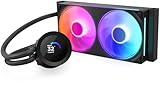
Top 3 picks at a glance
Quick comparison of the best looking CPU coolers
| Pick | Best for | Key specs | Price range |
|---|---|---|---|
| NZXT Kraken Elite 360 RGB | Best overall showpiece | 360mm AIO, customizable LCD on the pump head (640×640 on the current version), NZXT CAM software | Premium |
| Corsair iCUE LINK Titan 360 RX LCD | Cleanest cabling and RGB ecosystem | 360mm AIO, LCD pump head, daisy-chained iCUE LINK fans and a single cable run | Premium |
| Asus ROG Ryujin III 360 ARGB Extreme | Matching an Asus ROG build | 360mm AIO, large LCD pump head, integrated pump-block fan for VRM airflow | Premium |
| Thermalright Peerless Assassin 120 White | Best budget-friendly looker | Dual tower, 120mm fans, 6 heat pipes, roughly 157mm tall | Budget |
| Deepcool AK620 Digital | Best air cooler with a display | Dual tower, top-mounted digital readout for temperature and load, about 260W rated | Mid-range |
| Noctua NH-D15 G2 chromax.black | Best all-black air cooler | Dual tower, three-tone black finish, about 168mm tall, no RGB | Premium |
| Arctic Liquid Freezer III Pro 360 | Best minimalist AIO | 360mm AIO, clean pump head, A-RGB fan option, thick radiator | Mid-range |
Specs and finishes are per each manufacturer’s product pages. Exact variants and bundled fans change by region, so confirm the model on the box before you buy.
Best overall: NZXT Kraken Elite 360 RGB
The Kraken Elite line put a full-color LCD on the pump head and made it the default “looks expensive” part of the build. You can show a GIF, a clock, or live CPU and GPU temperatures from NZXT CAM, and the screen rotates so the image stays upright if your pump head is mounted at an odd angle. It suits builds in a glass-front or dual-chamber case where the pump head is visible.
Trade-off: the best features depend on NZXT’s CAM software running in the background, and the price sits at the top of the AIO market. If you want a screen but dislike background software, check whether the cooler can store a static image or run in a basic mode.
Best for a tidy, cable-free look: Corsair iCUE LINK Titan RX LCD
Corsair’s iCUE LINK system daisy-chains fans and the pump head, so a 360mm radiator needs only a single cable run back to the hub. That matters visually because tangled fan cables are the most common thing that ruins an otherwise good build. It’s a strong fit if you already use Corsair RAM, a Corsair case, or iCUE lighting.
Trade-off: the clean wiring only works with iCUE LINK-compatible parts, so you’re buying into the ecosystem. Mixing in non-Corsair fans brings the cable mess back.
Best for ROG builds: Asus ROG Ryujin III 360 ARGB Extreme
The Ryujin III has a large LCD and a design language that matches ROG motherboards and cases. Asus also includes a small fan in the pump block that pushes air over the VRM area, which solves a real problem on AIO-cooled boards with no tower heatsink nearby.
Trade-off: it looks best only if the rest of the build follows the ROG look. In a mixed-brand build, the NZXT or Corsair options usually fit in more neutrally.
Best budget: Thermalright Peerless Assassin 120 White
This is the usual recommendation when someone wants a clean white or black tower without paying AIO money. Dual towers with two slim fans look purposeful behind a tempered glass panel, and per Thermalright’s spec sheet it is rated for around 260W of heat. Published reviews have repeatedly placed it near far pricier air coolers in thermal performance.
Trade-off: it covers your RAM and CPU socket area, so you lose the open motherboard look. Verify RAM height clearance on the front fan side if you use tall modules.
Best air cooler with a display: Deepcool AK620 Digital
A small screen on top of the cooler shows CPU temperature and load (or power draw), giving you a built-in monitor without a radiator or pump. It is a good fit for people who like readouts but want the reliability and simple install of air cooling.
Trade-off: the screen sits on top of the tower, so it is only visible in an open-top or well-angled view, and it is a numbers display rather than a showpiece screen.
Best all-black air cooler: Noctua NH-D15 G2 chromax.black
Noctua’s classic beige-and-brown look has been replaced by the chromax.black variant, which gives a uniform dark finish with no lighting. It is a good pick for a stealth build and for people who care more about cooling and noise than RGB.
Trade-off: it is one of the largest air coolers available, at roughly 168mm tall, and it is priced like a premium part. Check your case’s maximum CPU cooler height before you buy it.
Best minimalist AIO: Arctic Liquid Freezer III Pro 360
If you find LCD screens gaudy, Arctic’s pump head is small and plain, and the radiator is thick and well built. Choose the black version with A-RGB fans for a sleek look or without lighting for a clean one. It offers strong cooling for the money, with a simple look.
Trade-off: no screen and no flashy design. It looks good by being unobtrusive.
How to choose: a decision matrix
| Your situation | Choose | Why |
|---|---|---|
| Glass-front or dual-chamber case, pump head visible | LCD AIO (Kraken Elite, Titan RX LCD, Ryujin III) | The screen is the focal point |
| Side glass only, tower view of the motherboard | White or black dual-tower air cooler | The tower is what you see; a pump head would be hidden |
| Hates cable clutter | iCUE LINK AIO or a cooler with pre-wired fans | One cable run to the radiator |
| Stealth, no lighting | NH-D15 G2 chromax.black or Arctic Liquid Freezer III Pro | Uniform finishes without RGB |
| Budget build with a white theme | Peerless Assassin 120 White | Matches white cases without a premium price |
| Small case (mid-tower with limited clearance) | 120mm or 240mm AIO, or a single-tower air cooler | Fit comes before looks |
Worked clearance check before you buy for looks
Say you want a 360mm AIO mounted at the top of a mid-tower. A typical 360mm radiator is about 27mm thick and standard fans add about 25mm, so the stack is about 52mm. Add a few millimeters for screws and you need roughly 55mm of space between the case roof and the top of your motherboard components. If your case only allows about 50mm above the board, or your RAM heatsinks are tall, the radiator will push onto the memory. In that case, mount it at the front, or switch to a 280mm or 240mm unit.
For air coolers the check is simpler. A cooler listed at about 168mm tall needs a case with a rated CPU cooler clearance of at least 170mm. A case rated for 160mm cannot take it, even if it looks like it should. The side panel will not close, or it will press on the fins.
Match the cooler to the heat, not just the style
A good-looking cooler that throttles looks bad in the long run. As a rule of thumb, pick a cooler whose rated capacity is at least 20 to 30 percent above your CPU’s sustained power draw. A chip that pulls around 200W under heavy load pairs better with a cooler rated for about 250W or more than with a 180W one. Gaming loads draw much less than all-core rendering, so these numbers matter most if you also do heavy rendering or encoding. Manufacturers’ TDP ratings are not standardized, so use them only as a comparison.
Other decision points that affect looks
- Pump head orientation: on LCD models, set the screen rotation in software so text and images are upright. Mounting the radiator tubes on the side changes the angle.
- Tube routing: in a front-mount layout, tubes that exit toward the bottom look neater. Top-mounted tubes can cross the motherboard.
- Color match: check the exact white or black finish of fans, tubes, and pump caps. Whites vary in tone between brands.
- Software: if you’d rather not run extra apps, choose a cooler with motherboard-synced A-RGB instead of vendor-specific lighting.
- Socket support: confirm your socket (for example AM5 or LGA 1700/1851) is covered by the included mounting kit.
Frequently Asked Questions
Is an AIO better looking than an air cooler?
Not always. An AIO frees up the view of the motherboard and offers an LCD focal point, but a good dual-tower air cooler has a clean, purposeful look and is a better choice in cases where the pump head is hidden. It comes down to what your case shows.
Do LCD CPU coolers hurt cooling performance?
The screen itself adds little to the cooling load. Thermal performance depends mostly on the cold plate, pump, radiator size and fans. Pump heads with screens are larger and more expensive, so you are paying for the display rather than for better temperatures.
Which looks better, a white or black cooler?
Match it to the rest of the build. White coolers stand out in white cases and with white RAM and GPUs, while black blends into darker themes. Mixed builds usually look best when the cooler matches the largest visible surface, such as the case or the graphics card shroud.
Can I get a nice-looking cooler on a small budget?
Yes. The Thermalright Peerless Assassin line offers white and black options at a budget price, and it is widely recommended in published reviews for its cooling relative to cost. Add a clean cable run and matching fans, and it will look good beside coolers that cost far more.
Will a big cooler fit in my case?
Check the case’s maximum CPU cooler height for air coolers, and its radiator support and clearance for AIOs, in the manufacturer’s spec sheet. Also check RAM height under any fan or radiator. If you are within a few millimeters of the limit, choose a smaller cooler.
Do I need RGB for a good-looking cooler?
No. Several of the cleanest builds use unlit coolers with black or white finishes. If you do want lighting, a cooler with standard A-RGB headers can sync with your motherboard software, so you do not have to install a separate app.
Related guides
More from Amazon
Programs that pair well with the guide above. Offers and eligibility are set by Amazon and may change.
A free business account with business pricing and bulk-buying tools for work, shop or home office.
Create a business accountFree shipping on eligible items, Prime Video and more. Eligible new members can start with a free trial.
Start a Prime free trialAudiobooks and podcasts to listen to on the go. Eligible new members can start with a free trial.
Try Audible freeAd-free music streaming. Eligible new subscribers can start with a free trial.
Try Music Unlimited freeAs an Amazon Associate we earn from qualifying purchases.


