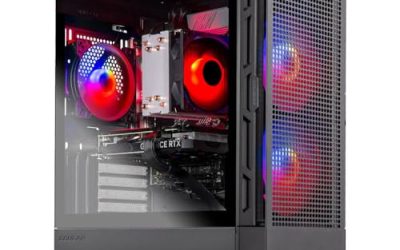
The best gaming PC in 2026 for most people is a 1440p machine built around a 12–16GB graphics card in the GeForce RTX 5070 or Radeon RX 9070 class, a six- to eight-core current CPU, 32GB of DDR5 and a 1TB NVMe SSD. Spend on the GPU first, since it sets your frame rate at a given resolution. Then match the power supply, RAM and monitor to it, so you do not pay for performance your screen or case cannot use.
Quick comparison of the best gaming PC classes
These are spec classes rather than single branded systems, because prebuilt listings change constantly. Use them as a checklist when comparing any prebuilt or parts list.
| Pick | Best for | Key specs | Price range |
|---|---|---|---|
| Best overall | 1440p high settings, 100+ fps | RTX 5070 / RX 9070 class (12–16GB VRAM), Ryzen 5 or 7 / Core Ultra 5 or 7, 32GB DDR5, 1TB NVMe, 750W PSU | Mid-range |
| Best budget | 1080p high, entry 1440p | RTX 5060 / RX 9060 XT class (prefer 16GB on the Radeon), 6-core CPU, 16–32GB DDR5, 1TB NVMe, 550–650W PSU | Budget |
| Best for 4K | 4K with upscaling, 60–120 fps | RTX 5080 / RX 9070 XT class or better (16GB+ VRAM), Ryzen 7 X3D or equivalent, 32GB DDR5, 2TB NVMe, 850W PSU | Premium |
| Best for esports | 240 Hz+ at 1080p or 1440p | RTX 5060 Ti / RX 9060 XT class, fastest-gaming CPU you can afford (such as a Ryzen 7 9800X3D), 32GB DDR5 | Mid-range to premium |
| Best flagship | Maximum 4K, ray tracing, creator work | RTX 5090 (32GB, 575W board power), top X3D CPU, 64GB DDR5, 1000W+ PSU | Top end |
Best overall: the 1440p mid-range machine
A GeForce RTX 5070 (12GB, 250W total board power per NVIDIA’s spec sheet) or Radeon RX 9070 (16GB, 220W per AMD’s spec sheet) paired with a modern six- or eight-core CPU is the sweet spot. Published reviews generally show this class landing in roughly the 80–140 fps range at 1440p high settings in demanding recent games, varying by game, CPU and patch. Esports titles run far higher.
Who it suits: anyone with a 1440p monitor at 144–165 Hz who wants to play new releases without fiddling with settings.
Main trade-off: 12GB of VRAM is enough for 1440p today, but it leaves less headroom than 16GB for heavy texture packs and ray tracing. If you keep PCs for five or more years, lean toward the 16GB option.
Best budget: 1080p-first, with a path to 1440p
The RTX 5060 (8GB, 145W) and the RX 9060 XT (available in 8GB and 16GB versions) cover this tier. The RTX 5060 Ti also ships in 8GB and 16GB versions, so check the exact variant in any listing. Pair the card with a Ryzen 5 or Core Ultra 5 class CPU.
Who it suits: 1080p players, or 1440p players willing to use medium-high settings and upscaling.
Main trade-off: 8GB cards can hit their VRAM limit in recent games at high textures, which shows up as stutter rather than a lower average fps. If the budget stretches, the 16GB variants are the safer buy.
Best for 4K: 16GB minimum, upscaling assumed
Native 4K at high settings is demanding, so this tier relies on DLSS or FSR upscaling. An RTX 5070 Ti (16GB, 300W) is the entry point, the RTX 5080 (16GB, 360W) is the comfortable choice, and the Radeon RX 9070 XT (16GB, 304W) is the main AMD alternative. Expect roughly 60–120 fps with upscaling in many current games, but this swings widely by title and ray tracing use.
Who it suits: owners of a 4K monitor or TV who want 60 fps or better with high settings.
Main trade-off: the cost jump is large, and the gains over the mid-range class only matter if your display is 4K. On a 1440p monitor this is mostly wasted money.
Best for esports: CPU and refresh rate matter more
At 240 Hz or higher, the CPU often becomes the limit. A cache-heavy gaming CPU such as the Ryzen 7 9800X3D is widely recommended in published reviews for high-frame-rate play. In that case, a mid-range GPU is usually enough, because competitive games are lightly threaded and not graphically heavy.
Prebuilt or custom build?
A prebuilt costs somewhat more than the same parts bought separately, but includes assembly, a warranty and one support contact. Building yourself saves money and gives you control over the PSU, motherboard and cooler, which are the parts prebuilts most often cut corners on. Choose a prebuilt if you want it working on day one; build if you are comfortable with an hour or two of assembly.
What to check in any prebuilt listing
- Exact GPU variant: “RTX 5060 Ti” without a VRAM size could be the 8GB or 16GB model.
- RAM configuration: two sticks (dual channel) of DDR5 beat one stick of the same capacity.
- PSU wattage and brand: vague “650W power supply” listings with no named model are a warning sign.
- SSD type: NVMe, with 1TB as the practical minimum, since many current games exceed 100GB.
- Upgrade path: a standard ATX or micro-ATX motherboard and a standard PSU make later upgrades simple. Proprietary parts do not.
How to choose with numbers
Worked power budget
Take a system with an RTX 5070 Ti (300W board power) and a Ryzen 7 9800X3D (roughly 120W rated TDP, with gaming peaks near that range; assume 150W to be safe).
- GPU: 300W
- CPU: 150W
- Motherboard, RAM, SSD, fans, USB devices: about 75W
- Total peak: about 525W
Power supplies run most efficiently and quietly at about 50–70% load, and modern GPUs have brief power spikes. Dividing 525W by 0.7 gives about 750W, which matches the 750W system power NVIDIA lists for this card. The same arithmetic with an RTX 5090 (575W) and a 150W CPU gives roughly 800W of load, so a 1000W unit is the sensible choice.
| GPU class | Board power | Typical VRAM | Suggested PSU |
|---|---|---|---|
| RTX 5060 | 145W | 8GB | 550W |
| RTX 5060 Ti | 180W | 8GB or 16GB | 600W |
| RTX 5070 | 250W | 12GB | 650W |
| RX 9070 / 9070 XT | 220W / 304W | 16GB | 650W / 750W |
| RTX 5070 Ti | 300W | 16GB | 750W |
| RTX 5080 | 360W | 16GB | 850W |
| RTX 5090 | 575W | 32GB | 1000W |
Board power and suggested PSU figures come from the manufacturers’ published specifications; actual draw varies by game and card model.
VRAM by resolution
| Resolution | Comfortable VRAM | Notes |
|---|---|---|
| 1080p | 8GB | Fine at high settings; tight with maximum textures in the newest games |
| 1440p | 12GB | 16GB gives longer-lasting headroom |
| 4K | 16GB | Ray tracing and frame generation add further memory use |
These are practical guidelines rather than hard limits; they depend on the game and texture setting.
Match the machine to your monitor
The pixel rate your display demands shows what the GPU must deliver. At 1440p and 165 Hz, that is 2560 × 1440 × 165, about 608 million pixels per second. At 4K 60 Hz it is 3840 × 2160 × 60, about 498 million. This is why a 4K 60 Hz screen can be driven by a card that would struggle with 1440p at 165 Hz in the same game. Buy the GPU for the screen you own, not the one you might buy later.
Decision matrix: your situation to the right pick
| Your situation | Choose | Why |
|---|---|---|
| 1080p 144 Hz monitor, mixed games | Budget class | Extra GPU power would go unused on this screen |
| 1440p 144–165 Hz, new releases | Best overall class | Balances frame rate and VRAM headroom |
| Competitive shooters at 240 Hz+ | Esports class | CPU speed limits fps more than the GPU |
| 4K TV or monitor | 4K class (16GB+) | Needs VRAM and upscaling power |
| Streaming plus gaming | Best overall, with 8+ cores and 32GB RAM | Encoding and multitasking add load |
| Small desk or living room | Compact build in the mid-range class | Check GPU length and cooler height against the case |
Frequently Asked Questions
How much RAM does a gaming PC need in 2026?
32GB of DDR5 is the sensible target for a new gaming PC. 16GB still runs most games, but it leaves little room for background apps, streaming or the largest recent titles. Buy it as two matched sticks so it runs in dual channel.
Is an 8GB graphics card still enough?
For 1080p it can be, especially if you lower texture settings in the newest games. At 1440p and above, 12GB or 16GB is a safer choice. The usual symptom of too little VRAM is stutter and texture pop-in rather than a smooth drop in fps.
Should I pick Nvidia or AMD?
Both are strong. Nvidia generally leads in ray tracing performance and DLSS support, while AMD’s Radeon RX 9000 series often offers more VRAM at a given performance level. Compare the specific cards at your budget rather than choosing by brand.
Do I need a Ryzen X3D CPU?
Not for most players. X3D chips such as the Ryzen 7 9800X3D are most valuable for high-refresh play at 1080p or 1440p, where the CPU limits frame rate. At 4K, or with a mid-range GPU, a cheaper six- or eight-core CPU is usually enough.
Is it a good time to buy a gaming PC in 2026?
Current GPU generations are available across every tier, so there is no strong reason to wait if you need a PC now. Prices move with supply, memory costs and new launches, so check the current market. Buy the best GPU tier for your monitor, and keep the PSU and case standard so you can upgrade later.
Related guides
More from Amazon
Programs that pair well with the guide above. Offers and eligibility are set by Amazon and may change.
A free business account with business pricing and bulk-buying tools for work, shop or home office.
Create a business accountFree shipping on eligible items, Prime Video and more. Eligible new members can start with a free trial.
Start a Prime free trialAudiobooks and podcasts to listen to on the go. Eligible new members can start with a free trial.
Try Audible freeAd-free music streaming. Eligible new subscribers can start with a free trial.
Try Music Unlimited freeAs an Amazon Associate we earn from qualifying purchases.