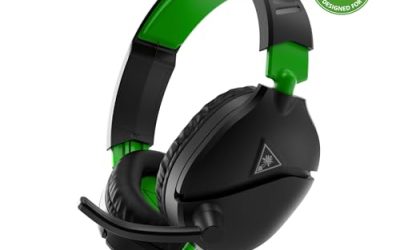
The best affordable wireless headset for most people is a 2.4 GHz dongle model in the $50–$100 range, with the Logitech G435 Lightspeed the lightest and cheapest pick and the Corsair HS55 Wireless the better all-rounder. Skip Bluetooth-only headsets for gaming, because their audio delay is noticeable in fast games. Pick on three things: which device you play on, how many hours you play per day, and how much weight your head tolerates.
As an Amazon Associate we earn from qualifying purchases at no extra cost to you.


Quick comparison of the affordable wireless picks
| Pick | Best for | Key specs (per manufacturer) | Typical price |
|---|---|---|---|
| Logitech G435 Lightspeed | Lightest, cheapest, kids and small heads | 2.4 GHz + Bluetooth, about 165 g, 40 mm drivers, up to ~18 h | $50–$80 |
| HyperX Cloud Stinger 2 Wireless | Budget PC and PS5 with a real boom mic | 2.4 GHz dongle, 50 mm drivers, up to ~20 h, swivel-to-mute mic | $50–$80 |
| Razer Barracuda X | One headset for PC, phone and handheld | USB-C 2.4 GHz dongle, 40 mm drivers, up to ~20 h, detachable mic | $60–$100 |
| Corsair HS55 Wireless | Best overall value | 2.4 GHz + Bluetooth, 50 mm drivers, up to ~24 h, roughly 270 g | $70–$100 |
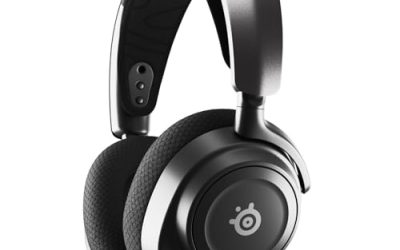
| SteelSeries Arctis Nova 5 Wireless | Best if you can stretch the budget | 2.4 GHz + Bluetooth, very long rated battery (~60 h), app EQ presets | $100–$130 |
Prices are general market ranges and move with sales. Battery figures are manufacturer claims, and real runtime is usually lower (see the calculation below).
Best overall: Corsair HS55 Wireless
The HS55 Wireless has the strongest balance of battery, comfort and flexibility at this price. It offers both a 2.4 GHz dongle for low-latency gaming and Bluetooth for your phone. The 50 mm drivers and a rated runtime near 24 hours put it ahead of the other sub-$100 options on paper. It suits long sessions and people who switch between a PC and a console.
Trade-off: it is heavier than the G435, and the sound is tuned for a warm, bass-forward profile. Competitive players may want to flatten the low end in software.
Best lightweight budget pick: Logitech G435 Lightspeed
At roughly 165 g, the G435 is one of the lightest wireless gaming headsets you can buy. That matters for sessions beyond three hours, and for smaller heads. It uses Logitech’s Lightspeed dongle and Bluetooth, so it also works as a phone headset. The microphones are built into the earcups rather than on a boom.
Trade-off: the built-in mics sound thinner than a boom mic, and the clamp can feel loose on large heads. Battery life is also the shortest here.
Best for a real boom mic on a budget: HyperX Cloud Stinger 2 Wireless
This is the pick if voice chat quality matters more than extras. It uses a 2.4 GHz USB dongle and has 50 mm drivers. It also has a swivel-to-mute mic arm, which makes it easy to tell at a glance whether you are muted. It works well for PC and PlayStation, where USB audio dongles are generally accepted.
Trade-off: the feature set is basic. Expect no Bluetooth and only light software tuning, so it is a plain, practical headset.
Best for multi-device use: Razer Barracuda X
The Barracuda X uses a USB-C dongle, which makes it easy to plug into a PC, a PS5 or a handheld PC or console. The detachable mic lets you use it like regular headphones outside the house. It is a sensible choice if your gaming happens on more than one device.
Trade-off: it is heavier than the G435, and the 40 mm drivers do not give the larger soundstage of 50 mm models. Check whether your specific variant includes Bluetooth, since Razer has sold more than one version.
Best if you can stretch the budget: SteelSeries Arctis Nova 5 Wireless
The Nova 5 Wireless sits at the top of “affordable.” It is worth the extra $30–$40 if you hate charging. Its rated battery life is several times that of the cheaper picks, and its companion app has game-specific EQ presets that make tuning easy for beginners. It also supports 2.4 GHz and Bluetooth.
Trade-off: it costs the most of the group, and at the lower end of the budget you get nearly the same core experience from the HS55.
How to choose: a compatibility matrix
Wireless headsets fail most often on compatibility, not on sound quality. Use this table before you buy.
| Your main device | What to buy | Watch out for |
|---|---|---|
| Windows PC | Any 2.4 GHz dongle headset | Dongle needs a free USB-A port; use a short extension cable to avoid interference from rear ports |
| PlayStation 5 | A USB dongle headset (HS55, Stinger 2 Wireless, Barracuda X, Nova 5) | Confirm the PlayStation logo or “PS5 compatible” on the box |
| Xbox Series X|S | Only headsets licensed for Xbox wireless, which differ from the PC-focused models above | A generic USB dongle usually will not work on Xbox. Check the box for Xbox compatibility |
| Nintendo Switch / Switch 2 | Dongle headset in dock mode; Bluetooth in handheld | Bluetooth audio carries more delay, so it suits slower games better |
| Phone and laptop only | A Bluetooth-capable model (G435, HS55, Nova 5) | Use Bluetooth for media, dongle for games |
Worked example: how battery claims translate to charging days
Rated battery life is measured under ideal conditions: moderate volume, lighting off and a new battery. A practical rule is to multiply the claim by about 0.8 for real use, then divide by your daily hours.
| Headset (rated hours) | Real estimate (×0.8) | Days per charge at 3 h/day | Days per charge at 6 h/day |
|---|---|---|---|
| G435 (~18 h) | 14.4 h | 4.8 days | 2.4 days |
| Stinger 2 / Barracuda X (~20 h) | 16 h | 5.3 days | 2.7 days |
| HS55 (~24 h) | 19.2 h | 6.4 days | 3.2 days |
| Nova 5 (~60 h) | 48 h | 16 days | 8 days |
If you play six hours a day, a 20-hour headset needs charging every three days or so. Most of these headsets can be used while charging over USB-C, so the real cost is a cable at your desk. If you would rather never think about it, the Nova 5’s much longer runtime is the justification for its higher price.
Latency: why Bluetooth is not enough
A 2.4 GHz dongle typically adds a delay in the tens of milliseconds, which is hard to notice in games. Bluetooth with the basic SBC codec can add well over 100 ms, depending on the device and codec. That is enough to make footsteps and gunshots feel behind the action. For this reason, every pick above uses a dongle for gaming and keeps Bluetooth for phones and video.
What to prioritize at each budget level
- Under $60: look for a dongle first. Accept a thinner mic and shorter battery life.
- $60–$100: aim for 20+ rated hours, 50 mm drivers or good tuning, and Bluetooth as a bonus.
- $100–$130: pay for battery life, app EQ and a better mic, not for more RGB.
Weight is the spec people overlook. Under about 280 g is generally comfortable for long sessions, and under 200 g is noticeably easier on glasses wearers. Check clamp force and earpad material too, as leatherette pads run warmer than fabric.
Frequently Asked Questions
Are cheap wireless gaming headsets good enough?
Yes, for most players. Models in the $50–$100 range with a 2.4 GHz dongle give low-latency audio and a usable microphone. What you give up is mostly premium materials, longer battery life and advanced software.
Is Bluetooth OK for gaming?
It works for casual or slower games, but it is not ideal for shooters or rhythm games because of the added delay. A headset with both a dongle and Bluetooth gives you the best of both. Use the dongle when playing and Bluetooth for calls and music.
Will a wireless headset work on Xbox?
Only if it is specifically licensed for Xbox. Most PC-focused dongle headsets, including many of the models above, work on PC and PlayStation but not on Xbox. Check the Xbox compatibility label on the packaging or the manufacturer’s spec sheet before buying.
How long should the battery last?
Aim for at least 20 hours rated, which is about 16 hours in real use. That gives you roughly five days at three hours per day. If you play more than that, consider a model rated for far more.
Is a boom mic better than built-in mics?
Usually, yes. A boom mic sits closer to your mouth, which improves voice clarity and background noise rejection. Built-in mics are more convenient and look cleaner, and they are fine for casual party chat.
Do I need surround sound on a budget headset?
No. Virtual surround is mostly a software effect, and good stereo tuning helps more for locating footsteps. If you want to try it, enable it in the game or in the headset app and compare it with stereo in a game you know well.
Related guides
More from Amazon
Programs that pair well with the guide above. Offers and eligibility are set by Amazon and may change.
A free business account with business pricing and bulk-buying tools for work, shop or home office.
Create a business accountFree shipping on eligible items, Prime Video and more. Eligible new members can start with a free trial.
Start a Prime free trialAudiobooks and podcasts to listen to on the go. Eligible new members can start with a free trial.
Try Audible freeAd-free music streaming. Eligible new subscribers can start with a free trial.
Try Music Unlimited freeAs an Amazon Associate we earn from qualifying purchases.