Our Short List of 3
- View on Amazon: https://www.amazon.com/dp/B09Q7SZHKG

- View on Amazon: https://www.amazon.com/dp/B06WGVJ9GY

- View on Amazon: https://www.amazon.com/dp/B0BRQNJG7X
All 3 Picks at a Glance
| Product | Specs | Action |
|---|---|---|
| 2. DROP + EPOS PC38X Gaming Headset |
| Check price on Amazon |
| 3. beyerdynamic MMX 300 (2nd Generation) Premium Gaming Headset |
| Check price on Amazon |
| 4. Audio-Technica ATH-M50xSTS-USB StreamSet Streaming Headset |
| Check price on Amazon |
For a custom-built PC, the best wired gaming headset is one that matches the audio output of the build, keeps its cable managed across the desk, and delivers clear voice for Discord and streaming. The SteelSeries Arctis Nova Pro Multi-System suits builders who want a dedicated desktop DAC, while the DROP + EPOS PC38X, beyerdynamic MMX 300, and Audio-Technica ATH-M50xSTS-USB each serve a different desktop setup described below.
On a desk build, a headset becomes part of a fixed audio chain: motherboard rear panel, front panel header, external DAC, audio interface, or USB port. Cable length, connector type, impedance, and microphone path all interact with choices made when the PC was assembled, from case selection and front panel wiring to where the tower sits beside the monitor and keyboard. Each headset below was selected because it solves a specific desktop problem: bypassing noisy onboard audio, giving open and spacious sound for a quiet room, isolating sound in a shared space, or raising microphone quality for regular streaming.
Top 3 picks at a glance
How to Choose the Best Wired Gaming Headset for a Custom-Built PC
Match the Headset to the Motherboard or DAC Output
A motherboard rear 3.5 mm output usually provides a cleaner path than a front panel jack, because the front panel cable runs unshielded through the case, past power cables and fans, before reaching the header on the board. Builders who hear a faint buzz that changes with GPU load are often hearing that front panel route rather than a fault in the headset. Moving the plug to the rear panel is a simple diagnostic step before any hardware is replaced.
Impedance decides how much this matters. Low-impedance headsets such as the 32 ohm beyerdynamic MMX 300 are easy for a motherboard to drive to full volume, so onboard audio can be entirely workable. A dedicated DAC moves conversion outside the electrically noisy case interior and adds a physical volume control at desk level. The Arctis Nova Pro takes this approach with its GameDAC Gen 2, while the ATH-M50xSTS-USB places conversion in its USB connection. Both sidestep a weak front panel output, but a DAC anchors a permanent setup, while USB keeps things simple when the PC is shared or rebuilt often.
Builders should also check combined headset jacks. Many headsets use a single four-pole plug carrying sound and microphone, while older cases expect separate plugs, so a splitter may be needed. Planning the plug and adapter chain before buying prevents a tangle of extensions afterward.
Plan Cable Routing as Part of the Build
A wired cable is a permanent feature of the desk, so routing deserves the same attention given to power and display cables during the build. Practical questions decide comfort: does the cable leave the left or right earcup, how far is that side from the tower or DAC, and what does the cable cross on the way? A cable draped across the keyboard tray or catching on a chair armrest becomes a daily irritation, and repeated snagging is a common cause of intermittent sound in one earcup.
Routing the cable behind the monitor and down through the same grommet or channel as the display leads keeps it off the work surface. Leaving a controlled loop of slack near a headphone hook allows normal head movement without pulling the plug sideways in its socket. Placing a DAC such as the GameDAC Gen 2 on the desk shortens the headset run, because the long connection becomes the USB lead back to the PC, which is easier to fix in place with clips or a tray. Detachable cables add flexibility: the MMX 300 uses a removable cable, and the PC38X ships with cables for different connection types, so a damaged lead can be replaced without replacing the headset.
Judge Microphone Quality for Discord and Streaming Separately
Game sound and voice quality are separate problems. For Discord, the priorities are consistent volume, rejection of keyboard and fan noise, and a microphone position that stays put. A boom placed close to the mouth captures voice at a lower gain setting, which keeps case fans, mechanical switches, and room echo further down in the mix. That placement advantage is why boom designs remain the default for desktop communication.
Streaming raises the bar, because an audience hears the microphone without the context of a game lobby, and platform compression exposes harshness, plosive bursts, and hiss. The ATH-M50xSTS-USB uses a cardioid condenser microphone based on Audio-Technica 20 Series designs, and the MMX 300 is built around a high-quality microphone capsule intended for clear speech intelligibility. Both approach voice as a recording task, which suits a desk where streaming and recorded commentary sit alongside gaming. Gain staging in the operating system, noise suppression in Discord, and sensible fan curves during a stream complete the chain: a quieter room lets any microphone perform closer to its potential.
Choose Open-Back or Closed-Back for the Room, Not the Game
Open-back headsets such as the PC38X let air and sound pass through the earcup, producing a wider sense of space that helps place footsteps, distant movement, and environmental cues in a natural field. The trade is leakage: sound escapes into the room, and room sound reaches the ears, so open-back designs belong in a quiet, private space. They also let heat escape during long sessions, which many builders value in a warm room full of hardware.
Closed-back headsets such as the MMX 300 and the ATH-M50xSTS-USB seal the earcup, keeping game sound in and household noise out. That isolation suits a shared room, a desk near a television, or late sessions where leakage would disturb others, and it keeps microphone bleed low because less headphone sound escapes to be picked up again by the boom. Neither design is universally better; the room and the household decide which compromise fits a particular build.
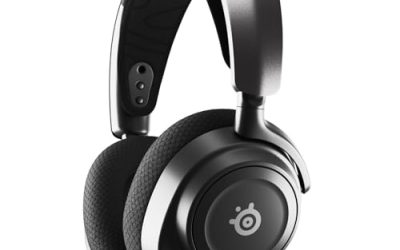
1. SteelSeries Arctis Nova Pro Multi-System Gaming Headset
The Arctis Nova Pro Multi-System is the most desk-centered option here because its GameDAC Gen 2 becomes a permanent part of the build. Instead of relying on the motherboard output, the headset connects through the DAC, which search evidence describes as using an ESS Sabre Quad-DAC with audio resolution raised to 96 kHz/24-bit. For a builder who selected a motherboard for expansion, storage, or lighting rather than for its audio section, that external conversion removes onboard sound from the equation entirely.
The DAC also changes daily use. Volume, equalization, input selection, and balancing between game and voice are handled on the unit in front of the user rather than through layers of software menus. Its multi-system connection allows two sources to stay plugged in and switched with a button press, fitting a desk where a custom PC shares a monitor with a second machine or a console. The long run back to the tower becomes a fixed USB connection routed once through a cable tray, leaving only the shorter headset lead free on the desk surface.
Sound is built around premium high fidelity drivers with 360 degree spatial audio support through SteelSeries Sonar software, according to listing evidence. That suits competitive play where directional information matters, and single-player titles where a detailed presentation adds atmosphere. The retractable ClearCast Gen 2 microphone slides into the earcup when not needed and extends to a consistent position for Discord, with AI-powered noise cancelling described in listing evidence. Supplied items include the GameDAC Gen 2, main headset cable, microphone pop filter, and USB-C to USB-A cables. Builders should allow desk space for the DAC within easy reach, since its controls are the reason to choose this model.
- View on Amazon: https://www.amazon.com/dp/B09ZLS8LB3
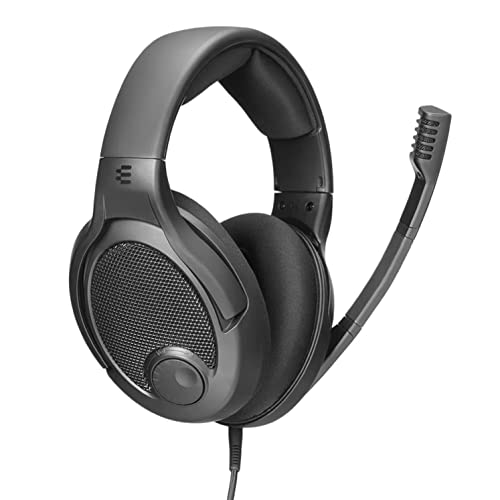
2. DROP + EPOS PC38X Gaming Headset
- View on Amazon: https://www.amazon.com/dp/B09Q7SZHKG
The PC38X is the audiophile-leaning open-back choice, developed by DROP with EPOS, a company with roots in Sennheiser gaming audio. Its open-back over-ear design and velour earpads define its character: sound is presented in a wide, open field, and the velour covering stays breathable during long sessions in a warm room. For a builder with a private desk in a quiet space, that openness is a functional advantage, helping positional cues sit naturally around the listener rather than feeling confined inside the head.
Connection is deliberately simple, suiting builders who prefer a clean analog chain. The headset works from a motherboard rear output, an external DAC, or a small desktop amplifier, and asks for no software layer to function. That simplicity also makes it easy to move between a gaming PC and a work laptop at the same desk. Because open-back designs leak sound, a household with thin walls or a desk in a living area should weigh the closed-back options instead, yet in the right room the PC38X gives the most spacious presentation here.
The microphone is a noise-cancelling boom design, and listing evidence highlights that microphone as a central feature rather than an accessory. Close placement allows lower input gain for Discord, so fans and keyboard sound stay further in the background. For custom builds, the PC38X pairs well with a motherboard that has a respectable rear output or with a modest DAC added later, since the headset imposes no proprietary hub on the desk. It occupies almost no footprint beyond a hook or stand, and its cable routes behind the monitor in one clean run.
3. beyerdynamic MMX 300 (2nd Generation) Premium Gaming Headset
- View on Amazon: https://www.amazon.com/dp/B06WGVJ9GY
The MMX 300 approaches gaming audio from the studio headphone world. Search evidence links its closed design to the heritage of beyerdynamic studio models, and its published figures clarify its tuning and drive requirements: nominal impedance of 32 ohms, frequency response from 5 Hz to 35,000 Hz, and nominal sound pressure level of 96 dB. At 32 ohms, a motherboard output drives it comfortably without a separate amplifier, making it a straightforward addition to a build where desk space is reserved for other components.
Closed-back isolation is its defining practical strength. Sealed earcups keep game audio contained and reduce outside sound reaching the listener, fitting a desk in a shared room, an apartment with noticeable ambient noise, or sessions held while others sleep nearby. That isolation also helps the microphone, because less sound escapes the earcups to leak back into voice chat. The build reflects its German manufacture, with sturdy construction and a detachable cable that can be replaced if a routing accident damages it, extending the life of the headset across several PC upgrades.
Speech is a particular focus. Listing evidence describes excellent intelligibility of speech due to a high-quality microphone capsule, matching the positioning of this headset for clear communication in games, calls, and recorded voice. The microphone is fixed rather than retractable, so it remains in position and ready, a layout many desktop users prefer when voice chat is constant. The headset connects through a 3.5 mm jack, with adapter cabling described in listing evidence for a PC as well as devices with a combined jack, so it can run from a rear motherboard output, a DAC, or an audio interface as the build evolves. A builder planning to add an interface later for streaming can keep the same headset through that upgrade.
4. Audio-Technica ATH-M50xSTS-USB StreamSet Streaming Headset
- View on Amazon: https://www.amazon.com/dp/B0BRQNJG7X
The ATH-M50xSTS-USB is the broadcast-microphone option, built for a desk where streaming and content creation sit at the center of the build. It combines the headphone side of the ATH-M50x line with a microphone drawn from professional recording practice. Search evidence describes 45 mm large-aperture drivers with rare earth magnets and copper-clad aluminum wire voice coils, the same driver description associated with the M50x studio headphones, giving this headset a monitoring character suited to hearing a stream mix accurately while playing.
The microphone is the headline component. Listing evidence describes a cardioid condenser microphone based on Audio-Technica 20 Series microphones, mounted on a boom so it stays close to the mouth and rejects sound from the sides and rear. Cardioid pickup is the pattern used by many desktop streaming microphones, and placing it on a boom removes the desk stand, shock mount, and extra cable that a separate microphone would add to a custom setup. For a compact desk with limited surface area, consolidating broadcast-style voice capture into the headset keeps the workspace clear for keyboard, mouse, and monitor.
The USB version connects with a permanently attached cable ending in USB, bypassing the motherboard analog output entirely. Evidence from related listings describes a built-in converter rated at 24-bit/96 kHz and sidetone circuitry, which lets the wearer hear a controlled amount of personal voice in the earcups. Sidetone is valuable with closed-back isolation, because it prevents the muffled, raised-voice effect that sealed earcups can cause during long commentary. Two sets of earpads are included, one emphasizing sound isolation and another emphasizing breathability. At a custom desk, this headset fits a single-cable routine: one USB connection carries game sound out and broadcast-oriented voice in, with no interface required.
Comparison Table
| Product | Design | Connection and Audio Path | Microphone | Best Fit for a Custom PC Desk |
|---|---|---|---|---|
| SteelSeries Arctis Nova Pro Multi-System | Closed, over-ear | Wired through GameDAC Gen 2, ESS Sabre Quad-DAC, 96 kHz/24-bit | Retractable ClearCast Gen 2 boom | A permanent battlestation wanting a desktop DAC hub and two connected sources |
| DROP + EPOS PC38X | Open-back, over-ear, velour earpads | Wired analog 3.5 mm to motherboard, DAC, or amplifier | Noise-cancelling boom | A quiet private room wanting spacious sound and a simple analog chain |
| beyerdynamic MMX 300 (2nd Generation) | Closed, over-ear | Wired 3.5 mm, 32 ohms, detachable cable | Fixed boom with high-quality capsule | A shared space needing isolation and a durable studio-rooted headset |
| Audio-Technica ATH-M50xSTS-USB StreamSet | Closed, over-ear, two earpad sets | Wired USB with built-in conversion | Cardioid condenser boom based on 20 Series designs | A streaming desk wanting broadcast-oriented voice from a single cable |
Frequently Asked Questions
Is a wired headset better than wireless for a custom-built PC?
For a fixed desk, a wired connection removes battery management and wireless interference from consideration, and keeps latency tied to the audio chain rather than to a radio link. A custom build stays in one place, so freedom to move matters less than in a living room, and wired headsets remain usable across system changes with no pairing process.
Should a headset use the front panel jack or the rear motherboard output?
The rear output is generally the cleaner choice, because its path stays on the motherboard, while a front panel jack depends on a cable routed through the case interior. If buzzing appears at the front jack and changes with system load, moving to the rear jack is a useful test. An external DAC or a USB headset bypasses both outputs, which is why those models suit builds with noisy onboard audio.
Does a custom PC need a DAC for a wired gaming headset?
Many headsets, including the 32 ohm MMX 300, run well from a motherboard output, so a DAC is not a requirement. A DAC becomes worthwhile when onboard sound is noisy, when volume and chat balance controls are wanted at hand on the desk, or when higher resolution processing is part of the plan, as with the GameDAC Gen 2. Treating the DAC as a desk control hub helps decide whether it earns its space.
How can microphone quality be improved for Discord without buying a separate microphone?
Position and gain matter most. Keep the boom close to the mouth, set input gain so normal speech stays clear of clipping, and enable noise suppression in Discord to reduce keyboard and fan sound. Choosing a headset with a stronger microphone design, such as the cardioid condenser boom on the ATH-M50xSTS-USB or the high-quality capsule on the MMX 300, raises the ceiling further while keeping the desk free of a separate stand.
Which design suits late sessions in a shared home, open-back or closed-back?
Closed-back is the safer choice for shared spaces, because it contains game sound and blocks more outside noise, as the MMX 300 and ATH-M50xSTS-USB designs do. Open-back headsets such as the PC38X leak sound into the room and admit room sound in return, so they fit a private, quiet desk. Matching earcup design to the household avoids problems that no equalizer setting can fix.
Disclosure: As an Amazon Associate, we earn from qualifying purchases.
Related guides
More from Amazon
Programs that pair well with the guide above. Offers and eligibility are set by Amazon and may change.
A free business account with business pricing and bulk-buying tools for work, shop or home office.
Create a business accountFree shipping on eligible items, Prime Video and more. Eligible new members can start with a free trial.
Start a Prime free trialAudiobooks and podcasts to listen to on the go. Eligible new members can start with a free trial.
Try Audible freeAd-free music streaming. Eligible new subscribers can start with a free trial.
Try Music Unlimited freeAs an Amazon Associate we earn from qualifying purchases.