Logitech has spent years building the most complete wireless gaming mouse lineup in the business, and it shows. From the feather-light Superlight 2 that professional players trust to the affordable G305 that still outperforms mice twice its price, there is a Logitech wireless mouse for almost every hand, grip, and budget. The common thread is LIGHTSPEED wireless, a connection that reports movement as quickly as a cable.
This guide compares the five strongest Logitech wireless gaming mice you can buy right now, using the names and specifications printed on their Amazon listings. Each one is a different answer to the same question, so whether you want the lightest mouse available or the most buttons for the money, there is a pick here that fits.
Our Top Picks
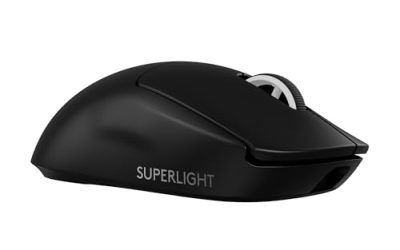
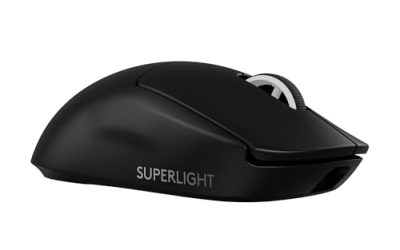
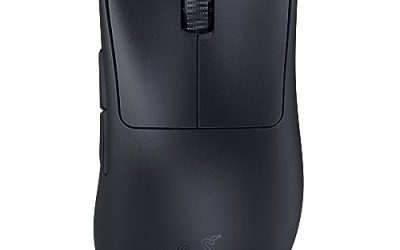
 Logitech G Pro X Superlight 2 Lightspeed WirelessClassic1.57 x 2.5 x 4.92 inches0.1 poundsCheck on Amazon
 Logitech G502 X Plus Wireless RGB Gaming MouseWireless7.1 x 4.6 x 2.7 inches0.84 poundsCheck on Amazon
 Logitech G309 Lightspeed Wireless Gaming Mouse1.51 x 2.49 Inch1.51 x 2.49 x 0.1 inches0.2 poundsCheck on Amazon

Top 3 picks at a glance

Quick Picks
As an Amazon Associate we earn from qualifying purchases
| Product | Best for | Key spec from title |
|---|---|---|
| Logitech G Pro X Superlight 2 | Competitive play | 60g, HERO 2 sensor, up to 44,000 DPI |
| Logitech G502 X LIGHTSPEED | Button-heavy gaming | HERO 25K sensor, 13 programmable buttons |
| Logitech G502 X Plus | RGB and buttons | LIGHTSYNC RGB, HERO 25K sensor |
| Logitech G305 LIGHTSPEED | Affordable wireless | HERO 12K sensor, up to 250 hours battery |
| Logitech G309 LIGHTSPEED | Lightweight endurance | HERO 25K sensor, 300+ hours battery |
How to Choose
Start with the sensor
Logitech’s HERO sensors are the heart of its wireless lineup, and they scale with price in a clear way. The HERO 12K in the G305 tracks up to 12,000 DPI, which is more than enough for most players, while the HERO 25K in the G502 X and G309 reaches 25,600 DPI with the same tracking fidelity. The HERO 2 sensor in the Superlight 2 goes further still, up to 44,000 DPI with sub-micron tracking. For most players the practical difference between these sensors is small, because few people play above 1,600 DPI, so choose based on weight and shape first and treat the sensor as a tiebreaker.
Weight changes how a mouse feels
Logitech’s wireless mice span from 60 grams to over 100 grams, and that range matters more than any other specification. The Superlight 2 at 60 grams moves with almost no effort, which suits fast flicks and long sessions, while the G502 X at around 100 grams feels planted and steady for players who anchor their wrist. The G309 sits in between at 86 grams with a AA battery, or 68 grams with a PowerPlay charging module, giving you a choice. Think about your grip: fingertip and claw players usually prefer lighter, while palm players often like a little more mass.
Battery life decides how often you think about charging
A wireless mouse is only convenient when its battery lasts long enough to forget about. The G305 runs for up to 250 hours on a single AA battery, and the G309 stretches past 300 hours, which means months of play between battery swaps. The Superlight 2 and G502 X use rechargeable batteries with 95 and 140 hours respectively, and both charge over USB-C. If you hate cables entirely, the G502 X and G309 also work with PowerPlay charging mats, which keep the mouse topped up whenever it sits on the pad.
Shape is personal, so match it to your grip
Logitech makes both symmetrical and ergonomic wireless mice, and the right one depends on how you hold it. The Superlight 2 and G305 are symmetrical, which suits claw and fingertip grips that lift and reposition the mouse. The G502 X line is ergonomic, with a thumb rest and a shape that fills the palm for long sessions. The G309 is a compact symmetrical design that works well for medium and smaller hands. If you know your grip style, the shape choice almost makes itself.
The 5 Best Options
Logitech G Pro X Superlight 2
The Superlight 2 is the mouse that professional players reach for, and its specification sheet explains why. At 60 grams it is light enough to disappear during fast flicks, while the HERO 2 sensor tracks up to 44,000 DPI with sub-micron accuracy, so even the smallest adjustment registers. The LIGHTSPEED wireless connection polls at up to 8 kHz, which cuts the delay between your hand and the screen to a fraction of what older wireless mice managed. Five programmable buttons keep the layout clean, and USB-C charging means a quick top-up between matches.
Specs
- 60g lightweight design
- HERO 2 sensor with up to 44,000 DPI
- LIGHTSPEED wireless with up to 8 kHz polling
- 5 programmable buttons
- Up to 95 hours of battery life
- USB-C charging
- LIGHTFORCE hybrid optical-mechanical switches
Best for: Competitive players who want the lightest proven tournament mouse Logitech makes.
Watch out for: The symmetrical shape suits claw and fingertip grips better than a full palm grip, and there is no dedicated DPI button on the shell.
Logitech G502 X LIGHTSPEED
The G502 X LIGHTSPEED is the pick for players who want a mouse that does more than aim. Thirteen programmable buttons give you room for push-to-talk, melee, abilities, and macros without touching the keyboard, and the dual-mode scroll wheel switches between a notched step for weapon selection and a free-spin mode for scrolling. The HERO 25K sensor tracks up to 25,600 DPI with the accuracy the G502 line is known for, and LIGHTFORCE switches combine optical speed with a mechanical click feel. Battery life reaches up to 140 hours, and the shell works with PowerPlay charging mats.
Specs
- HERO 25K sensor with up to 25,600 DPI
- 13 programmable buttons
- LIGHTFORCE hybrid optical-mechanical switches
- Up to 140 hours of battery life
- PowerPlay wireless charging compatible
- Dual-mode scroll wheel with hyper-fast scroll
- LIGHTSPEED wireless technology
Best for: Players who want extra buttons and the longest battery life in the G502 line.
Watch out for: It is noticeably heavier than the ultra-light picks here, and the shape is large for small hands.
Logitech G502 X Plus
The G502 X Plus takes everything that makes the G502 X LIGHTSPEED good and adds LIGHTSYNC RGB lighting across the shell. The HERO 25K sensor, thirteen programmable buttons, and LIGHTFORCE switches are all here, so performance is identical to its non-RGB sibling. Battery life is slightly shorter at up to 130 hours, which is the trade-off for the lighting, and the shell still works with PowerPlay charging mats. The dual-mode scroll wheel and the familiar ergonomic shape round out a mouse that suits players who want their setup to look as good as it plays.
Specs
- HERO 25K sensor with up to 25,600 DPI
- LIGHTSYNC RGB lighting
- 13 programmable buttons
- LIGHTFORCE hybrid optical-mechanical switches
- Up to 130 hours of battery life
- PowerPlay wireless charging compatible
- Dual-mode scroll wheel
Best for: G502 fans who want RGB lighting without giving up buttons or battery life.
Watch out for: Battery life is a little shorter than the standard G502 X LIGHTSPEED, and the RGB adds cost for a feature that does not affect performance.
Logitech G305 LIGHTSPEED
The G305 is the mouse that proves you do not need to spend flagship money to get a serious wireless gaming mouse. The HERO 12K sensor tracks up to 12,000 DPI with the same accuracy Logitech is known for, and the LIGHTSPEED wireless connection is the same low-latency technology used in mice that cost three times as much. Six programmable buttons cover the essentials, and the 99-gram body is a comfortable middleweight. Best of all, a single AA battery runs for up to 250 hours, so charging is something you think about a few times a year rather than every week.
Specs
- HERO 12K sensor with up to 12,000 DPI
- LIGHTSPEED wireless technology
- Up to 250 hours of battery life on one AA battery
- 6 programmable buttons
- 99g weight
- Onboard memory for saved profiles
Best for: Budget-conscious players who want real wireless gaming performance.
Watch out for: The sensor ceiling is lower than the flagship models, and it uses a disposable AA battery rather than a rechargeable one.
Logitech G309 LIGHTSPEED
The G309 is Logitech’s newest take on the lightweight wireless mouse, and it brings flagship ideas to a friendlier price. The HERO 25K sensor tracks up to 25,600 DPI, and LIGHTFORCE hybrid switches give clicks the speed of optical with the feel of mechanical. At 86 grams with a AA battery it is light enough for fast play, and it drops to 68 grams with a PowerPlay module installed. Battery life stretches past 300 hours, the longest of any mouse in this guide, and six programmable buttons cover the controls most players actually use.
Specs
- HERO 25K sensor with up to 25,600 DPI
- LIGHTFORCE hybrid optical-mechanical switches
- 300+ hours of battery life
- 6 programmable buttons
- 86g with AA battery, 68g with PowerPlay module
- PowerPlay wireless charging compatible
- LIGHTSPEED wireless technology
Best for: Players who want flagship sensor performance with the longest battery life here.
Watch out for: The compact shape suits medium and smaller hands better than large palms, and the AA battery adds weight compared to rechargeable rivals.
Which One Fits Your Situation
You play competitively and want the best
Pick the Logitech G Pro X Superlight 2. Its 60-gram weight, 44,000 DPI sensor, and 8 kHz polling rate are the combination that professional players trust, and the long battery life means it is always ready. The clean five-button layout keeps accidental clicks out of your game.
You need lots of buttons for MMOs or tactical games
Pick the Logitech G502 X LIGHTSPEED. Thirteen programmable buttons cover abilities, push-to-talk, and macros, and the 140-hour battery is the longest among the rechargeable models here. The ergonomic shape is comfortable for long sessions.
You want RGB without giving up performance
Pick the Logitech G502 X Plus. It matches the G502 X LIGHTSPEED on sensor, buttons, and switches, and adds LIGHTSYNC RGB lighting across the shell. Battery life drops slightly to 130 hours, which is a small price for the lighting.
You want the cheapest way into wireless gaming
Pick the Logitech G305 LIGHTSPEED. The HERO 12K sensor and LIGHTSPEED wireless are genuinely good, and the 250-hour battery life on a single AA battery is remarkable. It is the best value wireless gaming mouse Logitech makes.
Common Mistakes
- Assuming the most expensive Logitech mouse is the best one for your hand, when shape matters more than price.
- Buying a G502 for its buttons and then never programming them, carrying extra weight for no benefit.
- Ignoring battery life and picking a mouse that needs charging every few days.
- Choosing a symmetrical mouse when your palm grip needs an ergonomic shell, or the reverse.
- Setting DPI far above what you actually use and blaming the mouse for twitchy aim.
Frequently Asked Questions
Is LIGHTSPEED wireless as fast as wired?
Yes. LIGHTSPEED is Logitech’s low-latency 2.4 GHz wireless technology, and it reports movement at 1,000 Hz, the same rate as most wired gaming mice. The Superlight 2 goes further with up to 8 kHz polling. In practice, the difference between LIGHTSPEED and a wired connection is smaller than the difference between two wired mice. Bluetooth is the slower option, so use the included receiver for gaming.
Which Logitech wireless mouse is best for small hands?
The G309 LIGHTSPEED is the best fit for smaller hands in this guide, thanks to its compact symmetrical shell. The G305 is also a good choice, as it is compact and light. The G502 X line is the largest here, so players with small hands should avoid it unless they use a palm grip and like a bigger shell.
How long do Logitech wireless gaming mice last on a charge?
It varies by model. The G309 runs for more than 300 hours on a AA battery, and the G305 lasts up to 250 hours on one AA. The rechargeable models last 95 to 140 hours per charge, which still means weeks of play for most people. All of them charge over USB-C, except the AA-powered models, which simply need a fresh battery.
Do Logitech wireless mice work with PowerPlay?
The G502 X LIGHTSPEED, G502 X Plus, G309, and Superlight 2 all work with PowerPlay wireless charging mats, which keep the mouse charged whenever it sits on the pad. The G305 does not support PowerPlay, since it runs on a AA battery. A PowerPlay mat is an optional extra that removes charging from your routine entirely.
Related guides
More from Amazon
Programs that pair well with the guide above. Offers and eligibility are set by Amazon and may change.
A free business account with business pricing and bulk-buying tools for work, shop or home office.
Create a business accountFree shipping on eligible items, Prime Video and more. Eligible new members can start with a free trial.
Start a Prime free trialAudiobooks and podcasts to listen to on the go. Eligible new members can start with a free trial.
Try Audible freeAd-free music streaming. Eligible new subscribers can start with a free trial.
Try Music Unlimited freeAs an Amazon Associate we earn from qualifying purchases.