Buying a set looks simple until you realise the keyboard and the mouse pull in opposite directions. A board with loud, clicky mechanical switches may delight you and annoy everyone in the next room, while a quiet membrane board may pair with a mouse whose top sensitivity is too low for a large monitor. The real decision is which compromise you live with every day: switch feel, desk space, cable clutter, and whether the mouse shape and sensitivity range suit the games you actually play.
This guide is for first-time PC gaming setups, players replacing a worn office set, and anyone furnishing a second desk or a family gaming PC. The picks below were chosen from product names and specifications on the Amazon pages, comparing layout, switch type, connection, and the mouse sensitivity each listing states.
Top 3 picks at a glance


Quick Picks
As an Amazon Associate we earn from qualifying purchases
| Product | Best for | Key spec from title |
|---|---|---|
| Redragon S101-3 PRO Gaming Keyboard and Mouse | A first wired set with macro keys and a wrist rest | RGB backlit programmable combo with independent macro record keys |
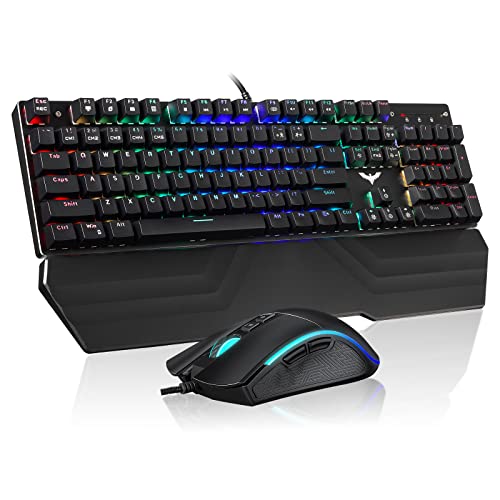
| Havit Mechanical Keyboard and Mouse Combo | Players who specifically want clicky mechanical switches | 104 keys, blue switches, wired USB, detachable wrist rest |
| MageGee Wireless Gaming Keyboard and Mouse Combo V560 | A tidy desk with one colour theme and no signal cables | RGB backlit rechargeable mechanical feel 2.4GHz combo |
| Logitech G203 Wired Gaming Mouse + G213 Prodigy Gaming Keyboard Bundle | Buyers who prefer two named Logitech G models in one bundle | G203 mouse with 8,000 DPI and G213 keyboard with Mech-Dome keys |
How to Choose
Decide the switch feel before anything else
Switch feel shapes every session, and a set locks you into one choice for the keyboard half. The Havit listing names blue switches, which the listing describes through its mechanical construction and floating keys; that style is clicky and tactile, and it carries into voice chat and shared rooms. The Redragon and Logitech boards take a membrane or Mech-Dome route, which tends to read quieter in the listing language and suits mixed gaming and typing. The MageGee board sits between them, described as mechanical feel rather than true mechanical. Pick based on where the desk lives, not on which word sounds more serious.
Match the layout to your desk and your games
A full-size board brings a number pad, dedicated media keys, and room to spread your hands, but it also pushes the mouse further to the right and widens the reach for every flick. The Redragon set lists 114 keys in total, and the Havit board lists 104 keys, so both assume a generous desk. The MageGee V560 uses a more compact arrangement that leaves extra mousing room, which helps on shallow desks or in small rooms. Measure the space between your monitor stand and the desk edge before ordering, and picture where the mouse will travel during a wide turn in a shooter.
Read the mouse half as carefully as the keyboard
Sets are often sold on the keyboard photograph, yet the mouse decides aiming comfort. Compare the sensitivity steps the listing actually prints. The Redragon mouse adjusts through set steps up to the figure in its listing, the Havit mouse lists six steps, the MageGee mouse changes through its own button, and the Logitech G203 lists a much higher ceiling. Higher is not automatically better; what matters is whether a low, steady step exists for precise work and whether the steps are spaced so you can find one that matches your monitor size. Also check button count, because side buttons change how abilities and push-to-talk get bound.
Choose wired, wireless, or a bundle of separate models
Connection decides clutter, charging, and how the set behaves when something stops responding. Wired sets such as the Redragon and Havit need no charging and keep both devices ready, at the cost of two cables crossing the desk. The MageGee set uses a single 2.4GHz approach, and its listing notes the cable is for charging, so the tidy look depends on remembering to top up both devices. The Logitech option is a bundle of two separately named wired models, which makes replacing one half later far easier. Decide which failure mode you would rather manage before you buy.
The 4 Best Options
Redragon S101-3 PRO Gaming Keyboard and Mouse
This set suits a first gaming desk where one box should cover the keyboard, the mouse, and a few extras without a separate hunt for accessories. The listing highlights programmable functions through software and independent macro record keys on the keyboard, which gives strategy and MMO players somewhere to park repeated commands. The integrated wrist rest in the product name matters for longer typing stretches, and the wired connection removes charging from the routine entirely. For a shared family PC that also handles homework and email, that straightforward wired setup is the appeal.
Specs
- RGB backlit gaming keyboard with 7 different RGB lighting modes and effects
- 4 backlight brightness levels and adjustable breathing speed
- 25 conflict-free keys, 10 dedicated multimedia keys plus 12 additional FN+ multimedia keys, 114 keys in total
- Wired gaming mouse adjustable to 3200 DPI, with 800, 1600, 2400 and 3200 DPI steps
- Mouse lists 30G acceleration, a weight tuning set, and 6 buttons of which 5 are programmable
- Compatibility listed for Windows 10, Windows 8, Windows 7, Windows Vista and Windows XP, with limited Mac OS keyboard support
Best for: A first wired gaming setup on a Windows PC that also needs multimedia keys and a wrist rest.
Watch out for: Confirm the limited Mac OS keyboard support in the listing is enough if the set will ever move to a Mac.
ASIN: B00NLZUM36
Havit Mechanical Keyboard and Mouse Combo
Choose this combo when the keyboard is the main event and you know you want a genuine mechanical action rather than a mechanical-feel membrane. The listing names blue switches across its 104 keys, an all-metal panel, and a floating key design, which together describe a board built around a firm, clicky press. The detachable wrist rest lets you change the footprint depending on the desk, and the mouse is programmable with six sensitivity steps. It fits a dedicated gaming corner where switch noise is not a problem and where typing feel is the deciding factor.
Specs
- Mechanical keyboard with 104 keys and blue switches, wired USB connection
- All-metal panel and floating keys design, with full n-key rollover listed
- RGB lighting with 14 backlit modes on the keyboard and 7 colour effects on the mouse
- Detachable wrist rest included in the product title
- Programmable gaming mouse with 6 DPI levels: 800, 1600, 2400, 3200, 4000 and 4800
- Compatibility listed for Windows 2000, Vista, Windows 7, Windows 8 and Windows 10, plus Mac and Linux
Best for: Players who want clicky blue mechanical switches and a metal-panel board in a wired set.
Watch out for: Blue switches are loud by design, so check that the room, and anyone sharing it, can live with the sound.
ASIN: B07QS6MG8B
MageGee Wireless Gaming Keyboard and Mouse Combo V560
This is the set for a desk where cables are the complaint. The listing describes a rechargeable wireless combo using 2.4GHz, with RGB backlighting and a mechanical feel rather than mechanical switches, and the colour in the product title is part of the point: the board and mouse arrive already matched. The listing also notes where the receiver lives and that the cable handles charging, which tells you the daily routine up front. It suits laptop gamers, living-room PCs, and anyone whose setup gets packed away or rearranged often.
Specs
- Wireless gaming keyboard and mouse combo, model V560, in Blue White Purple
- Connectivity technology listed as 2.4GHz wireless
- RGB backlit and rechargeable, with mechanical feel and a quiet description in the title
- Special features listed as RGB lighting, rechargeable keyboard and mouse, and ergonomic design
- USB receiver stored at the bottom of the mouse, according to the listing
- Listing notes only 2.4GHz mode is used for connection and the cable has a charging function
- Compatible devices listed as personal computer, with the title naming Mac, laptop and PC use
Best for: A colour-matched, cable-free desk for laptop or living-room gaming.
Watch out for: The listing states the cable is for charging only, so plan on the 2.4GHz receiver for the actual connection.
ASIN: B0D1MGVRR8
Logitech G203 Wired Gaming Mouse + G213 Prodigy Gaming Keyboard Bundle

This bundle takes a different route from the boxed combos above: it pairs two separately named Logitech G models, the G213 Prodigy keyboard and the G203 wired mouse, in a white bundle listing. That structure helps buyers who already know one of the two models, and it makes later replacement simpler because each half has its own identity. The keyboard listing points to Mech-Dome keys, a palm rest and dedicated media controls, while the mouse listing leads with its sensitivity figure and programmable buttons. It fits a buyer who trusts a familiar brand family over a single-box value kit.
Specs
- G213 Prodigy keyboard: wired RGB backlit keyboard with Mech-Dome keys
- Keyboard lists a palm rest, adjustable feet, media controls and USB connection
- Keyboard described as spill-resistant in the bundle listing details
- G203 mouse: wired gaming mouse with 8,000 DPI
- Mouse lists LIGHTSYNC RGB, 6 programmable buttons and on-board memory
- Mouse lists screen mapping and compatibility with PC and Mac computers and laptops
- Included components listed as the Logitech G203 wired gaming mouse and the G213 Prodigy gaming keyboard
Best for: Buyers who want two named Logitech G devices, a palm rest, and a higher mouse sensitivity ceiling.
Watch out for: This is a bundle of two models, so check the listing carefully to confirm both items and the white colour are in the option you select.
ASIN: B0BW1P6KKL
Which One Fits Your Situation
You are building a first gaming PC on a spare desk
Start with the Redragon S101-3 PRO set. One wired box covers the board, the mouse, multimedia keys and a wrist rest, and the programmable mouse buttons give you room to grow into more demanding games. Because nothing needs charging, the set stays ready on a family or spare-room PC that may sit unused for days and then get used hard all weekend.
You type all day and game in the evening
Look at the Havit combo if the typing feel is what you notice most, because its blue mechanical switches and metal panel make the keyboard the centrepiece. The detachable wrist rest helps when the desk doubles as a work surface. Just be honest about noise: if calls or a partner in the same room are part of the day, a membrane-based set will cause fewer complaints.
Your desk is small, shared, or in the living room
The MageGee V560 fits this problem best. Wireless connection clears the cable tangle that makes a shared surface look messy, the rechargeable design avoids a drawer of spare batteries, and the matched colour scheme reads as one intentional setup rather than two random peripherals. Keep the receiver safe, because the whole set depends on that one small part.
You already own, or plan to upgrade, one half later
Pick the Logitech G203 and G213 bundle. Because each device is a named model in its own right, replacing the mouse next year while keeping the keyboard, or the reverse, is a cleaner decision than retiring a matched combo. The G203 also lists the highest sensitivity ceiling here, which suits players who expect to fine-tune settings through Logitech software over time.
Common Mistakes
- Buying a set for the keyboard photograph and ignoring the mouse sensitivity steps, button count, and shape described in the same listing.
- Choosing clicky blue switches for a shared bedroom, dorm room, or open-plan office without thinking about who else hears every keypress.
- Assuming a wireless combo connects by its charging cable, when the listing says the cable only charges and the receiver does the connecting.
- Ordering a full-size 104-key or larger board for a shallow desk, then discovering the mouse has almost no room to move.
- Treating a bundle of two separate models as a single boxed combo, and not checking which colour and which items the selected option includes.
Frequently Asked Questions
Is a keyboard and mouse set better than buying each device separately?
A set guarantees the two devices arrive together, share a design language, and cover the basics in one purchase, which suits first setups and gifts. Buying separately gives more control over switch type and mouse shape. If one specific feature matters most, separate purchases usually serve it better; if convenience matters most, a set wins.
What does mechanical feel mean on a set like the MageGee V560?
The listing uses mechanical feel to describe a membrane-style board shaped and tuned to imitate some of the travel and response of a mechanical keyboard. It is not the same construction as the individual blue switches listed for the Havit combo. Expect a quieter, softer press, and read the exact wording on the listing before assuming switch type.
How much mouse DPI do most players actually need in a combo?
Most players settle on one or two sensitivity steps and rarely change them, so a mouse with clearly spaced steps matters more than a huge headline number. The sets here list very different ceilings, from the Redragon steps to the G203 figure. Choose based on whether a comfortable low step exists for precise aiming and editing work.
Can these gaming sets be used for work and school as well?
Yes, and several listings say so directly through their multimedia keys, number pads, and operating system compatibility. A full-size board with a wrist rest handles long documents comfortably, while programmable mouse buttons can carry shortcuts. The main work concern is noise from mechanical switches and lighting that may distract in a quiet office or classroom.
Related guides
More from Amazon
Programs that pair well with the guide above. Offers and eligibility are set by Amazon and may change.
A free business account with business pricing and bulk-buying tools for work, shop or home office.
Create a business accountFree shipping on eligible items, Prime Video and more. Eligible new members can start with a free trial.
Start a Prime free trialAudiobooks and podcasts to listen to on the go. Eligible new members can start with a free trial.
Try Audible freeAd-free music streaming. Eligible new subscribers can start with a free trial.
Try Music Unlimited freeAs an Amazon Associate we earn from qualifying purchases.