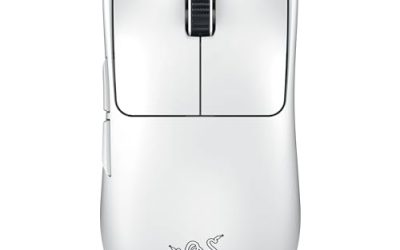
Tracking is the one thing a gaming mouse cannot fake. Your crosshair either follows your hand exactly, or it does not, and every missed shot, every overshot flick, and every moment of drift traces back to the sensor. A mouse with poor tracking forces you to compensate for its flaws, which means you are fighting your hardware instead of your opponent.
This guide compares five mice whose sensors are known for accurate, consistent tracking, using the names and specifications printed on their Amazon listings. The picks cover wired and wireless, light and heavy, symmetrical and ergonomic, because good tracking is not limited to one shape or one price.
Our Top Picks
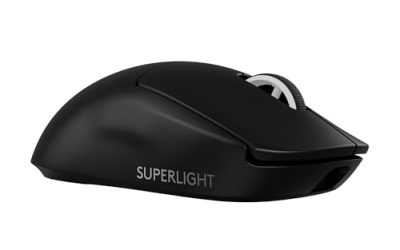
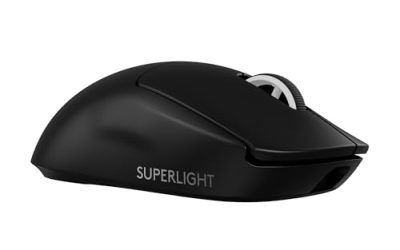
 Logitech G Pro X Superlight 2 Lightspeed WirelessClassic1.57 x 2.5 x 4.92 inches0.1 poundsCheck on Amazon
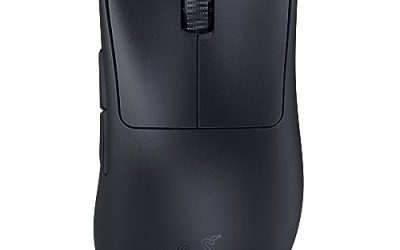
 Razer DeathAdder V3 Pro Wireless Gaming Mouse1000 Hz5.01 x 2.65 x 1.69 inches0.1 poundsCheck on Amazon
Top 3 picks at a glance

Quick Picks
As an Amazon Associate we earn from qualifying purchases
| Product | Best for | Key spec from title |
|---|---|---|
| Logitech G Pro X Superlight 2 | Best overall tracking | 60g, HERO 2 sensor, up to 44,000 DPI |
| Razer Viper V2 Pro | Lightweight tracking | 58g, Focus Pro 30K optical sensor |
| Razer DeathAdder V3 Pro | Ergonomic tracking | 63g, Focus Pro 30K optical sensor |
| Logitech G502 HERO | Wired tracking value | HERO 25K sensor, up to 25,600 DPI |
| Glorious Model O Wireless | Honeycomb tracking | 69g, 2.4 GHz wireless, RGB lighting |
How to Choose
The sensor is the whole story
Tracking quality comes down to the sensor, and the best sensors share the same traits: they track without acceleration, without angle snapping, and without smoothing, so the mouse reports exactly what your hand does. Modern flagship sensors from Logitech and Razer also track at very high speeds, which means they keep up during fast flicks instead of spinning out. When you compare mice, look for a sensor that is proven in competitive play rather than one with the biggest DPI number on the box, because the DPI ceiling is headroom you will never use.
Lift-off distance affects real aiming
Lift-off distance is how far you can raise the mouse before the sensor stops tracking, and it matters more than most people realise. A low lift-off distance means you can lift and reposition the mouse without the cursor drifting, which is essential for players who use a low sensitivity and a large mousepad. Most modern gaming mice let you adjust this in software, but some handle it better than others. If you reposition your mouse constantly during play, a sensor with a short, consistent lift-off distance will make your aim feel noticeably cleaner.
Surface compatibility is easy to overlook
A sensor that tracks perfectly on a cloth mousepad can behave differently on a hard pad or a bare desk, so check that the mouse you pick is tuned for the surface you actually use. Most flagship sensors now adapt to different surfaces automatically, but budget sensors sometimes struggle on glossy or uneven materials. A good cloth mousepad is the safest pairing for any tracking-focused mouse, and it is a cheap upgrade that improves the performance of every mouse on this list.
Polling rate and latency complete the picture
Tracking is not just about the sensor reading movement correctly; it is also about how often the mouse reports that movement to the computer. A 1,000 Hz polling rate sends an update every millisecond, which is fast enough for almost everyone, while 8,000 Hz polling on the Superlight 2 cuts that delay further still. The practical difference is small, but if you are chasing the cleanest possible tracking, a higher polling rate removes one more source of delay between your hand and the screen.
The 5 Best Options
Logitech G Pro X Superlight 2
The Superlight 2 sets the standard for tracking, because the HERO 2 sensor is the most precise Logitech has ever shipped. It tracks up to 44,000 DPI with sub-micron accuracy, which means the smallest movement of your hand registers exactly as it should. The LIGHTSPEED wireless connection polls at up to 8 kHz, so the sensor’s readings reach your computer with almost no delay. At 60 grams the mouse moves with almost no effort, and the five-button layout keeps the shell clean. USB-C charging and a 95-hour battery round out a mouse that is built around tracking first and everything else second.
Specs
- 60g lightweight design
- HERO 2 sensor with up to 44,000 DPI
- LIGHTSPEED wireless with up to 8 kHz polling
- 5 programmable buttons
- Up to 95 hours of battery life
- USB-C charging
- LIGHTFORCE hybrid optical-mechanical switches
Best for: Players who want the most accurate tracking available in a wireless mouse.
Watch out for: The symmetrical shape suits claw and fingertip grips better than a full palm grip, and there is no dedicated DPI button on the shell.
Razer Viper V2 Pro
The Viper V2 Pro pairs Razer’s Focus Pro 30K optical sensor with a 58-gram symmetrical shell, giving you flagship tracking in the lightest mouse in this guide. The sensor tracks without acceleration or smoothing at any speed a flick can produce, and the Gen-3 optical switches click with almost no debounce delay. HyperSpeed wireless delivers a cable-like response, and the 90-hour battery means charging is a rare event. On-mouse DPI controls let you switch sensitivity without opening software, which is handy when you change games mid-session.
Specs
- 58g symmetrical design
- Focus Pro 30K optical sensor
- Gen-3 optical mouse switches
- HyperSpeed wireless technology
- Up to 90 hours of battery life
- On-mouse DPI controls
- 5 programmable buttons
Best for: Claw and fingertip players who want flagship tracking in the lightest shell here.
Watch out for: The low profile offers little palm support, and there is no RGB lighting if that matters to your setup.
Razer DeathAdder V3 Pro
The DeathAdder V3 Pro brings the same Focus Pro 30K optical sensor as the Viper V2 Pro to a right-handed ergonomic shell, which makes it the best tracking mouse for players who rest their whole hand on the mouse. At 63 grams it is light enough for fast flicks, yet the shape supports your palm through long sessions without cramping. Gen-3 optical switches register clicks with almost no delay, and HyperSpeed wireless keeps the connection as responsive as a cable. The 90-hour battery will last through many sessions before it needs a charge.
Specs
- 63g right-handed ergonomic design
- Focus Pro 30K optical sensor
- Gen-3 optical mouse switches
- HyperSpeed wireless technology
- Up to 90 hours of battery life
- 5 programmable buttons
- On-mouse DPI controls
Best for: Right-handed players who want flagship tracking in a comfortable ergonomic shell.
Watch out for: The shape is right-handed only, and the side buttons sit close together for smaller hands.
Logitech G502 HERO

The G502 HERO is the wired pick for players who want proven tracking without paying for wireless. The HERO 25K sensor tracks up to 25,600 DPI with the same accuracy that made the G502 line famous, and the wired connection means there is no battery to think about and no wireless latency at all. Eleven programmable buttons cover push-to-talk, melee, and ability keys, and the adjustable weight system lets you tune the feel from light to heavy by adding or removing the included weights. RGB lighting and onboard memory round out a mouse that has earned its reputation over years of use.
Specs
- HERO 25K sensor with up to 25,600 DPI
- 11 programmable buttons
- Adjustable weight system
- RGB lighting
- Wired connection
- Onboard memory for saved profiles
Best for: Players who want reliable wired tracking and a tunable weight at a lower price.
Watch out for: The cable adds drag unless you use a mouse bungee, and the shape is large for small hands.
Glorious Model O Wireless
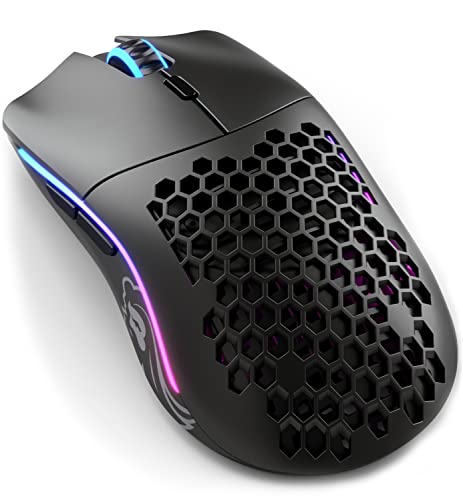
The Glorious Model O Wireless brings flagship-style tracking to a honeycomb shell that stays light without feeling fragile. At 69 grams it moves easily across the pad, and the 2.4 GHz wireless connection keeps latency low for competitive play. RGB lighting runs through the honeycomb cutouts, which looks striking on a dark desk, and the 71-hour battery means charging is a weekly task rather than a daily one. The symmetrical shape suits claw and fingertip grips, and the matte black finish resists fingerprints better than a glossy shell.
Specs
- 69g honeycomb design
- 2.4 GHz wireless connection
- RGB lighting
- Up to 71 hours of battery life
- Symmetrical shape
- Matte black finish
Best for: Players who want a light, distinctive wireless mouse with good tracking at a lower price.
Watch out for: The honeycomb shell can collect dust over time, and the battery life is shorter than the Logitech and Razer picks here.
Which One Fits Your Situation
You want the best tracking money can buy
Pick the Logitech G Pro X Superlight 2. The HERO 2 sensor tracks up to 44,000 DPI with sub-micron accuracy, and the 8 kHz polling rate means those readings reach your computer almost instantly. At 60 grams it is also one of the lightest mice here.
You play with a claw or fingertip grip
Pick the Razer Viper V2 Pro. At 58 grams it is the lightest mouse in this guide, and the symmetrical shape is built for grips that lift and reposition constantly. The Focus Pro 30K sensor keeps tracking honest at any speed.
You rest your whole hand on the mouse
Pick the Razer DeathAdder V3 Pro. The right-handed ergonomic shell supports your palm, and the same flagship sensor as the Viper means you give up nothing on tracking. The 90-hour battery will not quit mid-session.
You want wired reliability and a tunable weight
Pick the Logitech G502 HERO. The HERO 25K sensor is proven, the wired connection has no latency or battery to worry about, and the adjustable weights let you tune the feel to your liking. It is the best value tracking mouse here.
Common Mistakes
- Judging a mouse by its DPI number, when tracking consistency and lift-off distance matter far more.
- Using a glossy desk or a worn-out mousepad and blaming the sensor for poor tracking.
- Setting lift-off distance too high and letting the cursor drift every time you reposition the mouse.
- Picking a heavy mouse for tracking and finding it drags during fast flicks.
- Ignoring polling rate and wondering why a good sensor still feels slightly delayed.
Frequently Asked Questions
What is the most accurate mouse sensor available?
The HERO 2 sensor in the Logitech G Pro X Superlight 2 and the Focus Pro 30K sensor in Razer’s flagship mice are the most accurate sensors you can buy right now. Both track without acceleration, smoothing, or angle snapping, and both hold tracking at speeds far beyond what a human hand can produce. The practical difference between them is negligible; choose based on shape and weight instead.
Does a higher DPI mean better tracking?
No. DPI is the resolution of the sensor, not its accuracy, and most players use 400 to 1,600 DPI regardless of what the mouse supports. A sensor that tracks accurately at 800 DPI is far better than one with a huge DPI ceiling that drifts or spins out. High DPI numbers are headroom, not a quality measure, so ignore them when comparing mice.
What is lift-off distance and why does it matter?
Lift-off distance is how far you can raise the mouse before the sensor stops tracking. A low lift-off distance means you can lift and reposition the mouse without the cursor moving, which is essential for low-sensitivity players who run out of mousepad space. Most modern gaming mice let you adjust this in software, and a short, consistent lift-off distance makes aiming feel cleaner.
Is wireless tracking as good as wired?
Yes, with a good 2.4 GHz connection. Modern wireless gaming mice report movement at 1,000 Hz or more, matching wired mice, and the best models poll at 8,000 Hz. The sensor itself is identical whether the mouse is wired or wireless, so tracking quality does not depend on the connection. Just avoid Bluetooth for gaming, since it adds latency.
Related guides
More from Amazon
Programs that pair well with the guide above. Offers and eligibility are set by Amazon and may change.
A free business account with business pricing and bulk-buying tools for work, shop or home office.
Create a business accountFree shipping on eligible items, Prime Video and more. Eligible new members can start with a free trial.
Start a Prime free trialAudiobooks and podcasts to listen to on the go. Eligible new members can start with a free trial.
Try Audible freeAd-free music streaming. Eligible new subscribers can start with a free trial.
Try Music Unlimited freeAs an Amazon Associate we earn from qualifying purchases.