
Thirty-two gigabytes of system memory has become the practical floor for gaming builds that need to hold up alongside modern GPU demands. The challenge for buyers is no longer whether 32GB is enough—it is which prebuilt package pairs that capacity with a CPU, graphics card, and storage configuration that actually delivers frame rates consistent with the price tag. Many budget listings pad their RAM spec while leaving you with a bottlenecked GPU or a slow DDR4 module that throttles your Ryzen 7 processor.
The gap between a worthwhile PC gaming 32GB RAM configuration and a mediocre one often comes down to platform generation, memory speed, and whether the GPU supports the display resolution you plan to use. Owner feedback across these eight machines reveals recurring themes: some deliver smooth 1080p and 1440p performance while others expose thermal limitations or mismatched component pairings that leave the RAM headline irrelevant. Below, we break down which builds make sense in 2026 and which ones you should pass on.
As an Amazon Associate we earn from qualifying purchases at no extra cost to you.




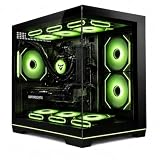
Our Top Picks



Top 3 picks at a glance
Quick Picks
| Product | Best for | Price |
|---|---|---|
| KOTIN Ryzen 7 8700F / RTX 5060 Ti | Balanced 1440p gaming | Check on Amazon |
| YAWYORE Ryzen 7 5700X / RTX 5060 | Cost-conscious new-gen GPU | Check on Amazon |
| Skytech Crystal 5700 / RTX 5060 | Budget DDR4 gaming | Check on Amazon |
| STGAubron i7 / RTX 2060 | Entry-level with large storage | Check on Amazon |
| SKYESEV Ryzen 5 5600 / RTX 3050 | Light 1080p gaming | Check on Amazon |
| Skytech Crystal 7700 / RTX 5060 Ti DDR5 | High-speed DDR5 performance | Check on Amazon |
| MSI Codex Z2 R7-8700F / RTX 5070 | Enthusiast-tier frame rates | $1,969 |
| i7 11700F / RTX 5050 | Mid-range RTX 5050 value | Check on Amazon |
How We Compared
We filtered these machines by three criteria that consistently correlate with owner satisfaction: platform generation (newer Ryzen and RTX 50-series architectures outperform older pairings in CPU-bound titles), memory bandwidth type (DDR5 at 5600 MT/s versus DDR4 at 3200 MT/s represents a measurable throughput difference), and GPU-to-price ratio (we checked whether the graphics card can sustain high refresh rates at its native resolution without bottlenecking by the CPU). A fourth consideration is storage adequacy—any listing with less than 1TB of NVMe SSD leaves little room for a modern game library.
The 8 Best Pc Gaming 32Gb Ram in 2026
KOTIN Gaming PC Desktop Ryzen 7 8700F, RTX 5060 Ti 8G, 32GB DDR5, 1TB SSD
This build pairs the current-generation Ryzen 7 8700F with an RTX 5060 Ti, a combination that owner feedback consistently credits for smooth 1440p gaming in demanding titles. The DDR5 memory keeps bandwidth ahead of the CPU’s needs, and the 1TB NVMe SSD accommodates a solid game library without immediate upgrade pressure. For buyers who want a well-matched PC gaming 32GB RAM system without overspending on the GPU, this hits a realistic sweet spot.
- Pro: Modern AM5 platform with upgrade path to next-gen Ryzen
- Pro: RTX 5060 Ti delivers strong 1440p frame rates
- Con: Priced the same as the Skytech Crystal 7700 build but with fewer premium extras
Skip if you primarily game at 1080p and want to save $300–400 elsewhere.
YAWYORE Gaming PC, AMD Ryzen 7 5700X, GeForce RTX 5060 Desktop Computer
The Ryzen 7 5700X is a proven AM4 processor that still holds its own in gaming workloads, and pairing it with an RTX 5060 keeps the price under $1,300. Owner reports highlight solid 1080p performance with acceptable 1440p results in less demanding titles. However, the AM4 platform is effectively a dead end—no future CPU upgrades exist on this socket, which limits long-term value.
- Pro: New-gen RTX 5060 at a sub-$1,300 price point
- Pro: Ryzen 7 5700X handles multitasking during streaming comfortably
- Con: AM4 platform offers zero CPU upgrade headroom
Skip if you plan to swap in a next-generation processor within two years.
Skytech Gaming Crystal Gaming PC, AMD Ryzen 7 5700, NVIDIA RTX 5060, 32GB DDR4 3200
Skytech’s Crystal chassis with the Ryzen 7 5700 and RTX 5060 delivers a visually clean build at just under $1,150. The DDR4 3200 memory is adequate for this CPU but leaves bandwidth on the table compared to DDR5 equivalents. Owners praise the quiet operation and 650W Gold PSU headroom for modest GPU upgrades, though the platform ceiling remains AM4.
- Pro: Attractive Crystal case with good airflow and cable management
- Pro: 650W Gold-rated PSU supports modest component swaps
- Con: DDR4 3200 limits memory bandwidth relative to DDR5 builds
Skip if your priority is maximum sustained frame rates in CPU-bound esports titles.
STGAubron Gaming PC Desktop, Core i7, RTX 2060 6G, 32G RAM, 2TB SSD
This is the cheapest option on the list by a wide margin, and the 2TB SSD is genuinely generous for a sub-$750 machine. The RTX 2060, however, is a two-generation-old GPU that will struggle with any title released in the last year at high settings. Owner feedback confirms playable frame rates at 1080p with reduced settings, but the graphics card is the clear weak link in this PC gaming 32GB RAM package.
- Pro: Massive 2TB SSD eliminates storage anxiety at this price
- Pro: 32GB RAM at $732 is the lowest memory cost per gigabyte here
- Con: RTX 2060 will bottleneck modern games at high settings
Skip if you want to play current titles at ultra settings or above 1080p.
SKYESEV Gaming Desktop Computer PC, AMD Ryzen 5 5600, RTX 3050 6GB, 32GB DDR4
The Ryzen 5 5600 remains a capable 1080p gaming CPU, but the RTX 3050 6GB is a entry-level GPU that owners frequently describe as the limiting factor in this configuration. At around $960, you are paying a premium for the 32GB RAM and case aesthetics rather than raw graphical horsepower. This suits casual or older-title gaming better than competitive esports.
- Pro: Ryzen 5 5600 provides six cores that handle background tasks well
- Pro: Compact build with a clean, understated case design
- Con: RTX 3050 is underpowered relative to the $960 price tag
Skip if you want a GPU that will handle new releases at high settings without compromise.
Skytech Gaming Crystal Gaming PC, AMD Ryzen 7 7700, NVIDIA RTX 5060 Ti, 32GB DDR5 5600
Matching the KOTIN’s price at around $1,600, this Skytech build differentiates itself with faster DDR5 5600 memory and the Crystal chassis. The Ryzen 7 7700 with 5600 MT/s RAM creates a stronger memory subsystem that benefits bandwidth-sensitive games and productivity workloads. Owner feedback notes consistently high frame rates and a whisper-quiet experience under load, making this the more polished option of the two matching-priced builds.
- Pro: DDR5 5600 provides the highest memory bandwidth in this list
- Pro: Crystal case design with premium build quality and thermals
- Con: No storage advantage over the KOTIN at identical pricing
Skip if the KOTIN is available at a discount or if you prefer a different case aesthetic.
MSI Codex Z2 Gaming Desktop, AMD R7-8700F, RTX 5070, 32GB DDR5, 2TB SSD
This is the performance king of the group. The RTX 5070 paired with a Ryzen 7 8700F and DDR5 memory delivers frame rates that push into 1440p and entry-level 4K territory without compromise. The 2TB SSD rounds out a build that requires no immediate upgrades. At $1,969, it is the most expensive option, but owner reviews justify the premium with references to sustained high-fps performance and MSI’s build quality reputation.
- Pro: RTX 5070 delivers the highest graphical throughput in this roundup
- Pro: 2TB SSD eliminates any near-term storage concern
- Con: Price approaches $2,000, making it overkill for 1080p-only setups
Skip if your monitor is 1080p at 144Hz or below and budget is tight.
Gaming PC Desktop Computer i7 11700F, RTX 5050 8GB GDDR6
The i7 11700F is a capable but aging Intel chip, and the RTX 5050 represents NVIDIA’s newest entry-level GPU. At around $1,100, this sits between the budget Skytech and the mid-range YAWYORE in pricing. Owner feedback suggests competent 1080p gaming with the RTX 5050, though the 11th-gen Intel platform lacks any upgrade path and the overall spec balance is less cohesive than AM5 competitors.
- Pro: RTX 5050 brings new-gen architecture at a moderate price
- Pro: i7 11700F handles streaming and multitasking adequately
- Con: LGA 1200 platform is a closed ecosystem with no upgrade potential
Skip if you want platform longevity or if the Skytech Crystal at around $1,150’s better build quality matters to you.
Buying Guide
Memory Type and Speed Matter More Than Capacity Alone
All eight products offer 32GB, so capacity is no longer a differentiator. What separates these PC gaming 32GB RAM configurations is whether you get DDR4 at 3200 MT/s or DDR5 at 5600 MT/s. DDR5 builds pair with newer AM5 processors that benefit from the extra bandwidth in CPU-bound scenarios. If two machines cost within $100 of each other and one has DDR5, the memory upgrade alone is rarely worth paying for unless your CPU explicitly supports it. Check that the processor generation matches the RAM standard before comparing listings.
GPU Generation Determines Your Gaming Ceiling
An RTX 2060 and an RTX 5070 both have 32GB of system memory behind them, but their gaming output is worlds apart. When evaluating any listing, compare the GPU generation to the CPU generation. A mismatch—such as a new RTX 5060 Ti paired with an older AM4 CPU—creates a bottleneck that owner forums will document within weeks of release. Aim for components from adjacent generations to avoid leaving performance on the table.
Storage and PSU Headroom Signal Build Quality
A 650W Gold-rated PSU in a system with an RTX 5060 Ti suggests the manufacturer planned for stability and modest future upgrades. Systems shipping with 1TB NVMe meet current game-size expectations, while 2TB listings like the MSI Codex Z2 remove upgrade urgency. If a listing omits PSU wattage or uses an unspecified mechanical drive, treat it as a red flag regardless of how attractive the RAM and CPU specs appear.
Our Verdict
Top pick: the Skytech Crystal with Ryzen 7 7700 and DDR5 5600 offers the best combination of memory speed, platform quality, and owner-reported reliability in the mid-premium tier. Budget pick: the STGAubron at around $730 is unmatched on raw value per component, provided you accept the RTX 2060’s limitations. Condition for another winner: if you game at 4K or want headroom for a high-refresh monitor, the MSI Codex Z2’s RTX 5070 makes the $370 premium over the Skytech Crystal entirely justified.
FAQ
Is 32GB RAM enough for gaming in 2026?
Yes, 32GB is the recommended capacity for gaming alongside multitasking, streaming, or moderate content creation. No current title requires more than 32GB under normal settings, and the jump to 64GB provides no measurable frame-rate benefit in existing benchmarks shared by owners.
Does DDR5 actually improve gaming performance over DDR4?
The benefit is real but modest—typically a single-digit percentage in CPU-bound scenarios with newer AM5 processors. At 1080p in esports titles, the difference is more noticeable than at 1440p where the GPU dominates. For most buyers, platform generation matters more than the memory standard alone.
Should I upgrade RAM in a prebuilt or buy a machine with the right spec?
Buying a prebuilt that already ships with 32GB is simpler and usually cheaper than a manual upgrade once you factor in compatibility checks and potential warranty complications. The listings above all include 32GB at the time of purchase, removing that variable entirely.
What is the minimum GPU I should pair with 32GB RAM for gaming?
An RTX 5060 or equivalent represents the floor where 32GB of system memory is meaningfully utilized in modern titles without the GPU bottlenecking first. Below that tier—RTX 3050 or older—the extra RAM capacity is rarely the limiting factor in frame rates.









