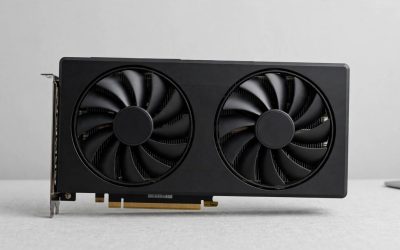
Choosing a graphics card by performance per watt changes the question from how fast it can run to how much heat, noise, and power supply headroom that speed demands. A card that delivers smooth play while drawing less puts less strain on a small case, keeps fans spinning slower during long sessions, and leaves room in a modest power supply for the processor and storage. That balance matters most in compact builds, quiet rooms, and systems that stay on for hours at a time.

This ranking is for builders who want steady 1080p and 1440p play without a large cooler or an oversized power supply, including small-form-factor owners, quiet-PC builders, and anyone upgrading an older office or prebuilt machine. The five cards below come from names and specifications listed on Amazon product pages, and they are ordered from the most efficient to the least efficient in this set, so the first pick is the easiest card to cool and power.
Our Top Picks
 ASUS Dual GeForce RTX 5060 Ti 16GB GDDR7RTX5060Ti|OC|16GB9 x 4.7 x 2 inches1.4 poundsCheck on Amazon


Quick Picks
As an Amazon Associate we earn from qualifying purchases.
| Product | Best for | Key spec from title |
|---|---|---|
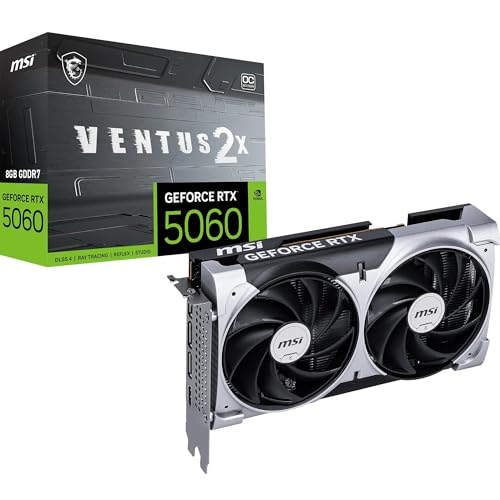
| MSI GeForce RTX 5060 8G VENTUS 2X OC Graphics Card | A compact 1080p build with limited cooling | 8GB GDDR7, 128-bit, 2535 MHz |
| ASUS Prime GeForce RTX 5060 8GB GDDR7 OC Edition | A small-form-factor 1080p upgrade | 8GB GDDR7, OC Mode 2595 MHz, Dual BIOS |
| ASRock Intel Arc B570 Challenger 10GB OC | A 1080p build that needs 10GB of memory | 10GB GDDR6, 2600 MHz, 0dB Cooling |
| XFX Swift AMD Radeon RX 9060 XT OC Triple Fan 16GB | A 1440p AMD build with 16GB of memory | 16GB GDDR6, boost up to 3320 MHz |
| ASUS Dual GeForce RTX 5060 Ti 16GB GDDR7 OC Edition | A 1440p build that needs extra memory | 16GB GDDR7, PCIe 5.0, 0dB Technology |
How to Choose
Board Power and Power Supply Size
Start with the board power figure in the maker specification, not with the size of the cooler or the length of the card. That figure sets the size of the power supply you need and the headroom left for the processor, drives, and fans. A card with a modest board power rating fits a smaller supply and a compact case more easily, while a card that draws more needs a supply with a clear margin above the combined draw of the whole system. Check the power connector on the listing as well, because a card that needs an extra connector may call for a different cable set than the supply already in the machine.
Cooling and Noise at Low Power
A card that draws less does not always run quiet, because fan size, heatsink depth, and the fan curve all shape the sound you hear. Look for a dual-fan design with a heatsink that covers the full length of the card, and check whether the listing mentions a fan-stop mode for light loads. In a small case, a card that vents heat toward the side panel can raise the temperature of nearby parts, so leave a clear path for intake and exhaust air. A two-slot card also leaves a spare slot free, which helps airflow around the card and makes the build easier to service later.
VRAM and Resolution Per Watt
Memory size shapes efficiency in a quiet way, because a card that runs out of memory has to move data back and forth more often, and that extra work costs power and frame time. For 1080p play, 8GB of memory covers most current games at sensible settings, while 1440p play and heavier texture settings benefit from 12GB or 16GB. Do not choose a card by memory size alone, though, because a larger memory pool on a weaker chip will not make that chip faster. Match the memory to the resolution you actually play at, and let the chip tier set the level of detail you can expect.
Driver Features That Save Power
Modern drivers can save more power than a small change in hardware, so the software around a card deserves the same attention as the cooler. Upscaling and frame generation let a card render at a lower internal resolution and still present a sharp image, which lowers the load on the chip during demanding scenes. A frame-rate cap is another useful tool, because holding a steady target rate stops the card from working harder than the monitor can show. Check that the card supports the upscaling method used by the games you play, and set a cap that matches the refresh rate of your display.
The 5 Most Efficient Options
MSI GeForce RTX 5060 8G VENTUS 2X OC Graphics Card (8GB GDDR7, 128-bit, Extreme Performance: 2535 MHz, DisplayPort x3 2.1b, HDMI 2.1b, NVIDIA Blackwell Architecture)
This is the easiest card in this ranking to cool and to power, because it pairs the entry Blackwell chip with a short dual-fan cooler, a single 8-pin connector, and an SFF-Ready badge. It suits a compact 1080p build, a quiet office machine that also plays games, or an older system that needs a modern card without a new power supply. Its short length leaves room for airflow in tight cases, and the fan-stop mode keeps the card silent during light loads. For a builder who values a cool, quiet machine over maximum detail, this is the natural first pick.
Specs
- 8GB GDDR7 memory, 128-bit
- Extreme Performance: 2535 MHz
- DisplayPort x3 2.1b, HDMI 2.1b
- TORX FAN 5.0 dual-fan design, PCIe 5.0
Best for: A compact 1080p build where low heat and low noise matter more than maximum detail.
Watch out for: 8GB of memory can limit heavier texture settings, so check the memory demand of the games you play most.
ASUS The SFF-Ready Prime GeForce RTX 5060 8GB GDDR7 OC Edition Graphics Card (PCIe 5.0, 8GB GDDR7, HDMI/DP 2.1, 2.5-Slot, Axial-tech Fans, Dual BIOS)
The Prime card uses the same Blackwell chip as the card above, with a slightly higher factory clock and a 2.5-slot Axial-tech cooler that trades a little width for quieter running. It suits a small-form-factor build that still wants room for demanding games, or a mid-tower upgrade where the extra slot width is no problem. The dual BIOS adds a quieter profile for everyday use, and DLSS 4 support helps the card hold smooth frame rates at 1080p without working at full load. It is the pick for a builder who wants the same efficient chip with a cooler tuned for silence.
Specs
- 8GB GDDR7 memory
- OC Mode: 2595 MHz
- PCIe 5.0, HDMI/DP 2.1
- 2.5-slot design, Axial-tech Fans, Dual BIOS
Best for: A small-form-factor 1080p build that wants a quieter cooler and a second BIOS profile.
Watch out for: The 2.5-slot width needs clearance beside the PCIe slot, so measure the space before ordering.
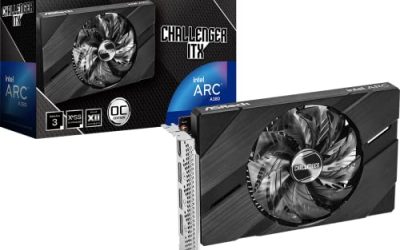
ASRock Intel Arc B570 Challenger 10GB OC GDDR6 Graphics Card, 2600 MHz GPU, 19 Gbps Memory, Dual Fan, Metal Backplate, HDMI 2.1a, DisplayPort 2.1, 0dB Cooling
The Arc B570 Challenger brings 10GB of memory to the efficient end of this ranking, which gives it more room for textures than the 8GB cards above while keeping a dual-fan design and a metal backplate. It suits a 1080p build that plays texture-heavy games, or a creator setup that benefits from Intel features such as XeSS upscaling and AV1 encoding. The 0dB cooling mode keeps the fans still during light work, and the dual-fan layout fits most mid-tower cases without crowding nearby slots. Check driver support for your games first, because feature coverage varies by title.
Specs
- 10GB GDDR6 memory
- 2600 MHz GPU, 19 Gbps memory
- Dual Fan, Metal Backplate, 0dB Cooling
- HDMI 2.1a, DisplayPort 2.1, PCIe 4.0
Best for: A 1080p build that needs 10GB of memory and Intel graphics features.
Watch out for: Check driver support for the games and creative tools you use, because feature coverage varies by title.
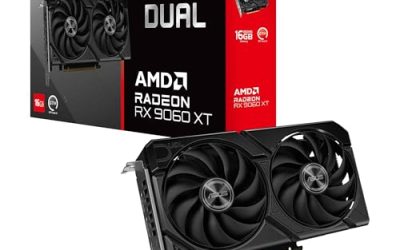
XFX Swift AMD Radeon RX 9060 XT OC Triple Fan Gaming Edition with 16GB GDDR6 HDMI 2xDP, AMD RDNA 4 RX-96TS316BA
The Swift card steps up to 16GB of GDDR6 memory and a triple-fan cooler, which makes it the first card in this ranking aimed squarely at 1440p play. It suits a builder who prefers AMD software and display features, or who already owns a monitor and board setup that pairs well with a Radeon card. Its larger memory pool helps with texture-heavy games, while its PCIe 5.0 link keeps the card ready for newer boards. The triple-fan design needs a case with room for a longer card and steady airflow, so measure the space beside the slot before ordering.
Specs
- 16GB GDDR6 memory
- Boost Clock up to 3320 MHz, Base Clock 1900 MHz
- HDMI 2xDP, RDNA 4 architecture
- Triple-fan design, model RX-96TS316BA
Best for: A 1440p AMD build where 16GB of memory and a modern PCIe link matter.
Watch out for: The triple-fan card is longer than the dual-fan models above, so check case length and airflow before ordering.
ASUS Dual GeForce RTX 5060 Ti 16GB GDDR7 OC Edition Graphics Card (PCIe 5.0, DLSS 4, HDMI 2.1b, DisplayPort 2.1b, 2.5-Slot, Axial-tech Fan, 0dB Technology)
This Dual card closes the ranking with the strongest chip in the set and 16GB of GDDR7 memory, which gives 1440p textures room to breathe and keeps the card useful for longer. It draws more than the cards above, so it ranks last on efficiency here, but its dual-fan Axial-tech cooler and 0dB mode still suit a mid-tower build with sound airflow. The dual BIOS adds a quieter option for everyday use, and DLSS 4 helps it hold smooth frame rates without running at full load. It is the pick for a builder who wants the most headroom in this set and accepts the extra draw.
Specs
- 16GB GDDR7 memory
- PCIe 5.0, DLSS 4
- HDMI 2.1b, DisplayPort 2.1b
- 2.5-slot design, Axial-tech Fan, 0dB Technology, Dual BIOS
Best for: A 1440p build that needs 16GB of memory and the most headroom in this set.
Watch out for: The 2.5-slot width needs clearance in a tight case, so measure the space beside the PCIe slot before ordering.
Which One Fits Your Situation
A Quiet Small-Form-Factor Build
Choose the MSI GeForce RTX 5060 8G VENTUS 2X OC, because it is the lowest-draw card in this ranking and the easiest to keep cool in a tight case. Its compact shape leaves room for airflow, and its modest board power keeps fan speed down during long sessions. Pair it with a case that has a clear intake path, and set a frame-rate cap that matches your monitor to keep the card from working harder than it needs to.
A 1080p Upgrade for an Older PC
Choose the ASUS Prime GeForce RTX 5060 8GB GDDR7 OC Edition, because its GDDR7 memory and Blackwell features give a clear step up over older cards while keeping a familiar compact size. It fits most mid-tower cases without a new cooler layout, and it handles 1080p play at higher settings. Before ordering, confirm that your power supply has the right connector and that the card clears any drive cages beside the slot.
An Intel Build That Needs More Memory
Choose the ASRock Intel Arc B570 Challenger 10GB OC, because its 10GB of memory gives texture-heavy games more room than the 8GB cards, while its dual-fan cooler and 0dB mode keep it quiet in a mid-tower case. It also brings Intel features such as XeSS upscaling and AV1 encoding to a build that does light creative work as well as gaming. Check that your games list Intel driver support before you order.
A 1440p Build That Stays Cool
Choose the XFX Swift AMD Radeon RX 9060 XT OC Triple Fan 16GB for an AMD build that needs 16GB of memory, or the ASUS Dual GeForce RTX 5060 Ti 16GB GDDR7 OC Edition if your games favour NVIDIA features and DLSS 4. Both cards give 1440p textures room to breathe, and both need a case with steady airflow. Set the fan profile to favour a steady temperature rather than a silent idle if the case runs warm.
Common Mistakes
- Choosing a card by frame rate alone and ignoring board power, case airflow, and power supply headroom.
- Buying 8GB of memory for heavy 1440p texture settings, then lowering detail to fit the memory pool.
- Fitting a 2.5-slot card into a tight case without measuring the space beside the PCIe slot.
- Leaving the frame rate uncapped, so the card works at full load even when the monitor cannot show the extra frames.
- Skipping the driver and upscaling settings, which can save more power than a small hardware change.
Frequently Asked Questions
What does performance per watt actually mean?
It means how much useful work a graphics card delivers for each unit of power it draws. A card with strong performance per watt gives smooth play while drawing less, which usually means less heat, slower fans, and a smaller power supply. It does not mean the card is the fastest overall, because a larger card can still be faster while drawing more.
Is a more efficient GPU always the best choice?
No, because efficiency is only one part of the decision. A more efficient card may have less memory or a weaker chip than a larger card, so it can struggle at higher resolutions or with heavier settings. Choose the most efficient card that still meets your resolution, memory, and feature needs, rather than the most efficient card in absolute terms.
Does more VRAM make a GPU less efficient?
Not by itself, because memory size is only one factor in total draw. A card with 16GB of memory can still be efficient if its chip and cooler are well matched to the load, while a card with 8GB can waste power if it constantly moves data because the memory pool is too small. Match the memory to your resolution and texture settings, and judge efficiency by the whole card.
Can I use one of these cards with a small power supply?
It depends on the card and the rest of the system, so check the board power figure in the maker specification and add the draw of the processor, drives, and fans. The lower-ranked cards in this guide need less headroom than the higher-tier models, but every build needs a margin above the combined draw. If the supply is close to the limit, choose a lower-draw card or a larger supply.
Related guides
More from Amazon
Programs that pair well with the guide above. Offers and eligibility are set by Amazon and may change.
A free business account with business pricing and bulk-buying tools for work, shop or home office.
Create a business accountFree shipping on eligible items, Prime Video and more. Eligible new members can start with a free trial.
Start a Prime free trialAudiobooks and podcasts to listen to on the go. Eligible new members can start with a free trial.
Try Audible freeAd-free music streaming. Eligible new subscribers can start with a free trial.
Try Music Unlimited freeAs an Amazon Associate we earn from qualifying purchases.