Our Short List of 3
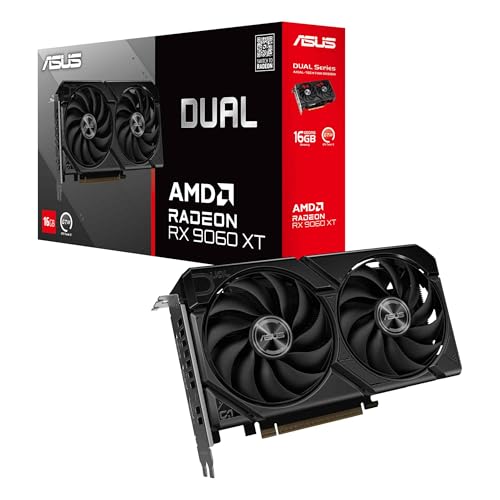
- Best for: A 1440p player who wants 16GB of memory for texture-heavy games and a longer useful life.
- Graphics coprocessor: AMD Radeon RX 9060 XT
- Memory: 16GB GDDR6
- Interface: PCIe 5.0
- Cooling: Dual fan, Axial-tech fan design, 0dB technology

- Best for: A 1440p upgrade from an older mid-range card, where 12GB and a wider interface matter most.
- Graphics coprocessor: AMD Radeon RX 7700 XT
- Memory: 12GB GDDR6, 192-bit, 18 Gbps
- Cooling: Dual fan, 0dB silent cooling
- Maximum resolution: 7680 x 4320

- Best for: A 1080p player who wants upscaling and modern rendering features in a compact dual-fan card.
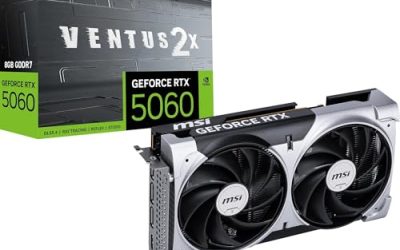
- Graphics coprocessor: NVIDIA GeForce RTX 5060
- Memory: 8GB GDDR7, 128-bit
- Interface: PCIe 5.0, PCI-Express x16
- GPU clock speed: 2512 MHz
All 4 Picks at a Glance
| Product | Specs | Action |
|---|---|---|
| ASUS Dual Radeon RX 9060 XT 16GB GDDR6 Graphics Card, AMD, for Desktop PCIe 5.0, HDMI 2.1b, DisplayPort 2.1a, 2.5 Slot, Axial-tech Fan Design, 0dB Technology, and More |
| Check price on Amazon |
| ASRock AMD Radeon RX 7700 XT Challenger 12GB GDDR6 192-bit 0dB Silent Cooling 7680 x 4320 DisplayPort HDMI LED Indicator 18Gbps Dual Fan Graphics Card |
| Check price on Amazon |
| GIGABYTE GeForce RTX 5060 WINDFORCE OC 8G Graphics Card, Cooling System, 8GB 128-bit GDDR7, PCIe 5.0, Manufactured by NVIDIA, DisplayPort & HDMI – Video Output Interface, GV-N5060WF2OC-8GD Video Card |
| Check price on Amazon |
 ASRock Radeon RX 7600 Challenger 8GB OC Graphics Card, AMD RDNA 3 Architecture, 8GB GDDR6, PCIe 4.0, Dual Fans, 0dB Silent Cooling, HDMI 2.1, DisplayPort 1.4 |
| Check price on Amazon |
Buying a graphics card for value means deciding how much gaming performance you actually need, and refusing to pay for headroom you will never use. A card with more memory or a higher tier can look appealing, yet it only earns its place when your monitor, games, and power supply can make use of it. The smarter question is not which card is fastest in isolation, but which one gives you smooth play at the resolution you use, with enough memory for the games you play.
This guide is for builders who want a new card for 1080p or 1440p gaming. It covers a first-time builder, a player upgrading an older card, and a 1440p gamer who wants a card that will stay useful for years. The five cards below were chosen from their names and specifications on Amazon product pages, and they are ranked in value order, from the strongest overall balance to the most narrowly focused entry option.
Our Top Picks
- ASUS Dual Radeon RX 9060 XT 16GB GDDR6RX9060XT|16GB|Black8 x 4.7 x 1.9 inches1.3 poundsCheck on Amazon
- GIGABYTE GeForce RTX 5060 WINDFORCE OC 8G GraphicsRTX5060|OC|8GB7.83 x 4.57 x 1.57 inchesCheck on Amazon
Top 3 picks at a glance
Quick Picks
As an Amazon Associate we earn from qualifying purchases.
How to Choose
Match VRAM to the bracket you are buying in
Memory is the first place where value is won or lost. A card in the lowest bracket with 12GB gives you more breathing room for high-resolution textures and newer titles than a similarly placed card with 8GB, even when their raw speed is close. At 1080p, 8GB is workable for many current games, but it leaves less margin when a title loads large texture packs or when you keep a browser and other software open in the background. At 1440p, 12GB or 16GB is a safer target, because the higher resolution and richer detail settings ask for more memory at the same time. Check the memory amount and memory type in the listing before you compare anything else.
Choose for the resolution you actually play at
A card that is excellent at 1080p can feel stretched at 1440p, and a card built for 1440p is wasted if you only ever play on a 1080p monitor. Start from your monitor, not from the card. If your display is 1080p and you play competitive titles or story games at moderate settings, an entry card with solid memory and a modest power draw will serve you well. If your display is 1440p, look for a card with more memory and a wider memory interface, because those two traits support the extra pixels. Buying above your resolution buys smoothness you cannot see, while buying below it buys stutter you will notice every session.
Count the power and cooling cost, not just the card
A graphics card also asks for power, airflow, and space, and those demands are part of its value. A card that needs a single 8-pin connector and a modest power supply is easier to fit into an existing build than one that needs more headroom or a larger case. Check the connector type in the listing, check the card length against your case, and check that your power supply has the right connectors free. A dual-fan card with a quiet mode also matters in a small room, because a hot card spins its fans harder. A card that fits without forcing other upgrades keeps more of its value.
Decide which features you will actually use
Upscaling, ray tracing, and encoding support only add value when you turn them on. If you play fast competitive games, upscaling can help you hold a steady frame rate at higher settings, and a card with strong upscaling support earns its place. If you mostly play older or less demanding titles, those features may sit unused, and a card with more memory for the same bracket may serve you better. The same logic applies to video encoding and creative work: if you record or stream gameplay, check the encoding support in the listing. If you do not, do not let a feature list distract you from memory, resolution, and power.
The 5 Best Value Options
Sparkle Intel Arc B580 Titan OC, 12GB GDDR6, Torn Cooling 2.0, Axial Fan, Breathing Light, Metal Backplate, SB580T-12GOC
This card ranks first because it puts 12GB of memory into the lowest bracket in this guide, and that memory is what lets it stretch from 1080p into 1440p without the compromises that usually follow an entry card. It is a strong match for a first-time builder who wants a modern card with upscaling support and enough memory for newer titles, and for anyone upgrading from a much older card who wants a clear step forward without moving to a higher tier. The dual-fan cooler and metal backplate suit a standard mid-tower build, and the single-card design keeps installation straightforward.
Specs
- Graphics coprocessor: Intel Arc B580
- Memory: 12GB GDDR6
- Cooling: Torn Cooling 2.0 with axial fan
- Backplate: Metal backplate
- Lighting: Breathing light
- Model: SB580T-12GOC
Best for: A first build that needs 12GB of memory and 1440p capability in the lowest bracket here.
Watch out for: Confirm driver support for your older games and check that your power supply has a free 8-pin connector before ordering.
ASUS Dual Radeon RX 9060 XT 16GB GDDR6 Graphics Card, AMD, for Desktop PCIe 5.0, HDMI 2.1b, DisplayPort 2.1a, 2.5 Slot, Axial-tech Fan Design, 0dB Technology, and More
- Best for: A 1440p player who wants 16GB of memory for texture-heavy games and a longer useful life.
- Graphics coprocessor: AMD Radeon RX 9060 XT
- Memory: 16GB GDDR6
- Interface: PCIe 5.0
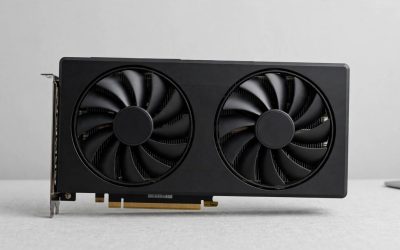
- Cooling: Dual fan, Axial-tech fan design, 0dB technology
A 1440p player who wants 16GB of memory for texture-heavy games and a longer useful life.
Measure the card against your case, because the 2.5-slot design is thicker than a standard dual-slot card, and confirm your power supply and connectors match the listing before you buy.
This card ranks second because its 16GB of memory gives it the longest useful life at 1440p in this group, and that longevity is the heart of its value. It suits a player who already owns a 1440p monitor and wants to run texture-heavy games at higher settings without worrying that memory will become the limit first. The dual-fan design with axial-tech fans and a 0dB mode suits a standard build, and the 2.5-slot size fits more cases than a triple-fan card. It sits a step above the entry bracket, yet it returns that step in memory headroom and in smoother play at higher detail.
Watch out for: Measure the card against your case, because the 2.5-slot design is thicker than a standard dual-slot card, and confirm your power supply and connectors match the listing before you buy.
ASRock AMD Radeon RX 7700 XT Challenger 12GB GDDR6 192-bit 0dB Silent Cooling 7680 x 4320 DisplayPort HDMI LED Indicator 18Gbps Dual Fan Graphics Card
- Best for: A 1440p upgrade from an older mid-range card, where 12GB and a wider interface matter most.
- Graphics coprocessor: AMD Radeon RX 7700 XT
- Memory: 12GB GDDR6, 192-bit, 18 Gbps
- Cooling: Dual fan, 0dB silent cooling
- Maximum resolution: 7680 x 4320
A 1440p upgrade from an older mid-range card, where 12GB and a wider interface matter most.
Check the card length and the power connectors in the listing, because this is a larger dual-fan card than an entry model.
This card ranks third because it pairs 12GB of memory with a 192-bit interface, a combination that supports 1440p play well and gives it an edge over 8GB cards in the same tier. It fits a player upgrading from an older mid-range card who wants a clear improvement in demanding titles without jumping to the newest generation. The dual-fan design with silent cooling suits a build that sits on a desk in a quiet room, and the DisplayPort and HDMI outputs cover a monitor and a second display. It is a practical middle step, strong where it matters and without features you may not use.
Watch out for: Check the card length and the power connectors in the listing, because this is a larger dual-fan card than an entry model.
GIGABYTE GeForce RTX 5060 WINDFORCE OC 8G Graphics Card, Cooling System, 8GB 128-bit GDDR7, PCIe 5.0, Manufactured by NVIDIA, DisplayPort & HDMI – Video Output Interface, GV-N5060WF2OC-8GD Video Card
- Best for: A 1080p player who wants upscaling and modern rendering features in a compact dual-fan card.
- Graphics coprocessor: NVIDIA GeForce RTX 5060
- Memory: 8GB GDDR7, 128-bit
- Interface: PCIe 5.0, PCI-Express x16
- GPU clock speed: 2512 MHz
A 1080p player who wants upscaling and modern rendering features in a compact dual-fan card.
Check texture settings in demanding titles, because 8GB of memory can fill up at higher detail levels.
This card ranks fourth because its value comes from features rather than memory: GDDR7 memory, a PCIe 5.0 interface, and upscaling support make it a strong choice for 1080p play with modern rendering features turned on. It suits a player who values smooth frame rates with upscaling, ray tracing in supported titles, and a compact dual-fan card that fits a smaller case. The 8GB of memory is the limit to respect, so it earns its place when your games and settings stay within that amount. For a 1080p build that leans on features, it offers a balanced and modern package.
Watch out for: Check texture settings in demanding titles, because 8GB of memory can fill up at higher detail levels.
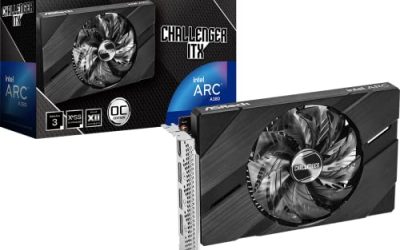
ASRock Radeon RX 7600 Challenger 8GB OC Graphics Card, AMD RDNA 3 Architecture, 8GB GDDR6, PCIe 4.0, Dual Fans, 0dB Silent Cooling, HDMI 2.1, DisplayPort 1.4
- Best for: A compact 1080p build where a straightforward, quiet dual-fan card is the priority.
- Graphics coprocessor: AMD Radeon RX 7600
- Memory: 8GB GDDR6
- Architecture: AMD RDNA 3
- Interface: PCI-Express x8, PCIe 4.0
A compact 1080p build where a straightforward, quiet dual-fan card is the priority.
Confirm your board and case support the card, and remember that 8GB will limit texture settings in the most demanding new titles.
This card ranks fifth because it is the most narrowly focused option here: it does 1080p well, and it does little beyond that brief. It suits a compact build or a first system where the monitor is 1080p, the games are current but not texture-heavy, and the builder wants a straightforward dual-fan card with quiet cooling. Its RDNA 3 architecture and 8GB of GDDR6 memory handle everyday 1080p play, and its PCIe 4.0 interface fits a wide range of existing boards. It ranks last not because it is a poor card, but because its 8GB limit and narrower interface give it less room to grow than the cards above it.
Watch out for: Confirm your board and case support the card, and remember that 8GB will limit texture settings in the most demanding new titles.
Which One Fits Your Situation
You are building your first gaming PC
Pick the Sparkle Intel Arc B580 Titan OC. Its 12GB of memory gives a first build room to grow, and its dual-fan design fits a standard mid-tower without special cooling. A first builder benefits most from a card that does not force a larger power supply or a larger case, and this one keeps the rest of the build simple. It also supports upscaling, which helps when a new game is more demanding than expected.
You play at 1440p and want the card to last
Pick the ASUS Dual Radeon RX 9060 XT 16GB. Its 16GB of memory is the largest amount in this guide, and that headroom is what keeps a 1440p card useful as games ask for more texture memory. If you already own a 1440p monitor and you plan to keep the card for several years, the extra memory matters more than a feature you might use once. Check the card length first, then build around it.
You want modern features at 1080p
Pick the GIGABYTE GeForce RTX 5060 WINDFORCE OC 8G. Its GDDR7 memory and upscaling support suit a 1080p player who turns on modern rendering features and wants a steady frame rate. The compact dual-fan design also fits smaller cases, which matters when the rest of the build is already chosen. Keep texture settings within the 8GB limit, and this card will serve a 1080p setup well.
You are upgrading an older mid-range card
Pick the ASRock AMD Radeon RX 7700 XT Challenger. Its 12GB of memory and 192-bit interface give a clear step up for 1440p play, and its dual-fan cooler with silent operation suits a desk-side system. If your current card struggles at 1440p or runs out of memory in newer titles, this one addresses both limits at once. Confirm the length and power connectors before you order, because it is larger than an entry card.
Common Mistakes
- Choosing a card for its tier name instead of its memory amount, then finding that texture settings have to drop in the games you play most.
- Buying for a 1440p monitor with an 8GB card and expecting the same headroom as a 12GB or 16GB card.
- Forgetting to check the card length, the power connectors, and the free space in the case before ordering.
- Paying for upscaling, ray tracing, or encoding features that you never turn on, while ignoring memory and resolution.
- Pairing a strong card with an older power supply that lacks the right connector, then needing a second round of upgrades.
Frequently Asked Questions
Is 8GB of VRAM enough for gaming in 2026?
It depends on your resolution and your settings. At 1080p, 8GB handles many current games at moderate to high settings, especially when you keep texture quality in check. At 1440p, 8GB leaves less margin, and demanding titles can fill it quickly. If you play texture-heavy games or plan to keep the card for years, 12GB or 16GB gives you more room.
Does a higher tier always mean better value?
No. A higher tier only adds value when your monitor and your games can use the extra capability. If you play at 1080p, a card built for 1440p will spend much of its ability on pixels you do not have. Value comes from matching the card to your resolution, your memory needs, and your power supply, not from buying the highest tier in the list.
Should I choose GDDR6 or GDDR7 memory?
Both types work well when the rest of the card is matched to your needs. GDDR7 appears on newer cards and supports higher memory speeds, which helps with upscaling and modern rendering features. GDDR6 remains common on strong value cards, especially where a larger memory amount matters more than raw memory speed. Choose by memory amount and resolution first, then by memory type.
How do I know if a card will fit my case and power supply?
Check three things in the listing: the card length, the power connector type and count, and the interface. Measure the free space in your case from the rear bracket to the nearest obstruction, and check that your power supply has the right connectors free. If any of those three do not match, choose a different card or plan the extra upgrade before you order.
Related guides
More from Amazon
Programs that pair well with the guide above. Offers and eligibility are set by Amazon and may change.
A free business account with business pricing and bulk-buying tools for work, shop or home office.
Create a business accountFree shipping on eligible items, Prime Video and more. Eligible new members can start with a free trial.
Start a Prime free trialAudiobooks and podcasts to listen to on the go. Eligible new members can start with a free trial.
Try Audible freeAd-free music streaming. Eligible new subscribers can start with a free trial.
Try Music Unlimited freeAs an Amazon Associate we earn from qualifying purchases.