
Upgrading to an M.2 2280 NVMe PCIe SSD is one of the most impactful changes you can make to a desktop or laptop. It eliminates the mechanical bottleneck of spinning drives, slashes boot times, and accelerates everything from game loading to large file transfers. But the market is crowded, and the spread between a genuinely excellent drive and a mediocre one is wider than most buyers expect. Sustained write performance, thermal behavior under load, and long-term reliability all vary significantly across products that look identical on a spec sheet.
The eight drives here represent the full spectrum: ultra-budget Gen3 options for secondary storage, value-driven Gen4 drives that undercut premium pricing, and top-tier NVMe SSDs that push sequential reads above 7,000 MB/s. What separates the good from the bad in this category comes down to NAND type, DRAM or HMB caching strategy, controller efficiency, and whether the drive holds its speed during sustained writes rather than just short bursts. This roundup compares published specifications and owner-reported experiences to help you identify which drive fits your system and your budget.
As an Amazon Associate we earn from qualifying purchases at no extra cost to you.





Our Top Picks
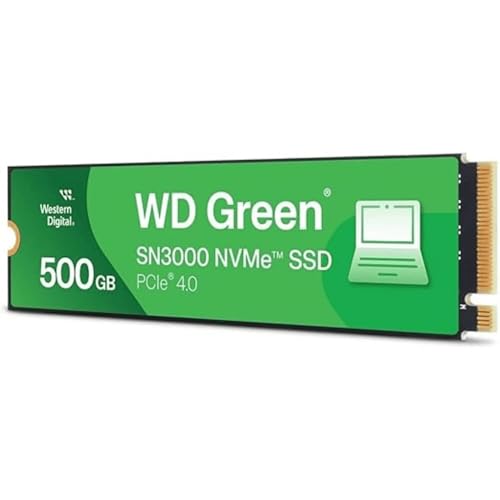 Western Digital 500GB WD Green SN3000 NVMe Internal500GB3.15 x 0.9 x 0.09 inches0 PoundsCheck on Amazon


Top 3 picks at a glance
Quick Picks
| Product | Best for | Price |
|---|---|---|
| Kingston NV3 1TB | Balanced Gen4 value | Check on Amazon |
| Patriot P320 512GB | Tight budgets, Gen3 slots | Check on Amazon |
| Samsung 990 PRO 2TB | Maximum capacity and speed | $389 |
| WD Green SN3000 500GB | Affordable Gen4 entry | Check on Amazon |
| SIX NVME 1TB | High speed with included heatsink | Check on Amazon |
| Patriot P320 256GB | OS drive on a shoestring | Check on Amazon |
| WD_Black SN7100 1TB | Laptops and handhelds | Check on Amazon |
| Samsung 990 PRO 1TB | Premium all-rounder | Check on Amazon |
How We Compared
We evaluated each drive on four criteria: sequential speed on the published spec sheet, price per gigabyte, thermal design and included accessories, and long-term owner satisfaction drawn from user reviews on retail platforms. A drive that claims high burst speeds but throttles within seconds of sustained writing fails our threshold, as does one priced well above competing options without a clear NAND or controller advantage. We also considered form-factor compatibility, since all eight are M.2 2280, but the interface generation (Gen3 versus Gen4) still determines which systems benefit most.
The 8 Best M.2 2280 NVMe PCIe SSD in 2026
Kingston NV3 1TB
The Kingston NV3 occupies a comfortable middle ground for anyone building a gaming or productivity PC on a reasonable budget. Its PCIe Gen 4×4 interface and claimed read speeds up to 6000 MB/s land it in the upper tier of value drives, and at around $160 for a full terabyte, the cost per gigabyte undercuts several competitors with similar headline numbers.
- Pro: Strong sequential read performance for the price bracket
- Pro: Backed by Kingston’s long-standing consumer storage reputation
- Con: DRAM-less design means sustained writes may trail premium drives
Skip this drive if your motherboard only has Gen3 M.2 slots or if you need maximum write endurance for video editing workloads.
Patriot P320 512GB
The Patriot P320 in 512GB is a straightforward Gen3x4 option for secondary storage or older systems without a Gen4 slot. At around $84 it undercuts every Gen4 drive on this list, and for users adding a second drive for game libraries or media files, the interface bottleneck matters less than raw capacity per dollar.
- Pro: Low price for half a terabyte of NVMe storage
- Pro: Compatible with any M.2 2280 slot regardless of generation
- Con: Gen3x4 interface caps real-world sequential reads well below Gen4 options
Skip this if you need your boot drive to push past Gen3 speed limits or if your motherboard supports Gen4.
Samsung 990 PRO 2TB
This is the drive for enthusiasts who want the fastest M.2 2280 NVMe PCIe SSD Samsung currently offers, with double the capacity of its 1TB sibling. Claimed read speeds up to 7,450 MB/s place it at the top of the Gen4 stack, and Samsung’s Magician software suite provides firmware management, thermal throttling data, and endurance monitoring in a polished package.
- Pro: Top-tier sequential speed with Samsung’s proven controller architecture
- Pro: 2TB capacity suits large game libraries or professional project files
- Con: $389 is the highest price on this list and carries a significant premium over value picks
Skip this if a Gen3x4-only slot or a budget below $200 defines your constraints.
WD Green SN3000 500GB
Western Digital’s Green line targets buyers who want Gen4 speeds without Gen4 prices. The SN3000 claims reads up to 5,000 MB/s, comfortably beating the Patriot P320 at roughly $11 more. For a lightweight boot drive or a system with a single M.2 slot, this is a sensible way to step up from Gen3 without overspending.
- Pro: Entry-level Gen4 pricing with acceptable everyday performance
- Pro: Backed by WD’s consumer support network and five-year warranty structure on Green drives
- Con: 500GB fills quickly with modern AAA game installs
Skip this if you need more than half a terabyte for a primary drive or if your workload demands sustained write throughput above Gen3-class levels.
SIX NVME 1TB
The SIX NVME 1TB is the wildcard on this list. It claims read speeds up to 7,350 MB/s, nearly matching Samsung’s flagship, and ships with a heatsink included—a practical bonus for laptops or tight desktop builds. At around $170 it undercuts premium branded drives by a substantial margin.
- Pro: High advertised speed with a bundled heatsink for passive cooling
- Pro: Competitive pricing for the performance tier it targets
- Con: Limited brand recognition and sparse long-term reliability data compared to established manufacturers
Skip this if you want the assurance of a major OEM warranty process or if you cannot verify the controller inside.
Patriot P320 256GB
At around $54, the 256GB Patriot P320 is the cheapest drive here and the most accessible entry into NVMe storage. It is best suited as a system drive for older desktops or as an emergency boot replacement. The Gen3x4 interface and small capacity mean it is not a long-term solution for anyone with a large file library.
- Pro: Lowest price on the list for a functioning NVMe drive
- Pro: No configuration overhead—install, format, boot
- Con: 256GB leaves almost no headroom after Windows and one or two applications
Skip this if your total storage need exceeds 300GB or if you plan to run resource-heavy software from the boot volume.
WD_Black SN7100 1TB
The WD_Black SN7100 uses TLC 3D NAND and claims read speeds up to 7,250 MB/s with writes up to 6,900 MB/s, placing it firmly in the enthusiast tier. Western Digital positions this drive explicitly for laptops and handheld gaming devices, and its thermal profile reflects that focus. At around $190 it sits below the Samsung 990 PRO 1TB while offering comparable sequential numbers.
- Pro: TLC NAND provides better sustained write endurance than QLC alternatives in the same price range
- Pro: Optimized for constrained thermal environments in laptops and handhelds
- Con: $30+ premium over the Kingston NV3 for a modest spec sheet advantage
Skip this if you are building a desktop with an M.2 heatsink already on the motherboard and want the lowest cost per gigabyte in the Gen4 tier.
Samsung 990 PRO 1TB
The 1TB Samsung 990 PRO delivers the same headline speed as its 2TB sibling—up to 7,450 MB/s—in a smaller, less expensive package. For users who want the top of the Gen4 market without the $389 price tag, this is the compromise pick. Owner feedback consistently highlights firmware stability and thermal management as strengths of the 990 PRO line.
- Pro: Class-leading sequential read speed with mature firmware
- Pro: Samsung’s ecosystem tooling gives visibility into drive health over time
- Con: around $240 for 1TB is a high cost per gigabyte compared to the Kingston NV3 or WD Black SN7100
Skip this if you can find the 990 PRO 2TB on sale for under $400, as the capacity-per-dollar math shifts decisively in the larger drive’s favor.
Buying Guide
Interface Generation and Slot Compatibility
Every drive on this list fits the M.2 2280 form factor, but Gen3x4 and Gen4x4 are not interchangeable in performance terms. A Gen4 drive in a Gen3 slot will run at Gen3 speeds without error, but you pay for capability you cannot use. Check your motherboard manual before purchasing; many mid-range boards include only one Gen4 slot, often positioned directly beneath the CPU where GPU cooler clearance is tight.
DRAM, HMB, and Caching Strategy
Drives with dedicated DRAM cache maintain a full mapping table in fast memory, which translates to better sustained write performance and lower latency during random I/O. DRAM-less drives substitute Host Memory Buffer (HMB), borrowing a small slice of system RAM. In everyday use the difference is subtle, but during multi-gigabyte file transfers or heavy virtual machine workloads, a DRAM-equipped drive will hold speed longer before its SLC cache is exhausted.
Thermal Design and Heatsink Inclusion
Gen4 drives drawing above 7,000 MB/s generate noticeable heat under sustained load. Many motherboards include a built-in M.2 heatsink; if yours does not, a bare drive may throttle within seconds. The SIX NVME ships with its own heatsink, removing that concern. For laptops and handhelds with no airflow over the drive, a thin-profile heatsink or a drive with a lower TDP design like the WD_Black SN7100 is the practical choice.
Our Verdict
For most desktop builders, the Kingston NV3 1TB is the best overall balance of price and performance in this group. It delivers solid Gen4 speeds, carries a major brand’s support infrastructure, and costs well under the premium tier. If your budget is the primary constraint, the WD Green SN3000 500GB is the clear value pick—it crosses into Gen4 territory for less than $100. One scenario favors a different winner: if you need the maximum possible sequential read in a laptop or handheld with no dedicated motherboard heatsink, the WD_Black SN7100’s thermal tuning makes it the right choice over the Samsung 990 PRO despite a lower peak spec number.
FAQ
Can I use a Gen4 M.2 2280 NVMe SSD in a Gen3 slot?
Yes, the physical connector is identical and the drive will function at Gen3 speeds. You lose some sequential bandwidth but retain the latency advantages of NVMe over older SATA-based M.2 drives.
Is the M.2 2280 length still the standard?
For consumer desktops and laptops, 2280 (120 mm long, 22 mm wide) remains overwhelmingly dominant in 2026. Shorter variants like 2230 exist in ultra-thin devices, but almost all enthusiast and mainstream motherboards use 2280 slots.
Do I really need a heatsink on an NVMe SSD?
In a desktop with active case airflow, a Gen3 drive rarely benefits from one, but high-speed Gen4 drives can throttle without passive cooling. If your motherboard already includes an M.2 heatsink plate, you are covered; if not, adding one is inexpensive insurance against sustained-load performance drops.
How do I know if my system supports NVMe boot?
Check your BIOS or UEFI settings for an NVMe or M.2 boot option. Systems from roughly 2015 onward generally support NVMe boot, but very older firmware may require a CSM or legacy mode adjustment. Most modern boards expose the drive as a boot device without any configuration.









