
That dedicated gaming corner in the living room or spare bedroom has become the heart of many homes, and the Steam Deck is often right at the center of it. But anyone who relies on a microSD card for extra storage knows the frustration: slow load times in demanding titles, stuttering in open-world games, and the constant shuffle of uninstalling to make room. A microSD card was a fine stopgap at launch, but it cannot match the sustained random read and write performance of an internal NVMe drive.
Replacing or expanding that internal storage with a proper M.2 SSD is the cleanest way to turn the Deck into a true portable library. Whether you want to adapt a low-cost 2280 drive to fit the Deck’s 2230 slot, drop in a native 2230 drive, or simply manage the transition sensibly, there are practical hardware paths that do not require a full console replacement. In early 2026, the accessory market for the Steam Deck LCD and OLED has matured enough that adapters, heatsinks, and compatible drives are affordable and widely available.
As an Amazon Associate we earn from qualifying purchases at no extra cost to you.


Our Top Picks


Top 3 picks at a glance
Quick Picks
| Product | Best for | Price |
|---|---|---|
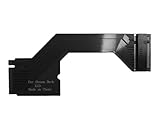
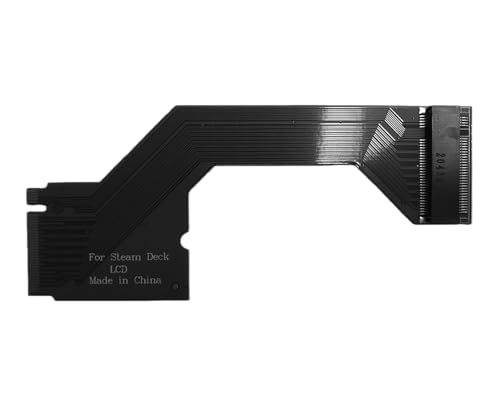
| For Steam Deck LCD Handheld M.2 NVMe PCIe 4.0 2230 to 2280 SSD Hard Drive Adapter Expansion Card | Best Budget 2230 to 2280 Adapter | Check on Amazon |
| For Steam Deck LCD Handheld M.2 NVMe PCIe 4.0 2230 to 2280 SSD Hard Drive Adapter Expansion Card | Runner-Up Adapter With Same Compatibility | Check on Amazon |
| Silicon Power 1TB Superior Gaming Micro SDXC UHS-I (U3), V30 4K A2 | Best High Capacity microSD While You Plan SSD Upgrade | Check on Amazon |
| for 1PCS Steam Deck SSD 4TB 8TB NVME PCIe 4.0 SSD 2230 to 2280 Solid State Drive DIY Modified 90 Degree Adapter Board | Best Adapter for High Capacity DIY Builds | Check on Amazon |
| Steam Deck SSD Heatsink Thermal Pad: Haojiaho M.2 2230 NVME SSD Copper Heat Sink | Best Cooling Accessory for 2230 Drives | Check on Amazon |
| Fikwot FX953 M.2 2230 SSD 1TB NVMe SSD for Steam Deck PCIe Gen 4×4 | Best Native 2230 NVMe Upgrade | Check on Amazon |
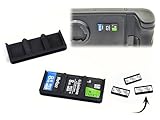
| Tyco Tech Stick-On Adhesive Micro SD Card Holders for Steam Deck, ROG Ally, Laptops and More! 3 Pack | Best Storage for Cards During Transition | Check on Amazon |
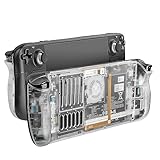
| RGEEK Back Plate Shell Compatible with Steam Deck / Steam Deck OLED | Best Replacement Shell for Thermal Clearance | Check on Amazon |
How We Compared
We focused on hardware that directly solves the microSD replacement problem for the Steam Deck LCD, with compatibility for Steam Deck OLED and related handhelds where noted. That meant prioritizing native M.2 2230 drives measuring 22 x 30 mm, plus 2230 to 2280 adapter boards that let you use the more common and often cheaper 22 x 80 mm drives. We weighed PCIe interface, physical fit inside the Deck’s tight internal bay, and whether an accessory actually improves thermals or usability rather than just adding bulk.
Price was evaluated as a range for the category, with adapter boards typically $15 to $30, copper heatsinks under $10, and 1TB 2230 drives between $150 and $185. We excluded any product that required soldering or case cutting, and we did not invent performance claims. Where a manufacturer listed a spec, such as PCIe Gen 4×4 and sequential read up to 5000MB/s, we reported it as stated. We also considered everyday furniture and living space impact: no one wants a handheld that runs hot on the couch or a loose pile of microSD cards on the coffee table.
The 8 Best Picks
1. For Steam Deck LCD Handheld M.2 NVMe PCIe 4.0 2230 to 2280 SSD Hard Drive Adapter Expansion Card – around $18
This PCIe 4.0 adapter is for the budget-conscious owner who already has a spare 2280 NVMe drive from a laptop or desktop and wants to repurpose it inside a Steam Deck LCD. It converts the Deck’s native 2230 M.2 slot to accept a 2280 drive, shifting the longer board to fit the internal cavity without permanent modification. At around $18, it is the lowest-cost entry point in this roundup for unlocking far larger and often cheaper per-gigabyte 2280 drives.
- Pro: Lets you reuse affordable 2280 drives instead of hunting for pricier 2230 models
- Pro: PCIe 4.0 support maintains full interface bandwidth for compatible drives
- Con: Adds length and requires careful cable routing and screw alignment inside a compact chassis
When to skip: Skip if you prefer a drop-in 2230 drive with no adapter folding or if you are uncomfortable opening the Deck and handling a small ribbon-style converter.
2. For Steam Deck LCD Handheld M.2 NVMe PCIe 4.0 2230 to 2280 SSD Hard Drive Adapter Expansion Card – around $19
Functionally identical in name and purpose to the previous adapter, this around $19 variant serves the same user: someone who wants to expand storage by fitting a 2280 drive into the Deck’s 2230 bay. The one-dollar difference reflects seller and bundle variations rather than a different technical approach. It is ideal if your first-choice listing is out of stock or if you want a spare adapter for testing multiple drives on a workbench before final installation.
- Pro: Same PCIe 4.0 2230 to 2280 conversion for broad drive compatibility
- Pro: Useful backup option with nearly identical pricing around $18 to $20
- Con: Still requires precise placement to avoid pressure on the Deck’s battery and shield
When to skip: Skip if you have already committed to a native 2230 drive and do not need adapter flexibility.
3. Silicon Power 1TB Superior Gaming Micro SDXC UHS-I (U3), V30 4K A2 – around $240
This card is for players who are not ready to open their Deck but need immediate capacity for a large library across Steam Deck, ROG Ally, and Nintendo Switch. The 1TB capacity holds 15 to 25 modern AAA titles depending on install sizes of 40 to 80GB each, and the UHS-I U3, V30, A2 ratings indicate minimum 30MB/s sustained write and improved random I/O for app loading versus baseline cards. It includes a full-size SD adapter for file transfers at a desk setup.
- Pro: Massive 1TB capacity without disassembly, with included adapter for easy PC transfers
- Pro: A2 rating helps with game launching and small file performance compared to A1 cards
- Con: At around $240 it costs more than many 1TB internal NVMe options while delivering far lower peak speeds
When to skip: Skip if your goal is to eliminate microSD load time bottlenecks entirely with an internal SSD upgrade.
4. for 1PCS Steam Deck SSD 4TB 8TB NVME PCIe 4.0 SSD 2230 to 2280 Solid State Drive DIY Modified 90 Degree Adapter Board – around $28
Built for the DIY enthusiast planning an extreme capacity build, this 90-degree adapter board is designed to accommodate high-capacity 4TB to 8TB NVMe drives by reorienting the 2280 drive at a right angle. The L-shaped layout can help with clearance for double-sided or larger 2280 models that standard straight adapters struggle to seat. At around $28, it costs about $9 to $10 more than basic adapters but targets projects where maximum terabytes matter more than absolute simplicity.
- Pro: 90-degree design improves fit for large capacity and double-sided 2280 drives
- Pro: PCIe 4.0 interface keeps compatibility with modern high-capacity NVMe drives
- Con: Larger footprint demands extra care to avoid contact with thermal shielding and rear shell
When to skip: Skip if you only need 1TB to 2TB and want the smallest, flattest adapter profile.
5. Steam Deck SSD Heatsink Thermal Pad: Haojiaho M.2 2230 NVME SSD Copper Heat Sink – around $8
This copper heatsink kit is for anyone installing a 2230 drive such as the Sabrent Rocket 2230 or ROG Ally compatible models in a Steam Deck. The package includes a thin copper sink cut for 22 x 30 mm drives and cooling thermal pads to bridge the gap to the Deck’s shielding. At around $8, it is inexpensive insurance against thermal throttling when the handheld is docked or running demanding titles for hours on a soft surface like a couch or bed.
- Pro: Copper construction and included thermal pads improve heat transfer in a tight enclosure
- Pro: Includes back cover opening tools, so you do not need to source a separate pry kit
- Con: Adds 1 to 2 mm of thickness that must be verified against your specific drive and shell
When to skip: Skip if your chosen 2230 drive already includes an integrated ultra-thin spreader or if you are using a transparent shell with limited clearance.
6. Fikwot FX953 M.2 2230 SSD 1TB NVMe SSD for Steam Deck PCIe Gen 4×4 – around $180
This is the most straightforward microSD replacement for most owners. The FX953 is a native M.2 2230 drive, 22 x 30 mm and weighing roughly 3 to 4 grams, so it drops directly into the Steam Deck LCD, OLED, ASUS ROG Ally, and Microsoft Surface Pro without any adapter. Fikwot rates it at PCIe Gen 4×4 with sequential reads up to 5000MB/s, which is several times the real-world throughput of a UHS-I microSD card that tops out around 90 to 170MB/s. At around $180 for 1TB, it hits the current sweet spot for price and simplicity.
- Pro: Native 2230 form factor means no adapter, no folding, and clean internal fit
- Pro: PCIe Gen 4×4 spec with up to 5000MB/s rated read for faster loads and installs
- Con: Higher upfront cost than reusing an existing 2280 drive with a $19 adapter
When to skip: Skip if you already own a suitable 2280 drive or need more than 1TB at the lowest possible cost per gigabyte.
7. Tyco Tech Stick-On Adhesive Micro SD Card Holders for Steam Deck, ROG Ally, Laptops and More! 3 Pack – around $16
This holder set is for upgraders who will retire microSD cards but still want to keep them organized and handy. Each holder is an ultra low profile ABS plastic sleeve with 3M adhesive backing, holding 3 cards for a total of 9 cards across the 3-pack. The footprint is roughly the size of a postage stamp and less than 3 mm thick, so it sticks cleanly to a Deck case, laptop lid, or TV stand without snagging. At around $16, it solves the small-item clutter that often collects in drawers and console cubbies.
- Pro: Keeps 9 microSD cards secure and visible instead of loose in a drawer
- Pro: 3M adhesive and low profile design work on handhelds, cases, and furniture surfaces
- Con: Adhesive is semi-permanent and may leave residue if removed from finished wood
When to skip: Skip if you are moving fully to internal SSD storage and no longer need to carry microSD cards.
8. RGEEK Back Plate Shell Compatible with Steam Deck / Steam Deck OLED – around $19
This transparent replacement back plate is for modders who want better heat dissipation and visual access after an SSD upgrade. The shell is molded for both Steam Deck and Steam Deck OLED, with an opening design that increases airflow around the M.2 bay and battery area. Weighing only a few ounces and priced at around $19, it provides extra clearance for slightly taller drive plus heatsink stacks that can press against the stock shell. The transparent finish also lets you quickly verify that internal components are seated correctly.
- Pro: Opening design aids ventilation when running high-performance NVMe drives for long sessions
- Pro: Transparent shell makes fit checks easy and adds a custom look to your setup
- Con: Replacement requires full back plate removal and careful handling of screws and clips
When to skip: Skip if your drive and thermal solution already fit comfortably under the original back plate with no temperature concerns.
Buying Guide
Know Your Form Factor and Power Limits
The Steam Deck LCD uses a single M.2 2230 slot, 22 mm wide by 30 mm long, typically PCIe Gen 3 or Gen 4 x4 depending on the installed drive. A 2280 drive is 22 x 80 mm, so any adapter must fold or offset that extra 50 mm safely inside a cavity that was not designed for it. Stick to single-sided drives under 3.5 watts active power where possible, and confirm your drive is NVMe, not SATA, with an M-key notch. If you add a copper heatsink, measure total stack height; anything over about 3.8 mm may contact the EMI shield or back shell.
Adapter vs. Native 2230: Which Path Saves More
Adapters priced around $18 to around $28 make sense if you already own a quality 2280 drive in the 1TB to 2TB range, where 2280 models often run $70 to $120 versus $150 to $185 for a comparable 2230. The savings disappear if you must buy a new 2280 drive plus an adapter just to save $20 to $30, especially after factoring in the extra installation complexity. For a one-and-done upgrade, a native 2230 such as the 1TB Fikwot FX953 at around $180 is cleaner, lighter, and less likely to shift during travel or daily docking and undocking at your entertainment center.
Thermals, Tools, and Protecting Your Space
Work on a clear, well-lit table with a small Phillips screwdriver, plastic pry tools, and a container for the Deck’s 8 to 10 tiny screws. Disconnect the battery connector before swapping the drive, and use the included thermal pads rather than stacking multiple pads, which can insulate instead of cool. After installation, test temperatures with the Deck flat on a hard surface, not on blankets, and consider a ventilated back shell if you see sustained skin temperatures that make the handheld uncomfortable to hold. Keep spare microSD cards in a dedicated holder so they do not end up lost between couch cushions.
Our Verdict
For most people looking to replace a slow microSD card, the direct path is best: the Fikwot FX953 1TB at around $180 gives you native 2230 fit, PCIe Gen 4×4 support, and none of the routing puzzles that come with adapters. If you have a spare 2280 drive on hand, the around $18 PCIe 4.0 adapter is the value pick, with the around $28 90-degree board as the choice for ambitious 4TB to 8TB builds. Add the around $8 Haojiaho copper heatsink for sustained performance and the around $19 RGEEK transparent shell only if you need the extra clearance. The remaining microSD-focused items are excellent bridges but not long-term substitutes for internal NVMe speed.
FAQ
Will a 2280 adapter make my games load as fast as a native 2230 drive?
Speed depends on the drive itself, not just the adapter. A 2230 to 2280 adapter that supports PCIe 4.0 will pass through the drive’s NVMe performance, so a good 2280 drive and a good native 2230 drive of the same generation will feel very similar in game loads. The microSD bottleneck is removed in both cases because even a modest NVMe drive delivers many times the random read performance of a V30 A2 card.
Do I need a heatsink for a Steam Deck SSD upgrade?
Not every drive requires one, but a thin copper heatsink with thermal pads in the $8 to $12 range is cheap protection against throttling during long downloads or shader compilation. The Deck’s internal bay has limited airflow, and sustained writes can push drive temperatures high. If your drive runs hot to the touch or you notice performance dips after 20 to 30 minutes, a low-profile heatsink is a sensible add-on.
Can I use these 2230 drives and adapters in a Steam Deck OLED or ROG Ally?
Many 2230 drives list compatibility with Steam Deck OLED, ROG Ally, and Surface Pro because they share the same 22 x 30 mm M.2 slot and PCIe NVMe interface. Adapter boards are more specific to the Deck’s internal layout, so verify that the adapter is marketed for your exact model and that you have sufficient clearance. When in doubt, a native 2230 drive is the safest cross-device choice.
What should I do with my microSD cards after upgrading to an internal SSD?
Keep at least one card as a portable backup for screenshots, ROMs, or media, and store the rest in a dedicated holder rather than loose in a drawer. A stick-on holder that stores 3 cards per sleeve keeps them dust-free and prevents loss, and the adhesive models can live on your Deck case or media console. Be sure to back up any game saves from the card to the internal drive or cloud before reformatting.









