Our Short List of 3
- Best for: bedrooms and second rooms where Wi-Fi is weak and the menu should stay neutral.
- Output: up to 4K at 60fps, with Dolby Vision, HDR10, HDR10+ and HLG
- Wi-Fi: 802.11ac dual-band MIMO with a long-range receiver in the power cable
- Connection: built-in HDMI 2.0b plug, USB for power
- Remote: Roku Voice Remote with TV power, volume and mute buttons

- Best for: Alexa households that want the fastest stick and room for many apps.
- Processor: quad-core 2.0 GHz
- Storage: 16 GB internal
- Wi-Fi: Wi-Fi 6E
- Picture: 4K with Dolby Vision, HDR10, HDR10+ and HLG

- Best for: Google households that can run a network cable to the television.
- Output: up to 4K HDR with Dolby Vision
- Audio: Dolby Atmos support
- Memory: 4 GB RAM
- Storage: 32 GB
All 4 Picks at a Glance
| Product | Specs | Action |
|---|---|---|
| Roku Streaming Stick 4K |
| Check price on Amazon |
| Amazon Fire TV Stick 4K Max |
| Check price on Amazon |
| Google TV Streamer 4K |
| Check price on Amazon |
 NVIDIA Shield TV Pro |
| Check price on Amazon |
Choosing a streaming device is rarely about the apps, because every serious player opens the same big services. The real decision is which voice assistant your household will talk to every evening, whether the bundled remote can retire the TV remote for good, and whether a stick on Wi-Fi can hold a steady 4K feed in the room where the television actually sits.
This guide is for households replacing a slow smart TV menu, adding streaming to a plain panel, or building a small gaming corner around one screen. Each pick below was chosen from the names and specifications on its Amazon page: every listing states that a voice remote is included, and every device outputs 4K with at least one premium HDR format.
Our Top Picks
Top 3 picks at a glance
Quick Picks
As an Amazon Associate we earn from qualifying purchases
| Product | Best for | Key spec from title |
|---|---|---|
| Roku Streaming Stick 4K | Weak Wi-Fi rooms and a neutral menu | Dolby Vision with a long-range Wi-Fi receiver |
| Amazon Fire TV Stick 4K Max | Alexa homes that want the quickest stick | Wi-Fi 6E and 16 GB of storage |
| Google TV Streamer 4K | Google households and wired setups | 32 GB of storage plus an Ethernet port |
| NVIDIA Shield TV Pro | Local media libraries and cloud gaming | Tegra X1+ chip with two USB 3.0 ports |
How to Choose
Match the Voice Assistant to Your Home
A voice remote is only useful when it speaks the same language as the rest of the house. Fire TV answers to Alexa, the Google box answers to Google Assistant, and the Shield carries Google Assistant built in as well. Roku takes a different path: its remote runs Roku’s own voice search for titles, actors and genres, and the player also works with Alexa, Google Home and Apple HomeKit from the other side. Pick the platform your speakers, lights and routines already use, because switching assistants for one television creates daily friction that wears thin fast.
Check the Picture Formats Your TV Can Use
All four devices output 4K, yet the HDR badges differ in ways your television either honors or ignores. Dolby Vision appears on every pick here, while HDR10+ shows up on the Roku and the Fire TV stick, and HLG matters mainly for live broadcasts. Audio splits the group too: some listings promise Dolby Atmos support, others pass Dolby-encoded sound through to a soundbar or receiver for decoding there. Read your TV’s spec sheet first, then match the badges. A format the panel cannot display is money spent on a logo, not on picture quality you will ever see.
Decide Between a Hidden Stick and a Wired Box
Form factor decides more than shelf looks. Sticks hide behind the panel and draw power from a USB cable, which keeps a bedroom setup clean, but they connect over Wi-Fi only and offer no spare ports. Boxes sit in the open and bring the connections a busy setup needs: the Google streamer and the Shield both include an Ethernet port for a wired feed that ignores crowded airwaves, and the Shield adds two USB 3.0 ports for drives, keyboards and game controllers. Count the cables your setup truly needs before falling for the smallest shape.
Treat the Remote as the Main Controller
You will touch the remote far more often than the device itself, so judge it like a controller you hold nightly. The details that matter are written on each listing: TV power, volume and mute buttons, a push-to-talk voice key, and on the Fire TV remote, dedicated channel buttons for live viewing. Google adds a trick the others lack, a find-my-remote feature that makes the handset ring when it slides between cushions. Battery type counts as well, since a remote that eats cells during a long series will annoy you weekly.
The 4 Best Options
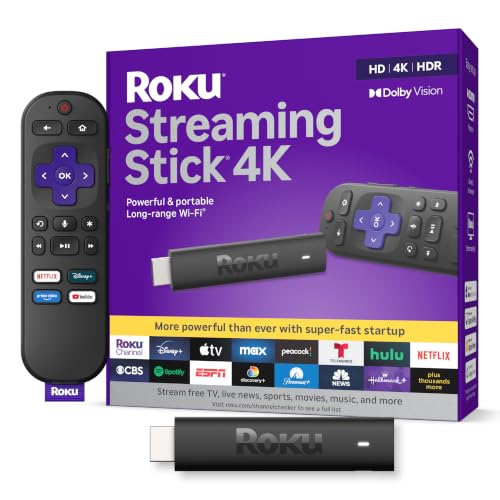
Roku Streaming Stick 4K
- Best for: bedrooms and second rooms where Wi-Fi is weak and the menu should stay neutral.
- Output: up to 4K at 60fps, with Dolby Vision, HDR10, HDR10+ and HLG
- Wi-Fi: 802.11ac dual-band MIMO with a long-range receiver in the power cable
- Connection: built-in HDMI 2.0b plug, USB for power
- Remote: Roku Voice Remote with TV power, volume and mute buttons
bedrooms and second rooms where Wi-Fi is weak and the menu should stay neutral.
there is no Ethernet port and no USB socket for storage, so this stick lives or dies by your wireless signal, and it must use the supplied power cable because the receiver sits inside it.
The Roku Streaming Stick 4K fits households that want one neutral menu for every service instead of a home screen arranged around a single store. Its long-range Wi-Fi receiver is built into the USB power cable, which helps in rooms where the router signal fades before it reaches the television, and the stick itself disappears behind the panel. The voice remote covers push-to-talk search plus TV power, volume and mute, so the original TV remote can stay in a drawer. It also cooperates with rival platforms, working with AirPlay, HomeKit, Alexa and Google Home.
Amazon Fire TV Stick 4K Max
- Best for: Alexa households that want the fastest stick and room for many apps.
- Processor: quad-core 2.0 GHz
- Storage: 16 GB internal
- Wi-Fi: Wi-Fi 6E
- Picture: 4K with Dolby Vision, HDR10, HDR10+ and HLG
Alexa households that want the fastest stick and room for many apps.
Wi-Fi 6E only pays off with a 6E router on the other end, and the home screen leans toward Amazon’s own services, which not every viewer enjoys.
The Fire TV Stick 4K Max is the pick for a home already run by Alexa, where the television should join the same voice routine as the lights and speakers. It is the quickest stick in this group, with a quad-core 2.0 GHz processor and Wi-Fi 6E for crowded networks, and its 16 GB of storage holds a larger app and game library than most sticks allow. The Alexa Voice Remote Enhanced adds TV controls and dedicated channel buttons, while the Ambient Experience turns an idle screen into artwork and glanceable information between sessions.
Google TV Streamer 4K
- Best for: Google households that can run a network cable to the television.
- Output: up to 4K HDR with Dolby Vision
- Audio: Dolby Atmos support
- Memory: 4 GB RAM
- Storage: 32 GB
Google households that can run a network cable to the television.
the listing states that an HDMI 2.1 cable is required and sold on its own, so budget for one if your drawer is empty, and remember this is a box that sits on the shelf rather than a stick that hides.
The Google TV Streamer 4K suits homes invested in Google services, where recommendations should gather titles from every subscription into one row instead of sending viewers app by app. The box format earns its shelf space with an Ethernet port for a wired feed and 32 GB of storage backed by 4 GB of memory, so menus stay quick as the app list grows. Its voice remote carries a customizable button for a favorite app, and when the handset vanishes into the sofa, a button on the box or a spoken request makes it ring.
NVIDIA Shield TV Pro
- Best for: local media libraries, cloud gaming and setups that need USB ports.
- Processor: NVIDIA Tegra X1+
- Memory: 3 GB RAM
- Storage: 16 GB, expandable through USB
- Ports: 2 x USB 3.0, HDMI, Gigabit Ethernet
local media libraries, cloud gaming and setups that need USB ports.
check the seller line on the listing before ordering, because first-party stock of this model has come and gone and current offers may come from marketplace sellers; the hardware design also dates back several years, even though the software keeps moving.
The Shield TV Pro is built for the corner of the home where streaming meets a gaming PC habit. Its Tegra X1+ processor drives GeForce NOW cloud gaming and AI-enhanced upscaling that sharpens older shows, while the Plex Media Server built into the box turns it into the hub for a local film and music library. Two USB 3.0 ports accept external drives, keyboards and controllers, and Gigabit Ethernet keeps large files moving. Google Assistant is built in for voice control through the included remote, and the box also works with Alexa.
Which One Fits Your Situation
A Back Bedroom With a Weak Signal
Choose the Roku Streaming Stick 4K. Its receiver sits in the power cable, away from the metal back of the television, and Roku rates that design for longer range than a plain stick antenna. The neutral menu keeps setup simple for guests or children, and the voice remote’s TV buttons mean one handset runs the whole room.
A Living Room Run by Alexa
Choose the Fire TV Stick 4K Max. It joins the same Alexa routines as your speakers, answers voice searches from the remote, and its Wi-Fi 6E radio keeps 4K feeds steady when phones, consoles and laptops crowd the network. The Ambient Experience also gives the big screen something calm to show between viewing sessions.
A Shelf Setup That Can Take a Cable
Choose the Google TV Streamer 4K. A wired Ethernet feed removes buffering from the equation entirely, 32 GB of storage swallows a long app list, and Google TV gathers recommendations across your services into one place. The ringing remote finder quietly solves the most common living-room problem of all, and the whole setup stays calm and predictable once the cable is in.
A Corner Built Around Local Media and Cloud Games
Choose the NVIDIA Shield TV Pro. It plays the big streaming apps, then goes further: Plex Media Server for the library on your drives, USB ports for controllers and storage, and GeForce NOW for gaming without a console under the desk. No other pick here covers both jobs in one box.
Common Mistakes
- Buying a 4K device for an HD television and expecting a sharper picture; the player can only send what the panel can show, so the upgrade waits until the TV changes.
- Powering a stick from a television USB port that switches off with the screen, then blaming the player for slow boots and missed updates; use the wall adapter packed in the box.
- Assuming every voice remote speaks to the same assistant; each platform answers to a different one, so match the device to the speakers and services already in the home.
- Ordering the Google streamer and finding no HDMI cable in the carton; the listing says a cable is required and sold on its own, so check your drawer first.
- Confusing near-identical model names at checkout; Fire TV Stick 4K and 4K Max differ in storage, Wi-Fi and remote, so read the full title before paying.
Frequently Asked Questions
Do the voice remotes work without a smart speaker?
Yes. Every remote in this guide has its own microphone path for voice search, so you press the voice button and speak to the handset itself; no separate speaker is required. The Shield goes one step further with Google Assistant built into the box, and each platform can still link to speakers later if you want them.
Can one of these remotes replace my TV remote?
For daily viewing, mostly yes. The Roku and Fire TV listings spell out power, volume and mute buttons on the remote itself, and the Google and Shield remotes hand those jobs to your television over the HDMI connection during setup. Deep picture menus and input switching on older sets may still call for the original handset now and then.
Which of the four can plug into a wired network?
Two of them. The Google TV Streamer 4K and the NVIDIA Shield TV Pro both carry an Ethernet port, so they can take a cable feed that ignores wireless congestion entirely. The Roku and Fire TV sticks connect over Wi-Fi only, which makes router placement and signal strength a bigger part of their setup.
Will a 4K streamer improve an older HD television?
It will improve the experience, not the resolution. Menus get faster, apps stay current long after the TV maker’s own software stalls, and voice search replaces letter-by-letter typing. The picture itself stays at the panel’s native HD limit, though HDR and color handling can still look cleaner on sets that support those formats.
Related guides
More from Amazon
Programs that pair well with the guide above. Offers and eligibility are set by Amazon and may change.
A free business account with business pricing and bulk-buying tools for work, shop or home office.
Create a business accountFree shipping on eligible items, Prime Video and more. Eligible new members can start with a free trial.
Start a Prime free trialAudiobooks and podcasts to listen to on the go. Eligible new members can start with a free trial.
Try Audible freeAd-free music streaming. Eligible new subscribers can start with a free trial.
Try Music Unlimited freeAs an Amazon Associate we earn from qualifying purchases.