
Large dual-tower CPU coolers can turn a straightforward DDR5 upgrade into a clearance problem. In compact gaming rooms, office corners, and shared workspaces, the issue is not only whether a memory kit is fast enough—it is whether it can sit under the front fan of an air cooler without forcing you to raise that fan, crowd the side panel, or compromise the clean, low-profile look of the build.
For 2026 buyers, the best low-profile DDR5 choice depends on whether you need a new memory kit, more capacity, or extra airflow across existing modules. The RAM kits below prioritize practical air-cooling compatibility through restrained heat spreaders and no towering RGB bars, while the dedicated coolers offer an alternative for systems where memory temperatures or case airflow need attention. Check your motherboard manual, CPU cooler clearance specification, and DIMM-slot layout before ordering.
As an Amazon Associate we earn from qualifying purchases at no extra cost to you.




Our Top Picks
 JAGTRADE Fan Memory Active Heatsink Cooling Solution for120x62x28mm4.72 x 2.44 x 1.1 inches0.6 poundsCheck on Amazon



Top 3 picks at a glance
KLEVV FIT V DDR5 16GB (2x8GB) 6000MHz CL28 SK Hynix A-Die 1.4V...Check price Corsair Vengeance DDR5 16GB (2 x 8GB) Up to 6000MHz AMD Intel...Check priceCrucial Pro DDR5 RAM 32GB Kit (2x16GB), 6400MHz CL32, Overclocking Desktop Gaming...Check price
Quick Picks
| Product | Best for | Price |
|---|---|---|
| KLEVV FIT V DDR5 16GB (2x8GB) 6000MHz CL28 | Speed-focused low-profile gaming builds | Check on Amazon |
| Corsair Vengeance DDR5 16GB (2x8GB) Up to 6000MHz | Broad AMD and Intel platform flexibility | Price n/a |
| Crucial Pro DDR5 RAM 32GB Kit (2x16GB) 6400MHz CL32 | 32GB capacity with a higher rated speed | $529 |
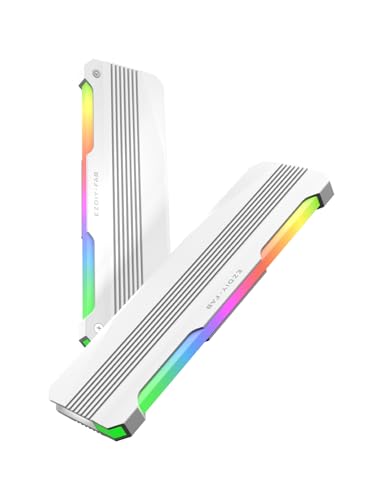
| EZDIY-FAB RH01 ARGB RAM Heatsink, 2-Pack, White | Adding a white ARGB cooling accessory | Check on Amazon |
| JAGTRADE Fan Memory Active Heatsink Cooling Solution | Active airflow over installed DDR memory | Check on Amazon |
| BAFOVY ARGB RAM Cooler, Dual Fan Memory Heatsink | Dual-fan cooling with ARGB styling | Check on Amazon |
| KLEVV Bolt V DDR5 32GB (2x16GB) 6000MHz CL30, Black | 32GB DDR5 for understated dark builds | Check on Amazon |
| KLEVV Bolt V DDR5 32GB (2x16GB) 6000MHz CL30, White | 32GB DDR5 for white air-cooled builds | Check on Amazon |
How We Compared
This roundup separates two types of products: DDR5 memory kits and RAM-cooling accessories. A memory kit is the right starting point for a new build or capacity upgrade; an accessory is for buyers who already have compatible RAM and want additional airflow or visual customization. For air-cooled systems, we favored products with practical, non-towering positioning rather than tall RGB-first designs that can interfere with a CPU cooler’s front fan.
We also considered rated speed, latency, capacity, voltage, AMD EXPO and Intel XMP 3.0 support where specified, finish options, and listed price. Compatibility remains system-specific. Confirm that your motherboard supports the memory profile you plan to use, that your CPU cooler leaves sufficient space above the relevant DIMM slots, and that any add-on cooler fits around the CPU cooler, graphics card, and case side panel.
The 8 Best Picks
1. KLEVV FIT V DDR5 16GB (2x8GB) 6000MHz CL28 — Best for Speed-Focused Air-Cooled Gaming Builds
The KLEVV FIT V kit is the strongest pick here for a buyer building a performance-oriented desktop around a substantial air cooler and wanting 16GB of DDR5 with an aggressive 6000MHz CL28 rating. It uses SK Hynix A-Die memory, runs at 1.4V, and supports both Intel XMP 3.0 and AMD EXPO, making it a compelling option for builders who want profile support across modern platforms. Its silver finish also suits neutral, metal-accented interiors without relying on oversized lighting hardware.
- Pro: 6000MHz CL28 specification targets responsive gaming and desktop use.
- Pro: XMP 3.0 and EXPO readiness broadens platform appeal.
- Con: The 16GB total capacity may be limiting for demanding multitasking.
Skip it if you know you need 32GB from the start or if around $270 does not fit the memory budget.
2. Corsair Vengeance DDR5 16GB (2x8GB) Up to 6000MHz — Best for Flexible AMD and Intel Builds
Corsair Vengeance DDR5 is a sensible choice for shoppers who want a familiar, straightforward 16GB kit and need compatibility positioning for both AMD and Intel systems. With speeds listed up to 6000MHz, it belongs on the shortlist for air-cooled gaming PCs where tall decorative memory is undesirable. The two-stick 2x8GB configuration also keeps the upgrade simple for users who are assembling a first DDR5 machine and want matched modules rather than mixing individual sticks later.
- Pro: Listed for both AMD and Intel RAM platforms.
- Pro: Up-to-6000MHz rating suits mainstream performance builds.
- Con: No price is provided, making value comparison difficult.
Skip it if you need confirmed 32GB capacity, a stated latency rating, or a kit with a published price before deciding.
3. Crucial Pro DDR5 RAM 32GB Kit (2x16GB) 6400MHz CL32 — Best for Higher-Speed 32GB Capacity
The Crucial Pro 32GB kit is for buyers who have moved beyond basic gaming memory needs and want 2x16GB capacity for heavier workloads, larger project files, and more demanding multitasking. Its 6400MHz CL32 rating is the highest stated speed in this roundup, while Intel XMP 3.0 and AMD EXPO compatibility give builders a clear path to using supported memory profiles. The black finish fits naturally in restrained, air-cooled desktop builds where visual clutter is not the goal.
- Pro: 32GB capacity provides more headroom than 16GB kits.
- Pro: 6400MHz CL32 is a strong rated specification.
- Con: At $529, it is a premium-priced option.
Skip it if your workload is light, your motherboard does not support its intended profile, or you are shopping strictly by price.
4. EZDIY-FAB RH01 ARGB RAM Heatsink, 2-Pack, White — Best for White ARGB Memory Cooling Accents
The EZDIY-FAB RH01 is not a DDR5 memory kit; it is a two-pack RAM heatsink accessory intended for DDR4 and DDR5 memory cooling. It makes the most sense for a white-themed desktop where the installed memory already meets your capacity and speed requirements but needs a more coordinated appearance or added heat-spreader treatment. Because it is an add-on part, clearance planning matters even more than usual in an air-cooled build, particularly near the CPU cooler’s front fan.
- Pro: Supports both DDR4 and DDR5 memory.
- Pro: White finish and ARGB design complement bright builds.
- Con: It does not add memory capacity or improve RAM specifications.
Skip it if your cooler already sits close to the DIMM slots or if you want a complete memory upgrade rather than an accessory.
5. JAGTRADE Fan Memory Active Heatsink Cooling Solution — Best for Dedicated Active Airflow
JAGTRADE’s Fan Memory Active Heatsink Cooling Solution is aimed at users who want direct airflow across installed memory. It supports DDR through DDR5 and is listed at 120x62x28mm, a measurement that should be treated as essential planning information for air-cooled systems. This is a practical category of product for builders with existing RAM who want a dedicated cooler rather than changing modules. Its focus is function and compatibility across memory generations instead of color matching or a platform-specific memory profile.
- Pro: Active cooling design targets airflow over memory modules.
- Pro: Compatible with DDR, DDR2, DDR3, DDR4, and DDR5.
- Con: Its 120x62x28mm footprint requires careful clearance checks.
Skip it if space around your CPU cooler is tight or if a lower-profile RAM kit would solve the underlying fit problem more cleanly.
6. BAFOVY ARGB RAM Cooler, Dual Fan Memory Heatsink — Best for Dual-Fan ARGB Styling
The BAFOVY ARGB RAM Cooler is another accessory rather than a memory kit, but it can appeal to builders who want active cooling and a more dramatic lighting treatment. Its dual-fan memory heatsink design supports DDR4 and DDR5, making it relevant to a broad range of desktop upgrades. At around $22, it is among the lower-cost ways to add a dedicated RAM-cooling component. Still, extra hardware above the DIMM area can complicate installation with large air coolers, so fit should come before aesthetics.
- Pro: Dual-fan design emphasizes active memory cooling.
- Pro: ARGB lighting suits showcase-oriented builds.
- Con: Added hardware can conflict with air-cooler clearance.
Skip it if your priority is the lowest possible memory height, minimal lighting, or a new 16GB or 32GB DDR5 kit.
7. KLEVV Bolt V DDR5 32GB (2x16GB) 6000MHz CL30, Black — Best for Understated 32GB Builds
The black KLEVV Bolt V is the best fit for builders who want 32GB in a dark, restrained air-cooled desktop without abandoning performance-oriented specifications. This 2x16GB kit is rated for 6000MHz CL30, uses SK Hynix A-Die, operates at 1.35V, and supports Intel XMP 3.0 plus AMD EXPO. Those details make it a well-rounded candidate for users who need more than entry-level capacity but do not want elaborate RGB hardware competing with a large tower cooler.
- Pro: 32GB capacity is well suited to demanding modern use.
- Pro: 6000MHz CL30 with XMP 3.0 and EXPO support is versatile.
- Con: The around $510 price is substantial.
Skip it if 16GB is enough for your actual workload or if a white build requires coordinated components.
8. KLEVV Bolt V DDR5 32GB (2x16GB) 6000MHz CL30, White — Best for White Air-Cooled Builds
The white KLEVV Bolt V delivers the same core specification as the black version—32GB in a 2x16GB configuration, 6000MHz CL30, SK Hynix A-Die, 1.35V operation, and Intel XMP 3.0 and AMD EXPO readiness—but is the more natural choice for a white air-cooled system. It is ideal when visual consistency matters and you want memory that can sit alongside a white CPU cooler, white case, or pale motherboard accents. The tradeoff is straightforward: the white version costs more.
- Pro: 32GB capacity and 6000MHz CL30 specification match the black kit.
- Pro: White finish supports coordinated light-color builds.
- Con: At around $530, it costs more than the black version.
Skip it if finish does not matter, since the black KLEVV Bolt V offers the same stated performance specifications for less.
Buying Guide
Start With Cooler-to-RAM Clearance
Your CPU cooler is the first measurement to verify. Large air coolers often extend over the nearest memory slots, especially when a front-mounted fan is used. Read the cooler manufacturer’s RAM-clearance specification, then compare it with your intended memory or accessory setup. Do not assume that a heatsink or fan accessory will fit simply because the bare memory modules do. The JAGTRADE unit’s listed 120x62x28mm size illustrates why add-on coolers demand a full clearance check.
Choose Capacity Before Chasing Speed
A 16GB kit, such as the KLEVV FIT V or Corsair Vengeance option, can suit everyday computing and many gaming systems. A 32GB kit offers more breathing room for heavier multitasking, creative programs, and long-term build planning. Once capacity is settled, compare the stated ratings: 6000MHz CL28, 6000MHz CL30, and 6400MHz CL32 each represent different speed-and-latency combinations. Use only settings your motherboard and processor support.
Match Profiles, Voltage, and Finish to the Build
Intel XMP 3.0 and AMD EXPO support can make profile selection easier on compatible systems. The listed KLEVV FIT V operates at 1.4V, while both KLEVV Bolt V kits are listed at 1.35V. For appearance, silver, black, and white heat spreaders are easier to coordinate under air cooling than very tall illuminated modules. If RGB is essential, remember that a separate ARGB accessory may consume the clearance that low-profile memory was meant to preserve.
Our Verdict
For the best balance of speed, low-profile-minded design, and air-cooling practicality, choose the KLEVV FIT V DDR5 16GB 6000MHz CL28 if 16GB meets your needs. For a more capable 32GB build, the black KLEVV Bolt V DDR5 6000MHz CL30 is the strongest all-around pick, while the white version is worth considering when finish coordination is a priority. Buyers who need the highest listed speed should look at the Crucial Pro 32GB 6400MHz CL32 kit. Choose the EZDIY-FAB, JAGTRADE, or BAFOVY products only when you already own compatible RAM and have verified room for an add-on cooler.
FAQ
Is low-profile DDR5 better for air cooling?
It can be. Lower-profile memory is less likely to interfere with the front fan of a large CPU air cooler. The exact fit depends on your cooler, motherboard, memory-slot position, and case width.
Should I buy a RAM cooler instead of new DDR5?
Buy new DDR5 if you need more capacity, a different speed rating, or platform profile support. Buy a RAM cooler only if your current memory already meets your needs and you have confirmed physical compatibility.
Is 16GB or 32GB better for a new air-cooled gaming PC?
16GB can work for many users, but 32GB provides more room for multitasking and demanding applications. Your budget and actual workload should determine the better choice.
Can I use XMP 3.0 or EXPO on any motherboard?
No. Confirm motherboard and processor support before enabling a memory profile. The KLEVV and Crucial kits listed here specify XMP 3.0 and/or AMD EXPO compatibility, but successful profile use remains dependent on the complete system.









