The best all-round live-streaming webcam for most people is the Elgato Facecam MK.2, which gives a clean 1080p60 picture with simple controls. If you want 4K and a bigger sensor for dim rooms, the Razer Kiyo Pro Ultra is the better buy. If you only need a reliable budget camera, the Logitech C920s still does the job.
This guide reads “best asian live webcams” as a search for webcams that suit live streaming and video calls for creators and gamers in Asia. That means rooms that are often small and dim, mains-powered lights at 50 Hz or 60 Hz, and upload speeds that vary by provider. The sections below cover those local factors, then the picks, then how to choose with numbers.
As an Amazon Associate we earn from qualifying purchases at no extra cost to you.
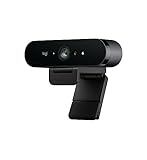
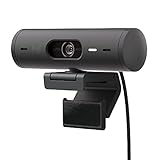


Top 3 picks at a glance
Quick comparison of the picks
| Pick | Best for | Key specs (per manufacturer) | Typical price |
|---|---|---|---|
| Elgato Facecam MK.2 | Best overall | 1080p60, HDR, USB-C, uncompressed output | $80–$150 |
| Logitech C920s HD Pro | Best budget | 1080p30, privacy shutter, USB-A cable | $50–$80 |
| Razer Kiyo Pro Ultra | Best low light | Up to 4K30, large sensor, USB 3 | $200–$300 |
| OBSBOT Tiny 2 | Best for movement and tracking | 4K30, AI gimbal tracking, voice and gesture control | $200–$300 |
| Logitech StreamCam | Best for vertical and mobile-style video | 1080p60, USB-C, portrait mode | $100–$170 |
| Elgato Facecam Pro | Best 4K60 for pro setups | 4K60, USB 3, Sony sensor | $250–$350 |
Prices are general market ranges and shift by region and season.
Best overall: Elgato Facecam MK.2
This is the pick for streamers who want a good picture without tuning a lot of settings. It is a 1080p60 camera with HDR and an uncompressed output option, so your streaming software gets clean video without a double compression pass. It suits solo streamers with a decent desk lamp.
Trade-off: It is capped at 1080p, and it has no built-in tracking. If you move around a lot, look at the OBSBOT below.
Best budget: Logitech C920s HD Pro
The C920s has been a default recommendation for years. It outputs 1080p30 and includes a privacy shutter, and it works with nearly every streaming and meeting app. It suits new streamers, shared family PCs and call-heavy setups.
Trade-off: Its small sensor gets noisy and soft in dim rooms, so budget for a key light. It also stops at 30 fps, which makes fast hand motion look less smooth.
Best for low light: Razer Kiyo Pro Ultra
Many apartments and dorms in dense Asian cities have a single overhead light and little daylight. A camera with a large sensor, like the one Razer specifies for the Kiyo Pro Ultra, handles that better than small-sensor webcams. It suits evening streamers who can’t add much lighting.
Trade-off: It costs a lot, and the USB bandwidth needs described below apply. Use a proper USB 3 port, not a hub.
Best for movement and tracking: OBSBOT Tiny 2
The Tiny 2 has a motorized gimbal that follows your face or body. That helps cooking, art, fitness and IRL-style desk streams where you leave the frame. Its 4K sensor also lets you crop digitally and still keep a sharp image. It suits creators who move.
Trade-off: Tracking can drift on busy backgrounds, and the gimbal is visible on your desk. Competitive gamers who sit still gain little from it.
Best for vertical video: Logitech StreamCam
Short-form platforms and mobile-first audiences are big across Asia, so vertical video matters. The StreamCam offers 1080p60 with a portrait mode, so you can capture 9:16 video without cropping a landscape frame. It suits creators who stream to both desktop and phone-style layouts.
Trade-off: It has a plastic build and a modest sensor, so it falls behind the larger-sensor cameras in poor light.
Best 4K60: Elgato Facecam Pro
This camera is aimed at creators who record or stream at 4K60 and want a high-quality source for editing. It suits dedicated content rooms with controlled lighting.
Trade-off: Most platforms cap live streams at 1080p or 1440p, so 4K60 mainly helps recorded content and cropping. It also needs a fast USB 3 port and a capable PC.
How to choose: the numbers that matter
1. USB bandwidth: why 4K needs the right port
Uncompressed video bandwidth is width × height × bytes per pixel × frames per second. Using YUY2 at 2 bytes per pixel:
- 1080p30: 1920 × 1080 × 2 × 30 ≈ 124 MB/s, or about 1.0 Gbps.
- 1080p60: about 249 MB/s, or about 2.0 Gbps.
- 4K30: 3840 × 2160 × 2 × 30 ≈ 498 MB/s, or about 4.0 Gbps.
- 4K60: about 8.0 Gbps.
USB 3.0 is rated at 5 Gbps, but real throughput is lower, so uncompressed 4K30 is already near its limit. This is why many 4K webcams send compressed MJPEG or H.264 video instead. Treat 4K60 as a 10 Gbps USB or compressed-output job. Plug the camera into a rear motherboard port, not a hub shared with other devices.
2. Upload speed: what your stream needs
A 1080p60 stream usually runs at about 6 Mbps video plus 160 kbps audio. Leave 50% headroom so the stream survives congestion: 6.2 × 1.5 ≈ 9.3 Mbps of stable upload. If your plan gives 20 Mbps up but you also game online and upload clips, the headroom shrinks quickly. Test at your usual streaming hours, because evening speeds often drop. A webcam that outputs 4K does not raise the bitrate you need unless you also stream at 4K.
3. Fix flicker: match your local mains frequency
Many regions run 50 Hz mains, including mainland China, Hong Kong, India, Singapore, Malaysia, Thailand and Vietnam. Others use 60 Hz, such as South Korea, Taiwan and the Philippines. Japan uses both, split by region. Lights on mains power flicker at twice the mains frequency, so 100 Hz or 120 Hz. Set the camera’s anti-flicker option to match your region. In manual exposure, use a shutter speed that is a multiple of that flicker: 1/100 s on 50 Hz, or 1/120 s on 60 Hz. Choose 25 or 50 fps in 50 Hz regions if your camera and software allow it, because it matches the light cycle. If banding persists, the cause is often a cheap PWM-dimmed LED lamp, so replace the lamp.
4. Decision matrix
| Your situation | Choose | Reason |
|---|---|---|
| Small room, one overhead light | Razer Kiyo Pro Ultra | Large sensor handles dim light better |
| Tight budget, first stream | Logitech C920s | Low cost, works everywhere |
| Competitive gamer, sitting still | Elgato Facecam MK.2 | 60 fps, clean output, low CPU load |
| Cooking, art or fitness streams | OBSBOT Tiny 2 | Gimbal follows you |
| Vertical clips for mobile audiences | Logitech StreamCam | Portrait mode built in |
| Recording 4K content | Elgato Facecam Pro | 4K60 source, with a fast USB port |
5. Lighting often matters more than the camera
A $60 webcam with a soft key light beside the monitor usually beats a $250 camera under a bare ceiling bulb. Place a soft light at 45 degrees from your face, a little above eye level, and keep the light warm enough to match your skin tone. Lock white balance and exposure manually once you are happy, so the picture doesn’t pump when you move.
Frequently Asked Questions
Is a 4K webcam worth it for streaming?
Usually not for the stream itself, since most platforms and viewers use 1080p. It helps if you record content, crop in post or use digital zoom. A 1080p60 camera with good light is often the better first purchase.
What frame rate should I pick, 30 or 60 fps?
Pick 60 fps if you show hand motion, use a face cam in fast gaming content, or want a smoother look. Pick 30 fps if your upload speed or PC is limited, since it halves the bandwidth. Match your game capture frame rate when you can.
Why does my webcam image flicker or show bands?
Mismatch between your lights’ flicker and the camera’s shutter is the usual cause. Set the camera’s anti-flicker mode to your local mains frequency, either 50 Hz or 60 Hz, and use a matching shutter speed. If it persists, swap cheap PWM-dimmed LED lamps for flicker-free ones.
Can I use my phone instead of a webcam?
Yes. Modern phone cameras often beat budget webcams, especially in low light, and several apps and operating systems support using a phone as a webcam. The trade-offs are cable clutter, heat, battery drain and tying up your phone during the stream.
Do I need a USB 3 port?
For 1080p30 a USB 2 port can work with compressed output, but 1080p60 and 4K cameras are designed for USB 3. Use a rear motherboard port rather than a front-panel header or an unpowered hub. A weak connection often causes dropped frames or the camera falling back to a lower resolution.
Which webcam is best if I move around a lot?
The OBSBOT Tiny 2 is the best fit because its gimbal can track you. Fixed cameras with a wide field of view are a cheaper option, but you will have to stay inside the frame.
Related guides
More from Amazon
Programs that pair well with the guide above. Offers and eligibility are set by Amazon and may change.
A free business account with business pricing and bulk-buying tools for work, shop or home office.
Create a business accountFree shipping on eligible items, Prime Video and more. Eligible new members can start with a free trial.
Start a Prime free trialAudiobooks and podcasts to listen to on the go. Eligible new members can start with a free trial.
Try Audible freeAd-free music streaming. Eligible new subscribers can start with a free trial.
Try Music Unlimited freeAs an Amazon Associate we earn from qualifying purchases.


