Choosing a gaming keyboard means choosing how every command reaches the game. A switch that feels too heavy can slow repeated presses, a layout that crowds your mouse hand can cramp your aim, and a connection that drops at the wrong moment can undo a careful play. The right board should match the games you play most, the space on your desk, and the way your fingers move during long sessions.
This guide is for competitive players who want fast, consistent input, for casual gamers who also type and work at the same desk, and for players building a first serious setup who want a board that will last. The five keyboards below were chosen from the names and specifications shown on their Amazon product pages, covering tenkeyless, full-size, and compact layouts, wireless and wired connections, and several switch styles.
Top 3 picks at a glance


Quick Picks
As an Amazon Associate we earn from qualifying purchases.
| Product | Best for | Key spec from title |
|---|---|---|
| Logitech G PRO X TKL Lightspeed Wireless Gaming Keyboard | Competitive play away from home | LIGHTSPEED wireless, tenkeyless design |
| SteelSeries Apex Pro TKL (2023) | Adjustable actuation for different games | OmniPoint 2.0 adjustable actuation |
| Razer BlackWidow V4 X | Full-size play with dedicated macro keys | Green tactile and clicky switches |
| Corsair K70 RGB PRO | Fast wired play with a palm rest | 8,000Hz Hyper-Polling |
| HyperX Alloy Origins 65 | A compact desk with a small footprint | Compact 65 percent form factor |
How to Choose
Switch Type and Feel
Switches decide how a keypress feels and how quickly it registers. Linear switches travel smoothly from top to bottom, which suits rapid repeated presses in shooters and action games. Tactile switches add a small bump, giving your fingers a clear signal that the press counted without a loud click. Clicky switches add sound as well as feel, which some players enjoy and others find distracting in shared rooms. Hall effect switches, such as the magnetic switches in some tenkeyless boards, let you change how far a key must travel before it activates. Match the switch to your main games first, then to typing, because a switch that tires your fingers in long matches will not improve with practice.
Layout and Desk Space
Layout controls how much room your mouse gets and which keys sit within easy reach. Full-size keyboards include a number pad, arrow keys, and a full function row, which helps players who bind many commands or use the same board for spreadsheets and editing. Tenkeyless boards drop the number pad, pulling the mouse closer to the centre of the desk and giving your right arm a more natural angle. Compact 65 percent boards go further, keeping arrows and a small navigation cluster while removing the function row and number pad entirely. Measure your desk before you buy, note where your monitor and mousepad sit, and choose the smallest layout that still holds the keys you actually press during play.
Polling Rate and Connection
Polling rate describes how often a keyboard reports its state to the computer, and a higher rate can make input feel more immediate in fast games. Many wired gaming keyboards now offer 8,000Hz polling, while wireless models rely on a low-latency 2.4GHz connection or Bluetooth for everyday use. Wired boards remove battery worries and keep the connection simple, which is why many tournament players still prefer a cable. Wireless boards free the desk from cables and travel well, but they need charging and a reliable receiver. Check whether the board supports both wireless and wired modes, how it charges, and whether its software lets you switch profiles without digging through menus mid-game.
Build, Keycaps, and Extra Controls
Build quality shows up after months of use, not on the first day. An aluminium frame resists flex during intense play, while a plastic chassis can feel lighter and cost less. Keycap material matters too: PBT keycaps resist shine and wear better than ABS keycaps, and double-shot legends keep letters readable as the coating ages. Media controls, a volume roller, and dedicated macro keys save time when you adjust sound or trigger a sequence without leaving the game. A detachable wrist rest helps during long sessions, and a detachable cable makes the board easier to pack and replace. Read the listing for frame material, keycap type, cable style, and included accessories before deciding.
The 5 Best Options
Logitech G PRO X TKL Lightspeed Wireless Gaming Keyboard
This tenkeyless board suits competitive players who travel to friends, tournaments, or LAN sessions and want a wireless keyboard that packs down easily. Its compact shape leaves generous room for broad mouse movements, while the tactile GX Brown switches give a clear bump on each press without the sharp sound of a clicky switch. The wireless connection keeps the desk tidy for a clean setup. Players who switch between a desktop and a laptop will appreciate a layout that fits in a bag and a design built around portable play.
Specs
- LIGHTSPEED wireless connection
- Ultra-portable tenkeyless design
- LIGHTSYNC RGB lighting
- PBT keycaps
- Tactile Switches (GX Brown)
- Black finish
Best for: Competitive players who want a portable tenkeyless wireless keyboard for tournaments and travel.
Watch out for: Confirm the switch version on the listing before ordering, because this model is sold with tactile, linear, and clicky switch options.
SteelSeries Apex Pro TKL (2023)
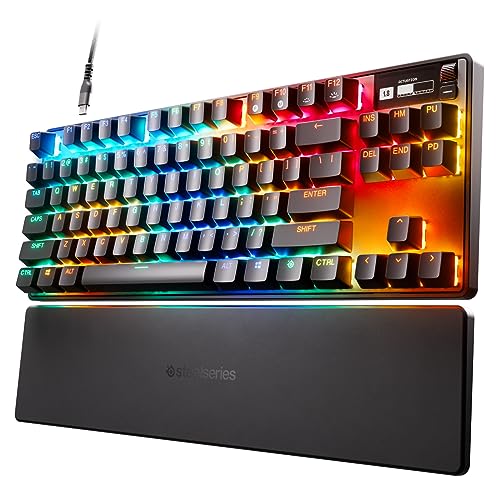
This tenkeyless board suits players who want to tune each key to a different game instead of accepting one fixed actuation point. Its adjustable actuation lets you set shallow presses for fast movement keys and deeper presses for keys you might hit by accident, which helps in shooters and in games with many held commands. The OLED screen puts volume, profiles, and game information within reach, while the tenkeyless shape keeps the mouse hand close. It is a strong fit for players who enjoy adjusting settings and want one board for several genres.
Specs
- HyperMagnetic gaming keyboard
- Adjustable actuation
- Esports tenkeyless layout
- OLED screen
- RGB lighting
- PBT keycaps
- USB-C connection
- 2023 Edition
Best for: Players who want adjustable actuation and an OLED screen on a tenkeyless board.
Watch out for: Check that the layout on the listing is the US QWERTY version you expect, because this model is also sold in other regional layouts.
Razer BlackWidow V4 X
This full-size board suits players who want a number pad, dedicated macro keys, and media controls without giving up a classic mechanical feel. Its Green switches are tactile and clicky, so each press gives both a bump and a sound cue, which helps players who like clear feedback during fast sequences. Six macro keys are ready for abilities, emotes, or build commands, and the roller and media keys make volume changes quick. The doubleshot ABS keycaps keep legends bright under RGB lighting, and the full layout works well for players who also use the board for work.
Specs
- Green Switches, tactile and clicky
- 6 macro keys
- Chroma RGB lighting
- Doubleshot ABS keycaps
- Roller and media keys
- Snap Tap
Best for: Full-size players who want macro keys, media controls, and clicky tactile switches.
Watch out for: Confirm the switch colour on the listing before ordering, because this model is also sold with Yellow linear switches.
Corsair K70 RGB PRO

This wired full-size board suits players who want a fast, stable connection and a comfortable typing surface for long sessions. Its CHERRY MX RGB Speed switches are linear and rapid, which suits repeated presses and quick movement changes, while 8,000Hz Hyper-Polling keeps input reporting frequent. PBT double-shot keycaps resist wear, and the soft-touch palm rest supports the wrists during extended play. The wired connection removes any concern about charging during a match.
Specs
- CHERRY MX RGB Speed Switches, linear and rapid
- 8,000Hz Hyper-Polling
- PBT DOUBLE-SHOT PRO Keycaps
- Soft-Touch Palm Rest
- Wired mechanical gaming keyboard
- QWERTY, NA layout
- Black finish
Best for: Wired players who want rapid linear switches, high polling, and a palm rest.
Watch out for: Confirm the switch version on the listing before ordering, because this model is sold with Speed, Red, and Brown switch options.
HyperX Alloy Origins 65

This compact board suits players with a small desk, a crowded setup, or a preference for keeping the mouse close to the keyboard. Its 65 percent layout keeps arrows and essential navigation keys while removing the number pad and function row, which frees a surprising amount of space for a large mousepad. The Tactile Aqua switches give a gentle bump without a loud click, and the double-shot PBT keycaps hold up well under daily use. RGB backlighting and NGENUITY software support let you adjust lighting and key assignments, making this a practical choice for a tidy, focused setup.
Specs
- Compact 65 percent form factor
- Tactile Aqua Switch
- Double Shot PBT Keycaps
- RGB LED Backlit
- NGENUITY Software Compatible
- Mechanical gaming keyboard
Best for: Players with a small desk who want a compact 65 percent board with tactile switches.
Watch out for: Check the arrow and navigation key placement on the listing, because the compact layout moves some keys to a function layer.
Which One Fits Your Situation
You Play Competitive Shooters Most Days
Choose the Logitech G PRO X TKL if you travel or want a portable wireless board, or the SteelSeries Apex Pro TKL (2023) if you want to adjust actuation per key. Both tenkeyless boards give your mouse room, and both keep the keys you need for movement and abilities close together. The Logitech board is the simpler travel choice, while the SteelSeries board rewards players who enjoy fine-tuning settings for each game.
You Want a Full-Size Board for Games and Work
Choose the Corsair K70 RGB PRO for fast wired play with a palm rest, or the Razer BlackWidow V4 X if you want dedicated macro keys and clicky feedback. Both keep the number pad for work and for games with many bindings. The Corsair board suits players who prefer smooth linear switches, while the Razer board suits players who like a clear tactile bump and sound with each press.
Your Desk Is Small or Shared
Choose the HyperX Alloy Origins 65. Its compact footprint leaves room for a large mousepad, a notebook, or a second device, and its tactile switches stay quiet enough for a shared room. The 65 percent layout still keeps arrows within reach, so you lose less than the size suggests. Pair it with a compact mouse and a small mousepad to keep the whole setup balanced.
You Want One Board You Can Tune Deeply
Choose the SteelSeries Apex Pro TKL (2023). Adjustable actuation, the OLED screen, and profile controls give you more ways to shape the board around each game than a fixed-switch keyboard offers. Set shallow actuation for movement keys, deeper actuation for keys you press by accident, and separate profiles for shooters, strategy games, and typing. The tenkeyless layout keeps the setup focused while the tuning options do the heavy work.
Common Mistakes
- Buying a full-size board for a small desk, then losing mouse space and playing with a cramped arm angle.
- Choosing clicky switches for a shared room without checking how loud they sound during late sessions.
- Picking a compact layout without checking where arrows, delete, and function keys moved.
- Ignoring keycap material and then watching legends fade or keys shine after months of use.
- Forgetting to confirm the switch version and layout on the listing, then receiving a different switch or regional layout than expected.
Frequently Asked Questions
What switch type is best for gaming?
There is no single best switch for every player. Linear switches suit fast repeated presses, tactile switches suit players who want a clear bump, and clicky switches suit players who also want sound feedback. Hall effect switches suit players who want adjustable actuation. Choose the feel that matches your main games, then check typing comfort, because the board will serve both purposes.
Is a tenkeyless keyboard better than a full-size keyboard?
A tenkeyless keyboard is better when mouse space matters more than a number pad, which is common in shooters and in small setups. A full-size keyboard is better when you use the number pad for work, macros, or games with many bindings. Neither layout is faster on its own. Pick the layout that fits your desk and the keys you press most often.
Does polling rate make a real difference?
Polling rate can make input feel more immediate, especially in fast games where small timing differences matter. A high polling rate helps most when the rest of the setup is also fast, including the mouse and monitor. For casual play, the difference is subtle. Choose a board with a solid connection first, then treat a higher polling rate as a useful bonus.
Should I choose a wireless or wired gaming keyboard?
Choose wireless when you want a tidy desk, easy travel, or a setup you rearrange often, and check battery life and charging before you buy. Choose wired when you want a simple connection with no charging and no receiver to manage. Many wireless boards also work wired, so check the listing for a detachable cable and a wired mode if you want both options.
Related guides
More from Amazon
Programs that pair well with the guide above. Offers and eligibility are set by Amazon and may change.
A free business account with business pricing and bulk-buying tools for work, shop or home office.
Create a business accountFree shipping on eligible items, Prime Video and more. Eligible new members can start with a free trial.
Start a Prime free trialAudiobooks and podcasts to listen to on the go. Eligible new members can start with a free trial.
Try Audible freeAd-free music streaming. Eligible new subscribers can start with a free trial.
Try Music Unlimited freeAs an Amazon Associate we earn from qualifying purchases.