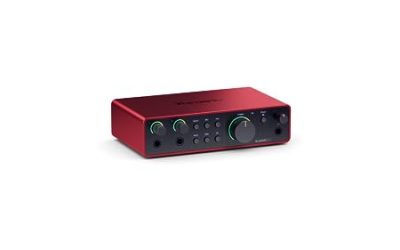
Our Top Picks
Top 3 picks at a glance

Intro
A Dragon gaming laptop, the kind of machine that carries MSI Dragon branding across lines such as the Raider, Vector, and Titan families, is built around a fast graphics card and a strong processor. The audio side of that same laptop is usually far less generous. A thin chassis leaves little room for audio hardware, and the built-in audio path shares space and power with everything else inside the machine. The result is sound that works, but rarely sounds as clean or as spacious as the rest of the setup deserves.

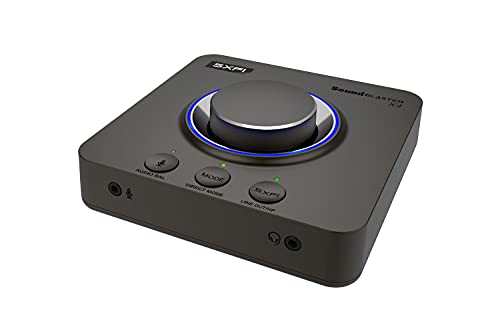
An external USB sound card changes that without opening the laptop or adding a permanent peripheral. It plugs into a USB port, takes over audio processing from the onboard chip, and gives a headset or a set of speakers a cleaner signal, a stronger headphone amplifier, and controls that are easier to reach mid-game.
This guide compares four external USB sound cards that suit a Dragon gaming laptop. Every pick is an external unit, every pick connects over USB, and every pick is listed on Amazon US. The four cover different needs: a flagship gaming DAC for demanding headsets, a desktop hub for speakers and chat, a compact USB-C unit for travel, and a simple plug-and-play adapter for a quick audio fix. Read the comparison, match the unit to how the Dragon laptop is used, and use the setup notes at the end to get it running cleanly.
At a Glance
| Sound card | Connection | Playback resolution | Surround | Headphone support | Suits a Dragon setup that… |
|---|---|---|---|---|---|
| Creative Sound BlasterX G6 | USB | 32-bit / 384 kHz | 7.1 virtual surround | Up to 600 ohm | Pairs a demanding headset with a mic for competitive play |
| Creative Sound Blaster X4 | USB-C | 24-bit / 192 kHz | 7.1 discrete and virtual | Up to 600 ohm | Runs speakers, a headset, and voice chat from one desk hub |
| Creative Sound Blaster G3 | USB-C | 24-bit / 96 kHz | 7.1 virtual surround | Up to 300 ohm | Travels with the laptop and doubles for console sessions |
| Creative Sound Blaster Play! 3 | USB-A | 24-bit / 96 kHz | Stereo | Standard headsets | Needs a simple plug-and-play audio fix with no software |
1. Creative Sound BlasterX G6
View on Amazon: https://www.amazon.com/dp/B07FY45F2S
The Sound BlasterX G6 is the strongest all-round pick in this guide for a Dragon laptop. It is a compact external USB DAC and headphone amplifier built around a 32-bit / 384 kHz converter with 130 dB of dynamic range, which gives it the cleanest signal path of the four units here. The Xamp discrete headphone amplifier drives each audio channel separately, and it can drive studio-grade headphones up to 600 ohm, so a high-impedance headset that sounds quiet or flat on onboard audio gets the power it needs.
For gaming, the G6 adds 7.1 virtual surround sound for headphones, Dolby Digital processing, and Scout Mode, a feature that lifts faint in-game cues such as footsteps so they are easier to place. Sidetone control lets the user hear their own voice in the headset while talking, which keeps chat volume natural instead of shouting over game audio. Physical profile buttons on the unit switch between saved audio modes without opening software.
Connectivity is generous for a unit this size. It has USB input, optical input and output, line-in, and a microphone input, so it can sit between a Dragon laptop, a console, and a set of powered speakers. It is bus-powered over USB, so no separate power brick is needed on a desk or in a bag.
Considerations
The G6 uses a Micro-USB connection on the unit itself, which feels dated next to the USB-C ports found on current Dragon laptops, so keep the supplied cable with the unit. The full feature set, including Scout Mode and SBX Pro Studio effects, needs Creative software on Windows, and the unit takes up a USB port plus desk space that a smaller adapter would not. It is also the most capable unit here, so a listener who only uses a basic headset may not use everything it can do.
2. Creative Sound Blaster X4
View on Amazon: https://www.amazon.com/dp/B0953LL5R6
The Sound Blaster X4 is the desk-hub pick for a Dragon setup that runs more than one audio device. It is an external USB DAC and amplifier with 24-bit / 192 kHz playback, 7.1 discrete surround for multi-channel speakers, and virtual surround for headphones. Super X-Fi headphone processing is included for a wider, more speaker-like image from a headset, and Dolby Digital Live support covers multi-channel speaker output.
What sets the X4 apart is how many devices it connects at once. It has USB-C input, optical input and output, line-in, mic-in, and a headset input, plus analog outputs for up to 7.1 channels of speakers. A Dragon laptop owner can leave powered speakers, a headset, and an external microphone all connected and switch between speakers and headphones from the unit itself, using the Audio Balance control to blend game audio and chat. The headphone amplifier drives headphones up to 600 ohm.
The SmartComms Kit is the other reason to choose the X4. It bundles VoiceDetect automatic microphone muting, NoiseClean noise reduction, and CrystalVoice processing, which keeps voice chat clear without a separate microphone interface.
Considerations
The X4 is a desktop unit with a larger footprint than the compact DACs in this guide, so it suits a fixed desk better than a travel bag. Some features need the Creative app on Windows or Mac to configure fully. Its breadth is also its main trade-off: a listener who only needs amplified sound for one headset will find the extra inputs and speaker outputs unused. The unit is USB-powered, so it still needs a free USB-C port on the Dragon laptop.
3. Creative Sound Blaster G3
View on Amazon: https://www.amazon.com/dp/B081N3M7DV
The Sound Blaster G3 is the travel pick for a Dragon laptop. It is a slim, pen-shaped external USB-C DAC and amplifier that weighs about 32 grams and runs entirely from USB power, with no drivers needed for basic use. Its 24-bit / 96 kHz playback and 100 dB signal-to-noise ratio give a clear step up from onboard laptop audio, and its built-in headphone amplifier drives headphones up to 300 ohm.
GameVoice Mix is the headline feature. It is a physical control that balances game audio against voice chat, so a player can turn chat up during a team call and turn it back down without leaving the game or opening a menu. Physical volume and microphone mute controls sit on the unit as well, which is handy when the Dragon laptop sits on a stand or a cooling pad and its own keys are harder to reach. The Sound Blaster Command app on mobile or desktop adds equalizer settings and audio profiles for listeners who want to tune the sound further.
The G3 is also flexible about where it is used. It works with Windows and Mac computers as well as PlayStation 4, PlayStation 5, and Nintendo Switch, so the same unit can move from a Dragon laptop to a console session.
Considerations
The G3 is a compact unit, so it has fewer connections than the G6 or the X4, with no separate line-out for powered speakers and no discrete multi-channel speaker output. Its maximum playback resolution is 24-bit / 96 kHz, below the G6 and X4, and its headphone amplifier tops out at 300 ohm rather than 600 ohm. The slim body can also slide on a smooth desk, so place it where its cable will not tug it off the edge.
4. Creative Sound Blaster Play! 3
View on Amazon: https://www.amazon.com/dp/B073KTPNDR
The Sound Blaster Play! 3 is the simple pick for a Dragon laptop that just needs better sound with no setup fuss. It is a compact external USB sound adapter that plugs into a USB-A port and works with no drivers required on Windows and Mac. Playback runs at 24-bit / 96 kHz, which lifts clarity above typical onboard laptop audio for games, music, and calls.
Its appeal is how little it asks of the user. There is no software to install, no separate power supply, and no configuration beyond selecting it as the playback device. It adds a headphone jack and a microphone jack, which is useful when a Dragon laptop has a single combined audio jack or when the built-in jack has picked up hum or crackle. The adapter is small enough to leave plugged into a laptop bag or a USB hub without adding bulk.
Considerations
The Play! 3 is a stereo adapter with no surround processing, no optical connection, and no built-in amplifier beyond what the compact adapter provides, so it cannot drive high-impedance headphones the way the G6, X4, or G3 can. It has no physical volume or mute controls and no companion app for equalizer settings. It is a straightforward audio adapter rather than a full DAC, so listeners who want surround sound, chat mixing, or speaker outputs should look at the other picks in this guide.
How to Choose
Start with the headset. Check its impedance, which is printed in its specifications. Standard gaming headsets work with any of the four units here. High-impedance headphones, generally those at 250 ohm and above, need the stronger amplification of the G6 or X4, and the G3 covers the middle ground up to 300 ohm. A headset that sounds quiet on onboard audio is the clearest sign that a stronger amplifier is needed.
Next, count the devices. One headset and nothing else points to the G6 or the Play! 3, depending on how much control and surround processing is wanted. A setup with powered speakers plus a headset points to the X4, which switches between them and adds discrete multi-channel output. A setup that moves between a Dragon laptop and a console points to the G3, which is built for that kind of switching.
Then look at the ports on the Dragon laptop. Current Dragon laptops carry USB-C and USB-A ports, but the mix varies by model. The G3 and X4 use USB-C, which matches modern laptops directly. The G6 uses Micro-USB on the unit with its own cable, and the Play! 3 uses USB-A, so both work through the laptop ports or a hub. Before buying, confirm which ports are free during a normal session, since a laptop dock, an external drive, and a mouse can already fill them.
Microphone needs matter too. Every unit here accepts a microphone input, but the X4 goes further with its SmartComms Kit and built-in microphone array for calls. If voice chat is a daily habit, the X4 or the G6, with sidetone and chat controls, will feel better than a bare adapter. If chat is occasional, the G3 covers it with GameVoice Mix and a mute control.
Finally, think about where the laptop lives. A fixed desk setup rewards the X4 or the G6, which stay put and connect to speakers. A laptop that travels between home, class, and a friend’s setup rewards the G3 or the Play! 3, which slip into a bag and need no extra power. Surround sound, speaker output, and chat tools are worth having only if they will actually be used, so match the unit to the real setup rather than the longest feature list.
Fit and Installation
Installation is straightforward because every unit here is external and USB-powered. Plug the unit into a free USB port on the Dragon laptop, wait for Windows to recognize it, then open Sound settings and set the unit as the default playback device and, where needed, the default recording device. The G3 and Play! 3 work with no drivers for basic use. The G6 and X4 benefit from the Creative software on Windows, which unlocks Scout Mode, SBX Pro Studio, Super X-Fi, and the SmartComms tools, so install it when those features are wanted.
Port choice affects stability. Use a USB port on the laptop itself rather than an unpowered hub when possible, since the headphone amplifier draws its power from the USB connection. On a Dragon laptop with ports on both sides, put the sound card on the side with the most free space so its cable does not cross the mouse hand or block a vent. Dragon laptops move a lot of air under load, so keep the unit and its cable clear of exhaust vents on the sides and rear.
Cable routing deserves a minute of attention. Run the headset cable from the sound card rather than the laptop jack, and keep the sound card close to where the headset is used so the cable does not drag across the keyboard. For a desk setup with speakers, place the X4 or G6 between the laptop and the speakers, with optical or line cables routed behind the desk. For a travel setup, coil the G3 or Play! 3 cable loosely and keep the adapter in a small pouch so the connector does not bend in a bag.
Check the setup after connecting. Play a game or a music track, speak into the microphone, and confirm that chat partners can hear clearly. If sound comes from the laptop speakers instead of the headset, the default playback device is still set to the onboard chip, so switch it in Sound settings. If a microphone is not picked up, check the default recording device and the physical mute control on the unit. A restart of the game or the voice app after switching devices clears most remaining issues.
FAQ
Does an external sound card work with a Dragon gaming laptop?
Yes. A Dragon laptop runs Windows, and every unit in this guide connects over USB and appears as a standard audio device. Plug it in, select it as the default playback device in Sound settings, and connect the headset or speakers to the unit instead of the laptop audio jack. No internal changes to the laptop are needed.
Do I need to install drivers for these sound cards?
The G3 and Play! 3 work with no drivers for basic playback and microphone use. The G6 and X4 also work as standard USB audio devices without drivers, but their extra features, such as Scout Mode, SBX Pro Studio, Super X-Fi, and the SmartComms Kit, need the Creative software on Windows. Install the software when those features are wanted, and skip it when simple plug-and-play sound is enough.
Will an external sound card make my headset louder and clearer?
It can, within the limits of the headset itself. An external unit bypasses the onboard audio chip, which removes a common source of hum and interference, and its built-in headphone amplifier delivers more power than a laptop jack. High-impedance headphones gain the most. A headset that is already loud on onboard audio will mainly gain cleaner sound and better controls rather than more volume.
Can I use speakers and a headset with one external sound card?
Yes, with the right unit. The Sound Blaster X4 is built for this, with analog outputs for up to 7.1 channels of speakers, a headset input, and a control that switches between speakers and headphones. The G6 can drive powered speakers through its line and optical outputs alongside a headset. The G3 and Play! 3 are headset-first units, so they suit a headset and a microphone rather than a speaker setup.
Conclusion
A Dragon gaming laptop already handles the hard part of gaming, and an external USB sound card finishes the setup by giving that hardware audio to match. The Sound BlasterX G6 is the best all-round pick for a demanding headset and competitive play, with the cleanest converter and the strongest amplifier in this guide. The Sound Blaster X4 is the pick for a desk setup with speakers, a headset, and regular voice chat, thanks to its many connections and SmartComms tools. The Sound Blaster G3 is the pick for travel and for sessions that move between a Dragon laptop and a console, with GameVoice Mix and a pocket-sized body. The Sound Blaster Play! 3 is the pick for a simple, driver-free audio fix that costs little in space or setup time.
Match the unit to the headset, the devices on the desk, and how often the laptop moves, then follow the installation notes to set it as the default device and keep its cable clear of vents. The right external sound card is the one that fits the setup as it is used every day, not the one with the longest feature list.
As an Amazon Associate, we earn from qualifying purchases.
Related guides
More from Amazon
Programs that pair well with the guide above. Offers and eligibility are set by Amazon and may change.
A free business account with business pricing and bulk-buying tools for work, shop or home office.
Create a business accountFree shipping on eligible items, Prime Video and more. Eligible new members can start with a free trial.
Start a Prime free trialAudiobooks and podcasts to listen to on the go. Eligible new members can start with a free trial.
Try Audible freeAd-free music streaming. Eligible new subscribers can start with a free trial.
Try Music Unlimited freeAs an Amazon Associate we earn from qualifying purchases.