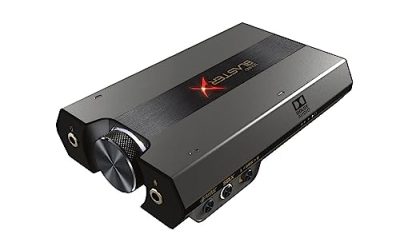
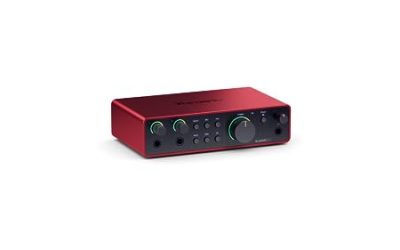
The best zero-latency option for most gamers is a USB audio interface with hardware direct monitoring, such as the Focusrite Scarlett Solo or Audient EVO 4, while the Creative Sound Blaster AE-9 and AE-7 are the best internal cards for people who want surround, headphone amplification and a gaming-focused control panel. No sound card has literally zero latency, because every digital path takes a few samples to process, but direct monitoring bypasses the computer entirely and gets the delay below what your ears can notice.
What “zero latency” actually means for a sound card
Audio latency is the time between a sound being generated (a footstep in a game, or your voice into a microphone) and you hearing it. It comes from three places: the buffer your driver uses, the analog-to-digital and digital-to-analog converters, and any processing such as surround virtualization or effects. When manufacturers advertise “zero latency”, they almost always mean direct monitoring, where the input signal is routed to the headphone output inside the device before it ever reaches the PC.
For plain game audio playback, latency matters less than people think. Games already add their own audio engine delay, typically in the range of 20 to 60 ms depending on the engine and settings. What you can control is the driver buffer and the device path. For streaming, voice chat monitoring, rhythm games and music production, the sound card’s behavior becomes much more important.
Worked example: how buffer size becomes milliseconds
Driver latency is simple arithmetic: buffer size in samples divided by sample rate. The table below shows one-way buffer delay; real round-trip latency is roughly double that plus converter delay, which most interface makers specify at around 1 to 2 ms in total.
| Buffer size (samples) | Sample rate | One-way buffer delay | Approx. round trip with converters | Typical use |
|---|---|---|---|---|
| 64 | 48 kHz | 1.33 ms | about 4-5 ms | Live monitoring, rhythm games |
| 128 | 48 kHz | 2.67 ms | about 7-8 ms | Streaming with software monitoring |
| 256 | 48 kHz | 5.33 ms | about 12-13 ms | Everyday gaming and voice chat |
| 512 | 48 kHz | 10.67 ms | about 22-24 ms | Stable playback on busy systems |
| 128 | 96 kHz | 1.33 ms | about 4-5 ms | Higher rate halves the delay, but costs more CPU |
The takeaway: a 128-sample buffer at 48 kHz is already under 3 ms each way, and anything under roughly 10 ms of monitoring delay is difficult to perceive as an echo of your own voice. If a card cannot hold that buffer without crackling, its driver quality is the weak point, not the sample rate.
Quick comparison of the picks
| Pick | Best for | Key specs | Typical price range |
|---|---|---|---|
| Creative Sound Blaster AE-9 | Best internal card overall | PCIe, up to 32-bit/384 kHz, 127 dB DNR on the main output, discrete headphone amp, external DAC box | usually $250-$350 |
| Creative Sound Blaster AE-7 | Best value internal card | PCIe, 32-bit/384 kHz, 127 dB DNR, ESS Sabre-class DAC, headphone amp for high-impedance cans | usually $150-$220 |
| ASUS Xonar-style PCIe cards (AE series) | Simple stereo and 7.1 upgrade | PCIe, 192 kHz, 150-ohm headphone amp on select models | usually $100-$150 |
| Focusrite Scarlett Solo (4th gen) | Best zero-latency monitoring for streamers | USB-C, 24-bit/192 kHz, direct monitor, one XLR mic input | usually $120-$150 |
| Audient EVO 4 | Best budget interface | USB, 24-bit/96 kHz, direct monitoring, two mic inputs | usually $100-$140 |
| Sound BlasterX G6 | Best portable USB DAC for consoles and PC | USB, 32-bit/384 kHz, optical in/out, 130 dB DNR claimed | usually $120-$170 |
Best overall internal card: Creative Sound Blaster AE-9
The AE-9 is the flagship of Creative’s Ae line. It uses a PCIe slot for data and power, adds an external DAC and headphone amplifier box, and ships with the Sound Blaster Command software for equalizer, scout mode and surround profiles. Per Creative’s spec sheet, the main output reaches 127 dB dynamic range. It is a good fit if you have a high-impedance headphone such as a 250-ohm studio model and want the amplifier built in.
The trade-off is that you are using Creative’s driver stack. Its ASIO driver is capable, but it is not at the level of a dedicated pro interface when you push buffers down to 64 samples. Also, the processing features (Scout Mode, SBX surround) add their own delay, so turn them off if you chase the lowest possible latency.
Best value internal card: Creative Sound Blaster AE-7
The AE-7 keeps most of the AE-9 experience at a lower cost: same 127 dB claimed dynamic range, a high-end DAC chip, a headphone amplifier that drives up to 600-ohm headphones, and a remote. It lacks the external module, so you connect everything on the back of the card. For a typical gamer with a 32 to 80 ohm headset and optional speakers, this is enough, and the buffer behavior is similar to the AE-9.
Best for streamers and voice: Focusrite Scarlett Solo
The Scarlett Solo is the most dependable way to get what people mean by “zero latency”. Its direct monitor switch routes your microphone to the headphones in analog or near-analog fashion inside the box, so you hear yourself with essentially no computer delay. Focusrite specifies round-trip latency around 2 to 3 ms at a 128-sample buffer on its ASIO driver. It has one XLR input with a preamp, which is what a condenser or dynamic mic needs.
The trade-off is that it is a stereo interface without gaming surround processing. If you want virtual 7.1 you will use Windows Sonic or a game’s own spatial option instead.
Best budget interface: Audient EVO 4
The EVO 4 has two inputs, direct monitoring and a simple one-knob setup, and it normally sells for under what a flagship card costs. It is stereo-only and has a lighter headphone amplifier than the Creative cards, so very hard-to-drive headphones can run short on volume.
Best portable option: Sound BlasterX G6
The G6 is a USB DAC and amplifier about the size of a deck of cards. It works on PC, PlayStation and Xbox through optical or USB, which makes it a good pick for people who also game on consoles. Its monitoring is software-based when used with a PC, so it is better for playback quality than for ultra-low-latency microphone monitoring.
How to choose with numbers
- Decide what you must monitor. If you hear your own voice while streaming or singing, buy an interface with hardware direct monitoring. If you only play games, latency is not your bottleneck.
- Match the amplifier to the headphones. As a rule, headphones above 80 ohms need a real amplifier. A 250-ohm headphone needs roughly 2 to 3 V RMS to reach loud levels; onboard audio often gives about 1 V.
- Check the driver, not the sample rate. Look for a native ASIO driver and a stable 128-sample buffer. User reports of crackles at 128 samples are a bad sign.
- Pick the connection. PCIe cards sit inside the case, can pick up noise near a hot graphics card, and use a slot. USB devices stay outside and are immune to case electrical noise.
- Disable enhancements. In Windows Sound settings, turn off “Audio enhancements” and set exclusive mode only if you need ASIO or WASAPI exclusive.
Settings that cut latency on any card
- Set the default format to 24-bit, 48000 Hz, which matches most game audio and avoids resampling.
- Use the ASIO driver and a 128-sample buffer; raise to 256 if you hear clicks.
- Close apps with their own audio engines (browser tabs with video, Discord soundboards) while monitoring.
- Use the high-performance power plan so the CPU does not slow down mid-buffer.
- Update the driver from the maker’s site rather than relying on Windows Update.
Frequently Asked Questions
Is there a sound card with truly zero latency?
No digital device has exactly zero latency, but interfaces with direct monitoring route your input to the headphones before the computer, so the delay is only the analog path. That is effectively zero to the ear. Latency through the computer will always be a few milliseconds at minimum.
Do I need a sound card for gaming?
Most modern motherboards have decent onboard audio, so a card is not required. A card or USB DAC helps when you use high-impedance headphones, need noise-free output, or want microphone monitoring. For a standard 32-ohm headset, the improvement is small.
Is a USB interface better than an internal sound card?
For low-latency monitoring and clean electrical isolation, yes. Internal cards offer surround processing and tight integration with gaming software, so they suit people who want more than stereo.
What buffer size should I use for gaming?
For normal gameplay, a 256-sample buffer at 48 kHz (about 5.3 ms one way) is comfortable and stable. Drop to 128 samples only if you monitor your voice in software or play rhythm games.
Does a higher sample rate reduce latency?
Yes, for the same buffer size, a higher rate shortens the delay, since delay equals samples divided by rate. But it increases CPU load and rarely improves audible quality in games.
Related guides
More from Amazon
Programs that pair well with the guide above. Offers and eligibility are set by Amazon and may change.
A free business account with business pricing and bulk-buying tools for work, shop or home office.
Create a business accountFree shipping on eligible items, Prime Video and more. Eligible new members can start with a free trial.
Start a Prime free trialAudiobooks and podcasts to listen to on the go. Eligible new members can start with a free trial.
Try Audible freeAd-free music streaming. Eligible new subscribers can start with a free trial.
Try Music Unlimited freeAs an Amazon Associate we earn from qualifying purchases.