The best budget PC case for most gaming builds in 2026 is a mesh-front ATX mid-tower with at least two included fans, usually $50–$90. The Lian Li Lancool 216, Fractal Design Pop Air and Corsair 3000D Airflow are strong starting points. Fit and airflow matter more than looks at this price, so check GPU length, cooler height and fan count before you check RGB.
As an Amazon Associate we earn from qualifying purchases at no extra cost to you.


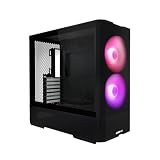

Our Top Picks
 LIAN LI LANCOOL 216 RGB Black ATX Mid-TowerMid-tower Case18.94 x 9.26 x 19.36 inches23.1 poundsCheck on Amazon
 Lian Li Lancool 216 Mid-Tower Airflow Case-3 PWMMid Tower"18.94 x 9.26 x 19.36 inches15.9 poundsCheck on Amazon
Top 3 picks at a glance
Quick comparison of the budget picks
Dimensions below come from the manufacturers’ spec sheets and can differ slightly between regional variants. Prices are general market ranges and move with sales.
| Pick | Best for | Key specs | Typical price |
|---|---|---|---|
| Lian Li Lancool 216 | Best overall airflow | ATX mid-tower, mesh front, large front fans, GPU clearance of roughly 390 mm, cooler clearance of roughly 180 mm | $90–$120 |
| Fractal Design Pop Air | Best for looks plus airflow | ATX mid-tower, honeycomb mesh front, long GPU clearance of roughly 400 mm, tool-free panels | $80–$110 |
| Corsair 3000D Airflow | Best low-cost ATX | ATX mid-tower, mesh front, two 120 mm fans included, GPU clearance of roughly 360 mm, cooler clearance of roughly 170 mm | $65–$95 |
| Montech Air 903 Max | Best for included fans | ATX mid-tower, mesh front, multiple pre-installed ARGB fans, long GPU support | $60–$90 |
| DeepCool CH360 | Best compact micro-ATX | Micro-ATX / mini-ITX tower, mesh front, smaller footprint, radiator support | $70–$100 |
Best overall: Lian Li Lancool 216
The Lancool 216 is the pick for people who care about temperatures and noise. Its mesh front and large, slow-spinning front fans move a lot of air without much noise. Clearance is generous for a case in this price band, so most current triple-fan graphics cards fit.
Trade-off: It usually costs $20–$30 more than the cheapest ATX cases, and the styling is plainer than glass-panel designs. If your budget is a hard $60, look further down the list.
Best for looks and easy building: Fractal Design Pop Air
The Pop Air pairs a honeycomb mesh front with a colorful, clean design and tool-free panels. Its roughly 400 mm GPU clearance suits larger cards, and the interior is easy to work in for first-time builders.
Trade-off: The honeycomb front is more restrictive than a fine mesh, and the fan setup may need an upgrade if you pair it with a hot CPU and GPU. Dust filtering is adequate but needs regular cleaning.
Best low-cost ATX: Corsair 3000D Airflow
The 3000D Airflow is a straightforward mesh-front mid-tower with two 120 mm fans included. It is easy to find, and the layout is conventional, which helps when you are following a build video for the first time.
Trade-off: Clearance is tighter than on the Lancool 216 or Pop Air. A 340 mm+ GPU and a tall tower cooler can get cramped, and cable management space behind the motherboard tray is limited.
Best for included fans: Montech Air 903 Max
Montech’s Air 903 Max is aimed at buyers who want a fully fanned case without buying extras. It ships with several pre-installed ARGB fans and a mesh front, so the airflow budget is already covered. Check the exact fan count and ARGB controller on the current listing, because Montech sells related variants.
Trade-off: Bundled fans are usually fine rather than great, and the ARGB hub or motherboard header requirement can complicate wiring. Fan noise at full speed can be noticeable.
Best compact option: DeepCool CH360
If you are building a micro-ATX system, the CH360 gives you a smaller desk footprint without the thermal penalty of a closed-front mini case. Its mesh front keeps airflow reasonable, and it has radiator support for those who want a liquid cooler later.
Trade-off: Micro-ATX boards usually cost more per feature than ATX boards, and building in a smaller case takes more care with cable routing and cooler height.
How to choose: three numbers to check first
1. GPU length vs. case clearance
Compare the card’s length in the manufacturer’s spec sheet with the case’s GPU clearance. Leave at least 10–15 mm spare for the power cable bend. Worked example: a 330 mm card in a case rated for 360 mm leaves 30 mm. That is fine, but if you add a front radiator that cuts clearance by 40 mm, the card no longer fits. Most budget cases lose clearance when a front radiator or fan is mounted in a certain position.
2. CPU cooler height vs. side panel
Tower coolers are listed by height. A cooler rated at 158 mm needs a case rated for at least 160 mm, and the extra margin should cover the side panel. A 170 mm clearance case such as the 3000D Airflow handles most popular 155–160 mm air coolers, but 165 mm+ giants will not fit.
3. Fan airflow vs. heat load
A rough airflow calculation shows why fan count matters. Use the common estimate that air temperature rise in °C is about 1.76 × watts ÷ CFM.
- Typical gaming heat load: 125 W CPU + 220 W GPU + 50 W for the rest = about 395 W.
- Case with 2 weak fans moving about 50 CFM real-world: 1.76 × 395 ÷ 50 ≈ 14 °C rise over room air.
- Case with 4 fans moving about 100 CFM real-world: 1.76 × 395 ÷ 100 ≈ 7 °C rise over room air.
In a 25 °C room, that means internal air near 39 °C versus 32 °C. Those figures are estimates, since dust filters, mesh density and fan curves change the real CFM, but the direction is reliable: doubling airflow roughly halves the temperature rise. That is why a $15 extra fan pair often does more than a $50 more expensive case.
Decision matrix: match your situation to a case
| Your situation | Choose | Why |
|---|---|---|
| Large triple-fan GPU (330 mm+) | Lancool 216 or Pop Air | Clearance of roughly 390–400 mm leaves margin for cables and a front fan |
| Hard $60–$70 cap | Montech Air 903 Max or Corsair 3000D Airflow | Mesh front and fans at the lowest price |
| Tower air cooler over 160 mm | Lancool 216 | Roughly 180 mm cooler clearance |
| Small desk, micro-ATX board | DeepCool CH360 | Compact footprint with mesh airflow |
| Quiet PC priority | Lancool 216 or Pop Air | Bigger, slower fans; fewer high-RPM fans needed |
| First build, wants easy assembly | Fractal Pop Air | Tool-free panels and a clean layout |
What to skip at this price
- Solid or glass front panels: Look for cases with a fully closed front and few vents. They look sleek, but they can add several degrees to GPU and CPU temperatures under load.
- Cases with no fans: A $40 case without fans is often a $60 case once you add two decent fans.
- Cases with a power supply built in: Bundled PSUs are often low quality. Buy the case and PSU separately.
- Old-generation cases with no front USB-C: Check whether the front I/O includes a USB Type-C port if you need it for newer peripherals.
Small build tips that save money
- Run front fans as intake and rear and top fans as exhaust, with slightly more intake than exhaust, for positive pressure and less dust.
- Set fan curves in the BIOS so fans stay near 30–40% below 60 °C and ramp up from there. This reduces noise at idle.
- If the case has only two fans, add a third as front intake before upgrading anything else.
- Check that your motherboard has enough 4-pin fan headers and an ARGB header if the case’s lighting requires one.
Frequently Asked Questions
How much should I spend on a budget PC case?
Most buyers get the best value between $60 and $100. Below $50, cases often have thin panels, few fans or restrictive fronts. Above $100, you start paying for design, extra features or premium materials rather than better gaming temperatures.
Are cheap cases bad for cooling?
Not if they have a mesh front and at least two fans. Airflow is largely determined by the front panel and fan count, not price. A $70 mesh case can run cooler than a $120 glass-front case.
Do I need RGB fans in a budget case?
No. RGB adds cost and wiring complexity without improving performance. If you want lighting, choose a case that includes ARGB fans with a clear controller so you are not buying extras later.
Will my graphics card fit in a budget case?
Check the card’s length in its spec sheet against the case’s maximum GPU length, and leave 10–15 mm spare. Many mid-range cards are 280–330 mm, which fits most mid-towers, but high-end triple-fan models can exceed 340 mm and need a roomier case like the Lancool 216 or Pop Air.
Is a micro-ATX case a good budget choice?
It can be, especially for small desks. You trade some expansion slots and sometimes cooler height for a smaller footprint. For a gaming PC with one GPU and one or two drives, micro-ATX is usually enough.
Should I buy extra fans right away?
If the case ships with only two fans, a third intake fan is the most cost-effective upgrade. Cases with several included fans, such as the Montech Air 903 Max, may not need any extras at first.
Related guides
More from Amazon
Programs that pair well with the guide above. Offers and eligibility are set by Amazon and may change.
A free business account with business pricing and bulk-buying tools for work, shop or home office.
Create a business accountFree shipping on eligible items, Prime Video and more. Eligible new members can start with a free trial.
Start a Prime free trialAudiobooks and podcasts to listen to on the go. Eligible new members can start with a free trial.
Try Audible freeAd-free music streaming. Eligible new subscribers can start with a free trial.
Try Music Unlimited freeAs an Amazon Associate we earn from qualifying purchases.


