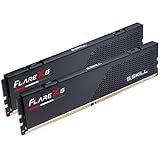
The best DDR4 kit for most older builds in this group is the G.SKILL Trident Z Neo 32GB (2x16GB) at 3600 MT/s with CL16 timings: it is the lowest-latency kit here, it gives plenty of capacity for current games and multitasking, and 3600 MT/s is the usual sweet spot for Ryzen 3000 and 5000 desktops. If 16GB is enough, the G.SKILL Ripjaws V 16GB at 3200 CL16 is a safe, widely compatible choice. DDR4 is the memory standard used by AM4 and by Intel platforms from 6th through 14th generation boards that kept DDR4 slots, so these kits fit a large installed base of older PCs.
Our Top Picks


Top 3 picks at a glance
Quick List
- G.SKILL Ripjaws V 16GB 3200 CL16 – best for a dependable, no-frills memory upgrade
- GIGASTONE Game Turbo RGB 16GB 3200 CL16 – best for an RGB-lit 16GB kit at standard speed
- G.SKILL Trident Z Neo 32GB 3600 CL16 – best overall for Ryzen builds that want capacity and low latency
- G.SKILL Trident Z RGB 32GB 4000 CL18 – best for high-frequency enthusiasts with a capable memory controller
- GIGASTONE Game Pro 16GB 3200 CL16 – best for a plain, unlit 16GB kit
- G.SKILL Ripjaws V 16GB 3600 CL18 – best for a higher-speed 16GB kit without the RGB premium
Which Kit Should You Pick?
| If you… | Choose |
|---|---|
| run a Ryzen 3000 or 5000 system and want the best balance | G.SKILL Trident Z Neo 32GB 3600 CL16 |
| just need to double a 8GB system to 16GB safely | G.SKILL Ripjaws V 16GB 3200 CL16 |
| want RGB lighting at an ordinary 3200 speed | GIGASTONE Game Turbo RGB 16GB |
| like unlit hardware and a straightforward spec | GIGASTONE Game Pro 16GB |
| run an unlocked Intel board and want to experiment with high clocks | G.SKILL Trident Z RGB 32GB 4000 CL18 |
| want a faster 16GB kit with 3600 MT/s speed | G.SKILL Ripjaws V 16GB 3600 CL18 |
Three questions narrow the field quickly: how much memory you need (16GB or 32GB), how fast your processor and board can reliably run it, and whether lighting matters to you. Capacity usually helps more than a small speed bump, so decide on the first before arguing over timings.
All 6 Picks in Detail
1. G.SKILL Ripjaws V 16GB (2x8GB) 3200 CL16 – Best for a Dependable Upgrade
As an Amazon Associate we earn from qualifying purchases at no extra cost to you.

Ripjaws V is a long-running G.SKILL line known for broad compatibility, and this kit is listed at up to 3200 MT/s with CL16-18-18-38 timings at 1.35V. It is a standard U-DIMM kit meant for both Intel and AMD desktops, with XMP profiles for easy setup. Its plain black heat spreaders suit builds where you do not want lighting, and the 16GB capacity is enough for most gaming and everyday use.
A good example is a family PC with an older Core i5 or Ryzen 5 and a single 8GB stick. Replacing that with a 2x8GB matched pair turns on dual-channel mode, which helps integrated graphics in particular, and 16GB removes the paging slowdowns that appear when a browser and a game compete for memory. Install both modules in the slots your manual recommends, usually the second and fourth, and enable XMP.
- 16GB (2x8GB) DDR4 U-DIMM
- Up to 3200 MT/s, per the listing name
- CL16-18-18-38 timings at 1.35V
- XMP profile for Intel and AMD desktops
- Black heat spreader, no RGB lighting
Pros
- Standard voltage and widely compatible
- First-word latency of about 10 nanoseconds
Cons
- 16GB limits heavy multitasking or creative work
- 3200 MT/s leaves some Ryzen performance unused
Compared with the GIGASTONE Game Pro, it has the same speed and similar timings but a longer-established brand and tighter secondary timings.
2. GIGASTONE Game Turbo RGB 16GB (2x8GB) 3200 CL16 – Best for RGB at Standard Speed

This GIGASTONE kit adds RGB lighting to a typical 16GB specification: DDR4-3200, PC4-25600, CL16-18-18-40 at 1.35V, a 288-pin unbuffered DIMM with Intel XMP 2.0 support and compatibility with AMD Ryzen. It is for builders who want a lit-up case without paying for an enthusiast brand. The secondary timings are slightly looser than the Ripjaws V, which usually has little everyday impact.
The kit suits builders refreshing a windowed case with colorful lighting and a limited budget. Remember that RGB modules sometimes need a software package or a motherboard header to change effects. If your board has no lighting support, the modules may run in a default pattern, so confirm the control method on the product page before you count on custom colors.
- 16GB (2x8GB) DDR4 UDIMM, 288-pin
- 3200 MHz (PC4-25600), per the listing
- CL16-18-18-40 at 1.35V
- Intel XMP 2.0 profile; AMD Ryzen compatible
- RGB lighting; sync software: confirm on listing
Pros
- RGB at a standard speed and voltage
- Same headline timings as the Ripjaws V
Cons
- Lighting control support is not stated
- Less known than G.SKILL for tuning headroom
Next to the Game Pro, it is the same memory with RGB added, so pick by appearance.
3. G.SKILL Trident Z Neo 32GB (2x16GB) 3600 CL16 – Best Overall for Ryzen Builds
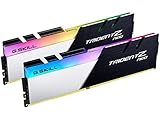
The Trident Z Neo is built with AMD Ryzen platforms in mind, and this kit pairs 32GB capacity with 3600 MT/s and CL16-19-19-39 timings at 1.35V. The latency works out to about 8.9 nanoseconds, the best in the group. For a Ryzen 5 or Ryzen 7 desktop on AM4, 3600 MT/s lets the memory and Infinity Fabric run in a matched 1:1 ratio at 1800 MHz, which is a commonly recommended setup. 32GB also gives breathing room for modern games and background apps.
If you own a Ryzen 7 3700X or a Ryzen 5 5600, this kit is the one that makes the most of the platform. After enabling XMP, check in the BIOS that the memory runs at 3600 and, if you want a tweak, confirm whether the fabric clock sits at 1800 MHz. Make sure the heat spreaders clear your cooler; tall modules and large dual-tower coolers do not always get along.
- 32GB (2x16GB) DDR4 U-DIMM
- Up to 3600 MT/s, per the listing name
- CL16-19-19-39 timings at 1.35V
- Intel and AMD desktop compatible, XMP profile
- RGB lighting; confirm lighting details on listing
Pros
- Lowest first-word latency of the six
- 32GB capacity at a mainstream voltage
Cons
- Costs more than the 16GB kits
- Taller heat spreaders may clash with large coolers
Compared with the Trident Z RGB 4000 kit, it is the more practical choice, since 3600 is far easier to run reliably.
4. G.SKILL Trident Z RGB 32GB (2x16GB) 4000 CL18 – Best for High-Frequency Tinkerers

This is the fastest kit in the set: 32GB at up to 4000 MT/s with CL18-22-22-42 timings at 1.40V. The first-word latency is about 9 nanoseconds. The higher voltage and frequency mean it is a tuner’s kit. On older Ryzen systems, 4000 MT/s would require a very high fabric clock that many chips cannot hold, so it often runs best on an Intel board with a capable memory controller. For older Intel systems with an unlocked overclocking-friendly board, it can be rewarding.
Treat this as an enthusiast purchase. Before buying, check your motherboard’s qualified memory list for high-speed kits and keep the BIOS up to date, because memory compatibility improves with firmware. If the kit does not boot at 4000 MT/s, loosening the speed to 3600 with the same timings is a sensible fallback that still delivers solid performance.
- 32GB (2x16GB) DDR4 U-DIMM
- Up to 4000 MT/s, per the listing name
- CL18-22-22-42 timings at 1.40V
- RGB lighting
- Board and CPU support for this speed: confirm on listing and with the board maker
Pros
- Highest rated frequency in the group
- 32GB capacity
Cons
- Not every older platform can run it at the rated speed
- Needs 1.40V
Next to the Trident Z Neo 3600, the extra speed is only useful if your platform can sustain it.
5. GIGASTONE Game Pro 16GB (2x8GB) 3200 CL16 – Best Plain 16GB Kit

The Game Pro mirrors the Game Turbo specification without the lighting: 16GB in a 2x8GB kit, DDR4-3200 (PC4-25600), CL16-18-18-40 at 1.35V, a 288-pin unbuffered DIMM with XMP 2.0 support for Intel and Ryzen. It is a reasonable, understated memory upgrade for an office PC, a family computer or an older gaming PC where the aim is simply to fill the slots with compatible modules.
It is the kind of upgrade that quietly fixes a sluggish office machine. For a Ryzen 3000 or an older Intel desktop where the processor limits performance more than the memory does, going from a single stick to a matched pair provides the bigger improvement than chasing higher frequency. Pick this style of kit when the build is practical rather than showy.
- 16GB (2x8GB) DDR4 UDIMM, 288-pin
- 3200 MHz (PC4-25600)
- CL16-18-18-40 at 1.35V
- Intel XMP 2.0 profile; AMD Ryzen compatible
- Heat spreader design: confirm on listing
Pros
- No lighting to configure
- Standard voltage and conventional timings
Cons
- Capacity is only 16GB
- Little tuning information is published
Compared with the Ripjaws V 3200 kit, it is functionally close, and the decision is mostly brand preference.
6. G.SKILL Ripjaws V 16GB (2x8GB) 3600 CL18 – Best Faster 16GB Kit
This Ripjaws V kit runs at up to 3600 MT/s with CL18-22-22-42 timings at 1.35V. The first-word latency is about 10 nanoseconds, the same as the 3200 CL16 kits, but bandwidth is higher. On a Ryzen platform, 3600 MT/s is where the memory and fabric clocks line up neatly, so this kit suits a Ryzen 5 build that does not need 32GB. It is also a good option for Intel boards that support XMP at that speed.
A smart use is as the memory in a Ryzen 5 3600 or 5600 system whose owner does not need more than 16GB. The 3600 MT/s speed lines up with the processor’s preferred fabric clock, and the black spreaders look unobtrusive. If you later need more capacity, add a complete second kit only if you accept the risk of lower stable speeds, or replace the pair entirely.
- 16GB (2x8GB) DDR4 U-DIMM
- Up to 3600 MT/s, per the listing name
- CL18-22-22-42 timings at 1.35V
- XMP profile for Intel and AMD desktops
- Black heat spreader, no RGB lighting
Pros
- Higher bandwidth at standard voltage
- Good fit for Ryzen 3000 and 5000 builds
Cons
- Latency is no better than a 3200 CL16 kit
- 16GB is a ceiling for heavy workloads
Next to the Ripjaws V 3200 kit, it gives more bandwidth for the same voltage, though timings are looser.
Specs Compared
| Kit | Capacity | Speed | Timings | Voltage | First-word latency | Lighting |
|---|---|---|---|---|---|---|
| G.SKILL Ripjaws V 3200 | 16GB (2x8GB) | 3200 MT/s | CL16-18-18-38 | 1.35V | About 10.0 ns | None |
| GIGASTONE Game Turbo RGB | 16GB (2x8GB) | 3200 MT/s | CL16-18-18-40 | 1.35V | About 10.0 ns | RGB |
| G.SKILL Trident Z Neo | 32GB (2x16GB) | 3600 MT/s | CL16-19-19-39 | 1.35V | About 8.9 ns | RGB; confirm on listing |
| G.SKILL Trident Z RGB | 32GB (2x16GB) | 4000 MT/s | CL18-22-22-42 | 1.40V | About 9.0 ns | RGB |
| GIGASTONE Game Pro | 16GB (2x8GB) | 3200 MT/s | CL16-18-18-40 | 1.35V | About 10.0 ns | None; confirm on listing |
| G.SKILL Ripjaws V 3600 | 16GB (2x8GB) | 3600 MT/s | CL18-22-22-42 | 1.35V | About 10.0 ns | None |
The latency column is calculated from the listed numbers: CAS latency multiplied by 2000 and divided by the transfer rate gives first-word latency in nanoseconds.
How We Chose These
This guide is based on listing names and manufacturer information, not on running the kits ourselves. We looked at the six products in the current catalog set and compared capacity, rated speed, CAS timings, voltage, module type and lighting. We calculated first-word latency from the listed figures so the kits can be compared on a common basis, and we noted which kits suit Ryzen platforms, which suit Intel boards with XMP support, and which need a platform that can sustain the rated speed. Where a detail was not in the listing name, we wrote “confirm on listing.” We did not generate performance results.
What to Look For
Capacity: 16GB versus 32GB
For gaming alone, 16GB remains workable on an older machine, but background applications, browsers and modern games benefit from 32GB. If you plan video editing, large photo libraries, virtual machines or heavy multitasking, choose a 2x16GB kit. As a rule of thumb, buy the capacity you will need in two years, because older boards have only two or four DIMM slots, and replacing a full set later wastes money. Two matched sticks in dual channel are better than four mismatched ones.
Speed and timings: calculating real latency
Speed (MT/s) and CAS latency go together. A 3200 MT/s CL16 kit has a first-word latency of 16 x 2000 / 3200 = 10 nanoseconds. A 3600 MT/s CL16 kit comes in at 8.9 nanoseconds, while a 3600 MT/s CL18 kit lands back at 10 nanoseconds. So a faster kit with looser timing is not automatically quicker in latency terms, though it has more bandwidth. Compare both numbers rather than chasing a single headline frequency.
Platform limits: what your older CPU can actually run
DDR4 kit ratings depend on XMP profiles, which are overclocks beyond official processor memory specifications. Ryzen 3000 and 5000 chips commonly run 3600 MT/s with good stability, while 4000 MT/s needs a very high fabric clock that many samples cannot hold. Older Intel processors have lower official memory speeds, and boards with budget chipsets may not allow XMP at all, so check your motherboard’s qualified vendor list and BIOS options. If a kit refuses to run at its rated speed, set it manually in the BIOS at 3200 or 3000 MT/s, which most boards accept.
Voltage, height and lighting
Standard XMP kits for this class run at 1.35V, which all supporting boards handle. Kits at 1.40V are fine on most boards but add heat. Tall heat spreaders can block large CPU air coolers, so check the module height against your cooler’s memory clearance. RGB kits need either a header on the motherboard or the maker’s software, and not all lighting platforms are compatible, so confirm support if you care about synchronization.
Worked example
Say you have a Ryzen 5 3600 build with a B450 board and 8GB of RAM. A 3600 MT/s CL16 32GB kit gives you four times the memory and the best latency in this group, and the fabric clock runs at a comfortable 1800 MHz. If the board is limited to 3200 MT/s, a 3200 CL16 kit would perform the same with a smaller cost.
Mistakes that cost older builds performance
The common errors are leaving memory in single-channel mode, forgetting to enable XMP, and mixing different brands or speeds. Another is putting the sticks in the wrong slots: most boards want a two-stick kit in the second and fourth slots counting from the processor, so check the manual. Finally, do not forget that a 32-bit operating system or a very old BIOS may limit how much memory is recognized. Update the BIOS first and confirm you run a 64-bit operating system.
Matching a kit to your platform
Match the kit to the processor family. Ryzen 1000 and 2000 chips are fussier about memory and often top out around 3000 to 3200 MT/s, Ryzen 3000 and 5000 handle 3600 MT/s well, and older Intel desktops vary by generation and chipset. Boards with budget chipsets may lock memory to the processor’s official speed even if the kit is rated higher. Look up your exact board model’s memory support page, which lists the maximum speed and capacity, and compare it with the kit before buying. If the page lists specific tested kits, choosing one of those lowers the risk of compatibility problems.
Installation and setup tips
Turn the PC off and unplug it, ground yourself, and press the modules in until both clips snap. Install a two-module kit in the slots marked in the manual, which are usually the second and fourth from the processor. On first boot, enter the BIOS, enable the XMP or DOCP profile, and confirm the displayed speed. Run a memory check for several passes if you want certainty that the kit is stable, and update the BIOS if the system fails to boot at the rated speed. These steps take about fifteen minutes and are the most reliable way to get the performance you paid for.
Capacity planning for the next few years
Operating systems and browsers keep growing, and so do games and creative tools. A system that is comfortable with 16GB today may feel tight in a couple of years if you keep many tabs, a chat client and a game open at once. If your board has four slots and you buy a 2x8GB kit now, you can add another kit later, but matching speed and timings gets harder over time, so a single 2x16GB kit is simpler. If your board has only two slots, buy the largest kit you can afford now.
Questions
Will these kits work in my older motherboard?
If your board has DDR4 U-DIMM slots, yes in principle. Check the board’s memory support list for capacity and speed limits.
Do I need to enable XMP?
Yes. Without XMP the kit usually runs at a slow default speed, so enable the profile in the BIOS for the rated speed.
Is 3200 or 3600 better for Ryzen?
3600 MT/s is the common sweet spot for Ryzen 3000 and 5000. Many people run 3200 without noticing a difference in daily use.
Should I mix different kits?
Avoid it. Mixing modules can force lower speeds or cause instability. Buy one matched kit for the capacity you need.
Is RGB worth it?
It does not affect performance. Choose it only if your case has a window and you want the look.
Can I run four sticks?
Many boards can, but four sticks put more strain on the memory controller and usually reduce the maximum stable speed. Two larger sticks are usually the better choice.
Update History
- October 20, 2026 – Initial publication; product set drawn from current catalog listings.
- Check the product page for current specifications and availability before buying.
Sources
- Manufacturer product and specification pages for G.SKILL and GIGASTONE
- Retailer listing titles and specification fields
- JEDEC DDR4 memory naming conventions for module speed and timing