The WD_BLACK SN850X 4TB is the best all-round 4TB NVMe drive for a gaming PC: it pairs a PCIe Gen4 interface and a dedicated DRAM cache with a 2,400 TBW endurance rating from its maker, and it fits any standard M.2 2280 slot. The Samsung 990 PRO 4TB is the close alternate, and the Samsung 9100 PRO 4TB is the choice if your board has a Gen5 slot. A 4TB drive simply means enough room for a large modern library, with roughly 3.6 TB of formatted space after the operating system takes its share.
All six drives below use the M.2 2280 format, so the real differences are interface generation, caching design, flash type and endurance.
Our Top Picks


Top 3 picks at a glance
Quick List
- WD_BLACK SN850X 4TB – best for a balanced, DRAM-backed Gen4 gaming drive
- Samsung 990 PRO 4TB – best for sustained speed and consistent loading on Gen4
- Samsung 9100 PRO 4TB – best for Gen5 desktops that can cool it
- Lexar NM790 4TB with Heatsink – best for a console or desktop slot that wants a built-in heatsink
- WD_Black SN7100 4TB – best for cool, power-efficient gaming in laptops and handhelds
- WD Blue SN5000 4TB – best for a game library that mostly sits and gets read
Which One Is Right for You?
| If you… | Choose |
|---|---|
| want one dependable Gen4 drive for a desktop | WD_BLACK SN850X 4TB |
| install large games and copy files often | Samsung 990 PRO 4TB |
| have a Gen5 M.2 slot and good case airflow | Samsung 9100 PRO 4TB |
| need a drive with a heatsink already attached | Lexar NM790 4TB with Heatsink |
| are upgrading a laptop or handheld and care about heat | WD_Black SN7100 4TB |
| mainly store games and rarely write huge files | WD Blue SN5000 4TB |
| want the longest rated endurance in the group | Lexar NM790 4TB with Heatsink |
For most people the decision comes down to Gen4 versus Gen5 and whether the drive keeps a DRAM cache. A Gen4 drive with DRAM, such as the SN850X or 990 PRO, is the safe center of the group. Pick the Gen5 model only when your motherboard supports it, and pick the budget-minded models when games are mostly read rather than rewritten.
All 6 Picks in Detail
1. WD_Black SN7100 – Best for Laptops and Handhelds
As an Amazon Associate we earn from qualifying purchases at no extra cost to you.
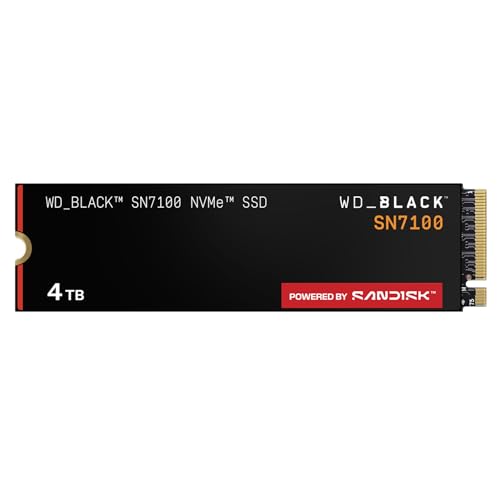
The SN7100 is aimed at systems where heat and battery draw matter as much as raw speed. The listing itself mentions laptops and handheld gaming devices, and the drive is a DRAM-less design that borrows a small slice of system memory through Host Memory Buffer. In the 4TB size Western Digital rates it at up to 7,000 MB/s read and 6,700 MB/s write, a touch below the 1TB and 2TB versions.
That makes it a sensible upgrade for a gaming laptop with a single M.2 slot, or for a handheld PC that accepts a 2280 drive. In a desktop it is fully capable, though the SN850X offers a more traditional cache design for roughly similar game load behavior.
- PCIe Gen4, M.2 2280 form factor
- Up to 7,000 MB/s read and 6,700 MB/s write, as stated in the listing
- Next-generation TLC 3D NAND
- DRAM-less design using Host Memory Buffer (per the manufacturer)
- Endurance rated by the maker at 2,400 TBW for the 4TB size; confirm on the product page
Pros
- Efficient and generally cooler-running than Gen5 drives
- Bare module is slim enough for most laptop slots
Cons
- No onboard DRAM, so very long write sessions lean on system memory and cache
- No heatsink included, so desktop users should use their motherboard cover
Compared with the SN850X, the SN7100 trades the dedicated cache for lower power use, which is why it suits portable hardware better.
2. WD_BLACK SN850X – Best Balanced Gen4 Gaming Drive

The SN850X has been the reference Gen4 gaming drive for several years, and the 4TB version is its roomiest form. It uses TLC flash and a DDR4 DRAM cache, which keeps the mapping table close to the controller and helps the drive stay consistent when you install several titles at once. The listing states up to 7,300 MB/s read and up to 6,300 MB/s write for this part.
It is a natural fit for a desktop with a free Gen4 slot, and it is one of the easier drives to recommend without caveats. Check the exact listing for whether a heatsink variant is included, because WD sells the drive both with and without one and the answer matters for console use.
- PCIe Gen4, M.2 2280 form factor
- Up to 7,300 MB/s read and up to 6,300 MB/s write, per the listing
- DRAM cache on the 4TB model (per the manufacturer’s specifications)
- TLC NAND with a 2,400 TBW endurance rating from the maker
- Marketed for gaming expansion and high-performance internal storage
Pros
- DRAM cache and TLC flash give steady behavior under mixed workloads
- Strong rated endurance for a game library that changes often
Cons
- Heatsink inclusion varies by listing; confirm before buying for a console
- Falls well short of Gen5 peak numbers, though games rarely use them
Next to the Samsung 990 PRO it is the more direct rival, and the choice between them is largely a matter of brand preference and stock.
3. WD Blue SN5000 – Best for Mostly-Read Game Libraries

The SN5000 is the most modest drive in this group and the easiest on a tight build. It is a PCIe Gen4 drive with a stated peak of 5,500 MB/s read, and the 4TB size uses higher-density QLC flash with no DRAM chip, relying on Host Memory Buffer instead. That design keeps cost and power down while still delivering far faster game loads than any SATA drive.
It is the one to choose when the drive will mostly hold a large installed library and you rarely move multi-gigabyte files around. Heavy creators or people who constantly reinstall games should look at the TLC-based models instead.
- PCIe Gen4, M.2 2280 form factor
- Up to 5,500 MB/s read, as stated in the listing
- Typically QLC flash in the 4TB size; confirm on the product page
- DRAM-less design using Host Memory Buffer
- Endurance rated by the maker at 1,200 TBW for this capacity
Pros
- Low power draw and low heat make it easy to fit almost anywhere
- Large capacity at a more moderate performance tier
Cons
- Lower endurance rating than the TLC drives here
- Write speed can drop on very long, sustained transfers
Compared with the SN7100, it gives up speed and endurance in exchange for a gentler profile, so it is the runner-up for people who write a lot. Think of it as the pick for a secondary drive that holds installed games while a faster drive handles the operating system and active projects. In a system that already has a quick boot drive, the SN5000 fills the bulk-storage role without adding noticeable heat or noise to the build.
4. Lexar NM790 with Heatsink – Best Value with a Built-In Heatsink

The NM790 4TB pairs a 7,400 MB/s read and 6,500 MB/s write rating with a preinstalled heatsink, which is the main reason it appears here. The drive is DRAM-less and uses Host Memory Buffer with a four-channel controller and TLC flash, and Lexar rates the 4TB size at 3,000 TBW, the highest endurance figure in this list.
The heatsink version is useful if your target is a console expansion slot that requires a cooling structure, or a desktop board that has no M.2 cover. Because the heatsink adds roughly 7 mm of height, it is a poor match for most laptops, so keep it for desktops and consoles after checking clearance.
- PCIe Gen4 x4, M.2 2280 form factor
- 7,400 MB/s read and 6,500 MB/s write, per the listing
- Heatsink attached, adding height beyond a bare module
- DRAM-less design with Host Memory Buffer
- Endurance rated by Lexar at 3,000 TBW for 4TB; confirm on the product page
Pros
- High rated endurance and strong peak speeds for a Gen4 drive
- Heatsink is ready out of the box for consoles and bare desktop slots
Cons
- Too tall for most laptops and low-clearance slots
- No DRAM cache, so it leans on system memory under heavy mixed use
Against the SN850X it offers similar peak speed and more rated endurance, but with less cache hardware and a bulkier body. If your motherboard already has a large M.2 cover, you may not need the attached heatsink at all and can weigh the drive purely on specifications.
5. Samsung 9100 PRO – Best for Gen5 Desktops

The 9100 PRO is the Gen5 option here, with a listed top read speed of 14,800 MB/s on a PCIe 5.0 x4 interface. Samsung rates the 4TB version at about 13,400 MB/s write, 2,400 TBW, and includes 4GB of DRAM. In a game it will not load levels twice as fast as a Gen4 drive, because loading is limited by CPU work and decompression as well as raw storage speed, but it gives you the most headroom for large file transfers.
It only runs at full speed in a Gen5 M.2 slot, and Gen5 drives run hotter than Gen4 ones, so plan for a motherboard heatsink with airflow. In a Gen4 slot it still works but is limited by the slot.
- PCIe 5.0 x4, M.2 2280 form factor
- Up to 14,800 MB/s read, as stated in the listing
- 4GB DRAM cache on the 4TB model, per the manufacturer
- Endurance rated by Samsung at 2,400 TBW for 4TB
- This listing is the standard version; heatsink models are separate listings
Pros
- Fastest drive here for large installs and file copies
- DRAM cache and strong rated endurance
Cons
- Needs a Gen5 slot to show its speed advantage
- Runs hot enough that cooling is a real requirement
It is the only pick that moves past the Gen4 ceiling, which is why the 990 PRO is the more sensible choice for most boards. If you do buy it, confirm that your motherboard routes the Gen5 slot to the CPU and that the cover leaves room for airflow around the controller.
6. Samsung 990 PRO – Best for Sustained Gen4 Performance

The 990 PRO 4TB is Samsung’s top Gen4 drive and the main rival to the SN850X. The listing gives up to 7,450 MB/s read, and Samsung specifies about 6,900 MB/s write, 4GB of LPDDR4 DRAM and a 2,400 TBW endurance rating for the 4TB size. It uses an in-house controller and V-NAND TLC flash, and it also supports hardware encryption for people who want it.
It is a strong choice for a desktop used for gaming plus creative work, since the DRAM cache and TLC flash hold up well during big copies. It ships as a bare module in this listing, so add a motherboard heatsink or check the console requirements.
- PCIe 4.0, M.2 2280 form factor
- Up to 7,450 MB/s read, per the listing
- 4GB LPDDR4 DRAM on the 4TB model (per Samsung)
- TLC V-NAND with a 2,400 TBW endurance rating
- Targeted at gaming, high-end computing and heavy workloads
Pros
- Very consistent behavior thanks to DRAM and TLC flash
- Top Gen4 read speed in this group
Cons
- No heatsink on this listing
- Gen5 drives have a higher ceiling if your board supports it
Compared with the SN850X, it edges ahead on peak read figures, while the WD drive is often easier to find in a heatsink variant. If you are buying the Samsung drive for a console, treat the missing heatsink as part of the total cost and check the console’s cooling requirements before you commit.
Specs Compared
| Drive | Interface | Form factor | Listed read / write (MB/s) | DRAM cache | Heatsink |
|---|---|---|---|---|---|
| WD_Black SN7100 4TB | PCIe Gen4 | M.2 2280 | 7,000 / 6,700 | No (HMB) | Confirm on listing |
| WD_BLACK SN850X 4TB | PCIe Gen4 | M.2 2280 | 7,300 / 6,300 | Yes (per maker) | Confirm on listing |
| WD Blue SN5000 4TB | PCIe Gen4 | M.2 2280 | 5,500 read; write confirm on listing | No (HMB) | Confirm on listing |
| Lexar NM790 4TB | PCIe Gen4 x4 | M.2 2280 | 7,400 / 6,500 | No (HMB) | Yes |
| Samsung 9100 PRO 4TB | PCIe 5.0 x4 | M.2 2280 | 14,800 read; write confirm on listing | Yes (per maker) | Confirm on listing |
| Samsung 990 PRO 4TB | PCIe 4.0 | M.2 2280 | 7,450 read; write confirm on listing | Yes (per maker) | Confirm on listing |
How We Chose These
We built this list from the products supplied in the current catalog and compared them against manufacturer specification pages and retailer listing fields. We looked at interface generation, form factor, rated sequential speeds, whether the drive carries a DRAM cache, flash type, and the endurance figures the makers publish. We did not run our own performance trials, so no speed numbers here are original measurements; every figure is a rating from the listing or the manufacturer. Where the listing name does not state a value, the table says to confirm on the listing rather than guess. Drives were ordered by who they suit, not by a single score.
What to Look For
Interface: Gen4 or Gen5
PCIe Gen4 x4 tops out near 8,000 MB/s in theory and about 7,000 to 7,500 MB/s in real drives. Gen5 x4 doubles that ceiling to roughly 14,000 MB/s and higher. For gaming, loading is shaped by the CPU, game engine and decompression as much as storage, so the jump from a fast Gen4 drive to a Gen5 drive is often small in games and larger in big sequential copies. A Gen5 drive in a Gen4 slot runs at Gen4 speed, so check your motherboard manual before paying for a ceiling you cannot reach.
DRAM cache versus Host Memory Buffer
A DRAM chip stores the drive’s mapping table so the controller can find data quickly. DRAM-less drives use Host Memory Buffer, borrowing a small amount of your system memory. HMB drives work well for typical game loading and cost less, but a drive with its own DRAM tends to stay steadier during long writes and mixed workloads. If you copy large video files, install many games at once or use the drive as a scratch disk, lean toward a DRAM model.
Flash type and endurance
TLC stores three bits per cell and QLC stores four. QLC lets makers reach big capacities at lower cost but usually has lower endurance and slower sustained writes. Endurance is stated in terabytes written, or TBW. A rating of 2,400 TBW on a 4TB drive means 2,400 terabytes of writes during the warranty, which is about 1.3 TB of writes per day over five years. Rule of thumb: if you install and delete about 100 GB of games a week, that is roughly 5 TB a year, so even a 1,200 TBW drive would take centuries to wear out on game installs alone. Endurance matters more for creators.
Heat, height and slot fit
Most M.2 2280 drives are bare modules around 2 mm thick, but heatsink versions can add 7 to 10 mm. Laptops almost never have the room. Consoles typically require a cooling structure and a minimum read speed, so check the console maker’s guidance before buying. For desktops, an M.2 cover on the motherboard is usually enough for Gen4, while Gen5 deserves a larger heatsink and some airflow.
A worked example: matching a drive to your build
Say you own a mid-range desktop with one Gen4 M.2 slot under a motherboard cover, plus a spare SATA bay. Your library is about 2.5 TB today and grows by around 400 GB a year. A 4TB Gen4 drive covers that for several years. Because your slot is Gen4, a Gen5 drive would be limited to Gen4 speed, so you would be paying for headroom you cannot use. A DRAM-backed Gen4 model such as the SN850X or 990 PRO is the sensible match. If you also edit video, the endurance and cache advantages grow in importance, and a DRAM-less QLC drive becomes the weaker fit.
Warranty, firmware and support
Every drive on this list carries a limited warranty from its maker, usually five years or until the TBW figure is reached, whichever comes first. Read the terms on the product page, because the endurance number is part of the warranty and the exact period can differ by region. Manufacturers also publish utilities for firmware updates, drive health and secure erase. These tools are worth installing once, since a firmware update can fix compatibility with a particular motherboard. Always back up important saves and projects separately, because no SSD rating replaces a backup.
Questions
Is 4TB too much storage for gaming?
Not anymore. Many current games take 100 GB or more, and a few exceed that with patches, so a 4TB drive holds a large library without constant uninstalling. If you only keep a handful of titles, 2TB is enough and costs less.
Do I need a Gen5 SSD for gaming?
No. Fast Gen4 drives load games almost as quickly as Gen5 in most cases because other parts of the system set the pace. Gen5 makes sense mainly if you also move very large files often and your motherboard has a Gen5 M.2 slot.
Is a DRAM-less drive bad for games?
No. DRAM-less drives that use Host Memory Buffer load games well. The tradeoff shows up in long, heavy write sessions, where a drive with its own DRAM cache is usually steadier.
Do these drives work in a console?
Some can, but the console maker sets requirements for speed, size and cooling. A drive with a heatsink, such as the Lexar model here, is the simplest fit, while bare drives need a compatible heatsink installed. Check the console’s official storage guidance first.
Will a 4TB drive fit in my laptop?
Most laptops with an M.2 2280 slot can take a bare 4TB module, but a drive with a tall heatsink usually will not fit. Check whether your slot is single-sided or double-sided and what clearance it offers.
What does TBW mean for a gaming drive?
TBW is the amount of data the maker rates the drive to write over its warranty. For game installs and updates it is rarely a limit, so treat it as a tiebreaker rather than a deciding factor.
Update History
- October 14, 2026 – Initial publication; product set drawn from current catalog listings.
- Check the product page for current specifications and availability before buying.
Sources
- Manufacturer product and specification pages for Western Digital, Samsung and Lexar
- Retailer listing titles and specification fields
- PCI-SIG interface generation definitions for PCIe Gen4 and Gen5