The SanDisk Optimus GX 7100 1TB is the best overall 1TB NVMe SSD for a gaming PC in this group: it is a PCIe 4.0 M.2 2280 drive with the highest rated speeds and the highest published endurance rating of the standalone drives that state one. The Crucial P310 is the strong value alternative, and the Kingston NV3 is the plain, budget-class option. Two listings on this page are complete gaming PCs, not drives, and we label them as runner-ups. An NVMe SSD is flash storage that connects directly to the PCIe bus, so game loading speed depends on it far more than on older hard drives.
Our Top Picks
 iBUYPOWER Element Gaming PC Desktop Computer AMD Ryzen20 x 9.1 x 17.4 inches36 poundsCheck on Amazon


Top 3 picks at a glance
Quick List
- Kingston NV3 1TB – best for a straightforward PCIe 4.0 drive at modest rated speeds
- ZYNEEX Prebuilt Gaming Desktop – a complete PC with a 1TB NVMe SSD, not a standalone drive
- Crucial P310 1TB – best for fast PCIe 4.0 performance from a familiar brand
- Fikwot FX910 1TB – best for PlayStation 5 and PC use with a heatsink included
- iBUYPOWER Element Gaming PC – a complete PC with a 1TB NVMe SSD, not a standalone drive
- SanDisk Optimus GX 7100 1TB – best overall for speed and rated endurance
Which One Is Right for You?
| If you… | Choose |
|---|---|
| write a lot of data and want the highest published endurance rating | SanDisk Optimus GX 7100 |
| want fast sequential speeds and a well-known brand | Crucial P310 |
| plan to use the drive in a PlayStation 5 and want a heatsink in the box | Fikwot FX910 |
| want the simplest PCIe 4.0 upgrade for a game library | Kingston NV3 |
| need a whole mid-range gaming computer, not just storage | iBUYPOWER Element Gaming PC |
| need an entry-level complete gaming computer | ZYNEEX Prebuilt Gaming Desktop |
Pick a drive if your computer has a free M.2 slot, and check that the slot supports PCIe 4.0 to get the rated speeds. The two prebuilt PCs are included because their listings feature a 1TB NVMe SSD, but they are a different kind of purchase and should be compared with other desktops, not other SSDs.
All 6 Picks in Detail
1. Kingston NV3 1TB – Best for a Straightforward PCIe 4.0 Upgrade
As an Amazon Associate we earn from qualifying purchases at no extra cost to you.

The NV3 is a PCIe 4.0 x4 NVMe drive in M.2 2280 form, with the listing stating speeds of up to 6,000 MB/s. Kingston’s datasheet puts the 1TB model at 6,000 MB/s reads and 4,000 MB/s writes, with a 320 terabyte endurance rating. It is a reasonable upgrade over a SATA drive or an older PCIe 3.0 drive for a game library, and it suits budget-minded builders who want a recognizable brand.
It is a DRAM-less design, and reviewers report its sustained write performance can drop under heavy loads. For gaming, where most activity is reading, that is rarely a problem. Part numbers and controllers can vary between production runs, so confirm details on the product page if they matter to you.
- Capacity: 1TB
- Interface: PCIe 4.0 x4, NVMe
- Form factor: M.2 2280
- Rated sequential speed: up to 6,000 MB/s read, per the listing
- Write speed: about 4,000 MB/s per Kingston’s datasheet
- Endurance: 320 TBW per Kingston’s datasheet; confirm on the product page
This model makes sense as a first NVMe upgrade for older systems. Moving a game library from a hard disk to any NVMe drive makes a bigger difference than the gap between Gen4 drives, so the NV3 gives you most of the benefit for a fair outlay.
Pros
- Recognizable brand and clear datasheet
- Good step up from SATA
- Higher endurance rating than the Crucial P310
Cons
- Lower rated speeds than the newer drives here
- Sustained writes can slow down
The P310 is the faster alternative if you want higher read speeds.
2. ZYNEEX Prebuilt Gaming Desktop PC – Runner-Up: A Complete PC, Not a Drive

This listing is a complete gaming desktop that includes a 1TB NVMe SSD among its parts, so it does not match the facet of this page, which is a standalone drive. The listing names an AMD Ryzen 5 5500 processor, a GeForce RTX 3050 6GB graphics card, 16GB of DDR4-3200 memory, Wi-Fi, and an ARGB air cooler. It suits first-time buyers who want a ready-to-run entry-level gaming machine.
The title does not say whether the 1TB drive is PCIe 3.0 or 4.0, and it does not name the SSD brand. The Ryzen 5 5500 is a PCIe 3.0-class processor, so full PCIe 4.0 speeds are not available on this platform; confirm the exact drive on the product page.
- Processor: AMD Ryzen 5 5500
- Graphics: GeForce RTX 3050 6GB
- Memory: 16GB DDR4-3200
- Storage: 1TB NVMe SSD; PCIe generation and brand: confirm on listing
- Cooling: ARGB air cooling
- Connectivity: Wi-Fi
Pros
- Ready to use out of the box
- Includes a 1TB NVMe SSD
Cons
- Not a standalone SSD
- SSD model is not named in the title
The iBUYPOWER Element is the more powerful complete PC in this list.
3. Crucial P310 1TB – Best for Fast PCIe 4.0 Speed from a Familiar Brand

The Crucial P310 is a PCIe Gen4 NVMe M.2 2280 drive rated by Crucial for up to 7,100 MB/s reads. Published specifications put the 1TB model near 6,000 MB/s writes and an endurance of 220 terabytes written, with a five-year warranty. The listing mentions that it suits laptops, desktops, and handheld gaming consoles, and that it includes a copy of Acronis disk cloning software, which helps when moving from an older drive.
It is a DRAM-less design that borrows a small part of system memory for its mapping table, a common approach on value drives. Reviews generally describe QLC flash on this model, which can slow down once the fast cache is full during very large writes, though game loading is mostly reads.
- Capacity: 1TB
- Interface: PCIe Gen4 NVMe
- Form factor: M.2 2280
- Rated sequential speed: up to 7,100 MB/s read; write speed around 6,000 MB/s per published specifications
- Endurance: 220 TBW per published specifications; confirm on the product page
- Software: cloning software included, per the listing
The included cloning software is easy to overlook, but it removes a common upgrade headache. You can copy an existing system drive to the new SSD, then boot from the copy, which avoids reinstalling Windows and your game launcher settings.
Pros
- Fast rated reads
- Cloning software for upgrades
- Works in PCs and handheld consoles that support M.2 2280
Cons
- Lower endurance rating than the SanDisk
- Large sustained writes can slow down
The SanDisk drive is the step up if you write a lot of data; the P310 is the better choice if read speed and brand familiarity are your priorities.
4. Fikwot FX910 1TB – Best for PlayStation 5 and PC with a Heatsink

The FX910 is marketed for both PlayStation 5 and PC and comes with a heatsink, which is a practical advantage. Sony’s guidance for PS5 expansion calls for a PCIe Gen4 M.2 drive with a sequential read speed of about 5,500 MB/s or higher and adequate cooling, and this drive’s listed speeds exceed that. It suits console owners who want one drive and heatsink in a single package, and PC builders with a motherboard that lacks its own M.2 cover.
The listing states speeds of up to 7,300 MB/s, but the manufacturer’s own pages show slightly lower figures for the 1TB model, so treat the headline number as a best case. Endurance and warranty details are not given in the listing, so confirm them before buying.
- Capacity: 1TB
- Interface: PCIe Gen4 x4, NVMe
- Form factor: M.2 2280 with an attached heatsink
- Rated sequential speed: up to 7,300 MB/s read, per the listing
- Cache: host memory buffer and SLC cache, per manufacturer information
- Endurance and warranty: confirm on listing
If you use it in a desktop, check whether your motherboard already has a heatsink over the M.2 slot. Stacking a second heatsink under a cover can cause a poor fit, and in that case it is easier to remove the supplied heatsink before installation, if the design allows it.
Pros
- Heatsink included
- Designed for PS5 and PC
- High rated read speed
Cons
- Endurance rating is not stated in the listing
- Heatsink may not fit every laptop or tight motherboard cover
Next to the Kingston NV3, it offers a faster rated speed and a heatsink, while the Kingston is a lower-speed drive without one.
5. iBUYPOWER Element Gaming PC – Runner-Up: A Complete PC, Not a Drive

This is also a complete system, not a standalone drive, so it is placed as a runner-up. The listing names an AMD Ryzen 9 7900X processor, a GeForce RTX 5070 12GB graphics card, 32GB of DDR5 memory, a 1TB NVMe SSD, and Windows. It suits buyers who want a high-performance gaming computer without assembling one, and who are comfortable with a single 1TB drive that they can supplement later.
As with the other prebuilt system, the SSD brand and PCIe generation are not stated in the title. Because the platform supports DDR5 and PCIe 5.0 on many boards, check the product page, and check whether there is a free M.2 slot for adding a second drive.
- Processor: AMD Ryzen 9 7900X
- Graphics: NVIDIA GeForce RTX 5070 12GB
- Memory: 32GB DDR5
- Storage: 1TB NVMe SSD; brand and PCIe generation: confirm on listing
- Operating system: Windows, per the listing
- Form factor: desktop tower
Pros
- High-end processor and graphics card
- 32GB of DDR5 memory
- Ready to use
Cons
- Not a standalone SSD
- 1TB can fill quickly with large modern games
Compared with the ZYNEEX system, it uses a newer platform and a more capable graphics card.
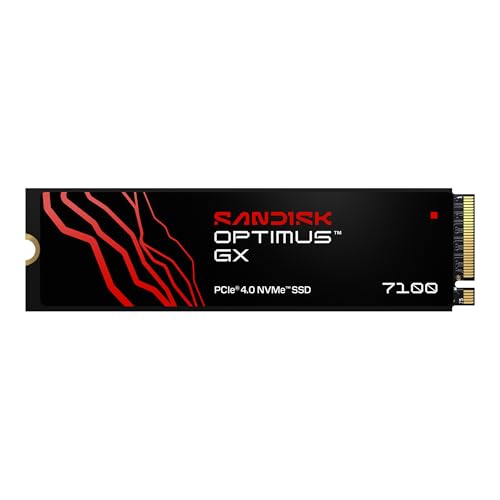
6. SanDisk Optimus GX 7100 1TB – Best Overall for Speed and Endurance
The Optimus GX 7100 is a PCIe 4.0 x4 drive in the common M.2 2280 size. SanDisk lists sequential reads of up to 7,250 MB/s and writes of up to 6,900 MB/s for the 1TB model, which places it at the top of this group on paper. It also uses TLC flash and carries a published endurance rating of 600 terabytes written, higher than the other standalone drives here. It suits gamers who install and update large game libraries often, and anyone who edits video or records gameplay.
The listing is brief, so details like the controller and cache design are best confirmed on the product page or the maker’s specification sheet. Like most drives of this class, it relies on a pseudo-SLC cache to hit its peak write speeds, so sustained large writes can be slower than the headline number.
- Capacity: 1TB
- Interface: PCIe 4.0 x4, NVMe
- Form factor: M.2 2280
- Rated sequential speed: up to 7,250 MB/s read and 6,900 MB/s write, per SanDisk
- Flash type: TLC, per SanDisk
- Endurance: 600 TBW, per SanDisk; confirm on the product page
Gamers who capture footage while playing are the group most likely to feel the difference in endurance and sustained write behavior. If your use is simply installing games and playing them, any of the standalone drives here will load levels quickly, and the choice comes down to price and brand preference at the time you buy.
Pros
- Highest rated speeds in the group
- Highest published endurance
- TLC flash rather than QLC
Cons
- Peak speeds depend on a PCIe 4.0 slot
- No heatsink named in the listing
Compared with the Crucial P310, it offers higher rated endurance and TLC flash, which is why it ranks first.
Specs Compared
| Model | Type | Capacity | Interface | Form factor | Rated read | Endurance |
|---|---|---|---|---|---|---|
| Kingston NV3 | Standalone SSD | 1TB | PCIe 4.0 x4 NVMe | M.2 2280 | Up to 6,000 MB/s | 320 TBW per Kingston datasheet |
| ZYNEEX Prebuilt Gaming Desktop | Complete PC | 1TB NVMe SSD | Confirm on listing | Confirm on listing | Confirm on listing | Confirm on listing |
| Crucial P310 | Standalone SSD | 1TB | PCIe Gen4 NVMe | M.2 2280 | Up to 7,100 MB/s | 220 TBW per published specs |
| Fikwot FX910 | Standalone SSD with heatsink | 1TB | PCIe Gen4 NVMe | M.2 2280 | Up to 7,300 MB/s | Confirm on listing |
| iBUYPOWER Element Gaming PC | Complete PC | 1TB NVMe SSD | Confirm on listing | Confirm on listing | Confirm on listing | Confirm on listing |
| SanDisk Optimus GX 7100 | Standalone SSD | 1TB | PCIe 4.0 x4 NVMe | M.2 2280 | Up to 7,250 MB/s | 600 TBW per SanDisk |
How We Chose These
This page covers the six listings in our catalog set, which include four standalone drives and two prebuilt PCs. We compared interface, form factor, rated speeds, endurance, and extras like heatsinks using manufacturer datasheets, retailer listing titles, and published hardware reviews for cross-checking, plus Sony’s published PS5 storage requirements for the console use case. We did not test or benchmark any drive, and rated speeds are manufacturer maximums, not measured results. Where the listing is silent on a specification, we say to confirm on the product page. The two complete PCs are labeled plainly and placed as runners-up.
What to Look For
PCIe Generation and Speed Ratings
A PCIe 4.0 x4 NVMe drive can reach roughly 7,000 MB/s in sequential reads, while a PCIe 3.0 x4 drive tops out around 3,500 MB/s. A Gen4 drive in a Gen3 slot still works but runs at the slower limit. Rated speeds are best-case sequential numbers. Game loading depends on many small reads and on the game’s own engine, so a drive rated at 7,000 MB/s will not load every game twice as fast as one rated at 3,500 MB/s.
Endurance: Understanding TBW
Terabytes written (TBW) is the amount of data the manufacturer says the drive can absorb within its warranty. As a rule of thumb, divide TBW by the number of years of warranty and by 365 for a daily figure. A 600 TBW rating over five years is roughly 330 GB of writes every day, and a 220 TBW rating over five years is about 120 GB per day. Most gamers write far less than that, so endurance is a tie-breaker rather than a deal-breaker.
DRAM, HMB, and Cache
Some SSDs include a DRAM chip to hold a mapping table. Others, called DRAM-less, use a portion of system memory through the host memory buffer feature. For gaming, DRAM-less drives generally perform well because gaming workloads are read-heavy. Almost all consumer drives also use a pseudo-SLC cache, which speeds up bursts of writes and can slow when it fills.
TLC and QLC Flash
TLC stores three bits per cell and is typically faster and more durable than QLC, which stores four bits per cell. QLC drives can offer more capacity at a lower cost but may slow down during very large sustained writes. If you install many large games at once, TLC offers more consistent results.
Capacity Planning for a Game Library
Large modern games often take 50 to 150 GB each. As a worked example, a 1TB drive holds about 930 GB after formatting. Subtract roughly 100 GB for Windows and apps, and you have room for around six to eight large titles at 100 GB each, before you leave the recommended 10 to 20 percent of free space that helps flash drives keep their speed. Players with long libraries should plan for a second drive.
Heatsinks and Fit
Fast drives get warm and may slow themselves to protect the flash. Many motherboards include M.2 covers, so a drive with its own heatsink can be unnecessary or even too tall. For the PS5, Sony’s requirements call for a Gen4 M.2 drive and keep the total size, with cooling, under about 25 mm wide and 11.25 mm tall. Check clearance before you install a drive with a taller sink.
Questions
Is 1TB enough for a gaming PC?
It is enough for a handful of large modern games plus the operating system, but it fills fast. Many players add a second drive later, so choose a motherboard with spare M.2 slots.
Do I need a PCIe 4.0 SSD?
A PCIe 4.0 drive gives faster sequential speeds, but it only reaches its rating in a PCIe 4.0 slot. In many games the loading-time difference between Gen3 and Gen4 is small.
Will these drives work in a PlayStation 5?
The PS5 needs a PCIe Gen4 M.2 drive with adequate cooling and size limits. The Fikwot FX910 is marketed for PS5 use, and the other standalone drives may work if they meet Sony’s requirements, so check that listing.
Why are two PCs in an SSD list?
Their listings mention a 1TB NVMe SSD, but they are complete computers, so they do not match a drive search. They are labeled as runners-up so you can decide whether a full system is what you want.
What does DRAM-less mean?
It means the drive has no onboard memory chip for its mapping table and instead uses a small slice of system memory. For most gaming workloads this has little effect, though heavy mixed workloads can be slower.
Can I use these drives in a laptop?
Standard M.2 2280 drives fit many laptops, but check the slot size and height limit first. Models with attached heatsinks may not fit in thin laptops.
Update History
- October 14, 2026 – Initial publication; product set drawn from current catalog listings.
- Check the product page for current specifications and availability before buying.
Sources
- Manufacturer product pages and datasheets for SanDisk, Crucial, Kingston, and Fikwot
- Sony’s published PlayStation 5 storage expansion requirements
- Retailer listing titles and specification fields
- Independent hardware reviews cross-checked for flash type, cache, and controller details