The Patriot Viper Venom 16GB (2x8GB) DDR5-6000 CL36 kit is the best overall 16GB DDR5 pick here for gaming, because it combines the 6000 MT/s speed that suits current AMD and Intel desktops with a two-module dual-channel layout and moderate timings. If you want the lowest latency, the Viper Elite 5 at CL30 is the faster single module, and the Corsair Vengeance RGB RS is the choice for lighting. DDR5 is the current desktop memory generation, and 16GB is the practical entry point for modern PC gaming. Two listings in this group do not fit that description, and we explain why below.
Our Top Picks




Top 3 picks at a glance
Quick List
- Patriot Viper Venom 16GB (2x8GB) 6000 CL36 – best overall for a dual-channel gaming kit
- Corsair Vengeance RGB RS 16GB (2x8GB) – best for RGB lighting with 6000-class speed
- Corsair Vengeance RS 32GB (2x16GB) – best for buyers who decide 16GB is too little (not a 16GB kit)
- Corsair Vengeance SODIMM 16GB 5600 – best for laptops and mini PCs only (not for standard desktops)
- Patriot Viper Elite 5 16GB (1x16GB) 6000 CL30 – best for the lowest latency from a single module
- Corsair Vengeance 16GB (2x8GB) 5200 – best for a simple, lower-speed dual-channel kit
Which One Is Right for You?
| If you… | Choose |
|---|---|
| want a dual-channel 16GB kit at the popular 6000 MT/s speed | Patriot Viper Venom 16GB (2x8GB) |
| care about the tightest timings and plan to add a second stick later | Patriot Viper Elite 5 16GB |
| want lit heatspreaders that match an RGB build | Corsair Vengeance RGB RS 16GB |
| need a basic dual-channel kit and do not care about 6000 MT/s | Corsair Vengeance 16GB (2x8GB) 5200 |
| already know 16GB will not be enough for your games and apps | Corsair Vengeance RS 32GB |
| are upgrading a laptop or mini PC with SODIMM slots | Corsair Vengeance SODIMM 16GB |
Two rules cover most decisions. First, match the form factor: desktop boards need full-size DIMMs, not SODIMMs. Second, buy two modules where you can, because dual channel doubles the width of the memory path compared with a single stick.
All 6 Picks in Detail
1. Patriot Viper Venom 16GB (2x8GB) – Best Overall Dual-Channel Gaming Kit
As an Amazon Associate we earn from qualifying purchases at no extra cost to you.

This kit gives you two 8GB modules rated at 6000 MT/s with CL36 timings. That speed is widely treated as a sweet spot for current desktop platforms, and the two-module layout runs in dual channel. It suits gamers building a mainstream rig who want 16GB without paying for 32GB, and it works well with a mid-range processor and graphics card.
The first-word latency of CL36 at 6000 MT/s is about 12 nanoseconds, a solid result for a standard kit. The listing says desktop memory but does not name the XMP or EXPO profile, so confirm that on the product page and check your motherboard’s memory support list before buying.
- Capacity: 16GB total as two 8GB modules
- Speed: DDR5-6000 (6000 MT/s)
- Latency: CL36
- Voltage: confirm on listing; kits of this type typically run around 1.35V
- Profiles: XMP and EXPO support; confirm on listing
- Form factor: desktop DIMM
A practical setup tip: after installing the kit, open the BIOS and enable the memory profile, because many boards boot at a much lower default speed. Without that step, the modules run well below their rated 6000 MT/s and you lose the benefit you paid for. Run a memory check or a stability test after changing profiles if the system behaves oddly.
Pros
- Popular speed class for gaming platforms
- Dual-channel from the start
- Moderate timings and straightforward installation
Cons
- 16GB total can limit heavy multitasking
- No stated RGB lighting in the title
The Elite 5 has tighter timings, but this two-module kit gives you dual channel with a typical upgrade path of adding another pair later.
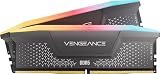
2. Corsair Vengeance RGB RS 16GB (2x8GB) – Best for RGB Lighting

This Corsair kit pairs two 8GB modules with RGB lighting and a speed listed as up to 6000MHz for both AMD and Intel platforms. It suits builders who have a glass-panel case and want the memory to match the rest of the lighting. The RS line is a lower-cost version of Corsair’s RGB memory with a simpler heatspreader and fewer LEDs.
The listing says “up to 6000MHz” and does not state a CAS latency, so confirm both the exact speed profile and timings on the product page. Kits of this family are sold in several speeds, and the lowest-speed profile can be much slower than the headline figure.
- Capacity: 16GB total as two 8GB modules
- Speed: up to 6000 MHz, per the listing; confirm profile
- Latency: confirm on listing
- Lighting: RGB, controlled through Corsair software
- Platform support: AMD and Intel, per the listing
- Form factor: desktop DIMM
If you do not care about lighting, a non-RGB kit of similar speed is often simpler, since lighting control software can conflict with other utilities. If you do care, remember that the heatspreader height matters: tall modules can collide with large air coolers, so check clearance on your cooler’s specification page before ordering.
Pros
- Addressable RGB lighting
- Works on AMD and Intel
- Dual-channel kit
Cons
- Timings not stated in the title
- Lighting software adds background processes for some users
Compared with the Venom kit, it costs you stated timings in the title, but it adds lighting.
3. Corsair Vengeance RS 32GB (2x16GB) – Runner-Up: Not a 16GB Kit

This listing is 32GB, not 16GB, so it does not match the facet of this page. We include it as a runner-up for readers who start with 16GB in mind and realize that more memory is a better fit. At 32GB, it handles heavy multitasking, streaming while gaming, and large modded games more comfortably than a 16GB kit.
It suits builders who keep many browser tabs, voice chat, and recording software open during play, or who plan to use the PC for editing as well. If you strictly want 16GB, choose one of the other kits.
- Capacity: 32GB total as two 16GB modules
- Speed: up to 6000 MHz, per the listing
- Latency: confirm on listing
- Profiles: Intel XMP and AMD EXPO support; confirm on listing
- Lighting: the title says RS; confirm whether this version has RGB
- Form factor: desktop DIMM
Capacity upgrades are easiest at the start of a build. Moving from 16GB to 32GB later usually means replacing the original kit, because mixing different kits can force lower speeds or cause instability. If you suspect you will need 32GB within a year, buying it now can save a second purchase.
Pros
- Double the capacity of the 16GB kits
- Dual-channel layout
- Room for background tasks
Cons
- Not 16GB, so it does not meet this page’s size
- Higher cost than a 16GB kit
The 16GB Corsair RS kit is the closest like-for-like alternative if capacity is the only difference you care about.
4. Corsair Vengeance SODIMM 16GB 5600 – Runner-Up: Laptop Memory, Not for Standard Desktops

The part number in the title and the module type, SODIMM, mean this is small-outline laptop memory with a different connector and size than desktop DIMMs. The listing name includes the words “desktop computer memory,” but a standard desktop motherboard will not accept SODIMM modules. It is useful only for laptops, mini PCs, and small-form-factor systems that use SODIMM slots.
That mismatch is why it is placed as a runner-up. It is a single 16GB module rated at 5600 MT/s with CL48 timings, so it is slower than the desktop kits above.
- Capacity: 16GB as one module
- Speed: up to 5600 MHz
- Latency: CL48, as named in the listing
- Profiles: Intel XMP 3.0, as named in the listing
- Form factor: SODIMM (laptop and compact PC memory)
- Fits standard desktop motherboards: no
If you have both a desktop and a laptop, double check the product line you are buying for each. The look-alike names of memory lines make it easy to order the wrong form factor, which is the most common reason for returned memory. Match the slot type first, then compare speed and capacity.
Pros
- Fits SODIMM laptops and mini PCs
- Single module simplifies upgrades
Cons
- Does not fit standard desktops
- Higher latency than the 6000 MT/s desktop kits
If you build a desktop, choose the Venom kit instead.
5. Patriot Viper Elite 5 16GB (1x16GB) – Best for Lowest Latency

The Viper Elite 5 is a single 16GB module at 6000 MT/s with CL30 timings and a stated voltage of 1.35V. CL30 at that speed works out to a first-word latency of about 10 nanoseconds, tighter than the CL36 kits. It suits builders who want responsive memory and who may add a second identical module later to reach 32GB in dual channel.
The trade-off is that one stick runs in single-channel mode, which cuts available bandwidth compared with a two-module kit. For games that benefit from memory bandwidth, that can matter more than the tighter timing. The listing states support for Intel XMP and AMD EXPO.
- Capacity: 16GB as a single module
- Speed: DDR5-6000 (6000 MT/s)
- Latency: CL30
- Voltage: 1.35V, per the listing
- Profiles: Intel XMP and AMD EXPO, per the listing
- Form factor: desktop UDIMM
Low latency matters most in games that are limited by the processor, such as large strategy titles and some competitive shooters at high frame rates. If you are limited by the graphics card instead, the real benefit is smaller. Either way, adding a second module later turns this into a dual-channel 32GB setup if the sticks match.
Pros
- Tight timings
- Easy upgrade path to two sticks
- Profiles for both major platforms
Cons
- Single module means single-channel until you add another
- Check motherboard compatibility lists for this module
Against the Venom kit, it wins on latency but loses on bandwidth until a second module is installed.
6. Corsair Vengeance 16GB (2x8GB) 5200 – Best for a Simple Lower-Speed Kit

This is a straightforward dual-channel 16GB kit at a lower speed of up to 5200MHz. It suits builders on an older DDR5 platform, those focused on stability, and buyers who do not plan to tune memory. The listing names Intel and AMD compatibility, but kits at this speed often default to a profile designed for one platform, so confirm which profile this exact SKU uses.
At 5200 MT/s, it is slower than the 6000 MT/s kits, and the performance gap in games depends on the processor and the title. Many games are limited by the graphics card, so the difference may be small in practice.
- Capacity: 16GB total as two 8GB modules
- Speed: up to 5200 MHz, per the listing
- Latency: confirm on listing
- Profiles: confirm XMP or EXPO support on the listing
- Lighting: none named in the title
- Form factor: desktop DIMM
Lower-speed kits are also a sensible choice when you want to avoid tuning. They tend to be easy to run at rated speed on a wider range of boards, and the price gap between speed grades can fund a better graphics card. Consider this kit if your processor and board do not officially support 6000 MT/s.
Pros
- Simple, stable-class kit
- Dual-channel from the start
- Good fit for older platforms
Cons
- Lower speed than the 6000 MT/s options
- Timings not stated in the title
For a faster dual-channel alternative, the Venom 6000 CL36 kit is the logical step up.
Specs Compared
| Model | Capacity | Modules | Speed | CAS latency | Form factor | Voltage |
|---|---|---|---|---|---|---|
| Patriot Viper Venom | 16GB | 2x8GB | 6000 MT/s | CL36 | Desktop DIMM | Confirm on listing |
| Corsair Vengeance RGB RS 16GB | 16GB | 2x8GB | Up to 6000 MHz | Confirm on listing | Desktop DIMM | Confirm on listing |
| Corsair Vengeance RS 32GB | 32GB | 2x16GB | Up to 6000 MHz | Confirm on listing | Desktop DIMM | Confirm on listing |
| Corsair Vengeance SODIMM | 16GB | 1x16GB | Up to 5600 MHz | CL48 | SODIMM (laptop) | Confirm on listing |
| Patriot Viper Elite 5 | 16GB | 1x16GB | 6000 MT/s | CL30 | Desktop UDIMM | 1.35V |
| Corsair Vengeance 5200 | 16GB | 2x8GB | Up to 5200 MHz | Confirm on listing | Desktop DIMM | Confirm on listing |
How We Chose These
This page covers the six memory listings in our catalog set, not every DDR5 kit available. We compared capacity, module count, speed, CAS latency, voltage, and form factor using manufacturer product pages, retailer listing titles, and published hardware reviews for cross-checking. We did not test or benchmark the memory, and we do not give frame-rate numbers. Listings that do not match the 16GB desktop facet, namely the 32GB kit and the SODIMM module, are labeled plainly and placed as runners-up. When a specification is not in the listing title, the table says to confirm on the product page.
What to Look For
Speed and Latency Together
DDR5 speed is quoted in megatransfers per second (MT/s), often labeled MHz on retail pages. Latency is the CAS number, such as CL30 or CL36. To compare kits, calculate first-word latency in nanoseconds: multiply CAS latency by 2000, then divide by the MT/s rating. A 6000 MT/s CL30 module gives 10 ns, a 6000 CL36 kit gives 12 ns, a 5200 CL40 kit gives about 15.4 ns, and a 5600 CL48 SODIMM gives about 17.1 ns. Lower numbers are better, but real game impact is usually modest.
Capacity: Is 16GB Enough?
For mainstream gaming, 16GB is a workable baseline. Many newer games list 16GB as recommended, and background apps such as browsers, chat clients, and recording tools can push usage higher. If you stream, edit video, or mod heavily, 32GB gives breathing room. A simple rule: if your system already uses over 12GB while gaming, move to 32GB.
Dual Channel and Module Count
Two modules run in dual channel, which increases memory bandwidth compared with a single module. For that reason, two 8GB modules are generally preferred over one 16GB module when you will never upgrade. A single 16GB module makes sense only when you plan to add a second matching module later. Install modules in the slots your motherboard manual recommends, usually the second and fourth from the processor.
XMP, EXPO, and Compatibility
Memory boots at a safe default speed until you enable a profile in the BIOS. Intel XMP and AMD EXPO store the manufacturer’s tested speed and timings. A kit listed with both is flexible, while a kit with only one may still work on the other platform but with manual tuning. Check your motherboard maker’s memory support list, and update the BIOS if a new CPU generation is not detected correctly.
A Worked Example: Choosing for a Mid-Range Build
Suppose you are building around a mid-range processor and a graphics card in the 1440p class. A 16GB 6000 MT/s CL36 dual-channel kit is a good starting point, because the graphics card is the main limit and the memory only needs to avoid becoming a bottleneck. If you also run a browser with many tabs and a streaming program, stepping to 32GB is a better use of money than pursuing CL30 timings.
Heat, Height, and Lighting Software
DDR5 modules include a power management chip on the module itself, so they run warmer than older memory. Most kits for gaming include an aluminum heatspreader, and a case with normal airflow is enough. Height matters for clearance: a large tower cooler can overhang the first memory slot. RGB kits add lighting software, which is optional and can often be set once and then removed.
Form Factor: DIMM or SODIMM
Desktop boards use full-size DIMMs, 288 pins on DDR5. Laptops and mini PCs use SODIMMs, which are roughly half the length and have 262 pins. The two cannot be swapped. Before buying, check whether your device uses DIMM or SODIMM slots.
Questions
Is 16GB DDR5 enough for gaming?
For most current games at typical settings, yes. If you run many background applications or play heavily modded titles, consider 32GB for extra headroom.
Is DDR5-6000 worth it over 5200?
For many current desktop platforms, 6000 MT/s is a common sweet spot. The gain in games depends on the processor and resolution, so it is most helpful when you are not limited by the graphics card.
Should I buy 2x8GB or 1x16GB?
Two modules run in dual channel and generally provide more bandwidth. Choose a single 16GB stick only if you plan to add another one later.
Can I use laptop SODIMM memory in a desktop?
No. SODIMM modules are physically smaller and use a different connector than desktop DIMMs. They only work in devices with SODIMM slots.
What does CL30 or CL36 mean?
CL stands for CAS latency, the number of clock cycles the memory takes to respond to a read request. Lower numbers at the same speed mean lower latency.
Do I need to turn on XMP or EXPO?
Yes, if you want the rated speed. Without enabling the profile in the BIOS, most boards run DDR5 at a lower default speed.
Update History
- October 14, 2026 – Initial publication; product set drawn from current catalog listings.
- Check the product page for current specifications and availability before buying.
Sources
- Manufacturer product and specification pages for Corsair and Patriot memory
- Retailer listing titles and specification fields
- Independent hardware reviews cross-checked for timings, voltage, and compatibility details