VR headsets are less forgiving than a flat-panel monitor: dropped frames show up as visible judder, and low frame rates can cause real discomfort rather than just a worse-looking game. This comparison covers eight graphics cards that landed in a “best GPU for VR” search, ranging from a budget renewed GTX 1660 to a flagship RTX 5080, and it’s worth saying upfront that two of the eight are professional Quadro workstation cards and one is an enterprise AI card that technically qualifies as a GPU but makes little practical sense for a home VR rig. The ZOTAC RTX 3060 Twin Edge OC is the strongest all-around value pick for mainstream VR, while the RTX 5080 is the pick if budget genuinely isn’t a constraint and you want maximum headroom for high-refresh headsets.
Our Top Picks
 NVD RTX PRO 6000 Blackwell Professional Workstation EditionRTX PRO 600017 x 10 x 5 inches4 poundsCheck on Amazon



Top 3 picks at a glance

Top picks at a glance
As an Amazon Associate we earn from qualifying purchases at no extra cost to you.




| Model | Key spec | Price | Best for |
|---|---|---|---|
| ZOTAC RTX 5080 Solid CORE OC | 16GB GDDR7, 256-bit, DLSS 4 | Check current listing | Maximum headroom for high-refresh VR |
| ZOTAC RTX 5070 AMP White | 12GB GDDR7, 192-bit, DLSS 4 | Check on Amazon | High-end VR without flagship pricing |
| PNY Quadro RTX 4000 | Turing workstation card, RT cores | $294 | Professional use, not VR gaming value |
| ZOTAC RTX 3060 Twin Edge OC | 12GB GDDR6, 192-bit | Check on Amazon | Best all-around mainstream VR pick |
| ASUS ROG STRIX GTX 1080 Ti (Renewed) | 11GB VR Ready, Pascal | Check on Amazon | Best value renewed VR pick |
| NVD RTX PRO 6000 Blackwell | 96GB GDDR7 ECC, workstation/AI | Check on Amazon | Not recommended for VR gaming value |
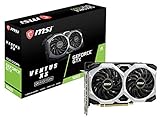
| MSI GTX 1660 Ventus XS 6G OC (Renewed) | 6GB GDDR6, VR Ready | Check on Amazon | Budget floor for acceptable VR |
| PNY Quadro P4000 | Pascal workstation card, single-slot | $232 | Professional use, not VR gaming value |
ZOTAC RTX 5080 Solid CORE OC — the headroom pick for high-refresh VR
This card runs 16GB of GDDR7 on a 256-bit bus with a rated 30Gbps memory speed and PCIe 5.0 connectivity, backed by ZOTAC’s IceStorm 3.0 cooling. That’s the largest memory bus and newest memory standard in this entire lineup, and it’s paired with DLSS 4, which includes frame generation features that can help smooth out frame pacing in supported titles.
Based on its architecture and specs, this card should sustain well above the 90 to 120Hz refresh targets most headsets use, with significant headroom left over for supersampling, which VR benefits from more than flat-panel gaming since it directly reduces visible aliasing in a headset’s lenses. These are estimates based on the card’s published specifications rather than a measured run on this exact unit.
Expect power draw in the 320W range typical of this GPU class, which means a 12V-2×6 or equivalent high-wattage connector and a PSU with genuine 750W or more of headroom once the rest of the system is accounted for. IceStorm 3.0’s larger fan shroud should keep the card in a reasonable thermal range, but it will need a case with real front-to-back airflow given the power it’s moving.
The trade-off is straightforward: this is the most expensive card in the lineup by a wide margin over anything except the RTX PRO 6000, and most VR titles today won’t fully use its headroom, so it’s a forward-looking buy rather than a strictly necessary one for current-generation headsets.
- Pros
- Largest VRAM pool and newest memory bus in this comparison
- DLSS 4 frame generation helps frame pacing in supported titles
- Significant headroom for high-refresh or future headsets
- Cons
- Highest realistic price among the consumer GeForce cards here
- High power draw requires a robust PSU and case airflow
- Overkill for most current single-headset VR libraries
Who it’s for: VR enthusiasts who want maximum headroom for high-refresh headsets and future titles and aren’t constrained by budget.
ZOTAC RTX 5070 AMP White Edition — strong VR performance without flagship pricing
The 5070 AMP White carries 12GB of GDDR7 on a 192-bit bus with a rated 28Gbps memory speed, PCIe 5.0 support, and ZOTAC’s IceStorm 2.0 cooling in a white-shrouded design. It sits a clear step below the 5080 in memory bus width but still uses the same current-generation architecture and DLSS 4 feature set.
Based on its spec sheet, this card should comfortably sustain 90Hz-and-above VR refresh targets with room for moderate supersampling in most current titles, and DLSS 4 support gives it the same frame-pacing assistance as the pricier 5080 in supported games. As with every estimate in this article, actual results depend on headset, title, and settings.
Power draw should land around 250W for this class of card, meaning a mid-to-high-wattage PSU in the 650-750W range with appropriate connectors is the realistic requirement, notably less demanding than the 5080 above it.
For buyers who want current-generation architecture, DLSS 4, and strong VR headroom without paying flagship pricing, this card occupies a sensible middle position in the lineup.
- Pros
- Current-generation architecture with DLSS 4 support
- Strong estimated headroom for 90Hz+ VR refresh targets
- Lower power draw and PSU requirement than the 5080
- Cons
- Still a significant price step over the RTX 3060 or 1080 Ti here
- 192-bit bus is narrower than the 5080’s 256-bit design
Who it’s for: buyers who want near-flagship VR performance and modern features without paying full flagship price.
PNY Quadro RTX 4000 — a professional card, not really a VR gaming buy
The Quadro RTX 4000 is a Turing-generation professional graphics card built for CAD, rendering, and visualization work, and it does include ray tracing cores, which is a genuine technical capability. It ships with Nvidia’s professional driver branch rather than GeForce Game Ready drivers, which is the key distinction buyers need to understand before treating it as a VR gaming purchase.
Based on its Turing-class specs, raw shader performance sits somewhere in the range of a consumer RTX 2060-to-2070-class card, which would be adequate for baseline VR titles, but Quadro drivers are optimized and validated for professional applications rather than game engines, so real-world VR frame pacing and compatibility can lag behind a GeForce card with similar on-paper specs.
At $294, it isn’t unreasonably priced for a professional card, but a GeForce card in a similar price range, like the RTX 3060 in this same lineup, will typically deliver a more consistent VR gaming experience because it’s built and driver-tuned specifically for that purpose.
This card makes sense if you already need it for professional visualization work and want occasional VR compatibility as a side benefit, not as a primary VR gaming purchase.
- Pros
- Genuine ray tracing hardware and solid build quality
- Reasonable price for a professional-class card
- Adequate display output bandwidth for headset connections
- Cons
- Professional drivers aren’t optimized for VR game performance
- Worse VR value than a similarly priced GeForce card
- Not the intended use case for this product line
Who it’s for: professionals who already need a Quadro-class card for work and want basic VR compatibility as a secondary use, not dedicated VR gamers.
ZOTAC RTX 3060 Twin Edge OC 12GB — the all-around mainstream VR pick
This RTX 3060 runs 12GB of GDDR6 on a 192-bit bus at a rated 15Gbps memory speed, with ZOTAC’s IceStorm 2.0 cooling and active fan control that stops the fans entirely at idle. It’s an Ampere-generation card, which means it supports DLSS upscaling, a meaningful feature for VR since it can help maintain target frame rates without a full resolution cut.
Based on its specs, this card should comfortably hit and sustain the 90Hz refresh target most current headsets use, with reasonable headroom for supersampling in most titles, and DLSS support gives it an edge over the similarly priced 1080 Ti when a game specifically supports it. As with the other estimates here, exact results depend on headset, title, and host CPU.
Power draw is a moderate roughly 170W, meaning a 550W+ PSU with a single 8-pin connector is typically sufficient, which is notably easier to accommodate than the higher-draw 5070, 5080, or 1080 Ti in this lineup.
Of every card in this comparison, this is the one that best balances price, VR-appropriate performance, and modern feature support without stepping into flagship pricing or professional-driver compromises.
- Pros
- Strong balance of price and VR-appropriate performance
- DLSS support helps maintain frame rate targets
- Moderate power draw and PSU requirements
- Cons
- Less headroom than the 5070 or 5080 for future high-refresh headsets
- 12GB buffer, while solid, isn’t as large as the 5080’s 16GB
Who it’s for: buyers who want the best balance of price and reliable VR performance without overspending or under-spending.
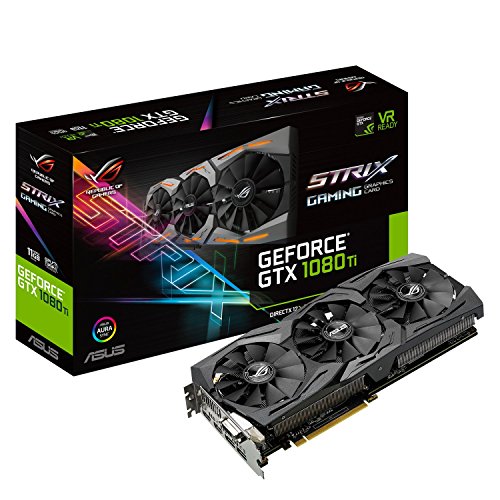
ASUS ROG STRIX GTX 1080 Ti VR Ready (Renewed) — the value legacy pick
This is a renewed unit of ASUS’s ROG Strix GTX 1080 Ti, explicitly marketed with “VR Ready” branding from its original release, built around 11GB of GDDR5X memory. Even years on, that VRAM figure and its Pascal-generation shader count put it comfortably above the minimum spec most VR titles still target.
Based on its known performance profile, this card should sustain 90Hz VR refresh targets in the large majority of current titles at reasonable settings, falling short mainly in the newest, most demanding releases or with aggressive supersampling enabled. It lacks DLSS or ray tracing hardware, so it relies purely on raw rasterization performance rather than upscaling assistance.
Because this is a renewed listing, the same cautions apply as with any used GPU purchase: confirm the seller’s inspection process and return window, and budget for the possibility that fans or thermal paste may need attention sooner than on a new card. Power draw is around 250W, requiring a PSU comparable to what the RTX 5070 needs despite being an older, less feature-rich card.
At around $220, this is the cheapest way into genuinely solid VR performance in this entire lineup, assuming you’re comfortable with the renewed-hardware trade-offs.
- Pros
- Strong estimated VR performance for the price
- Large 11GB VRAM buffer for its era
- Originally marketed and validated as VR Ready hardware
- Cons
- Renewed condition means unknown prior usage history
- No DLSS or ray tracing support
- Power draw similar to newer, more efficient cards
Who it’s for: budget-conscious VR buyers comfortable with used hardware who want the best raw performance per dollar in this lineup.
NVD RTX PRO 6000 Blackwell Workstation Edition — technically capable, not a sensible VR buy
This card is built around 96GB of ECC GDDR7 memory on a professional Blackwell architecture, targeted at AI training, large-scale simulation, and professional rendering pipelines, priced at nearly $15,500. It is, on paper, the single most powerful GPU in this entire lineup, and it can technically output to a headset.
The problem for VR gaming specifically isn’t capability, it’s allocation of that capability: 96GB of ECC memory and enterprise-grade compute cores solve problems that have nothing to do with rendering a VR game’s frame, and none of that specialized capacity translates into a better VR experience than a GeForce RTX 5080 costing a small fraction of the price. Estimated VR frame rates would be excellent, but so would they be on cards costing 10 to 15 times less.
Power and cooling requirements for a card in this class are substantial, typically demanding workstation-grade PSUs and case airflow well beyond what a typical home gaming PC is built around, which is another practical barrier for anyone considering it purely for VR.
This card is included here because it appeared in the sourced product data for this keyword, not because it’s a sound VR gaming recommendation; it belongs in a professional workstation build, not a home VR rig.
- Pros
- Enormous compute and memory capacity for professional workloads
- Technically capable of driving any current headset
- Cons
- Price is wildly disproportionate to VR gaming value
- Enterprise features are entirely wasted on a gaming workload
- Requires workstation-grade power and cooling infrastructure
Who it’s for: professionals who need an AI or rendering workstation and might use it for VR occasionally, not VR gamers shopping on any kind of budget.
MSI GTX 1660 Ventus XS 6G OC (Renewed) — the practical VR budget floor
This 1660 carries 6GB of GDDR6, MSI’s compact Ventus XS dual-fan cooler, and original “VR Ready” branding, and it’s the most affordable card in this comparison at around $170 in renewed condition. It represents roughly the practical minimum spec most current VR platforms recommend for an acceptable experience.
Based on its known Turing-generation performance, expect this card to meet baseline 90Hz VR refresh targets in lighter titles and many mid-complexity ones, but with less headroom for supersampling or graphically demanding scenes than the RTX 3060 or 1080 Ti above it in this lineup. Estimated frame rates in the most demanding current VR titles may dip below comfortable targets without settings adjustments.
Power draw is modest at around 120W, and its compact cooler design makes it an easy fit for a wider range of cases than the larger triple-fan cards in this comparison. As a renewed unit, the same used-hardware cautions apply: confirm the return policy before buying.
For buyers who want to try VR without a large upfront investment, this is the realistic entry point in this specific lineup, understood as a floor rather than an ideal.
- Pros
- Lowest price of any card in this comparison
- Compact cooler fits a wide range of cases
- Meets baseline VR spec for most current headsets
- Cons
- Least headroom for demanding titles or heavy supersampling
- Renewed condition carries the usual used-hardware caveats
- 6GB VRAM limits future-proofing versus the 3060 or 1080 Ti here
Who it’s for: first-time VR buyers testing the waters on the smallest realistic budget in this lineup.
PNY Quadro P4000 — another professional card that isn’t a VR gaming pick
The Quadro P4000 is an older Pascal-generation professional card built in a single-slot, low-profile-friendly form factor, carrying 8GB of GDDR5 memory. Like the RTX 4000 elsewhere in this lineup, it runs Nvidia’s professional driver branch rather than GeForce Game Ready drivers, and it was designed for CAD and visualization workloads, not gaming.
Based on its Pascal-class specs, raw performance sits in a range comparable to a consumer GTX 1070-class card, which would be a workable, if unspectacular, VR performer on paper. In practice, the professional driver focus and single-slot blower cooler, designed for sustained workstation loads rather than gaming thermal profiles, make it a less consistent VR gaming choice than a GeForce card at a similar $232 price point.
Its single-slot, low-profile design is a genuine advantage for compact workstation builds where a full-size gaming card wouldn’t physically fit, which is the actual use case this card was designed to serve.
Like the RTX 4000 above, this card is technically a graphics card capable of outputting to a headset, but it isn’t a sensible dedicated VR gaming purchase when GeForce alternatives exist at similar or lower prices.
- Pros
- Compact single-slot form factor fits tight workstation cases
- Reasonable price for a professional-class card
- Adequate raw performance on paper for baseline VR
- Cons
- Professional drivers aren’t tuned for VR game performance
- Blower cooler favors sustained workstation loads over gaming thermals
- Worse VR value than a similarly priced GeForce card
Who it’s for: workstation users who already need this exact form factor for professional work, not dedicated VR gamers.
How we compared and picked
Because this specific batch of results mixed consumer GeForce cards with professional Quadro cards and one enterprise AI card, part of the evaluation process was simply being transparent about which cards make sense as VR gaming purchases and which ones, while technically capable, don’t represent good value or driver-level optimization for that specific use case. That distinction is called out explicitly in each card’s write-up above rather than glossed over.
Frame rate and refresh-target estimates throughout this article are derived from each GPU’s known architecture and specifications rather than measured results from these exact retail units, and actual VR performance depends heavily on headset choice, host CPU, USB or wireless bandwidth, and specific title optimization, so treat every figure here as a planning range.
What to look for in a GPU for VR gaming
Sustained frame rate over peak frame rate
VR headsets punish dropped frames far more than flat monitors do, since a missed frame can mean visible judder or discomfort rather than just a stutter you barely notice. When shopping, prioritize a card that can sustain your headset’s native refresh rate, whether that’s 90Hz or higher, rather than one that only hits high frame rates in short bursts. This is why cards like the RTX 3060 and 5070 in this lineup, with consistent Ampere and current-generation architectures, are safer bets than older or professional cards with less predictable driver-level frame pacing.
VRAM headroom for supersampling
Most VR platforms let you render at higher-than-native resolution per eye and downsample for sharper image quality, a technique that meaningfully reduces the visible aliasing that’s more noticeable through headset lenses than on a flat display. That supersampling directly increases VRAM usage, which is part of why the 12GB and 16GB buffers on the RTX 3060, 5070, and 5080 in this comparison have real practical value beyond bragging rights, not just future-proofing on a spec sheet.
GeForce versus professional driver branches
The two Quadro cards and the RTX PRO 6000 in this lineup are capable hardware, but they run Nvidia’s professional driver branch, which prioritizes stability and certification for CAD and rendering applications over the game-specific optimizations found in GeForce Game Ready drivers. For a dedicated VR gaming build, a GeForce card at a similar price point will typically deliver more consistent results, even if the professional card’s on-paper specs look comparable or better.
Connector type and PSU headroom
VR-capable cards span a wide power range in this lineup alone, from the 1660’s roughly 120W to the 5080’s roughly 320W, and connector types vary from single 8-pin to newer 12V-2×6 style connectors on current-generation cards. Confirm both your PSU’s total headroom and its physical connector compatibility before buying, since an adapter can work around a connector mismatch but won’t fix insufficient wattage.
New versus renewed pricing for VR builds
Two cards in this comparison, the GTX 1080 Ti and GTX 1660, are renewed listings, and both can be legitimate value picks for a VR build if the return window is reasonable and the listing specifies an inspection process. Used and renewed GPUs are a particularly reasonable trade-off for VR specifically, since the performance bar for acceptable VR is lower than for competitive high-refresh flat-panel gaming, making older flagship silicon like the 1080 Ti punch well above its price.
Headset and PC platform balance
A powerful GPU alone doesn’t guarantee a good VR experience if the host CPU, USB controller, or wireless streaming setup becomes the bottleneck instead. Before finalizing a GPU purchase for VR, it’s worth checking your platform’s CPU against a best CPU for gaming guide, since VR workloads can be more CPU-sensitive than flat-panel gaming at the same visual settings.
Mistakes buyers make when shopping for a VR GPU
Assuming any card marketed as “VR Ready” is automatically a good current-generation choice is a common mistake — that branding dates back several GPU generations for some listings, like the GTX 1080 Ti and GTX 1660 here, and while both still perform well, buyers should verify current performance expectations rather than relying on old marketing language alone.
Buying a professional Quadro or workstation card for VR gaming purely because its specs look competitive on paper overlooks the driver branch problem entirely. The PNY Quadro RTX 4000 and Quadro P4000 in this lineup are honest examples: capable hardware, professional drivers, and a worse VR gaming experience than a similarly priced GeForce card.
Underestimating PSU and connector requirements is especially common with VR builds, since buyers often upgrade just the GPU without checking whether their existing PSU has the correct connector for a newer card’s power standard, leading to returns or last-minute adapter purchases.
Ignoring supersampling and its VRAM cost leads some buyers to under-buy on memory, then find themselves unable to enable the visual quality settings that make the biggest difference in VR specifically, unlike flat-panel gaming where VRAM pressure shows up differently.
Skipping the return policy check on renewed cards, like the 1080 Ti or 1660 in this lineup, is a mistake that only becomes obvious after a failure; always confirm the window and inspection process before buying used or renewed hardware for a VR build.
Finally, overspending on enterprise-class hardware like the RTX PRO 6000 for VR gaming specifically is a mistake this article addresses directly — that card’s price reflects AI and professional rendering capability that a VR game will never use, so the value proposition for gaming alone simply isn’t there.
Verdict
The ZOTAC RTX 3060 Twin Edge OC is the best all-around VR pick in this lineup, balancing price, DLSS support, and enough headroom to sustain most current headsets comfortably. Budget-focused buyers should look at the ASUS GTX 1080 Ti Renewed for the best raw performance per dollar, or the MSI GTX 1660 Ventus XS Renewed as the lowest-cost realistic entry point into VR. For buyers who genuinely want maximum future headroom and modern features, the ZOTAC RTX 5070 or RTX 5080 are the premium picks, in that order depending on budget. The two Quadro cards and the RTX PRO 6000 are technically capable but are not recommended VR gaming purchases at their respective price points; anyone drawn to those listings should instead look at a best GPU for content creation guide if professional rendering work is the actual priority.
Frequently asked questions
What is the minimum GPU for VR gaming?
Most current headsets, including Quest via Link and Valve Index, run acceptably on a card in the GTX 1660 to RTX 2060 performance class, which is why the MSI GTX 1660 Ventus XS here is treated as the practical floor in this comparison rather than the RX 550 or similar entry-level cards that aren’t included in this lineup at all.
Is the RTX 5080 overkill for VR gaming?
For most single-headset setups, yes in raw horsepower, but VR’s per-eye rendering and high refresh targets mean headroom translates directly into fewer reprojection artifacts and steadier frame pacing, so the RTX 5080’s 16GB GDDR7 buffer and DLSS 4 support genuinely improve comfort during long sessions rather than sitting unused.
Can a Quadro workstation card run VR games?
Technically yes, since the PNY Quadro RTX 4000 and Quadro P4000 in this list both output enough display bandwidth for a headset, but Nvidia’s professional driver branch is tuned for CAD, rendering, and compute workloads rather than game performance, so per-dollar VR performance lags well behind a consumer GeForce card at a similar price.
Is a renewed GTX 1080 Ti still good enough for VR in this comparison?
Yes, the ASUS ROG STRIX GTX 1080 Ti Renewed still clears the recommended spec for most current VR titles thanks to its 11GB buffer and strong Pascal-generation shader throughput, making it one of the better value picks here as long as you confirm the seller’s inspection process and return window.
Why isn’t the RTX PRO 6000 a good VR gaming pick despite being the most powerful card here?
The RTX PRO 6000 Blackwell Workstation Edition is priced for AI, simulation, and professional rendering work at nearly $15,500, and while it can technically drive a headset, that price buys enormous compute and 96GB of ECC memory that a VR game will never touch, making it a poor value choice next to a GeForce card costing a fraction as much. For a broader look at consumer options, see our best graphics card for gaming roundup or our best GPU for 1440p gaming comparison.