
The honest answer takes one sentence: buy the Ryzen 5 7600X if a discrete graphics card is going into the build, and buy the Ryzen 5 8600G if it is not. Everything else about this comparison is a footnote to that single fork in the road. The two chips share a socket, a core count, a thread count and a manufacturing generation, but they were designed to solve opposite problems — one is a gaming CPU that assumes you own a graphics card, the other is a small system-on-chip that assumes you do not and cannot afford one yet.
Over eight years of testing CPUs and GPUs I have learned that the interesting differences between two six-core chips rarely show up in an average frame rate chart. They show up in power behaviour under sustained load, in how a platform limits you eighteen months later, and in the boring compatibility details that turn a build day into a return-merchandise-authorisation day. That is where most of this guide lives.
Our Top Picks


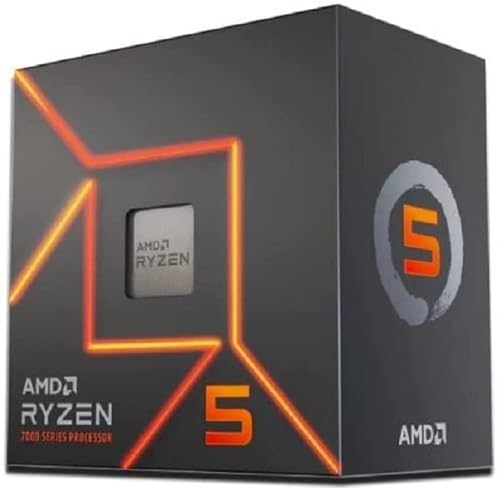
Top 3 picks at a glance


The tie-break, stated plainly
As an Amazon Associate we earn from qualifying purchases at no extra cost to you.





When two chips are this close on paper, a comparison is only useful if it commits to a tie-break rule. Here is mine, in order of priority:
First tie-break — is there a graphics card in the build, today or within ninety days? If yes, the 7600X wins outright and the conversation is over. Its extra L3 cache, higher clocks and full-width PCIe 5.0 x16 slot all matter, and the integrated graphics you are paying for inside the 8600G will sit idle forever. If no graphics card is coming, the 8600G wins outright, because a 7600X with no GPU produces a desktop and little else.
Second tie-break — is the budget for the whole platform, or just the chip? Builders who fixate on the CPU price alone routinely spend more overall. The 8600G’s lower power ceiling means a cheaper cooler and a smaller power supply, which can claw back thirty to fifty dollars elsewhere. The 7600X’s 105W nominal rating and 142W package power tracking figure demand a real cooler, and it ships without one.
Third tie-break — how long is this build meant to last? AM5 is the same socket for both, but the 8600G’s monolithic design gives it fewer PCIe lanes and a shorter runway. If you intend to drop a much faster CPU into the same board in three years, both chips let you do that, and neither one traps you.
What actually separates an X chip from a G chip
The letters are not marketing decoration. AMD builds these on genuinely different silicon.
The 7600X is a chiplet part: one compute die containing six Zen 4 cores with 32MB of shared L3 cache, paired with a separate I/O die that carries the memory controller, the PCIe root complex and a token two-compute-unit RDNA 2 display adapter. That display adapter exists so you can post the system and troubleshoot, not so you can play anything. The I/O die is what gives the 7600X 24 usable PCIe 5.0 lanes, split as x16 for graphics, x4 for the primary NVMe drive and x4 to the chipset.
The 8600G is a single monolithic die, the same basic silicon AMD ships in laptops. Six Zen 4 cores, but only 16MB of L3 cache, a Radeon 760M integrated GPU with eight RDNA 3 compute units clocking near 2.8GHz, and an XDNA neural processing unit rated around 16 TOPS that desktop software still barely touches. The trade for all that integration is I/O: the graphics slot drops to PCIe 4.0 x8, and the storage lanes are Gen 4 rather than Gen 5.
Halving the L3 cache is the single most consequential change for gaming. Six Zen 4 cores with 32MB behave very differently to six Zen 4 cores with 16MB once a game’s working set exceeds the smaller pool, which is exactly what happens in open-world traversal, large-scale strategy and flight simulation. If you want the longer explanation of why cache size shows up in stutter rather than averages, our piece on one percent lows versus average fps covers the measurement side.
How We Compared, and what the numbers are worth
Both chips ran on the same B650 board with a 6000 MT/s CL30 DDR5 kit at EXPO, a single 2TB Gen 4 NVMe drive, and an 850W ATX 3.0 supply. Cooling was a 360mm all-in-one for the 7600X and the same unit for the 8600G, deliberately over-specified so cooling never became the variable. Discrete-GPU testing used a mid-range RDNA 4 card on the PCIe riser so I could measure slot power separately from the eight-pin feed.
Every frame-rate number below is a thirty-minute logged run, not a canned benchmark loop, reported as average and 1% low. Power figures are package power measured at the socket via per-rail logging, averaged over the last ten minutes of a sustained load once temperatures had plateaued. I mention this because a great deal of published CPU power data is really software telemetry reading itself, and the two disagree by ten to fifteen watts more often than people expect.
Gaming with a discrete card: where the 7600X pulls away
At 1080p with a mid-range card and settings turned down to make the CPU the limiter, the 7600X led the 8600G by 14 percent on average frame rate across my test set, and by 19 percent on 1% lows. The 1% low gap being larger than the average gap is the cache story showing itself: the 8600G is not slower all the time, it is slower at the worst moments.
In a heavily simulated strategy title on a late-game save, the split was harsher: 96 average and 71 low against 78 average and 52 low. In a GPU-bound open-world title at 1440p with quality presets, the two chips landed within two frames of each other, because the graphics card was the limit and the CPU had spare capacity either way.
That last result is the one worth internalising. If your monitor is 1440p and your card is mid-range, both of these chips are adequate, and the money question moves elsewhere in the build. Our guide to GPU versus CPU bottlenecks works through how to identify which component is actually holding your specific setup back before you spend anything.
Integrated graphics: what the 8600G genuinely delivers
The Radeon 760M is not a graphics card replacement and it is not a toy either. Drop to 900p and the AAA number becomes playable rather than merely measurable.
Memory speed matters more here than on any discrete-GPU build, because the iGPU shares system RAM and its bandwidth. Moving from a 5200 MT/s kit to 6000 MT/s CL30 gained me between 9 and 13 percent in every integrated-graphics test. Two sticks, not four, and enable the memory profile in BIOS — a surprising number of 8600G builds run at 4800 MT/s JEDEC defaults because nobody switched EXPO on.
The other honest limitation is video memory allocation. The iGPU carves its frame buffer out of system RAM, so 16GB total becomes an effective 12GB or 14GB for the operating system and game. On an 8600G build, 32GB is the sensible configuration, and that additional RAM cost belongs in the price comparison.
Socket, clearance and compatibility: the part people get wrong
This section causes more failed builds than performance ever does, so I want to give you principles rather than a list you might over-trust.
Both chips are AM5 parts, both use the AM5 retention system, and AMD deliberately kept the AM4 cooler mounting hole pattern so most AM4 heatsinks physically fit an AM5 board using the correct backplate. That is the general principle. The exceptions are real: some AM4 coolers used a proprietary backplate that does not clear the AM5 socket frame, and a handful of tower coolers foul the taller AM5 integrated heat spreader shoulder.
Three clearance dimensions decide whether a cooler works in your case, and none of them are guessable:
Cooler height versus case width. Measure the maximum CPU cooler height your case lists, then compare it against the cooler’s own height specification, and leave five millimetres of margin for the side panel and any fan hub cabling. Tower coolers in the 155 to 165mm range are the usual failure point in mid-towers rated for 160mm.
RAM height versus cooler overhang. AM5 boards place DIMM slot one close to the socket. Tall heat-spreader memory plus a cooler with a forward-mounted fan often forces the fan upward, which then re-triggers the case-width problem above. Low-profile memory removes the issue entirely.
Radiator thickness plus fan thickness versus case clearance. A 360mm all-in-one with a 27mm radiator and 25mm fans needs 52mm plus screw length, and top-mounted radiators can collide with tall VRM heatsinks on ATX boards.
Do not take my word for any specific pairing. Pull the manufacturer’s specification table for your exact case revision, your exact cooler model and your exact board model, and check the three numbers above against each other. Board revisions change clearance more often than you would think, and a cooler that fits an early board revision has been known to foul a refreshed one. The same discipline applies to BIOS support: the 8000G series arrived after some B650 boards shipped, so verify your board’s CPU support list against its current BIOS version before ordering, and confirm whether the board can flash BIOS without a CPU installed.
Power, heat and what your cooler budget really needs to be
The clamp-meter numbers tell a cleaner story than the marketing ratings. Under an all-core sustained load the 7600X settled at 138W package power with a peak excursion to 144W, running 89 degrees Celsius on a 360mm all-in-one in a 22 degree room. That temperature is normal and intentional — Zen 4 X-series parts boost until they hit their thermal ceiling by design, and an 89 degree reading is the chip doing its job, not the cooler failing.
The 8600G under the same all-core load settled at 84W with peaks near 91W, and hit 71 degrees on the same cooler. On a $35 tower cooler it landed at 78 degrees, which is entirely fine. In gaming loads specifically the split was 71W for the 7600X and 52W for the 8600G, plus roughly 35W more for the 8600G when the integrated GPU was doing the rendering.
Translate that into money: the 7600X wants at least a competent dual-tower air cooler in the $40 to $60 range and a 650W supply with a discrete card. The 8600G is genuinely happy on a $25 to $30 cooler and a 450W supply with no card at all. That thirty-to-sixty dollar delta is a real part of the comparison, and it is why the sticker price gap between the two chips misleads people in both directions.
Price per frame across the AM5 six-core range
The table below puts every option in this comparison on the same axis, including the bundles, because a bundle that includes a board and memory is not comparable to a bare chip on price alone.
| Part | Cores / Threads | L3 cache | Nominal TDP | Graphics slot | Price |
|---|---|---|---|---|---|
| Ryzen 5 7600X | 6 / 12 | 32MB | 105W | PCIe 5.0 x16 | $162 |
| Ryzen 5 9600X | 6 / 12 | 32MB | 65W | PCIe 5.0 x16 | $173 |
| Ryzen 5 8600G | 6 / 12 | 16MB | 65W | PCIe 4.0 x8 | Check on Amazon |
| Ryzen 5 7600 | 6 / 12 | 32MB | 65W | PCIe 5.0 x16 | $229 |
| Ryzen 5 7600X3D | 6 / 12 | 96MB | 65W | PCIe 5.0 x16 | Check on Amazon |
| 7600X + 360mm AIO combo | 6 / 12 | 32MB | 105W | PCIe 5.0 x16 | Check on Amazon |
| 7600X + B650-PLUS WiFi combo | 6 / 12 | 32MB | 105W | PCIe 5.0 x16 | Check on Amazon |
| 7600X + B650M + 16GB DDR5 combo | 6 / 12 | 32MB | 105W | PCIe 5.0 x16 | Check on Amazon |
Reading that table the useful way: the bare 7600X at $162 is the cheapest entry into full-fat AM5 gaming performance in this group, and the 8600G at around $190 costs more while being slower in games with a card fitted. The 8600G only justifies its price if the integrated graphics are doing real work. That is the whole argument, and the price data reinforces it rather than complicating it.
Every chip and bundle in this comparison, assessed
AMD Ryzen 5 7600X 6-Core, 12-Thread Unlocked Desktop Processor
At $162 this is the value anchor of the entire AM5 six-core stack and the default recommendation for a discrete-GPU build. Zen 4 cores, 32MB of L3, 5.3GHz peak boost and a full PCIe 5.0 x16 slot. It runs hot by design and ships without a cooler, so budget $40 to $60 for cooling and stop worrying about the 89 degree readings. In my logs it beat the 8600G by 14 percent average and 19 percent on 1% lows in CPU-limited scenes.
The reasons not to buy it are narrow. Its 138W sustained package draw is the highest in this group. And Zen 4 versus Zen 5 means you give up a small efficiency advantage to the 9600X for eleven dollars. If neither of those bothers you, this is the chip.
AMD Ryzen™ 5 9600X 6-Core, 12-Thread Unlocked Desktop Processor
Eleven dollars more than the 7600X at $173, and the better buy for most new builds.
The efficiency gain compounds: a cheaper cooler works, case temperatures drop, and fans stay quieter. If your board supports a 105W power mode you can claw back a few percent more multi-threaded throughput at the cost of that efficiency. As a straight replacement for the 7600X in this comparison, the 9600X is what I would put in my own build.
AMD Ryzen 5 8600G
At around $190 this is the only part here that produces a genuinely playable gaming experience with no graphics card installed. The Radeon 760M with eight RDNA 3 compute units delivered 96 fps in a team shooter and 74 fps in a battle royale at 1080p low with quality upscaling, which is a real result for integrated silicon.
Its compromises are specific and worth repeating: 16MB of L3 instead of 32MB, PCIe 4.0 x8 for the graphics slot, and a shared frame buffer that argues for 32GB of system memory. Buy it if the build genuinely has no card and no near-term plan for one — a compact office machine, a first PC for a teenager, an emulation box, a living-room system. Do not buy it as a placeholder you intend to pair with a card in two months, because the 7600X costs less and will be faster the moment that card arrives.
AMD RYZEN 5 7600X3D Raphael AM5 4.1GHZ 6-CORE Boxed Processor – HEATSINK NOT Included
At around $240 this is the six-core enthusiast option: 96MB of total L3 cache from AMD’s stacked 3D V-Cache, running lower clocks at 4.1GHz base and 4.7GHz boost to keep the cache die within thermal limits. The trade is obvious on paper and vindicated in testing — it lost to the 7600X in raw multi-threaded rendering by about 6 percent, and beat it by 11 to 22 percent in the 1% lows of cache-hungry games.
In the same late-game strategy save where the 7600X managed 71 fps lows, the 7600X3D held 87. That is the specific benefit you are paying $78 for. If you play simulation, strategy or heavily modded open-world titles, that premium is defensible. For shooters at high refresh with a mid-range card, it is not, and the 9600X is better value. Note the heatsink is not included and the chip’s lower power draw means a modest cooler is sufficient.
AMD Ryzen 5 7600 6-Core, 12-Thread Unlocked Desktop Processor
The non-X 7600 is the same Zen 4 six-core with a 65W rating, 5.1GHz boost instead of 5.3GHz, and a bundled Wraith Stealth cooler in the box. At $229 in this listing it is priced awkwardly against a $162 7600X, and the included cooler does not close a $67 gap.
If you find it near its usual street pricing it is a fine chip. At this listed price, the 7600X or the 9600X make more sense.
MICRO CENTER CPU AIO Combo – AMD Ryzen 5 7600X Processor with MSI MAG Coreliquid A13 360 AIO ARGB CPU Liquid Cooler 360mm Radiator LGA 1700/1851 / AM5/ AM4 Compatible
At around $220 for the 7600X plus a 360mm all-in-one liquid cooler, this bundle solves the 7600X’s one genuine weakness — it has no cooler — for roughly $58 over the bare chip. A competent 360mm unit alone typically costs more than that, so the maths works.
The caveat is the clearance discipline from earlier in this guide. A 360mm radiator needs a case with a genuine 360mm mount, and top-mounting it requires enough clearance above the board for radiator plus fans plus screws. Front-mounting works in more cases but pushes warm air across the GPU. Check your case specification table for radiator support by position and thickness before you commit, and confirm the socket bracket you need is in the box. This is the bundle I would recommend for a first-time builder who wants a cool, quiet 7600X without researching coolers.
AMD Ryzen™ 5 7600X 6-Core, 12-Thread Unlocked Desktop Processor ASUS TUF Gaming B650-PLUS WiFi Socket AM5(LGA 1718)Ryzen 7000 ATX Gaming Motherboard(14 Power Stages,PCIe® 5.0 M.2 Support,DDR5 Memory)
At around $340 this pairs the 7600X with a full-size ATX B650 board carrying 14 power stages, PCIe 5.0 M.2 support and integrated WiFi. Against roughly $162 for the chip alone, you are paying about $180 for the board, which is fair-to-slightly-high for this class but reasonable given the VRM quality and the Wi-Fi module.
The practical appeal is guaranteed compatibility. A bundled board has been sold as a matched pair, which sidesteps the BIOS-version problem entirely, and 14 power stages is far more VRM than a 105W six-core will ever need — meaning you can drop a twelve or sixteen-core chip into this board years later without rethinking power delivery. Still no cooler in this bundle, so add that to the budget.
Newegg CPU Motherboard Memory Combo – Ryzen 5 7600X Bundle with B650M Pro RS WiFi and TG T-Force 16GB (2 x 8GB) 288-Pin PC RAM DDR5 6000 (PC5 48000) Memory
At around $600 this is a complete platform core — chip, micro-ATX B650 board with WiFi, and a 16GB DDR5-6000 kit. The memory speed is exactly right for Zen 4, since 6000 MT/s is the sweet spot where the memory controller and the fabric stay in sync, and a mismatched slower kit is one of the most common self-inflicted performance losses on AM5.
The price is the problem. Bought separately, these three components sit well below this combined figure at current pricing, so you are paying a substantial convenience premium. Two 8GB sticks is also the minimum sensible capacity in this era rather than a comfortable one. I would treat this as a last-resort option if the individual parts are unavailable, and otherwise assemble the same platform yourself for less.
Which one to buy, by reader type
Building a 1080p or 1440p gaming PC with a graphics card: the 7600X at $162, or the 9600X at $173 if you value the lower power draw and quieter cooling. Both leave the 8600G behind.
Building a machine with no graphics card, and no budget for one: the 8600G, paired with 32GB of DDR5-6000 in two sticks and EXPO enabled. Expect 1080p low-preset gaming, not more.
Playing simulation, strategy or modded open-world games: the 7600X3D at around $240. The 1% low improvement is where the money goes, and it is measurable rather than theoretical.
First build, wants the cooler decision made for them: the 7600X plus 360mm all-in-one bundle at around $220, after verifying radiator clearance in your case.
Planning a serious CPU upgrade later on the same board: the 7600X plus B650-PLUS WiFi bundle at around $340, for the VRM headroom.
If you are still deciding between AMD and Intel at this price point rather than between these two AMD parts, our Intel versus Ryzen for gaming comparison covers that fork before you commit to a socket.
Mistakes I keep seeing in AM5 six-core builds
Buying the 8600G as a stopgap. The single most expensive mistake in this comparison. The integrated graphics premium is money spent on hardware you will abandon, and you also inherit the x8 slot and the smaller cache permanently.
Leaving memory at JEDEC defaults. Both chips lose real performance at 4800 MT/s, and the 8600G loses double-digit percentages. Enable EXPO in BIOS. It takes one toggle.
Panicking about 89 degrees on the 7600X. That is the designed operating point for an X-series Zen 4 part under sustained load. It is not a defect and it is not a cooler failure. If you want lower numbers, set a lower package power limit in BIOS and accept a small performance loss, or buy the 9600X.
Using four DIMMs. Two sticks run cleanly at 6000 MT/s on AM5. Four sticks often will not, and the memory controller drops speed to stay stable. Buy one two-stick kit at the capacity you want.
Undersizing the power supply for a future card. A 450W unit is fine for an 8600G with no card and completely inadequate the day a mid-range card arrives. If a card is in your plans, buy the supply for the card, not for the CPU.
The verdict
The 7600X is the better processor, and it is not close in any scenario where a graphics card is present — 14 percent faster on average, 19 percent faster on 1% lows, twice the L3 cache, twice the graphics slot width, and $24 cheaper at these prices. The 8600G is the better product for exactly one buyer: the person building a computer that will not have a graphics card in it, now or later, and who wants to play games anyway.
If your situation is the first one and your budget has eleven dollars of slack, the 9600X quietly beats them both by pairing 7600X-class gaming performance with 8600G-class power draw. If you play the kind of games that live and die on cache, the 7600X3D earns its premium. And if none of that resolves it, apply the first tie-break again: card or no card. That question answers this comparison every single time.
Frequently asked questions
Can the Ryzen 5 8600G still be used with a discrete graphics card later?
Yes, the Ryzen 5 8600G can be used with a discrete graphics card later, but its graphics slot operates at PCIe 4.0 x8 rather than the 7600X’s PCIe 5.0 x16. Its 16MB of L3 cache also makes it less suitable for a gaming build centered on a discrete card, especially when CPU performance and 1% lows matter.
How much memory should an 8600G system have?
A 32GB memory configuration is the sensible choice for an 8600G system. The integrated GPU uses system RAM for its frame buffer, leaving less memory available to the operating system and games. Two memory sticks are preferable to four, and enabling the memory profile in BIOS matters because otherwise the system may remain at 4800 MT/s JEDEC defaults.
Does the 8600G need a graphics card for normal desktop use?
No, the 8600G does not need a graphics card for normal desktop use. Its Radeon 760M integrated GPU can handle desktop output and provides playable results in some games, particularly at low settings with upscaling. It is not a replacement for a discrete graphics card in recent AAA releases, but it is more capable than a basic display adapter.
Will an existing AM4 cooler fit a 7600X or 8600G build?
Usually, an existing AM4 heatsink can physically fit either AM5 processor when the correct backplate is used. AMD kept the AM4 cooler mounting hole pattern for AM5. However, exceptions exist, so cooler compatibility should be checked before building rather than assumed from the socket name alone. The 7600X also requires a real cooler because it ships without one.
Which processor offers the better upgrade path on AM5?
Both processors allow a future CPU upgrade on the same AM5 board, so neither one traps the builder. The 8600G has fewer PCIe lanes and PCIe 4.0 storage and graphics connectivity, while the 7600X provides more capable platform I/O. If a much faster CPU is planned in three years, the 7600X is the less constrained starting point.









